


 本文介绍了如何在Allure2报告中编写Python自动化测试用例时,通过装饰器和withallure.step()方法添加详细步骤,提高测试用例的可读性和组织性。
本文转自测试人社区,原文链接:https://ceshiren.com/t/topic/30184
Allure2报告中添加测试用例步骤
-
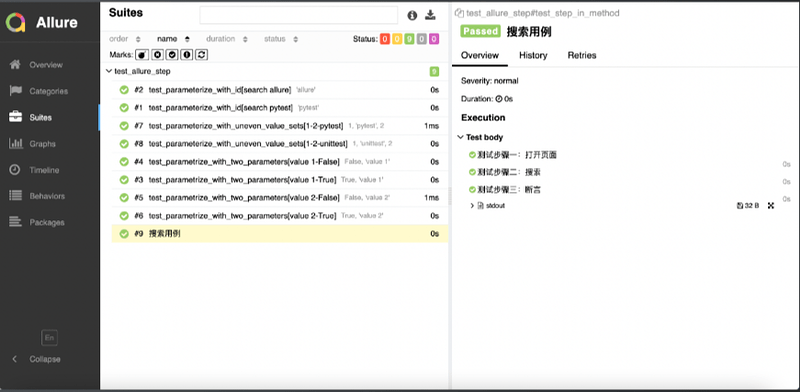
应用场景:编写自动化测试用例的时候经常会遇到需要编写流程性测试用例的场景,一般流程性的测试用例的测试步骤比较多,我们在测试用例中添加详细的步骤会提高测试用例的可阅读性。
-
Allure支持的两种方法:
1、使用装饰器定义一个测试步骤,在测试用例中使用
import allure
import pytest

@allure.step
def simple_step1(step_param1, step_param2 = None):
    '''定义一个测试步骤'''
    print(f"步骤1:打开页面,参数1: {step_param1}, 参数2:{step_param2}")

@allure.step
def simple_step2(step_param):
    '''定义一个测试步骤'''
    print(f"步骤2:完成搜索 {step_param} 功能")

@pytest.mark.parametrize('param1', ["pytest", "allure"], ids=['search pytest', 'search allure'])
def test_parameterize_with_id(param1):
    simple_step2(param1)

@pytest.mark.parametrize('param1', [True, False])
@pytest.mark.parametrize('param2', ['value 1', 'value 2'])
def test_parametrize_with_two_parameters(param1, param2):
    simple_step1(param1, param2)

@pytest.mark.parametrize('param2', ['pytest', 'unittest'])
@pytest.mark.parametrize('param1,param3', [[1,2]])
def test_parameterize_with_uneven_value_sets(param1, param2, param3):
    simple_step1(param1, param3)
    simple_step2(param2)
2、使用with allure.step()添加测试步骤
@allure.title("搜索用例")
def test_step_in_method():
    with allure.step("测试步骤一:打开页面"):
        print("操作 a")
        print("操作 b")

    with allure.step("测试步骤二:搜索"):
        print("搜索操作 ")

    with allure.step("测试步骤三:断言"):
        assert True
获取更多软件测试知识





 扫一扫
扫一扫


 587
587

 被折叠的 条评论
为什么被折叠?
被折叠的 条评论
为什么被折叠?
 到【灌水乐园】发言





