



表的约束
表中一定要有各种约束,要通过约束,让我们未来插入数据库表中的数据是符合预期的。站在mysql角度,凡是插入进来的数据,都是符合数据约束的!
1.非空约束
- 两个值:null(默认) 和 not null
mysql> create table myclass(
-> class_name varchar(20) not null,
-> class_room varchar(10) not null);
Query OK, 0 rows affected (0.02 sec)

mysql> desc myclass;
+------------+-------------+------+-----+---------+-------+
| Field 	| Type 			| Null | Key | Default | Extra |
+------------+-------------+------+-----+---------+-------+
| class_name | varchar(20) | NO    |     | NULL 	|	   |
| class_room | varchar(10) | NO    |     | NULL     |	   |
+------------+-------------+------+-----+---------+-------+

//插入数据时,没有给教室数据插入失败:
mysql> insert into myclass(class_name) values('高三1班');
ERROR 1364 (HY000): Field 'class_room' doesn't have a default value
2.default 约束
- 默认值:某一种数据会经常性的出现某个具体的值,可以在一开始就指定好,在需要真实数据的时候,用户可以选择性的使用默认值
mysql> create table t1 (
-> name varchar(20) not null,
-> age tinyint unsigned default 0,
-> sex char(2) default '男'
-> );
Query OK, 0 rows affected (0.00 sec)

mysql> desc t1;
+-------+---------------------+------+-----+---------+-------+
| Field | Type  			  | Null | Key | Default | Extra |
+-------+---------------------+------+-----+---------+-------+
| name | varchar(20) 		  | NO   | 	   | NULL    | 		 |
| age  | tinyint(3) unsigned  | YES  |     | 0 		 | 		 |
| sex  | char(2) 			  | YES  |     | 男   	 | 		 |
+-------+---------------------+------+-----+---------+-------+

mysql> insert into t1(name) values('zhangsan');
Query OK, 1 row affected (0.00 sec)
mysql> select * from tt10;
+----------+------+------+
| name     | age  | sex  |
+----------+------+------+
| zhangsan | 0    | 男   |
+----------+------+------+
//注意:只有设置了default的列,才可以在插入值的时候,对列进行省略
- default:如果设置了,用户将来插入,有具体数据,就用用户的,没有就用默认的
3. comment 约束
- 列描述:comment,没有实际含义,专门用来描述字段,会根据表创建语句保存,用来给程序员或DBA来进行了解。
mysql> create table t2 (
-> name varchar(20) not null comment '姓名',
-> age tinyint unsigned default 0 comment '年龄',
-> sex char(2) default '男' comment '性别'
-> );
4.zerofill 约束
mysql> create table t5(
    -> a int(5) not null,
    -> b int(5) not null
    -> );
Query OK, 0 rows affected, 2 warnings (0.02 sec)

mysql> insert into t5 values (1,2);//插入一条数据
Query OK, 1 row affected (0.01 sec)

mysql> select* from t5;//打印
+---+---+
| a | b |
+---+---+
| 1 | 2 |
+---+---+
1 row in set (0.00 sec)

mysql> alter table t5 modify b int(5) zerofill;//加上zerofill约束
Query OK, 1 row affected, 2 warnings (0.05 sec)
Records: 1  Duplicates: 0  Warnings: 2

mysql> select * from t5;
+---+-------+
| a | b     |
+---+-------+
| 1 | 00002 |
+---+-------+
1 row in set (0.00 sec)
我们可以看到b列的2变成了00002,这就是zerofill属性的作用。当宽度小于设定的宽度时,前面补0;宽度大于设定的宽度,不用管
5.主键约束
5.1 普通主键
- 主键:primary key用来唯一的约束该字段里面的数据,
不能重复,不能为空,一张表中最多只能有一个主键;主键所在的列通常是整数类型
//创建表时就指定主键
mysql> create table t3(
    -> id int unsigned primary key,
    -> name varchar(20)
    -> );
Query OK, 0 rows affected (0.02 sec)

mysql> desc t3;
+-------+--------------+------+-----+---------+-------+
| Field | Type         | Null | Key | Default | Extra |
+-------+--------------+------+-----+---------+-------+
| id    | int unsigned | NO   | PRI | NULL    |       |
| name  | varchar(20)  | YES  |     | NULL    |       |
+-------+--------------+------+-----+---------+-------+
2 rows in set (0.00 sec)

mysql> insert into t3 values(1,'孙权');
Query OK, 1 row affected (0.00 sec)

mysql> insert into t3 values(2,'刘备');
Query OK, 1 row affected (0.00 sec)

mysql> insert into t3 values(2,'曹操');//主键冲突了,插入失败
ERROR 1062 (23000): Duplicate entry '2' for key 't3.PRIMARY'

//删除主键
mysql> alter table t3 drop primary key;
Query OK, 2 rows affected (0.04 sec)
Records: 2  Duplicates: 0  Warnings: 0

mysql> desc t3;
+-------+--------------+------+-----+---------+-------+
| Field | Type         | Null | Key | Default | Extra |
+-------+--------------+------+-----+---------+-------+
| id    | int unsigned | NO   |     | NULL    |       |
| name  | varchar(20)  | YES  |     | NULL    |       |
+-------+--------------+------+-----+---------+-------+
2 rows in set (0.00 sec)

//添加主键
mysql> alter table t3 add primary key(id);
Query OK, 0 rows affected (0.05 sec)
Records: 0  Duplicates: 0  Warnings: 0

mysql> desc t3;
+-------+--------------+------+-----+---------+-------+
| Field | Type         | Null | Key | Default | Extra |
+-------+--------------+------+-----+---------+-------+
| id    | int unsigned | NO   | PRI | NULL    |       |
| name  | varchar(20)  | YES  |     | NULL    |       |
+-------+--------------+------+-----+---------+-------+
2 rows in set (0.00 sec)
5.2 复合主键
- 在创建表的时候,在所有字段之后,使用primary key(主键字段列表)来创建主键,如果有多个字段作为主键,可以使用复合主键
mysql> create table t4(
    -> id int unsigned,
    -> course_id char(8),
    -> sorce tinyint unsigned,
    -> primary key(id,course_id)
    -> );
Query OK, 0 rows affected (0.02 sec)

mysql> desc t4;
+-----------+------------------+------+-----+---------+-------+
| Field     | Type             | Null | Key | Default | Extra |
+-----------+------------------+------+-----+---------+-------+
| id        | int unsigned     | NO   | PRI | NULL    |       |
| course_id | char(8)          | NO   | PRI | NULL    |       |
| sorce     | tinyint unsigned | YES  |     | NULL    |       |
+-----------+------------------+------+-----+---------+-------+
3 rows in set (0.00 sec)

mysql> insert into t4 values(123,'11',40);
Query OK, 1 row affected (0.01 sec)

mysql> insert into t4 values(124,'11',40);
Query OK, 1 row affected (0.00 sec)

mysql> insert into t4 values(124,'12',40);
Query OK, 1 row affected (0.00 sec)

mysql> select * from t4;
+-----+-----------+-------+
| id  | course_id | sorce |
+-----+-----------+-------+
| 123 | 11        |    40 |
| 124 | 11        |    40 |
| 124 | 12        |    40 |
+-----+-----------+-------+
3 rows in set (0.00 sec)

mysql> insert into t4 values(124,'11',90);//主键冲突
ERROR 1062 (23000): Duplicate entry '124-11' for key 't4.PRIMARY'
6.自增长
auto_increment:当对应的字段,不给值,会自动的被系统触发,系统会从当前字段中已经有的最大值+1操作,得到一个新的不同的值。往往和主键搭配使用(自增长列不一定是主键列)- 特点:
- 任何一个字段要做自增长,前提是本身就是一个索引
- 自增长字段必须是整数
- 一张表最多只能由一个自增长
mysql> create table t1( id int unsigned primary key auto_increment, name varchar(20) not null );
Query OK, 0 rows affected (0.15 sec)

mysql> desc t1;
+-------+--------------+------+-----+---------+----------------+
| Field | Type         | Null | Key | Default | Extra          |
+-------+--------------+------+-----+---------+----------------+
| id    | int unsigned | NO   | PRI | NULL    | auto_increment |
| name  | varchar(20)  | NO   |     | NULL    |                |
+-------+--------------+------+-----+---------+----------------+
2 rows in set (0.01 sec)

mysql> insert into t1 (name) values ('a');
Query OK, 1 row affected (0.01 sec)

mysql> insert into t1 (name) values ('b');
Query OK, 1 row affected (0.01 sec)

mysql> insert into t1 (name) values ('c');
Query OK, 1 row affected (0.00 sec)

mysql> select* from t1;
+----+------+
| id | name |
+----+------+
|  1 | a    |
|  2 | b    |
|  3 | c    |
+----+------+
3 rows in set (0.00 sec)
//自增长默认从1开始,也可以自己设置

mysql> insert into t1  values (1000,'d');
Query OK, 1 row affected (0.00 sec)

mysql> insert into t1 (name) values ('e');
Query OK, 1 row affected (0.01 sec)

mysql> select* from t1;
+------+------+
| id   | name |
+------+------+
|    1 | a    |
|    2 | b    |
|    3 | c    |
| 1000 | d    |
| 1001 | e    |
+------+------+
5 rows in set (0.00 sec)

mysql> select last_insert_id();//获取上一次插入的自增长值
+------------------+
| last_insert_id() |
+------------------+
|             1001 |
+------------------+
1 row in set (0.00 sec)
7.唯一键
- 唯一键的本质和主键差不多,但是,唯一键允许为空,而且可以多个为空,空字段不做唯一性比较
- 唯一键和外键是不冲突的
mysql> create table t2(
    -> id char(20) unique,
    -> name varchar(20) not null
    -> );
Query OK, 0 rows affected (0.05 sec)

mysql> desc t2;
+-------+-------------+------+-----+---------+-------+
| Field | Type        | Null | Key | Default | Extra |
+-------+-------------+------+-----+---------+-------+
| id    | char(20)    | YES  | UNI | NULL    |       |
| name  | varchar(20) | NO   |     | NULL    |       |
+-------+-------------+------+-----+---------+-------+
2 rows in set (0.01 sec)

mysql> insert into t2 (id,name) values('101','张三');
Query OK, 1 row affected (0.01 sec)

mysql> insert into t2 (id,name) values('102','李四');
Query OK, 1 row affected (0.01 sec)

mysql> insert into t2 (id,name) values('102','王五');
ERROR 1062 (23000): Duplicate entry '102' for key 't2.id'//唯一约束不允许重复
mysql> insert into t2 (id,name) values(NULL,'王五');
Query OK, 1 row affected (0.01 sec)//唯一约束允许为空

mysql> insert into t2 (id,name) values(NULL,'王五');
Query OK, 1 row affected (0.00 sec)

mysql> select * from t2;
+------+--------+
| id   | name   |
+------+--------+
| 101  | 张三   |
| 102  | 李四   |
| NULL | 王五   |
| NULL | 王五   |
+------+--------+
4 rows in set (0.00 sec)
8.外键
- 外键用于定义主表和从表之间的关系:外键约束主要定义在从表上,主表则必须是具有主键约束/unique约束。当定义外键后,要求外键列数据必须在主表的主键列存在/NULL
//语法:
foreign key(字段名) references 主表(列)
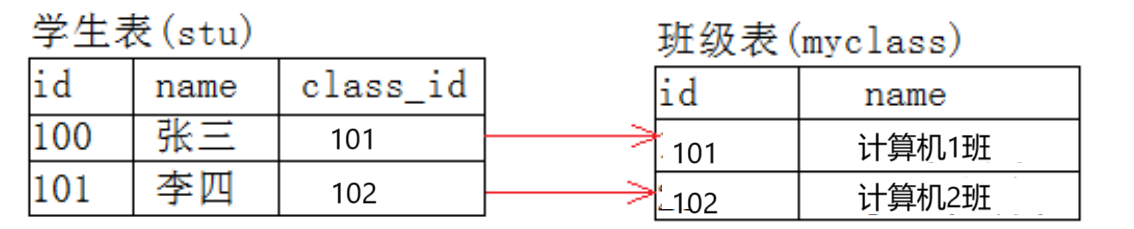
//定义主表
mysql> create table class
    -> (id char(20) primary key,
    -> name varchar(20)
    -> );
Query OK, 0 rows affected (0.03 sec)
//定义从表
mysql> create table stu(
    -> id char(20) primary key,
    -> name varchar(20) not null,
    -> class_id char(20),
    -> foreign key (class_id) references class(id)
    -> );
Query OK, 0 rows affected (0.02 sec)

mysql> insert into class (id,name) values('101',"计算机1班"),('102',"计算机2班");
Query OK, 2 rows affected (0.00 sec)
Records: 2  Duplicates: 0  Warnings: 0

mysql> insert into stu(id,name,class_id) values ('1','张三','101'),('2','李四','102');
Query OK, 2 rows affected (0.01 sec)
Records: 2  Duplicates: 0  Warnings: 0

mysql> select* from class;
+-----+---------------+
| id  | name          |
+-----+---------------+
| 101 | 计算机1班     |
| 102 | 计算机2班     |
+-----+---------------+
2 rows in set (0.00 sec)

mysql> select* from stu;
+----+--------+----------+
| id | name   | class_id |
+----+--------+----------+
| 1  | 张三   | 101      |
| 2  | 李四   | 102      |
+----+--------+----------+
2 rows in set (0.00 sec)

mysql> insert into stu values('3','王五','103');//主表主键列中不存在103,插入失败
ERROR 1452 (23000): Cannot add or update a child row: a foreign key constraint fails (`test2`.`stu`, CONSTRAINT `stu_ibfk_1` FOREIGN KEY (`class_id`) REFERENCES `class` (`id`))
mysql> insert into stu values('3','王五',NULL);//可以插入为空,表示还没有分配班级
Query OK, 1 row affected (0.00 sec)

mysql> delete from class where id='101';//不能直接删除班级101,因为班级中还有学生
ERROR 1451 (23000): Cannot delete or update a parent row: a foreign key constraint fails (`test2`.`stu`, CONSTRAINT `stu_ibfk_1` FOREIGN KEY (`class_id`) REFERENCES `class` (`id`))
mysql> delete from stu where id='1';//将101班级的学生删除
Query OK, 1 row affected (0.00 sec)

mysql> delete from class where id='101';//删除班级101成功
Query OK, 1 row affected (0.01 sec)





 扫一扫
扫一扫


 141
141

 被折叠的 条评论
为什么被折叠?
被折叠的 条评论
为什么被折叠?
 到【灌水乐园】发言





