






 该博客介绍了如何利用OpenLayers库创建一个包含天地图多个图层的地图应用,并实现图层滑动效果,允许用户通过拖动滑块查看不同图层。示例代码展示了地图组件的配置、事件监听以及滑动条操作,帮助开发者在项目中集成类似功能。
话不多说直接贴代码,有需要的小伙伴可以拿去直接用。
<template>
    <div class="newmap">
        <div class="map" id="map" onselectstart="return false">
            <div id="swipeContainer" @mousemove="move">
                <div id="swipeDiv">
                    <div class="handle"></div>
                </div>
            </div>
        </div>
    </div>
</template>

<script>

export default {
    name: "LayerSwipes",
    data() {
        return {
            map: {},
            swipe: {},
            value: 50,
            layer:{},
        };
    },
    watch: {},
    props: [""],
    components: {},
    created: function () {},
    mounted: function () {
        var _this = this;
        var layerGroup = new ol.layer.Group({
            layers: [
                new ol.layer.Tile({
                    source: new ol.source.XYZ({
                        crossOrigin: "anonymous",
                        url: "https://t0.tianditu.gov.cn/DataServer?T=vec_w&x={x}&y={y}&l={z}&tk=换上你自己的TK",
                    }),
                    visible: true,
                    isGroup: true,
                    name: "天地图",
                }),
                new ol.layer.Tile({
                    source: new ol.source.XYZ({
                        crossOrigin: "anonymous",
                        url: "https://t0.tianditu.gov.cn/DataServer?T=cva_w&x={x}&y={y}&l={z}&tk=6换上你自己的TK",
                    }),
                    visible: true,
                    isGroup: true,
                    name: "天地图标注",
                }),
            ],
        });
        this.layer = new ol.layer.Tile({
                    source: new ol.source.XYZ({
                        crossOrigin: "anonymous",
                        url: "https://t0.tianditu.gov.cn/DataServer?T=img_w&x={x}&y={y}&l={z}&tk=换上你自己的TK",
                    }),
                    visible: true,
                    name: "天地图影像图",
                })
        this.map = new ol.Map({
            target: "map",
            view: new ol.View({
                projection: "EPSG:4326",
                center: [108.17, 39.13],
                zoom: 5,
            }),
            controls: ol.control.defaults({
                attribution: false,
                zoom: false,
                rotate: false,
            }),
            layers: [layerGroup, layer],
        });
        var obj = {};
        this.LayerSwipes();
    },
    methods: {
        move(event) {
            var _this = this;
            var swipe = document.getElementById("swipeContainer");
            var obj = {};
            swipe.onmousedown = function (event) {
                var e = event || window.event;
                // 鼠标点击元素那一刻相对于元素左侧边框的距离=点击时的位置相对于浏览器最左边的距离-物体左边框相对于浏览器最左边的距离
                obj.diffX = e.clientX - this.offsetLeft;
                document.onmousemove = function (event) {
                    var e = event || window.event;
                    var moveX = e.clientX - obj.diffX;
                    if (moveX < 0) {
                        moveX = 0;
                    } else if (moveX > 870) {
                        moveX = 870;
                    }
                    // console.log(moveX);
                    _this.value = swipe.offsetWidth;
                    swipe.style.left = moveX + "px";
                    _this.LayerSwipes();
                    //重新渲染图层
                    _this.map.render();
                };
                document.onmouseup = function () {
                    this.onmousemove = null;
                    this.onmouseup = null;
                };
            };
        },
        LayerSwipes() {
            var _this = this;
            this.layer.on("prerender", (event) => {
                var swipe = document.getElementById("swipeContainer");
            var ctx = event.context;
            //计算图层在canvas画布上需要显示的范围
            var mapSize = _this.map.getSize();
            var height = event.context.canvas.height;
            var width = event.context.canvas.width;
            var swipeWidth = swipe.offsetLeft*width/mapSize[0];
            // console.log(swipeWidth);
            var tl = [swipeWidth,0];
            var tr = [width,0];
            var bl = [swipeWidth,height];
            var br = [width,height];

            ctx.save();
            //绘制裁剪路径
            ctx.beginPath();
            ctx.moveTo(tl[0], tl[1]);
            ctx.lineTo(bl[0], bl[1]);
            ctx.lineTo(br[0], br[1]);
            ctx.lineTo(tr[0], tr[1]);
            ctx.closePath();
            //裁剪,裁剪路径以外的部分不会绘制在canvas上下文中
            ctx.clip();
            });

            this.layer.on("postrender", (event) => {
                // 在Bing地图渲染之后触发
                var ctx = event.context;
                ctx.restore();
            });
        },
    },
    updated() {
        this.map.render();
        this.map.updateSize();
    },
};
</script>
<style scoped lang="scss">
.map {
    width: 887px;
    height: 671px !important;
    position: absolute;
    top: 50%;
    left: 50%;
    margin-left: -443.5px;
    margin-top: -335.5px;
    border-radius: 5px;
    border: solid 5px #ffffff;
}
input[type="range"]::-webkit-slider-runnable-track {
    height: 0; //设置不显示滑动条
    width: 887px;
    position: absolute;
    left: 50%;
    margin-left: -443.5px;
    z-index: 10;
}
input[type="range"]:focus {
    outline: none;
}
input[type="range"]::-webkit-slider-thumb {
    -webkit-appearance: none;
    height: 40px;
    width: 40px;
    border-radius: 50%;
    background-color: #00a0e9;
    background: url(../../assets/image/drag.png);
    background-size: 100% 100%;
    cursor: pointer;
}

// 添加滑块的dom新样式
#swipeContainer {
    position: absolute;
    opacity: 0.8;
    width: 2px;
    height: 100%;
    top: 0;
    left: 50%;
    margin-left: -1px;
    background-color: #00A0E9;
    cursor: e-resize;
    z-index: 2;
}


#swipeDiv {
    height: 100%;
    width: 0px;
    margin: 0 auto;
}

#swipeDiv .handle {
    position: absolute;
    height: 40px;
    width: 40px;
    border-radius: 50%;
    background-color: #00A0E9;
    background: url(../../assets/image/drag.png);
    background-size: 100% 100%;
    cursor: e-resize;
    margin-left: -20px;
    top: 50%;
    margin-top: -20px;
}

*,
*:before,
*:after {
    -moz-box-sizing: border-box;
    -webkit-box-sizing: border-box;
    box-sizing: border-box;
}
</style>
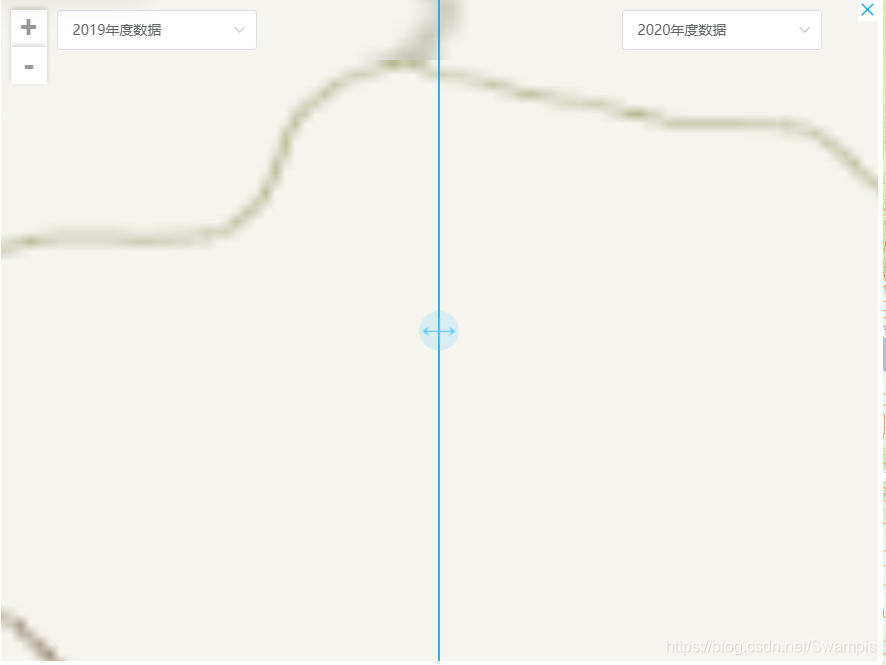
下面是实现的效果图,小伙伴们可以根据自己的需求修改样式。





 扫一扫
扫一扫


 733
733


 到【灌水乐园】发言



