

No bean named ‘user‘ available的异常的解决方法:

当在Springboot应用中遇到@Autowired注入失败,显示无bean定义时,可以尝试使用@ComponentScan指定扫描包,@Import导入特定配置类,或者创建自定义注解来封装注入逻辑,提高代码复用性。
Exception in thread "main" org.springframework.beans.factory.NoSuchBeanDefinitionException: No bean named 'user' available
	at org.springframework.beans.factory.support.DefaultListableBeanFactory.getBeanDefinition(DefaultListableBeanFactory.java:892)
	at org.springframework.beans.factory.support.AbstractBeanFactory.getMergedLocalBeanDefinition(AbstractBeanFactory.java:1318)
	at org.springframework.beans.factory.support.AbstractBeanFactory.doGetBean(AbstractBeanFactory.java:300)
	at org.springframework.beans.factory.support.AbstractBeanFactory.getBean(AbstractBeanFactory.java:200)
	at org.springframework.context.support.AbstractApplicationContext.getBean(AbstractApplicationContext.java:1132)
	at com.example.SpringbootEnableApplication.main(SpringbootEnableApplication.java:25)

在使用Springboot的自动注入@AutoWired时,有时会出现注入失败,显示没有这个bean加载。

此时我们可以有多种解决方法:

这里给出三种:

1:@ComponentScan("com.example.config")  使用ComponentScan注解,该注解内是你需要扫描类所在的包的位置
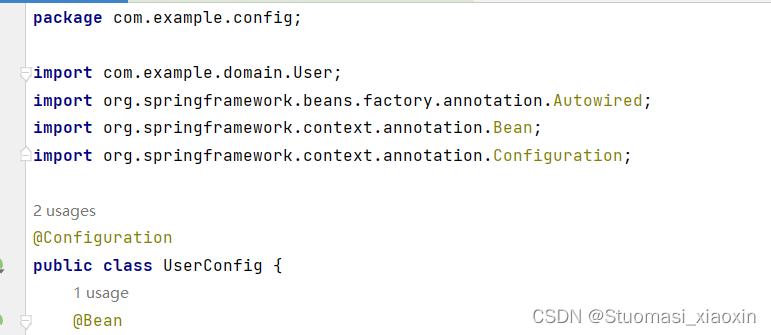
 2:第二种是使用@Import(UserConfig.class)  注解,Import中填入你所需要导入的类,个人认为这种方式暴力直接,好用。

3:第三种是自定义注解封装,可以自定义一个你所需要注入的类,将你所需要注入的类导入注解中,再直接使用该注解即可。这种方法,大大提高开发的复用性。
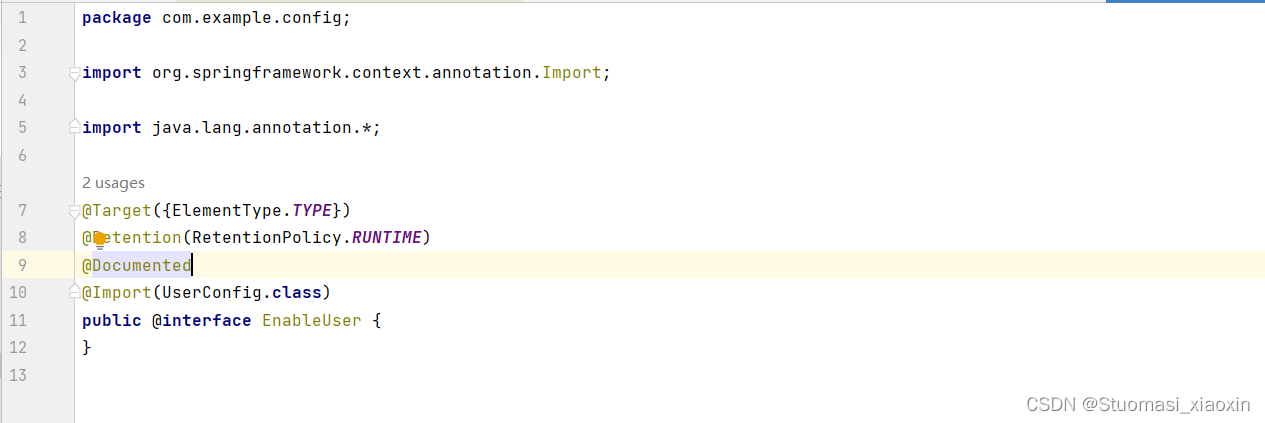
 自定义EnableUser注解,之后需要使用的地方直接使用注解方式即可。@EnableUser
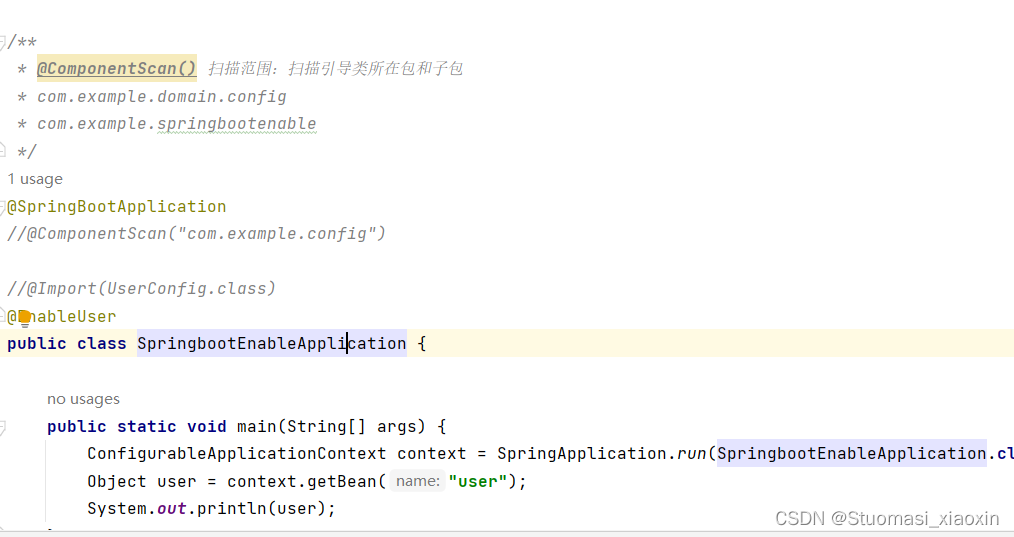
 

三种方式,可自行选择。

当出现 `No bean named 'imageService' available` 错误时,意味着 Spring 容器中没有找到名为 `imageService` 的 bean。以下是一些可能的解决方法: ### 检查 Bean 定义 要保证在配置文件里定义了 `imageService` bean。若使用 XML 配置,可参考示例配置一个 bean: ```xml <bean id="imageService" class="com.example.ImageService" /> ``` 此示例定义了一个名为 `imageService` 的 bean,其类为 `com.example.ImageService`,类似参考中定义 `userPreferences` bean 的方式 [^1]。 ### 检查组件扫描 若采用注解方式配置 bean,需要确保 Spring 能够扫描到包含 `@Service`、`@Component` 等注解的类。可在配置类上加 `@ComponentScan` 注解: ```java import org.springframework.context.annotation.ComponentScan; import org.springframework.context.annotation.Configuration; @Configuration @ComponentScan(basePackages = "com.example") public class AppConfig { // 配置类内容 } ``` 这样 Spring 就会扫描 `com.example` 包及其子包下的所有组件。 ### 检查 Bean 作用域 要保证 bean 的作用域是正确的。若使用了不恰当的作用域,可能会致使 bean 无法在需要时被获取。例如,在参考中定义 `userPreferences` bean 时指定了 `scope="session"` [^1]。 ### 检查依赖注入 确保在需要使用 `imageService` bean 的地方,依赖注入是正确的。若使用 `@Autowired` 注解进行注入,要保证注入的字段类型与 `imageService` bean 的类型一致: ```java import org.springframework.beans.factory.annotation.Autowired; import org.springframework.stereotype.Component; @Component public class SomeService { private final ImageService imageService; @Autowired public SomeService(ImageService imageService) { this.imageService = imageService; } // 其他方法 } ``` ### 检查配置文件加载 要确保配置文件被正确加载。若使用 Java 配置类,要保证配置类被 Spring 上下文加载;若使用 XML 配置文件,要保证 XML 文件被正确引入。
评论
添加红包

请填写红包祝福语或标题

红包个数最小为10个

红包金额最低5元

当前余额3.43前往充值 >
需支付:10.00
成就一亿技术人!
领取后你会自动成为博主和红包主的粉丝 规则
hope_wisdom
发出的红包

打赏作者

Stuomasi_xiaoxin

你的鼓励将是我创作的最大动力

¥1 ¥2 ¥4 ¥6 ¥10 ¥20
扫码支付:¥1
获取中
扫码支付

您的余额不足,请更换扫码支付或充值

打赏作者

实付
使用余额支付
点击重新获取
扫码支付
钱包余额 0

抵扣说明:

1.余额是钱包充值的虚拟货币,按照1:1的比例进行支付金额的抵扣。
2.余额无法直接购买下载,可以购买VIP、付费专栏及课程。

余额充值


