



ideal上搭建springboot+themeleaf项目详细过程
一些说明
以下部分是从我的一个网站项目的其中一个完整功能展开
完全复制下来就可以直接运行,js代码,以及图片就不附上,不影响整体功能
关于项目出现的一些异常,我会在下一篇文章中附上
该文章涉及,页面如何跳转,怎么模糊查询,配置文件怎么写,项目结构等等。
0、创建项目
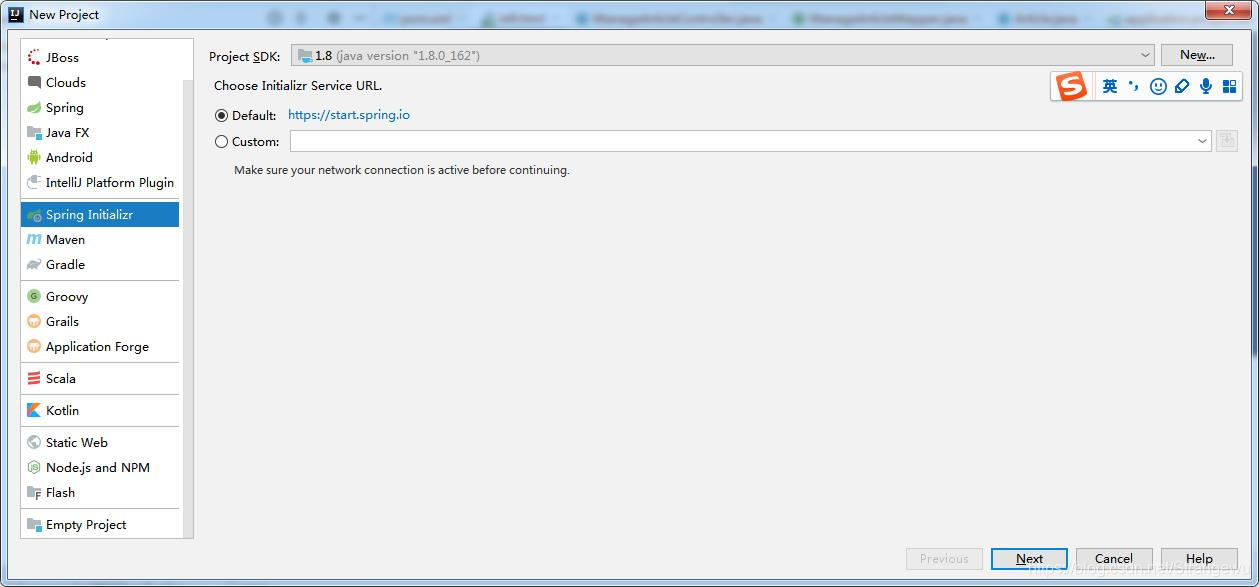
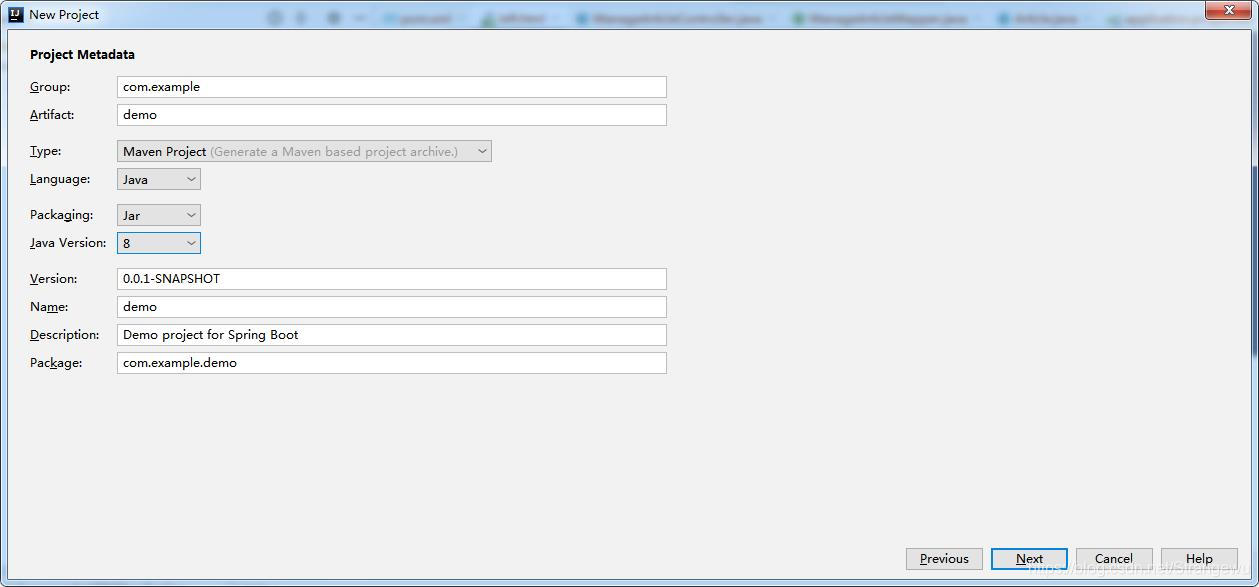
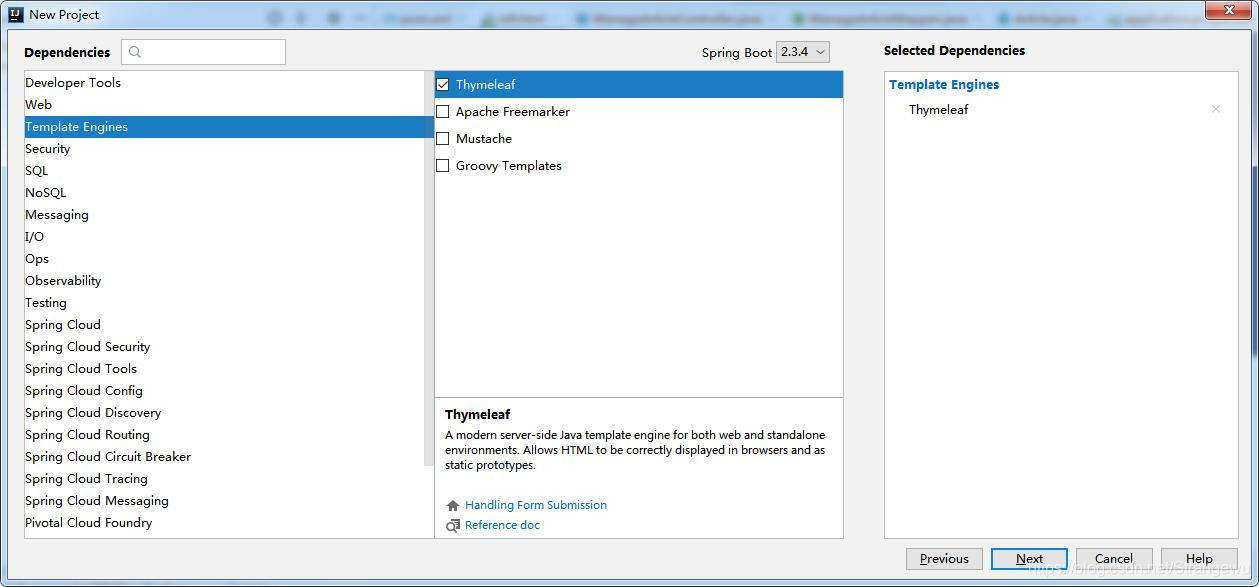
1、项目结构
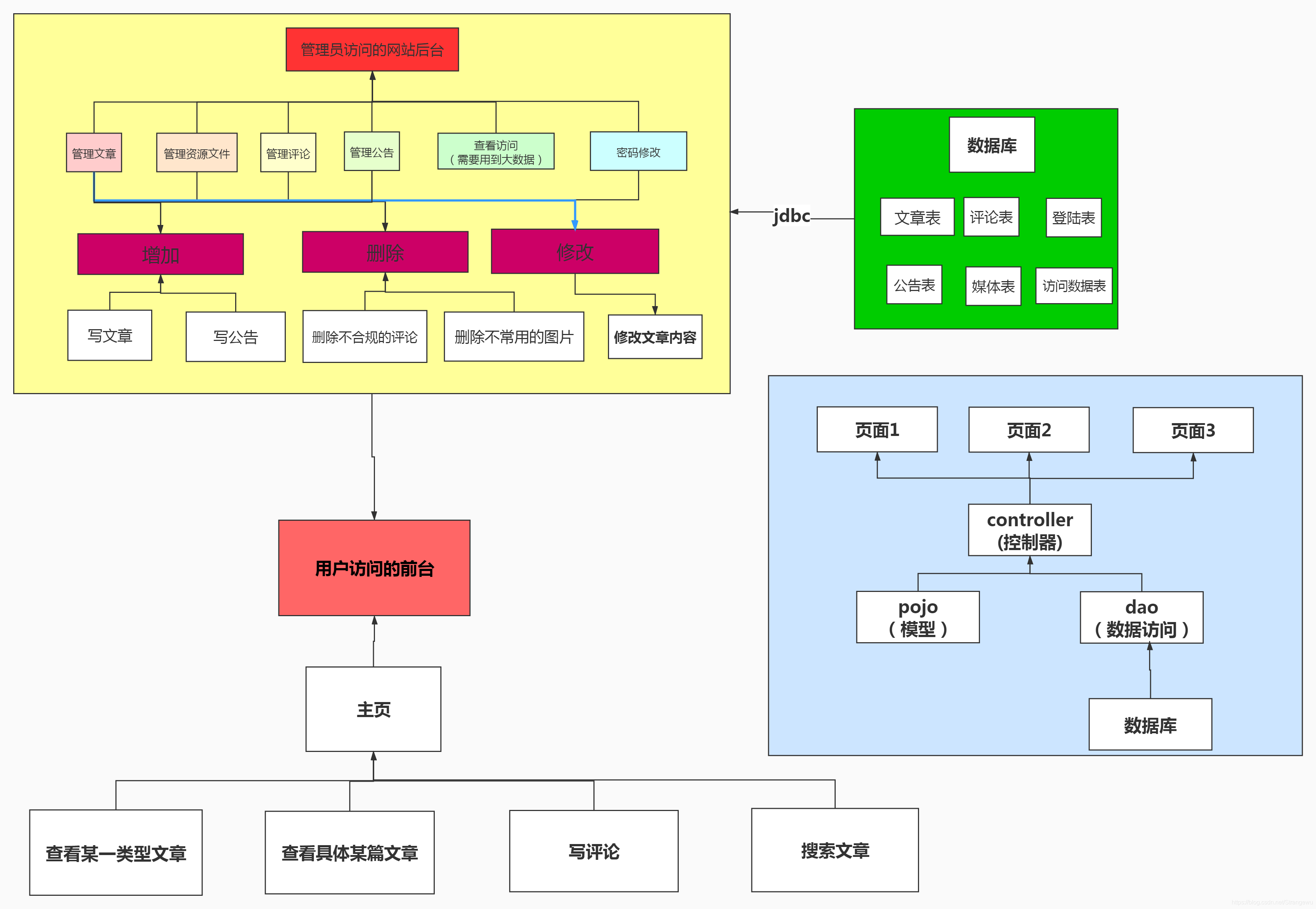
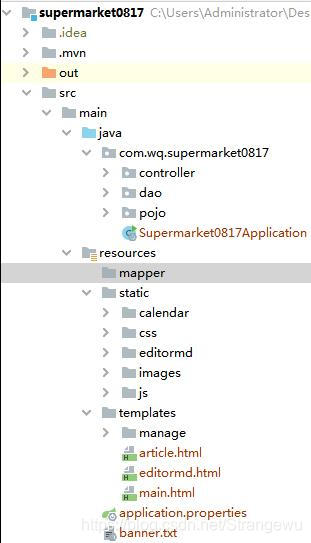
2、架包依赖pom.xml
 <dependencies>
        <dependency>
            <groupId>org.springframework.boot</groupId>
            <artifactId>spring-boot-starter-data-jdbc</artifactId>
        </dependency>
        <dependency>
            <groupId>org.springframework.boot</groupId>
            <artifactId>spring-boot-starter-data-jpa</artifactId>
        </dependency>
        <dependency>
            <groupId>org.springframework.boot</groupId>
            <artifactId>spring-boot-starter-thymeleaf</artifactId>
        </dependency>
        <dependency>
            <groupId>org.springframework.boot</groupId>
            <artifactId>spring-boot-starter-web</artifactId>
        </dependency>
        <dependency>
            <groupId>org.mybatis.spring.boot</groupId>
            <artifactId>mybatis-spring-boot-starter</artifactId>
            <version>2.1.3</version>
        </dependency>
        <dependency>
            <groupId>mysql</groupId>
            <artifactId>mysql-connector-java</artifactId>
            <version>5.1.35</version>
            <scope>runtime</scope>
        </dependency>
        <!--添加fastjson依赖-->
        <dependency>
            <groupId>com.alibaba</groupId>
            <artifactId>fastjson</artifactId>
            <version>1.2.41</version>
        </dependency>
        <dependency>
            <groupId>org.springframework.boot</groupId>
            <artifactId>spring-boot-starter-test</artifactId>
            <scope>test</scope>
            <exclusions>
                <exclusion>
                    <groupId>org.junit.vintage</groupId>
                    <artifactId>junit-vintage-engine</artifactId>
                </exclusion>
            </exclusions>
        </dependency>
    </dependencies>
3. controller层
import com.wq.supermarket0817.dao.ManageArticleMapper;
import com.wq.supermarket0817.pojo.Article;
import org.springframework.beans.factory.annotation.Autowired;
import org.springframework.stereotype.Controller;
import org.springframework.ui.Model;
import org.springframework.web.bind.annotation.*;


import java.util.List;

/**
 * @Author:wuqi
 * @DATE: 2020/9/28 0028
 * @TIME: 15:21
 * @PROJECT_NAME: supermarket0817
 */
@Controller
@RequestMapping("/manageArticles")
public class ManageArticleController {
    @Autowired
    private ManageArticleMapper manageArticleMapper;

    /*2.1 展示所有文章*/
    @GetMapping("/list")
    public String getallArticle(Model model) {
        List<Article> users = manageArticleMapper.getallArticles();
        model.addAttribute("list", users);
        return "manage/manageArticle";
    }

    /*2.1.1按照标题,类型模糊查*/
    @GetMapping("/listlike")
    public String getAnotherArticle(String title, Integer typeId, Model model) {
        List<Article> users = manageArticleMapper.getLikeArticle(title,typeId);
        System.out.println("模糊查出来"+title);
        model.addAttribute("list", users);
        return "manage/manageArticle";
    }

    /*2.1.2.1 传递对象*/
    @GetMapping("/giveArticle")
    public String adduser(Model model) {
        model.addAttribute("article", new Article());
        return "manage/addArticle";
    }

    /*2.1.2.2*/
    @PostMapping("/addArticle")
    public String addusers(@ModelAttribute Article user) {
        System.out.println("增加文章前传递的对象" + user);
        Integer integer = manageArticleMapper.addArticle(user);
        return "redirect:list";
    }

    /*2.1.3找到并,修改文章*/
    @GetMapping("/findPrivateArticle")
    public String privateusershow(Model model, Integer id) {
        Article user = manageArticleMapper.findArticle(id);
        model.addAttribute("user", user);
        return "manage/updateArticle";
    }

    /*2.1.4.1*/
    @GetMapping("/finduser")
    public String update(Model model, Integer id) {
        Article user = manageArticleMapper.findArticle(id);
        model.addAttribute("user", user);
        return "userupdate";
    }
    /*2.1.4.2 修改文章标题,类型,写作时间,图片位置*/
    @PostMapping("/articleUpdate")
    public String updates(@ModelAttribute Article user) {
        System.out.println("修改后的user" + user);
        Integer integer = manageArticleMapper.updateArticle(user);
        return "redirect:list";
    }
    /*2.1.5*/
    @RequestMapping("/delete")
    @ResponseBody
    public String delteUser(Integer id) {
        System.out.println("传来的id"+id);
        Integer integer = manageArticleMapper.deleteArticle(id);
        if (integer != null) {
            return "true";
        }
        return "false";
    }
}
4. dao层
不用service层也可以
import com.wq.supermarket0817.pojo.Article;
import org.apache.ibatis.annotations.*;
import org.springframework.stereotype.Repository;


import java.util.List;

/**
 * @Author:wuqi
 * @DATE: 2020/9/28 0028
 * @TIME: 15:23
 * @PROJECT_NAME: supermarket0817
 */
@Repository
@Mapper
public interface ManageArticleMapper {
    /*文章管理界面*/
    @Select("select * from articles")
    List<Article> getallArticles();

    /*模糊查询,按照标题,文章类型进行查找*/
    @Select("<script>select * from articles" +
            "<where>" +
            " <if test=\"title!=null\">" +
            " title like concat('%',#{title},'%')" +
            " </if>" +
            " <if test=\"typeId!=null\">" +
            " AND typeId like concat('%',#{typeId},'%')" +
            " </if>" +
            "</where>" +
            "</script>")
    List<Article> getLikeArticle(@Param("title") String title, @Param("typeId") Integer typeId);

    /*删除文章*/
    @Delete("<script>delete from articles" +
            "<where>" +
            "       articleId = #{articleId}" +
            "</where>" +
            "</script>")
    Integer deleteArticle(@Param("articleId") Integer articleId);
    /*通过id查找文章信息*/
    @Select("<script> select *from articles" +
            "<where>" +
            "articleId=#{articleId}" +
            "</where>" +
            "</script>")
    Article findArticle(@Param("articleId") Integer articleId);

    /*添加文章等信息商信息*/
    @Insert("<script> insert into articles" +
            "(" +
            "            <if test=\"title != null\" >" +
            "                title," +
            "            </if>\n" +
            "            <if test=\"writeTime != null\" >" +
            "                writeTime," +
            "            </if>" +
            "            <if test=\"picture != null\" >" +
            "                picture," +
            "            </if>" +
            "            <if test=\"content != null\" >" +
            "                content," +
            "            </if>" +
            "            <if test=\"typeId != null\" >" +
            "                typeId" +
            "            </if>" +
            ")" +
            "        values" +
            "(" +
            "            <if test=\"title != null\" >" +
            "                #{title}," +
            "            </if>\n" +
            "            <if test=\"writeTime != null\" >" +
            "                #{writeTime}," +
            "            </if>" +
            "            <if test=\"picture != null\" >" +
            "                #{picture}," +
            "            </if>" +
            "            <if test=\"content != null\" >" +
            "                #{content}," +
            "            </if>" +
            "            <if test=\"typeId != null\" >" +
            "                #{typeId}" +
            "            </if>" +
            ")" +
            "</script>")
    Integer addArticle(Article article);
    /*修改文章标题,写作时间,图片位置,文章类型*/
    @Update("<script>update articles" +
            "<set>" +
            "            <if test=\"title != null\" >" +
            "                title=#{title}," +
            "            </if>\n" +
            "            <if test=\"writeTime != null\" >" +
            "                writeTime=#{writeTime}," +
            "            </if>" +
            "            <if test=\"picture != null\" >" +
            "                picture=#{picture}," +
            "            </if>" +
            "            <if test=\"content != null\" >" +
            "                content=#{content}," +
            "            </if>" +
            "            <if test=\"typeId != null\" >" +
            "                typeId=#{typeId}" +
            "            </if>" +
            "</set>" +
            "<where>" +
            "  articleId=#{articleId}" +
            "</where>" +
            "</script>")
    Integer updateArticle(Article provider);
}
这部分只为展示使用配置文件对数据库的一些操作,我没使用这种形式,作为参考
dao层
@Repository
@Mapper
public interface UserMapper {
    /*1登陆验证*/
    User loginCheck(User user);
    /*4*/
    /*登陆后得到用户所有信息*/
    List<User> getallUser();
    /*模糊查询*/
    List<User> getLikeUser(String userName, Integer userRole);
    /*删除用户信息*/
    Integer deleteUser(Integer id);
    /*通过id查找用户信息*/
    User findUser(Integer id);

    /*添加用户信息*/
    Integer addUser(User user);
    /*修改用户信息*/
    Integer updateUser(User user);
}
service层
public interface UserService {

    /*1登陆验证*/
    User loginCheck(User user);

    /*4*/
    /*登陆后得到用户所有信息*/
    List<User> getallUser();

    /*模糊查询*/
    List<User> getLikeUser(String userName, Integer userRole);

    /*删除用户信息*/
    Integer deleteUser(Integer id);

    /*通过id查找用户信息*/
    User findUser(Integer id);

    /*添加用户信息*/
    Integer addUser(User user);
    /*修改用户信息*/
    Integer updateUser(User user);

}
@Service
public class UserServiceImpl implements UserService {
    @Autowired
    private UserMapper userMapper;
    private BillMapper billMapper;
    /*1*/
    @Override
    public User loginCheck(User user) {
        return userMapper.loginCheck(user);
    }
    /*4*/
    @Override
    public List<User> getallUser() {
        return userMapper.getallUser();
    }

    @Override
    public List<User> getLikeUser(String userName, Integer userRole) {
        return userMapper.getLikeUser(userName,userRole);
    }

    @Override
    public Integer deleteUser(Integer id) {
        return userMapper.deleteUser(id);
    }

    @Override
    public User findUser(Integer id) {
        return userMapper.findUser(id);
    }
    /*查找用户信息*/
    @Override
    public Integer addUser(User user) {
        return userMapper.addUser(user);
    }

    @Override
    public Integer updateUser(User user) {
        return userMapper.updateUser(user);
    }
}
UserMapper.xml
<?xml version="1.0" encoding="UTF-8" ?>
<!DOCTYPE mapper PUBLIC "-//mybatis.org//DTD Mapper 3.0//EN" "http://mybatis.org/dtd/mybatis-3-mapper.dtd" >
<mapper namespace="com.wq.supermarket0817.dao.UserMapper" >
    <resultMap id="BaseResultMap" type="User" >
        <constructor >
            <idArg column="id" jdbcType="BIGINT" javaType="java.lang.Integer" />
            <arg column="userCode" jdbcType="VARCHAR" javaType="java.lang.String" />
            <arg column="userName" jdbcType="VARCHAR" javaType="java.lang.String" />
            <arg column="userPassword" jdbcType="VARCHAR" javaType="java.lang.String" />
            <arg column="gender" jdbcType="INTEGER" javaType="java.lang.Integer" />
            <arg column="birthday" jdbcType="DATE" javaType="java.util.Date" />
            <arg column="phone" jdbcType="VARCHAR" javaType="java.lang.String" />
            <arg column="address" jdbcType="VARCHAR" javaType="java.lang.String" />
            <arg column="userRole" jdbcType="INTEGER" javaType="java.lang.Integer" />
            <arg column="createdBy" jdbcType="BIGINT" javaType="java.lang.Integer" />
            <arg column="creationDate" jdbcType="TIMESTAMP" javaType="java.util.Date" />
            <arg column="modifyBy" jdbcType="BIGINT" javaType="java.lang.Integer" />
            <arg column="modifyDate" jdbcType="TIMESTAMP" javaType="java.util.Date" />
        </constructor>
    </resultMap>
    <!--登陆验证-->
    <select id="loginCheck" parameterType="User" resultType="User">
        select * from smbms_user where userCode=#{userCode} and userPassword=${userPassword}
    </select>
    <!--以此引用属性-->
    <sql id="Base_Column_List" >
        id, userCode, userName, userPassword, gender, birthday, phone, address, userRole,
        createdBy, creationDate, modifyBy, modifyDate
    </sql>
    <select id="getallUser" resultMap="BaseResultMap">
        select * from smbms_user;
    </select>
    <!--查找具体用户-->
    <select id="findUser" resultMap="BaseResultMap" parameterType="java.lang.Integer" >
        select
        <include refid="Base_Column_List" />
        from smbms_user
        where id = #{id,jdbcType=BIGINT}
    </select>
    <!--删除-->
    <delete id="deleteUser" parameterType="java.lang.Integer" >
        delete from smbms_user
        where id = #{id,jdbcType=BIGINT}
    </delete>
    <!--模糊查询-->
    <select id="getLikeUser" resultMap="BaseResultMap">
        select * from smbms_user
        <trim prefix="where" prefixOverrides="and|or">
            <if test="userName!=null">
                AND userName like concat('%',#{userName},'%')
            </if>
            <if test="userRole!=0">
                AND userRole=#{userRole}
            </if>
        </trim>
    </select>
    <!--添加用户信息-->
    <insert id="addUser" parameterType="User" >
        insert into smbms_user
        <trim prefix="(" suffix=")" suffixOverrides="," >
            <if test="id != null" >
                id,
            </if>
            <if test="userCode != null" >
                userCode,
            </if>
            <if test="userName != null" >
                userName,
            </if>
            <if test="userPassword != null" >
                userPassword,
            </if>
            <if test="gender != null" >
                gender,
            </if>
            <if test="birthday != null" >
                birthday,
            </if>
            <if test="phone != null" >
                phone,
            </if>
            <if test="address != null" >
                address,
            </if>
            <if test="userRole != null" >
                userRole,
            </if>
            <if test="createdBy != null" >
                createdBy,
            </if>
            <if test="creationDate != null" >
                creationDate,
            </if>
            <if test="modifyBy != null" >
                modifyBy,
            </if>
            <if test="modifyDate != null" >
                modifyDate,
            </if>
        </trim>
        <trim prefix="values (" suffix=")" suffixOverrides="," >
            <if test="id != null" >
                #{id,jdbcType=BIGINT},
            </if>
            <if test="userCode != null" >
                #{userCode,jdbcType=VARCHAR},
            </if>
            <if test="userName != null" >
                #{userName,jdbcType=VARCHAR},
            </if>
            <if test="userPassword != null" >
                #{userPassword,jdbcType=VARCHAR},
            </if>
            <if test="gender != null" >
                #{gender,jdbcType=INTEGER},
            </if>
            <if test="birthday != null" >
                #{birthday,jdbcType=DATE},
            </if>
            <if test="phone != null" >
                #{phone,jdbcType=VARCHAR},
            </if>
            <if test="address != null" >
                #{address,jdbcType=VARCHAR},
            </if>
            <if test="userRole != null" >
                #{userRole,jdbcType=INTEGER},
            </if>
            <if test="createdBy != null" >
                #{createdBy,jdbcType=BIGINT},
            </if>
            <if test="creationDate != null" >
                #{creationDate,jdbcType=TIMESTAMP},
            </if>
            <if test="modifyBy != null" >
                #{modifyBy,jdbcType=BIGINT},
            </if>
            <if test="modifyDate != null" >
                #{modifyDate,jdbcType=TIMESTAMP},
            </if>
        </trim>
    </insert>
    <update id="updateUser" parameterType="User" >
        update smbms_user
        <set >
        /*org.apache.ibatis.reflection.ReflectionException: There is no getter for property named 'username'
        属性名必须一致,注意大小写;
        */
            <if test="userCode != null" >
                userCode = #{userCode,jdbcType=VARCHAR},
            </if>
            <if test="userName != null" >
                userName = #{userName,jdbcType=VARCHAR},
            </if>
            <if test="userPassword != null" >
                userPassword = #{userPassword,jdbcType=VARCHAR},
            </if>
            <if test="gender != null" >
                gender = #{gender,jdbcType=INTEGER},
            </if>
            <if test="birthday != null" >
                birthday = #{birthday,jdbcType=DATE},
            </if>
            <if test="phone != null" >
                phone = #{phone,jdbcType=VARCHAR},
            </if>
            <if test="address != null" >
                address = #{address,jdbcType=VARCHAR},
            </if>
            <if test="userRole != null" >
                userRole = #{userRole,jdbcType=INTEGER},
            </if>
            <if test="createdBy != null" >
                createdBy = #{createdBy,jdbcType=BIGINT},
            </if>
            <if test="creationDate != null" >
                creationDate = #{creationDate,jdbcType=TIMESTAMP},
            </if>
            <if test="modifyBy != null" >
                modifyBy = #{modifyBy,jdbcType=BIGINT},
            </if>
            <if test="modifyDate != null" >
                modifyDate = #{modifyDate,jdbcType=TIMESTAMP},
            </if>
        </set>
        where id = #{id,jdbcType=BIGINT}
    </update>
</mapper>
5 . pojo
import com.fasterxml.jackson.annotation.JsonProperty;

import java.io.Serializable;

/**
 * @Author:wuqi
 * @DATE: 2020/9/21 0021
 * @TIME: 16:11
 * @PROJECT_NAME: supermarket0817
 */
public class Article implements Serializable {
    private static final long serialVersionUID = -86149542952698496L;
    /*分别代表,文章的id,文章标题,文章内容,编写时间,点击次数,文章相关图片,文章类型,评论次数*/
    private Integer articleId;
    private String title;
    private String content;
    private String writeTime;
    private String clickCount;
    private String picture;
    private String articleType;
    private Integer typeId;
    private Integer commentNumber;

    public Integer getTypeId() {
        return typeId;
    }

    public void setTypeId(Integer typeId) {
        this.typeId = typeId;
    }

    public Integer getCommentNumber() {
        return commentNumber;
    }

    public void setCommentNumber(Integer commentNumber) {
        this.commentNumber = commentNumber;
    }

    public String getArticleType() {
        return articleType;
    }

    public void setArticleType(String articleType) {
        this.articleType = articleType;
    }

    public static long getSerialVersionUID() {
        return serialVersionUID;
    }

    public Integer getArticleId() {
        return articleId;
    }

    public void setArticleId(Integer articleId) {
        this.articleId = articleId;
    }

    public String getTitle() {
        return title;
    }

    public void setTitle(String title) {
        this.title = title;
    }

    public String getContent() {
        return content;
    }

    public void setContent(String content) {
        this.content = content;
    }

    public String getWriteTime() {
        return writeTime;
    }

    public void setWriteTime(String writeTime) {
        this.writeTime = writeTime;
    }

    public String getClickCount() {
        return clickCount;
    }

    public void setClickCount(String clickCounte) {
        this.clickCount = clickCounte;
    }

    public String getPicture() {
        return picture;
    }

    public void setPicture(String picture) {
        this.picture = picture;
    }


    public Article() {
    }

    @Override
    public String toString() {
        return "Article{" +
                "articleId=" + articleId +
                ", title='" + title + '\'' +
                ", content='" + content + '\'' +
                ", writeTime='" + writeTime + '\'' +
                ", clickCount='" + clickCount + '\'' +
                ", picture='" + picture + '\'' +
                ", articleType='" + articleType + '\'' +
                ", typeId=" + typeId +
                ", commentNumber=" + commentNumber +
                '}';
    }
}
6. application.properties
#server.servlet.context-path=/web
spring.datasource.url=jdbc:mysql://localhost:3306/web
spring.datasource.username=root
spring.datasource.password=root
spring.datasource.driver-class-name=com.mysql.jdbc.Driver
#日志
logging.level.com.wq.supermarket0817.dao=debug
#thymelea模板配置
#声明thymeleaf使用非严格的html。
spring.thymeleaf.prefix=classpath:/templates/
#是否在呈现模板之前检查模板是否存在
spring.thymeleaf.check-template=true
#检查模板位置是否正确(默认值:true)
spring.thymeleaf.check-template-location=true
spring.thymeleaf.suffix=.html
spring.thymeleaf.encoding=utf-8
#热部署文件,页面不产生缓存,及时更新
spring.thymeleaf.cache=false
#5. 启用不严谨 检查HTML  LEGACYHTML5
spring.thymeleaf.mode=HTML5
# 导入jar包
spring.resources.chain.strategy.content.enabled=true
spring.resources.chain.strategy.content.paths=/**

mybatis.mapper-locations=classpath:mapper/*.xml
mybatis.type-aliases-package=com.wq.supermarket0817.pojo
7.html
<!DOCTYPE html>
<html lang="en" xmlns:th="http://www.thymeleaf.org">
<head >
    <meta charset="UTF-8">
    <title>后台管理之文章管理</title>
    <link type="text/css" rel="stylesheet" th:href="@{/css/style.css}" href="/css/style.css" />
    <link type="text/css" rel="stylesheet" th:href="@{/css/public.css}" href="/css/public.css" />
<body>
<!--头部-->
<header class="publicHeader">
    <h1>头部</h1>
    <div class="publicHeaderR">
        <p>欢迎你!</p>
    </div>
</header>
<!--时间-->
<section class="publicTime">
    <a href="#">温馨提示:为了能正常浏览,请使用高版本浏览器!(IE10+)</a>
</section>
<!--主体内容-->
<section class="publicMian ">
    <div class="left">
    <h2 class="leftH2"><span class="span1"></span>功能列表 <span></span></h2>
    <nav>
        <ul class="list">
            <li ><a href="/manageArticles/list">文章管理</a></li>
            <li ><a href="">资源管理</a></li>
            <li><a href="">评论管理</a></li>
            <li><a href="">公告板管理</a></li>
            <li><a href="">访问管理</a></li>
            <li><a href="">密码修改</a></li>
        </ul>
    </nav>
</div>
    <input type="hidden" id="path" name="path" value="/SMBMS"/>
    <input type="hidden" id="referer" name="referer" value="http://localhost:8080jsp/provider.do?method=query&queryProCode=&queryProName="/>
    <div class="right">
        <div class="location">
            <strong>你现在所在的位置是:</strong>
            <span>用户管理页面</span>
        </div>
        <div class="search">
            <form method="get" action="/manageArticles/listlike">
                <input name="method" value="query" class="input-text" type="hidden">
                <span>文章标题:</span>
                <input name="title" class="input-text"	type="text" value="">
                <span>文章类型:</span>
                <select name="typeId">
                    <option value="0">--请选择--</option>
                    <option value="1">读书</option>
                    <option value="2">敲代码</option>
                    <option value="3">看电影</option>
                </select>
                <input type="hidden" name="pageIndex" value="1"/>
                <input	value="查 询" type="submit" id="searchbutton">
                <a href="/manageArticle/giveArticle">添加文章</a>
            </form>
        </div>
        <!--用户-->
        <table class="providerTable" cellpadding="0" cellspacing="0">
            <tr class="firstTr">
                <th width="10%">文章id</th>
                <th width="20%">标题</th>
                <th width="20%">写作时间</th>
                <th width="10%">点击次数</th>
                <th width="20%">图片位置</th>
                <th width="10%">文章类型</th>
                <th width="10%">操作</th>
            </tr>
            <tr th:each="user:${list}">
                <td>
                    <span th:text="${user.articleId}">文章id</span>
                </td>
                <td>
                    <span th:text="${user.title}">文章标题</span>
                </td>
                <td>
                    <span th:text="${user.writeTime}">编写时间</span>
                </td>
                <td>
                    <span th:text="${user.clickCount}">点击次数</span>
                </td>
                <td th:text="${user.picture}">
                </td>
                <td th:switch="${user.typeId}">
                    <span  th:case="1">读书</span>
                    <span  th:case="2">敲代码</span>
                    <span  th:case="3">看电影</span>
                </td>
                <td>
                    <span><a class="modifyUser" th:attr="href='findPrivateArticle?id='+${user.articleId}"><img th:src="@{/images/xiugai.png}" src="images/xiugai.png" alt="修改内容" title="修改内容"/></a></span>
                    <span><a class="modifyUser" th:attr="href='findPrivateArticle?id='+${user.articleId}"><img th:src="@{/images/xiugai.png}" src="images/xiugai.png" alt="修改标签等" title="修改标签等"/></a></span>
                    <span><a class="deleteUser" th:attr="οnclick='del(this,'+${user.articleId}+')'"  href="/manageArticles/delete"><img th:src="@{/images/schu.png}" src="images/schu.png" alt="删除" title="删除"/></a></span>
                </td>
            </tr>
        </table>
    </div>
</section>
<!--点击删除按钮后弹出的页面-->
<div class="zhezhao"></div>
<div class="remove" id="removeUse">
    <div class="removerChid">
        <h2>提示</h2>
        <div class="removeMain">
            <p>你确定要删除该文章吗?</p>
            <a href="#" id="yes">确定</a>
            <a href="#" id="no">取消</a>
        </div>
    </div>
</div>
<footer class="footer">
    版权归琪得龙东强所有
</footer>
<script type="text/javascript" th:src="@{/js/time.js}" src="/js/time.js"></script>
<script type="text/javascript" th:src="@{/static/js/jquery-1.8.3.min.js}" src="/static/js/jquery-1.8.3.min.js"></script>
<script type="text/javascript" th:src="@{/js/common.js}" src="/js/common.js"></script>
<script type="text/javascript" th:src="@{/static/calendar/WdatePicker.js}" src="/static/calendar/WdatePicker.js"></script>
</body>
<script type="text/javascript">
    function del(ele,id) {
        if(confirm("确实要删除吗?")){
            $.ajax({
                type: 'POST',
                url: "delete",
                cache: false,
                async : false,
                data : "articleId="+id,
                dataType: 'text',
                success: function (result) {
                    if(result=="true"){
                        $(ele).parents("tr").remove();
                    }else{
                        alert("删除失败");
                    }
                }
            });
        }else{
            alert("已经取消了删除操作");
        }

    }

</script>
</html>
页面引用
public.css
*{
    margin: 0;
    padding: 0;
}
body{
    font-size: 12px;
    background: #4287c2;
}
.clear:after{
    content: '';
    display: block;
    clear: both;
}
a{
    text-decoration: none;
}
li{
    list-style: none;
}

/*公共样式,头部*/
.publicHeader{
    height: 48px;
    line-height: 48px;
    font-size: 14px;
    background: linear-gradient(to bottom,#60acf0,#64a5df,#62a0dd,#5994d6,#4f8ace,#4880ca);
    background:-webkit-linear-gradient(to bottom,#60acf0,#64a5df,#62a0dd,#5994d6,#4f8ace,#4880ca);
    background:-moz-linear-gradient(to bottom,#60acf0,#64a5df,#62a0dd,#5994d6,#4f8ace,#4880ca);
    background:-ms-linear-gradient(to bottom,#60acf0,#64a5df,#62a0dd,#5994d6,#4f8ace,#4880ca);
}
.publicHeader h1{
    float: left;
    color: #fff;
    font-size: 22px;
    padding-left:80px;
    text-shadow: 2px 1px #000;
    background: url("../images/buy.png") 30px center no-repeat;

}
.publicHeaderR{
    float: right;
    color: #fff;
    margin-right: 50px;

}
.publicHeaderR p{
    display: inline-block;
    font-weight: bold;
}
.publicHeaderR a{
    width: 50px;
    height: 28px;
    display: inline-block;
    border: 1px solid #679e43;
    background: linear-gradient(to bottom,#baf076,#a2d866,#9cd055,#8dc838,#8bc93a);
    line-height: 28px;
    text-align: center;
    border-radius: 4px;
    font-weight: bold;
    color: #fff;

}
.publicHeaderR a:hover,.publicHeaderR a:active{
    border: 1px solid #192b02;
    border-radius: 4px;
    font-weight: bold;
    background: linear-gradient(to bottom,#70b21c,#5c9613,#47740e,#3b6209,#2b4906);
}
/*时间*/
.publicTime{
    height: 28px;
    line-height: 28px;
    font-size: 12px;
    background: linear-gradient(to bottom,#f5f9f8,#eef2fb,#e2ecf5,#e2ecf5,#e0edf6);
    padding-left: 20px;
    color: #808589;
}
#time{
    float: left;
    background: url("../images/time.png") 0 center no-repeat;
    padding-left: 26px;
}
.publicTime a{
    float: right;
    margin-right: 50px;
    color: #626367;
}

/*公共部分主体内容*/
.publicMian{
    border-top: 1px solid #c2ccd5;
    display: flex;  /*变为弹性盒模型*/
    display: -webkit-flex;
    background: #fff;
}
/*左边*/
.left{
    width: 168px;
    background: url("../images/leftBg.png") 0 0 repeat-y;
    margin-right: 10px;
    /*height: 520px;*/
    min-height: 520px;

}
.leftH2{
    width: 140px;
    height: 30px;
    border-radius: 4px;
    line-height: 30px;
    text-align: center;
    color: #fff;
    background: #60b3e7;
    margin: 10px  auto;
    box-shadow:4px 4px rgba(212,212,212,0.7);
}
.leftH2 span{
    width: 10px;
    height: 10px;
    display: inline-block;
    background: radial-gradient(#70c2f4,#3a8dc1, #035384, #4696c7,#83d1f5);
    border-radius: 50%;
}
.span1{
    margin-right: 10px;
}
.span2{
    margin-left: 12px;
}

.list{
    margin: 0 20px;
    font-weight: bold;
}
.list li{
    height: 40px;
    line-height: 40px;
    border-bottom: 1px solid rgba(212,212,212,0.5) ;
}
.list li:nth-child(1){
    background: url("../images/zd.png") 0  center no-repeat;
}
.list li:nth-child(2){
    background: url("../images/gys.png") 0  center no-repeat;
}
.list li:nth-child(3){
    background: url("../images/yh.png") 0  center no-repeat;
}
.list li:nth-child(4){
    background: url("../images/mm.png") 0  center no-repeat;
}
.list li:nth-child(5){
    background: url("../images/tc.png") 0  center no-repeat;
}
.list li:hover{
    background-color: #acd5f5;
    border-radius: 4px;
}
.list li:active, #active{
    background-color: #92c609;
    border-radius: 4px;
}
.list a{
    color: #0042a8;
    display: inline-block;
    padding-left: 40px;
    width: 90%;
}


/*右边*/
.right{
    width: 85%;
}
/*右边所在位置栏*/
.location{
    height: 30px;
    line-height: 30px;
    border: 1px solid #e6eaf6;
    border-radius: 8px;
    background: linear-gradient(to bottom, #fefefe,#ffffff,#f6fafd);
    color: #4a4a4a;
    padding-left: 30px;
}
.location strong{
    background: url("../images/home.png") 0 center no-repeat;
    display: inline-block;
    padding-left: 30px;
}
.location span{
    color: #2179a9;
    font-weight:  bold;
}
/*搜索信息栏*/
.search{
    height:50px;
    line-height:50px;
    background: #f6fafd;
    padding-left: 24px;
    color: #000;
}
.search input[type='text']{
    width: 200px;
    height: 30px;
    outline: none;
    padding-left: 10px;
    border: 1px solid #8ab2d5;
    border-radius: 4px;
}
.search input[type='button']{
    margin-left: 20px;
    width: 100px;
    padding: 0 20px;
    height: 30px;
    border: 1px solid #7ba92c;
    border-radius: 4px;
    color: #fff;
    font-weight: bold;
    background:#87c212 url("../images/search.png") 10px center no-repeat;
}
.search input[type='button']:focus{
    outline: none;
    background-color: #5d8410;
}
.search a{
    width: 80px;
    padding-left:40px;
    float: right;
    margin: 10px 60px;
    height: 30px;
    line-height: 30px;
    border: 1px solid #0c89de;
    border-radius: 4px;
    color: #fff;
    font-weight: bold;
    background:#47acf1 url("../images/tianjia.png") 10px center no-repeat;
    display: inline-block;
}
.search a:hover,.search a:active{
    background-color: #0778c5;
}
.search span{
    margin-left: 10px;
}
.search select{
    margin: 10px;
    width: 100px;
    height: 30px;
    border-radius: 4px;
    border: 1px solid #0c89de;
    outline: none;
}

/*底部*/
.footer{
    width: 100%;
    line-height: 40px;
    text-align: center;
    color: #fff;
}

#searchbutton{
    margin-left: 20px;
    width: 100px;
    padding: 0 20px;
    height: 30px;
    border: 1px solid #7ba92c;
    border-radius: 4px;
    color: #fff;
    font-weight: bold;
    background:#87c212 url("../images/search.png") 10px center no-repeat;
}
#searchbutton:focus{
    outline: none;
    background-color: #5d8410;
}
页面引用
style.css
* {
    margin: 0;
    padding: 0;
}

/*登录页面*/
.login_bg {
    background: url("../images/loginBg.jpg") 0 0 repeat-x;
}

.loginBox {
    width: 1000px;
    margin: 0 auto;
    background: url("../images/login_bg.jpg") 0 0 no-repeat;
}

.loginHeader {
    padding-top: 102px;
    text-align: center;
    padding-bottom: 30px;
}

.loginHeader h1 {
    color: #fff;
    text-shadow: 2px 2px #000;
}

.loginCont {
    width: 388px;
    height: 284px;
    /*border: 1px solid red ;*/
    margin: 0 auto;
}

.formBox {
    position: relative;
}

/*输入框里默认输入字体*/
::-webkit-input-placeholder {
    color: rgb(190, 188, 188);
    /*font-style: italic;*/
}

input:-moz-placeholder,
textarea:-moz-placeholder {
    color: rgb(190, 188, 188);
    font-style: italic;
}

input {
    outline: none;
}

.loginForm {
    background: url("../images/formBg.png") 0 0 no-repeat;
    width: 320px;
    height: 140px;
    border-radius: 8px;
    padding: 90px 38px 48px 30px;
    /*border: 1px solid green;*/
}

.loginForm label {
    width: 20%;
    display: inline-block;
}

.inputbox {
    height: 60px;
}

.info {
    color: red;
    font-weight:bold;
}

.inputbox input {
    width: 66%;
    padding: 10px 5px 10px 20px;
    border: 1px solid rgb(178, 178, 178);
    border-radius: 3px;
    -webkit-box-shadow: 0px 1px 4px 0px rgba(168, 168, 168, 0.6) inset;
    -moz-box-shadow: 0px 1px 4px 0px rgba(168, 168, 168, 0.6) inset;
    box-shadow: 0px 1px 4px 0px rgba(168, 168, 168, 0.6) inset;

}

/*输入框得到焦点的效果*/
.inputbox input:active, .providerAdd input:focus,
.inputbox input:focus {
    border: 1px solid rgba(91, 90, 90, 0.7);
    background: rgba(238, 236, 240, 0.2);
    -webkit-box-shadow: 0px 1px 4px 0px rgba(168, 168, 168, 0.9) inset;
    -moz-box-shadow: 0px 1px 4px 0px rgba(168, 168, 168, 0.9) inset;
    box-shadow: 0px 1px 4px 0px rgba(168, 168, 168, 0.9) inset;
}

.subBtn {
    margin-left: 70px;
}

/*/!*登录页登录和重置按钮*!/.providerView a是供应商管理页面下信息查看也得返回按钮的样式*/
input[type='submit'], input[type='reset'], .providerView a {
    width: 30%;
    cursor: pointer;
    background: #54a4d7;
    padding: 6px 18px;
    font-family: 'BebasNeueRegular', 'Arial Narrow', Arial, sans-serif;
    color: #fff;
    font-size: 18px;
    border: 1px solid #4682be;
    margin-bottom: 10px;
    margin-right: 22px;
    text-shadow: 0 1px 1px rgba(0, 0, 0, 0.5);
    -webkit-border-radius: 3px;
    -moz-border-radius: 3px;
    border-radius: 3px;
    -webkit-box-shadow: 0px 1px 4px 4px rgba(0, 0, 0, 0.07) inset,
    0px 0px 0px 3px rgb(254, 254, 254),
    0px 5px 3px 3px rgb(210, 210, 210);
    -moz-box-shadow: 0px 1px 4px 4px rgba(0, 0, 0, 0.07) inset,
    0px 0px 0px 3px rgb(254, 254, 254),
    0px 5px 3px 3px rgb(210, 210, 210);
    box-shadow: 0px 1px 4px 4px rgba(0, 0, 0, 0.07) inset,
    0px 0px 0px 3px rgb(254, 254, 254),
    0px 5px 3px 3px rgb(210, 210, 210);

}

input[type='submit']:hover, input[type='reset']:hover {
    background: rgb(74, 179, 198);
}

input[type='submit']:active, input[type='submit']:focus,
input[type='reset']:active, input[type='reset']:focus, .providerView a:hover, .providerView a:active {
    background: #2a5989;
    border: 1px solid rgb(12, 76, 87);
    -webkit-box-shadow: 0px 1px 6px 4px rgba(0, 0, 0, 0.2) inset;
    -moz-box-shadow: 0px 1px 6px 4px rgba(0, 0, 0, 0.2) inset;
    box-shadow: 0px 1px 6px 4px rgba(0, 0, 0, 0.2) inset;
}

/*欢迎登录页*/
.wColck {
    width: 88px;
    height: 108px;
    margin: 50px;
    float: left;
}

.wFont {
    float: left;
    margin-top: 50px;
}

.wFont h2 {
    font-size: 30px;
    line-height: 50px;
    color: #0a5eb6;
}

.wFont p {
    font-size: 14px;
    line-height: 30px;
    color: #5a656c;
}

/**/
.providerTable {
    width: 100%;
    border: 1px solid #ccc;
}

.providerTable tr {
    height: 30px;
    line-height: 30px;
    text-align: center;
}

.providerTable tr:nth-child(odd) {
    background: #f6f7f9;
}

.providerTable tr:hover {
    background: #e9f9ca;
}

.firstTr {
    border: 1px solid #d6dfe6;
    background: linear-gradient(to bottom, #f3f8fc, #ebf4f9, #e3f1fa, #e0f0fd, #d8e9fd);
}

.firstTr th {
    border-right: 2px solid rgba(209, 218, 223, 0.4);
}

.providerTable td a {
    margin-top: 10px;
    display: inline-block;
    margin-right: 10px;

}

/*供应商管理页面-->下面的信息查看页面*/
.providerView {
    margin: 20px 0;
    font-size: 18px;
    line-height: 30px;
    padding-top: 30px;
    border: 1px dashed #3d4f1b;
}

.providerView strong {
    display: inline-block;
    width: 200px;
    text-align: right;
}

.providerView span {
    color: #bd644e;
}

.providerView a {
    margin-left: 520px;
    position: relative;
    top: 60px;
}

/**/
.providerAdd {
    border: 1px solid #9ac70f;
    padding: 20px;
    margin: 20px;
}

.providerAdd form {

}

.providerAdd div {
    margin-top: 12px;
    margin-bottom: 12px;
}

.providerAdd label {
    width: 200px;
    display: inline-block;
    text-align: right;
}

.providerAdd input ,.providerAdd select{
    width: 260px;
    height: 30px;
    line-height: 30px;
    border-radius: 4px;
    outline: none;
    padding-left: 10px;
    border: 1px solid #4987c0;
    box-shadow: 1px 1px 1px #99afc4;
}

.providerAdd input:focus,.providerAdd select:focus {
    border: 1px solid #0e56a8;
    background: rgba(238, 236, 240, 0.2);
    -webkit-box-shadow: 0px 1px 4px 0px rgba(168, 168, 168, 0.9) inset;
    -moz-box-shadow: 0px 1px 4px 0px rgba(168, 168, 168, 0.9) inset;
    box-shadow: 0px 1px 4px 0px rgba(168, 168, 168, 0.9) inset;
}

.providerAdd span {
    margin-left: 20px;
    color: #faca0d;
}

/*验证错误*/
.providerAdd .error span {
    color: red;
}

.providerAdd .error input {
    border: 1px solid red;
}

/*验证成功*/
.providerAdd .ok span {
    color: green;
}

.providerAdd .ok input {
    border: 1px solid green;
}

.providerAddBtn {
    margin-left: 240px;
    padding-top: 20px;
}

.providerAddBtn a ,
.providerAddBtn input[type='submit'],
.providerAddBtn input[type='button'] {
    display: inline-block;
    width: 100px;
    height: 30px;
    line-height: 30px;
    text-align: center;
    border-radius: 4px;
    border: transparent;
    background: linear-gradient(to bottom, #85c0ec, #6aa7d6, #508dc6, #306fb4, #17559e);
    color: #fff;
    cursor: pointer;
    font-weight: bold;
    font-size: 14px;
    vertical-align: top;
}

.providerAddBtn a:active,
.providerAddBtn a:focus,
.providerAddBtn a:hover,
.providerAddBtn input[type='submit']:hover,
.providerAddBtn input[type='submit']:focus{
    background: linear-gradient(to bottom, #7aaed4, #578bb4, #406e99, #225792, #0d2d54);
}

.providerAdd input[type='radio']{
    width: 20px;
    height: 14px;
    line-height:12px;
    border-radius: 4px;
    outline: none;
    padding-left: 10px;
    border: none;
    box-shadow: none;
}

/*点击删除按钮后弹出的层*/
.zhezhao {
    display: none;          /* 修改这里可以让遮罩层消失*/
    position: absolute;
    top: 0;
    left: 0;
    width: 100%;
    height: 100%;
    background: #000;
    opacity: 0.7;
    filter: alpha(opacity=70);
    overflow: hidden;
}
.remove{
   display: none;       /* 修改这里可以让删除框消失*/
    width: 400px;
    height: 190px;
    position: absolute;
    top: 200px;
    left:500px;
    background: #fff;
    border-radius: 4px;
}
.removerChid{
    margin: 4px;
    border: 1px solid #ccc;
}
.removerChid h2{
    padding-left: 8px;
    font-size: 14px;
    line-height: 30px;
    margin: 4px 8px;
    border-bottom: 1px solid #99cc33;
}
.removeMain{
    margin-top: 38px;
    text-align: center;
    margin-bottom: 30px;
    border-radius: 4px;
}
.removeMain a{
    padding: 0 20px;
    display: inline-block;
    height: 30px;
    line-height: 30px;
    border-radius: 4px;
    border: 1px solid #5e8809;
    margin-top: 30px;
    background: #99cc33;
    color: #fff;
}
.removeMain a:hover,.removeMain a:active{
    background: #679016;

}

/*页码*/
.page-bar
{
	position:relative;
	margin-top:10px;
}
.page-num-ul li
{
	float:left;
}
.page-num-ul li a
{
	display:inline-block;
	padding:3px 5px;
	margin:0px 3px;
	border:1px solid #b8b8b8;
}
.page-num-ul a:hover,.page-num-ul .thisclass
{
	border:1px solid #c5063f;
	background-color:#c5063f;
	color:#FFF;
	text-decoration:none;
}
.page-key
{
	width:50px;
}
.page-btn
{
	border:1px solid #b8b8b8;
	background-color:#fff3f8;
	display:inline-block;
	width:52px;
	height:25px;
	line-height:25px;
	font-weight:20px;
}
.page-go-form
{
	position:absolute;
	display:inline-block;
	right:50px;
	top:0px;
}
.page-go-form input,label,button
{
	margin:0px 5px;
}
8.mysql
create database web
create table `articles` (
	`articleId` int (10),
	`title` varchar (300),
	`content` longtext ,
	`writeTime` datetime ,
	`clickCount` int (11),
	`picture` varchar (600),
	`typeId` int (10),
	`commentsId` int (10),
	`commentNumber` int (10)
);
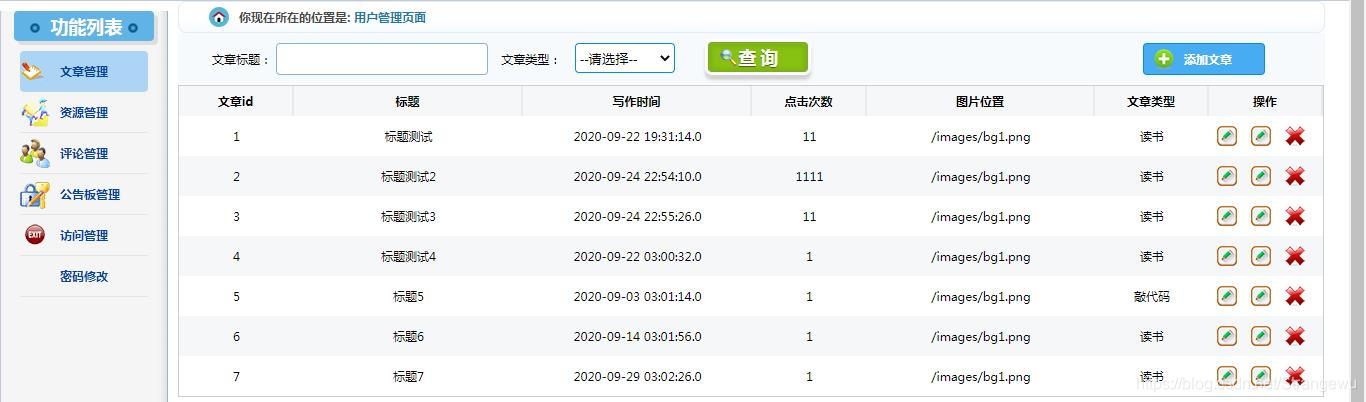
9.效果展示





 扫一扫
扫一扫


 1429
1429

 被折叠的 条评论
为什么被折叠?
被折叠的 条评论
为什么被折叠?
 到【灌水乐园】发言





