


概述
从今天开始总结一下,项目中学到的一些东西,方便学习。
1.避免从从安装页面打开app后退出后台,再点击桌面icon,多出一个任务栈
在启动页的onCreate方法中做判断
  @Override
    protected void onCreate(Bundle savedInstanceState) {
        super.onCreate(savedInstanceState);
        // 避免第一次安装成功,直接点击"打开"后,再点HOME置后台,再点桌面icon,导制存在2个任务栈问题
        if ((getIntent().getFlags() & Intent.FLAG_ACTIVITY_BROUGHT_TO_FRONT) != 0) {
            finish();
            return;
}2.时间转化//将小数分钟转化为xx小时和xx分,比如10.00分钟
public String getTime(double minute){
BigDecimal bigDecimal = new BigDecimal(minute * 60 * 1000);
long time = bigDecimal.longValue();
SimpleDateFormat format = new SimpleDateFormat("HH:mm", Locale.getDefault());
//解决8个小时误差问题
format.setTimeZone(TimeZone.getTimeZone("GMT+0"));
return format.format(new Date(time));
}3.在当前时间的基础上加上10分钟(当前时间格式为yyyy-MM-dd HH:mm:ss)
public void getTime2(String text){
    SimpleDateFormat format = new SimpleDateFormat("yyyy-MM-dd HH:mm:ss");
    Date date = null;
    try {
        date = format.parse(text);
        format.setLenient(false);
    } catch (ParseException e) {
        e.printStackTrace();
    }
    Calendar calendar = Calendar.getInstance();
    Date upcarTime = new Date(date.getTime() + 60 *  10000);
    calendar.setTime(upcarTime);
    int hour = calendar.get(Calendar.HOUR_OF_DAY);
    int minute = calendar.get(Calendar.MINUTE);
    String str = String.valueOf(minute);
    if (minute >=0 && minute <= 9) {
        str = "0" + str;
    }
    System.out.println(String.format(Locale.getDefault(),getString(R.string.arrive_time),hour,str));
}
4.重写onTouchEvent提示要调用performClick方法

正确写法如下
  @Override
    public boolean onTouchEvent(MotionEvent ev) {
        switch (ev.getAction()) {
            case MotionEvent.ACTION_DOWN:
             break;
            case MotionEvent.ACTION_UP:
                performClick();
                break;
        }
        return super.onTouchEvent(ev);
    }

    @Override
    public boolean performClick() {
        super.performClick();
        return true;
    }
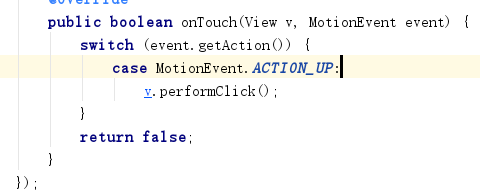
5.给View设置enable为false的情况下,无法执行点击事件,可以把事件放在onTouch里执行,onTouch同样会有警告

5.防止Button重复点击和ViewPager滑动过快
  // 检测以避免重复多次点击
    private static long lastClickTime;
    public static boolean isFastDoubleClick() {
        long time = System.currentTimeMillis();
        long timeD = time - lastClickTime;
        if ( 0 < timeD && timeD < 500) {
            return true;
        }
        lastClickTime = time;
        return false;
    }

    // 检测以避免快速滑动
    private static long lastScrollTime;
    public static boolean isFastScroll() {
        long time = System.currentTimeMillis();
        long timeD = time - lastScrollTime;
        if ( 0 < timeD && timeD < 800) {
            return true;
        }
        lastScrollTime = time;
        return false;
    }
6.设置View的bottomMargin
public void setMarginBottom(int marginBottom) {
        RelativeLayout.LayoutParams layoutParams = (LayoutParams) getLayoutParams();
        layoutParams.setMargins(layoutParams.leftMargin, layoutParams.topMargin, layoutParams.rightMargin, marginBottom + SizeUtils.dp2px(getContext(), 10));
    }





 扫一扫
扫一扫


 303
303

 被折叠的 条评论
为什么被折叠?
被折叠的 条评论
为什么被折叠?
 到【灌水乐园】发言





