


1.下载官方测试程序启动
[doda@host166 game]$curl -O https://arthas.aliyun.com/math-game.jar
[doda@host166 game]$ java -jar math-game.jar
2.下载Arthas启动包,启动Arthas
[doda@host166 arthas]$curl -O https://arthas.aliyun.com/math-game.jar
[doda@host166 arthas]$ java -jar arthas-boot.jar
[ERROR] Can not read maven-metadata.xml from: https://maven.aliyun.com/repository/public/com/taobao/arthas/arthas-packa ging/maven-metadata.xml
[ERROR] Can not find Arthas under local: /root/.arthas/lib and remote maven repo mirror: aliyun
[ERROR] Unable to download arthas from remote server, please download the full package according to wiki: https://githu b.com/alibaba/arthas
上面报错是因为不能连网,Arthas不能下载相关依赖,我们去官网下载完整.zip解压启动即可:
https://github.com/alibaba/arthas/releases
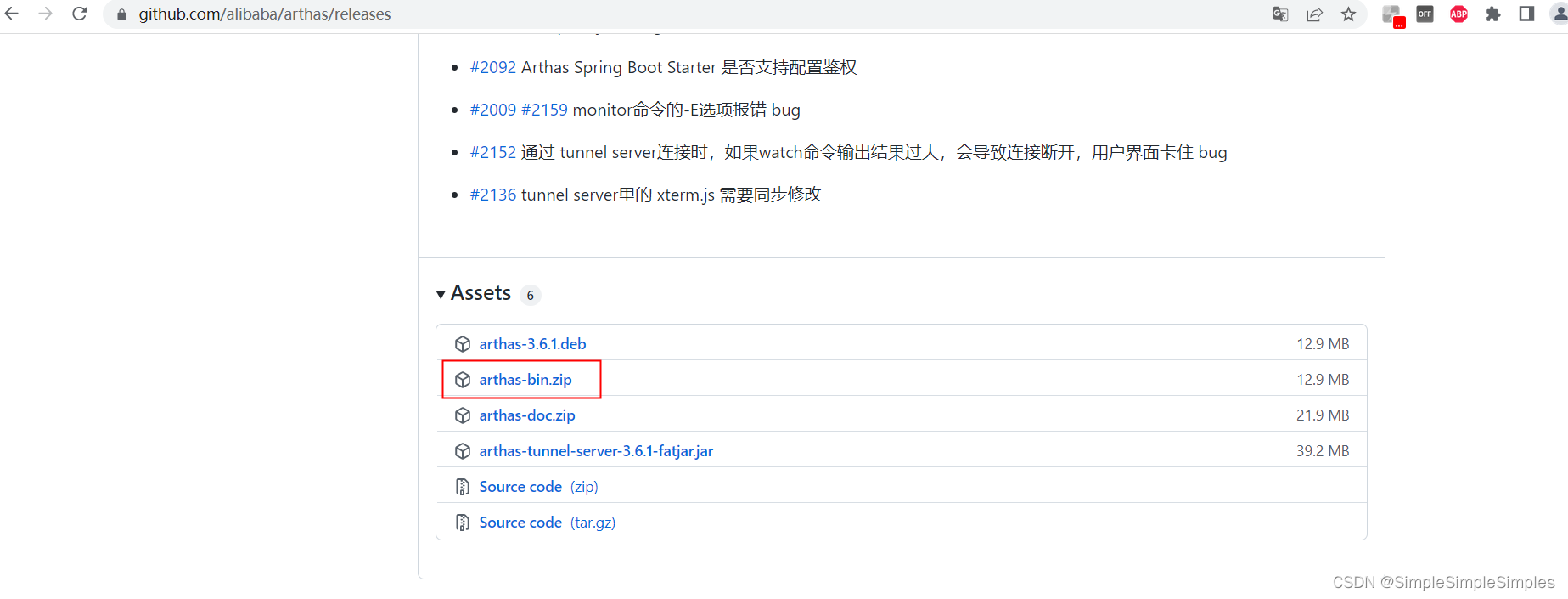
下载解压:
[doda@host166 arthas]$ unzip arthas-bin.zip
[doda@host166 arthas]$ ll
total 26812
-rw-r--r-- 1 doda doda 8449 Sep 27 2020 arthas-agent.jar
-rw-rw-r-- 1 doda doda 13519028 May 14 23:34 arthas-bin.zip
-rw-r--r-- 1 doda doda 141887 Sep 27 2020 arthas-boot.jar
-rw-r--r-- 1 doda doda 430939 Sep 27 2020 arthas-client.jar
-rw-r--r-- 1 doda doda 13266535 Sep 27 2020 arthas-core.jar
-rw-r--r-- 1 doda doda 531 Sep 27 2020 arthas.properties
-rw-r--r-- 1 doda doda 5436 Sep 27 2020 arthas-spy.jar
-rwxr-xr-x 1 doda doda 3113 Sep 27 2020 as.bat
-rwxr-xr-x 1 doda doda 7744 Sep 27 2020 as-service.bat
-rwxr-xr-x 1 doda doda 33257 Sep 27 2020 as.sh
drwxr-xr-x 2 doda doda 113 Sep 27 2020 async-profiler
drwxrwxr-x 2 doda doda 27 May 15 00:07 game
-rwxr-xr-x 1 doda doda 635 Sep 27 2020 install-local.sh
drwxr-xr-x 2 doda doda 108 Sep 27 2020 lib
-rw-r--r-- 1 doda doda 2020 Sep 27 2020 logback.xml
-rw-r--r-- 1 doda doda 4482 Sep 27 2020 math-game.jar
执行用启动命令,选择进程对应数字,回车确认,显示arthas用户,即登陆进arthas操作界面
[doda@host166 arthas]$ java -jar arthas-boot.jar
[INFO] arthas-boot version: 3.6.1
[INFO] Process 303962 already using port 3658
[INFO] Process 303962 already using port 8563
[INFO] Found existing java process, please choose one and input the serial number of the process, eg : 1. Then hit ENTER.
* [1]: 303962 org.apache.spark.deploy.SparkSubmit
[2]: 310993 math-game.jar
[3]: 316194 org.elasticsearch.bootstrap.Elasticsearch
[4]: 105913 smart-spark-1.0.jar
1
[INFO] arthas home: /home/doda/shangeshishi/arthas
[INFO] The target process already listen port 3658, skip attach.
[INFO] arthas-client connect 127.0.0.1 3658
,---. ,------. ,--------.,--. ,--. ,---. ,---.
/ O \ | .--. ''--. .--'| '--' | / O \ ' .-'
| .-. || '--'.' | | | .--. || .-. |`. `-.
| | | || |\ \ | | | | | || | | |.-' |
`--' `--'`--' '--' `--' `--' `--'`--' `--'`-----'
wiki https://arthas.aliyun.com/doc
tutorials https://arthas.aliyun.com/doc/arthas-tutorials.html
version 3.6.1
main_class
pid 303962
time 2022-05-15 00:25:19
[arthas@303962]$
退出当前 Arthas 客户端,其他 Arthas 客户端不受影响(quit)
[arthas@303962]$ quit
关闭 Arthas 服务端,所有 Arthas 客户端全部退出(stop)
[doda@host166 arthas]$ stop
3.Arthas常场景使用
3.1查看当前系统的实时数据面板
[arthas@303962]$ dashboard
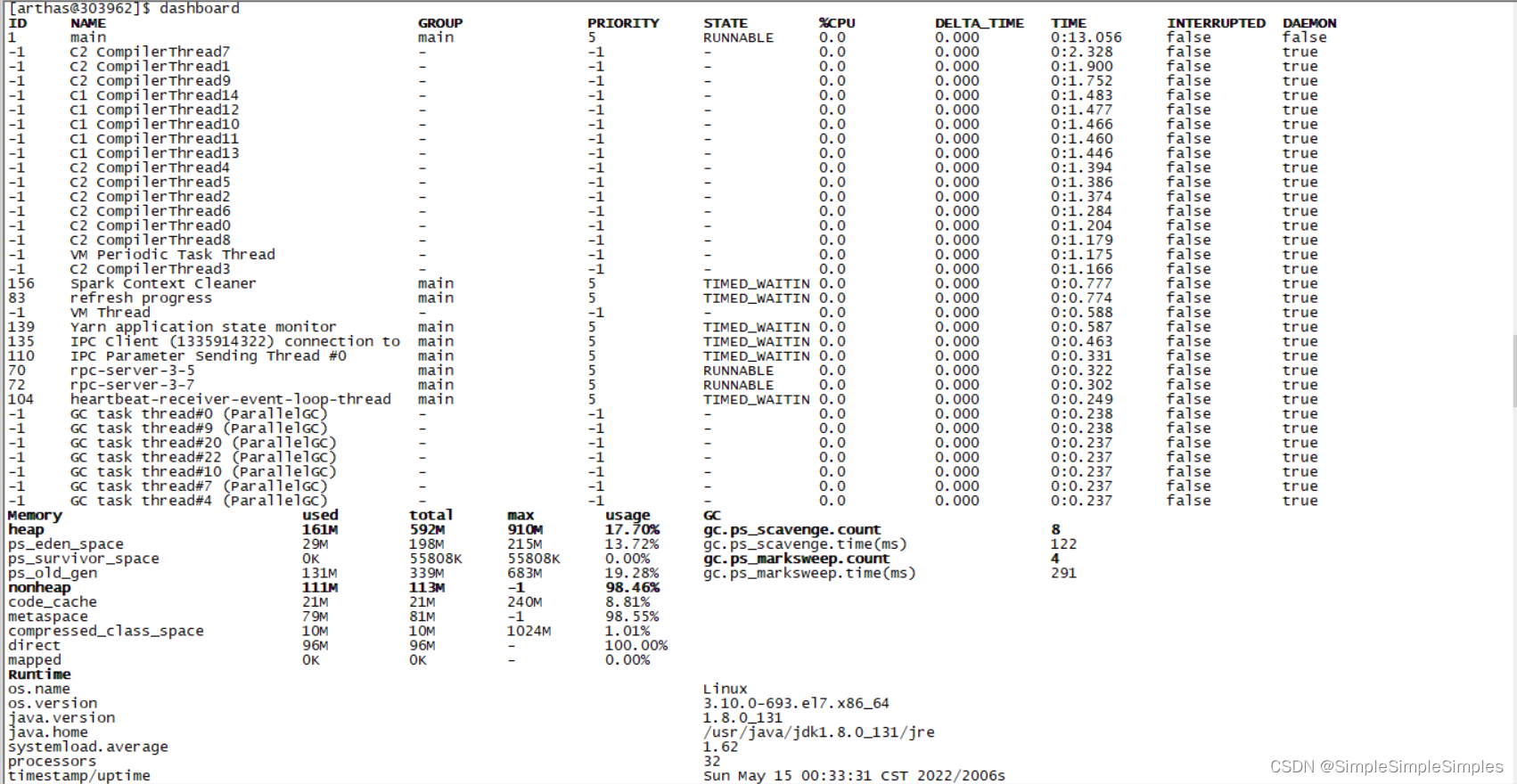
ID: Java级别的线程ID,注意这个ID不能跟jstack中的nativeID一一对应。
NAME: 线程名
GROUP: 线程组名
PRIORITY: 线程优先级, 1~10之间的数字,越大表示优先级越高
STATE: 线程的状态
CPU%: 线程的cpu使用率。比如采样间隔1000ms,某个线程的增量cpu时间为100ms,则cpu使用率=100/1000=10%
DELTA_TIME: 上次采样之后线程运行增量CPU时间,数据格式为秒
TIME: 线程运行总CPU时间,数据格式为分:秒
INTERRUPTED: 线程当前的中断位状态
DAEMON: 是否是daemon线程
3.2Thread命令
3.2.1通过thread命令来获取到math-game进程的Main Class
thread 1会打印线程ID 1的栈,通常是main函数的线程。
[arthas@310993]$ thread 1 | grep 'main('
at demo.MathGame.main(MathGame.java:17)
3.2.2例如使用 -n ,显示几条线程信息,根据cpu使用率排序
[arthas@310993]$ thread -n 3
"arthas-command-execute" Id=32 cpuUsage=0.48% deltaTime=0ms time=1008ms RUNNABLE
at sun.management.ThreadImpl.dumpThreads0(Native Method)
at sun.management.ThreadImpl.getThreadInfo(ThreadImpl.java:448)
at com.taobao.arthas.core.command.monitor200.ThreadCommand.processTopBusyThreads(ThreadCommand.java:206)
at com.taobao.arthas.core.command.monitor200.ThreadCommand.process(ThreadCommand.java:122)
at com.taobao.arthas.core.shell.command.impl.AnnotatedCommandImpl.process(AnnotatedCommandImpl.java:82)
at com.taobao.arthas.core.shell.command.impl.AnnotatedCommandImpl.access$100(AnnotatedCommandImpl.java:18)
at com.taobao.arthas.core.shell.command.impl.AnnotatedCommandImpl$ProcessHandler.handle(AnnotatedCommandImpl.java:111)
at com.taobao.arthas.core.shell.command.impl.AnnotatedCommandImpl$ProcessHandler.handle(AnnotatedCommandImpl.java:108)
at com.taobao.arthas.core.shell.system.impl.ProcessImpl$CommandProcessTask.run(ProcessImpl.java:385)
at java.util.concurrent.Executors$RunnableAdapter.call(Executors.java:511)
at java.util.concurrent.FutureTask.run(FutureTask.java:266)
at java.util.concurrent.ScheduledThreadPoolExecutor$ScheduledFutureTask.access$201(ScheduledThreadPoolExecutor.java:180)
at java.util.concurrent.ScheduledThreadPoolExecutor$ScheduledFutureTask.run(ScheduledThreadPoolExecutor.java:293)
at java.util.concurrent.ThreadPoolExecutor.runWorker(ThreadPoolExecutor.java:1142)
at java.util.concurrent.ThreadPoolExecutor$Worker.run(ThreadPoolExecutor.java:617)
at java.lang.Thread.run(Thread.java:748)
"C1 CompilerThread12" [Internal] cpuUsage=0.46% deltaTime=0ms time=544ms
"C1 CompilerThread10" [Internal] cpuUsage=0.2% deltaTime=0ms time=571ms
3.3通过jad来反编译Main Class
[arthas@310993]$ jad demo.MathGame
ClassLoader:
+-sun.misc.Launcher$AppClassLoader@3d4eac69
  +-sun.misc.Launcher$ExtClassLoader@43a024e5

Location:
/home/doda/shangeshishi/arthas/game/math-game.jar

       /*
        * Decompiled with CFR.
        */
       package demo;

       import java.util.ArrayList;
       import java.util.List;
       import java.util.Random;
       import java.util.concurrent.TimeUnit;

       public class MathGame {
           private static Random random = new Random();
           private int illegalArgumentCount = 0;

           public List<Integer> primeFactors(int number) {
/*44*/         if (number < 2) {
/*45*/             ++this.illegalArgumentCount;
                   throw new IllegalArgumentException("number is: " + number + ", need >= 2");
               }
               ArrayList<Integer> result = new ArrayList<Integer>();
/*50*/         int i = 2;
/*51*/         while (i <= number) {
/*52*/             if (number % i == 0) {
/*53*/                 result.add(i);
/*54*/                 number /= i;
/*55*/                 i = 2;
                       continue;
                   }
/*57*/             ++i;
               }
/*61*/         return result;
           }

           public static void main(String[] args) throws InterruptedException {
               MathGame game = new MathGame();
               while (true) {
/*16*/             game.run();
/*17*/             TimeUnit.SECONDS.sleep(1L);
               }
           }

           public void run() throws InterruptedException {
               try {
/*23*/             int number = random.nextInt() / 10000;
/*24*/             List<Integer> primeFactors = this.primeFactors(number);
/*25*/             MathGame.print(number, primeFactors);
               }
               catch (Exception e) {
/*28*/             System.out.println(String.format("illegalArgumentCount:%3d, ", this.illegalArgumentCount) + e.getMessage());
               }
           }

           public static void print(int number, List<Integer> primeFactors) {
               StringBuffer sb = new StringBuffer(number + "=");
/*34*/         for (int factor : primeFactors) {
/*35*/             sb.append(factor).append('*');
               }
/*37*/         if (sb.charAt(sb.length() - 1) == '*') {
/*38*/             sb.deleteCharAt(sb.length() - 1);
               }
/*40*/         System.out.println(sb);
           }
       }

Affect(row-cnt:1) cost in 1253 ms.
3.4通过watch查看函数返回
参数名称 参数说明
class-pattern 类名表达式匹配
method-pattern 函数名表达式匹配
express 观察表达式,默认值:{params, target, returnObj}
condition-express 条件表达式
[b] 在函数调用之前观察
[e] 在函数异常之后观察
[s] 在函数返回之后观察
[f] 在函数结束之后(正常返回和异常返回)观察
[E] 开启正则表达式匹配,默认为通配符匹配
[x:] 指定输出结果的属性遍历深度,默认为 1,最大值是4
这里重点要说明的是观察表达式,观察表达式的构成主要由 ognl 表达式组成,所以你可以这样写"{params,returnObj}",只要是一个合法的 ognl 表达式,都能被正常支持,详见:OGNL - Apache Commons OGNL - Language Guide
3.4.1通过watch命令来查看demo.MathGame#primeFactors函数的返回值
观察表达式,默认值是{params, target, returnObj},即:观察函数调用返回时的参数、this对象和返回值
[arthas@310993]$ watch demo.MathGame primeFactors -x 2
Press Q or Ctrl+C to abort.
Affect(class count: 1 , method count: 1) cost in 41 ms, listenerId: 14
method=demo.MathGame.primeFactors location=AtExit
ts=2022-05-15 01:47:50; [cost=0.98552ms] result=@ArrayList[
@Object[][
@Integer[1],
],
@MathGame[
random=@Random[java.util.Random@4d405ef7],
illegalArgumentCount=@Integer[2709],
],
@ArrayList[
@Integer[12343],
],
]
method=demo.MathGame.primeFactors location=AtExceptionExit
ts=2022-05-15 01:47:51; [cost=0.350333ms] result=@ArrayList[
@Object[][
@Integer[-147433],
],
@MathGame[
random=@Random[java.util.Random@4d405ef7],
illegalArgumentCount=@Integer[2710],
],
null,
]
上面的结果里,说明函数被执行了两次,第一次结果是location=AtExceptionExit,说明函数抛出异常了,因此returnObj是null
在第二次结果里是location=AtExit,说明函数正常返回,因此可以看到returnObj结果是一个ArrayList
3.4.2调整-x的值,观察具体的函数参数值
[arthas@310993]$ watch demo.MathGame primeFactors "{params,target}" -x 3
Press Q or Ctrl+C to abort.
Affect(class count: 1 , method count: 1) cost in 57 ms, listenerId: 15
method=demo.MathGame.primeFactors location=AtExceptionExit
ts=2022-05-15 01:50:56; [cost=0.357649ms] result=@ArrayList[
@Object[][
@Integer[-11884],
],
@MathGame[
random=@Random[
serialVersionUID=@Long[3905348978240129619],
seed=@AtomicLong[273686037247930],
multiplier=@Long[25214903917],
addend=@Long[11],
mask=@Long[281474976710655],
DOUBLE_UNIT=@Double[1.1102230246251565E-16],
BadBound=@String[bound must be positive],
BadRange=@String[bound must be greater than origin],
BadSize=@String[size must be non-negative],
seedUniquifier=@AtomicLong[-3282039941672302964],
nextNextGaussian=@Double[0.0],
haveNextNextGaussian=@Boolean[false],
serialPersistentFields=@ObjectStreamField[][isEmpty=false;size=3],
unsafe=@Unsafe[sun.misc.Unsafe@c4437c4],
seedOffset=@Long[24],
],
illegalArgumentCount=@Integer[2808],
],
]
-x表示遍历深度,可以调整来打印具体的参数和结果内容,默认值是1。
-x最大值是4,防止展开结果占用太多内存。用户可以在ognl表达式里指定更具体的field。
3.4.3观察异常信息的例子
[arthas@310993]$ watch demo.MathGame primeFactors "{params[0],throwExp}" -e -x 2
Press Q or Ctrl+C to abort.
Affect(class count: 1 , method count: 1) cost in 38 ms, listenerId: 16
method=demo.MathGame.primeFactors location=AtExceptionExit
ts=2022-05-15 01:52:23; [cost=0.319735ms] result=@ArrayList[
@Integer[-199542],
java.lang.IllegalArgumentException: number is: -199542, need >= 2
at demo.MathGame.primeFactors(MathGame.java:46)
at demo.MathGame.run(MathGame.java:24)
at demo.MathGame.main(MathGame.java:16)
,
]
-e表示抛出异常时才触发
express中,表示异常信息的变量是throwExp
3.4.4观察当前对象中的属性
如果想查看函数运行前后,当前对象中的属性,可以使用target关键字,代表当前对象
[arthas@310993]$ watch demo.MathGame primeFactors 'target'
Press Q or Ctrl+C to abort.
Affect(class count: 1 , method count: 1) cost in 39 ms, listenerId: 17
method=demo.MathGame.primeFactors location=AtExit
ts=2022-05-15 01:53:41; [cost=1.306179ms] result=@MathGame[
random=@Random[java.util.Random@4d405ef7],
illegalArgumentCount=@Integer[2885],
]
3.4.5然后使用target.field_name访问当前对象的某个属性
[arthas@310993]$ watch demo.MathGame primeFactors 'target.illegalArgumentCount'
Press Q or Ctrl+C to abort.
Affect(class count: 1 , method count: 1) cost in 41 ms, listenerId: 19
method=demo.MathGame.primeFactors location=AtExit
ts=2022-05-15 01:55:26; [cost=1.22408ms] result=@Integer[2931]

 3273


 扫一扫


 被折叠的 条评论
为什么被折叠?
 到【灌水乐园】发言


