



 本文详细介绍了如何使用Spring Cloud Gateway和Nacos实现动态路由,包括配置依赖、yml设置、启动类编写、监听Nacos配置并更新路由,以及通过Controller接收请求的测试过程。重点展示了如何实现实时响应Nacos配置变化,确保服务路由的灵活性。
Gateway+Nacos动态路由
一、pom依赖(关键部分)
1.gateway模块
		<!--引入gateway依赖-->
        <dependency>
            <groupId>org.springframework.cloud</groupId>
            <artifactId>spring-cloud-starter-gateway</artifactId>
        </dependency>

        <!-- SpringCloud Alibaba Nacos -->
        <dependency>
            <groupId>com.alibaba.cloud</groupId>
            <artifactId>spring-cloud-starter-alibaba-nacos-discovery</artifactId>
        </dependency>

        <!-- SpringCloud Alibaba Nacos Config -->
        <dependency>
            <groupId>com.alibaba.cloud</groupId>
            <artifactId>spring-cloud-starter-alibaba-nacos-config</artifactId>
        </dependency>
2.test模块
		<!-- SpringCloud Alibaba Nacos -->
        <dependency>
            <groupId>com.alibaba.cloud</groupId>
            <artifactId>spring-cloud-starter-alibaba-nacos-discovery</artifactId>
        </dependency>

        <!-- SpringCloud Alibaba Nacos Config -->
        <dependency>
            <groupId>com.alibaba.cloud</groupId>
            <artifactId>spring-cloud-starter-alibaba-nacos-config</artifactId>
        </dependency>
二、配置yml
1.gateway模块
server:
  port: 7002

shine:
  dynamic:
    route:
      address: ${spring.cloud.nacos.config.server-addr}
      dataId: ${spring.application.name}
      groupId: SHINE_GROUP

spring:
  application:
    name: shine-gateway
  profiles:
    # 环境配置
    active: dev
  datasource:
    type: com.alibaba.druid.pool.DruidDataSource
    driverClassName: com.mysql.cj.jdbc.Driver
    druid:
      url: jdbc:mysql://127.0.0.1:3306/数据库名称?useUnicode=true&characterEncoding=utf8&zeroDateTimeBehavior=convertToNull&useSSL=true&serverTimezone=GMT%2B8
      username: 用户名
      password: 密码
      # 初始连接数
      initialSize: 5
      # 最小连接池数量
      minIdle: 10
      # 最大连接池数量
      maxActive: 20
      # 配置获取连接等待超时的时间
      maxWait: 60000
      # 配置间隔多久才进行一次检测,检测需要关闭的空闲连接,单位是毫秒
      timeBetweenEvictionRunsMillis: 60000
      # 配置一个连接在池中最小生存的时间,单位是毫秒
      minEvictableIdleTimeMillis: 300000
      # 配置一个连接在池中最大生存的时间,单位是毫秒
      maxEvictableIdleTimeMillis: 900000
  cloud:
    nacos:
      discovery:
        # 服务注册地址
        server-addr: 127.0.0.1:7001
      config:
        # 配置中心地址
        server-addr: 127.0.0.1:7001
        # 配置文件格式
        file-extension: yml
        # 共享配置
        shared-configs:
          - application-${spring.profiles.active}.${spring.cloud.nacos.config.file-extension}
    gateway:
      discovery:
        locator:
          # 服务名小写
          lower-case-service-id: true

# MyBatis配置
mybatis:
  # 加载全局的配置文件
  configLocation: classpath:mybatis/mybatis-config.xml
  # 配置mapper的扫描,找到所有的mapper.xml映射文件
  mapperLocations: classpath*:mapper/*Mapper.xml
2.test模块
server:
  port: 7003

spring:
  application:
    name: shine-client
  profiles:
    # 环境配置
    active: dev
  cloud:
    nacos:
      discovery:
        # 服务注册地址
        server-addr: 127.0.0.1:7001
      config:
        # 配置中心地址
        server-addr: 127.0.0.1:7001
        # 配置文件格式
        file-extension: yml
        # 共享配置
        shared-configs:
          - application-${spring.profiles.active}.${spring.cloud.nacos.config.file-extension}
三、编写启动类
1.gateway启动类
/**
 * @author ShineQianMo
 */
@SpringBootApplication
@EnableDiscoveryClient
public class ShineGatewayApplication {

    public static void main(String[] args) {
        SpringApplication.run(ShineGatewayApplication.class, args);
        System.out.println("Shine: shine-gateway模块启动成功");
    }

}
2.test启动类
/**
 * @author ShineQianMo
 */
@SpringBootApplication
@EnableDiscoveryClient
public class ShineClientApplication {

    public static void main(String[] args) {
        SpringApplication.run(ShineClientApplication.class, args);
        System.out.println("Shine: shine-client模块启动成功");
    }

}
四、业务逻辑
1.监听nacos配置
/**
 * @author ShineQianMo
 * DateTime 2021/8/17 16:09
 */
@Configuration
public class DynamicRouteConfiguration {

    private static final Logger log = LoggerFactory.getLogger(DynamicRouteConfiguration.class);

    @Autowired
    private DynamicRoute nacosDynamicRoute;

    @Autowired
    private GatewayRouteService gatewayRouteService;

    @PostConstruct
    private void init() {
        dynamicRouteByNacosListener(nacosDynamicRoute.getDataId(), nacosDynamicRoute.getGroupId(), nacosDynamicRoute.getAddress());
    }

	// dataId、groupId、address 自己定义, address就是nacos地址+端口,我这里这三个值分别是shine-gateway、SHINE_GROUP、127.0.0.1:7001 我是从yml里加载的这边你们随意
    private void dynamicRouteByNacosListener(String dataId, String groupId, String address) {
        try {
            ConfigService configService = NacosFactory.createConfigService(address);
            configService.addListener(dataId, groupId, new Listener() {
                @Override
                public Executor getExecutor() {
                    return null;
                }

                @Override
                public void receiveConfigInfo(String configInfo) {
                    log.warn("监听到新的路由配置,正在更新中、、、");
                    List<RouteDefinition> routeDefinitionList = JSON.parseArray(configInfo, RouteDefinition.class);
                    for (RouteDefinition routeDefinition : routeDefinitionList) {
                        gatewayRouteService.addGatewayRoute(routeDefinition);
                    }
                    log.warn("路由更新完成");
                }
            });
        } catch (NacosException e) {
            e.printStackTrace();
            // 通知路由负责人(邮件)
        }
    }

}
2.路由更新
/**
 * @author ShineQianMo
 * DateTime 2021/8/17 10:57
 */
@Service
public class GatewayRouteServiceImpl implements GatewayRouteService, ApplicationEventPublisherAware {

    private static final Logger log = LoggerFactory.getLogger(GatewayRouteServiceImpl.class);

    private ApplicationEventPublisher publisher;

    @Autowired
    private RouteDefinitionWriter routeDefinitionWriter;

    @Override
    public List<GatewayRoute> getGatewayRouteList(GatewayRoute gatewayRoute) {
        return gatewayRouteMapper.selectGatewayRouteList(gatewayRoute);
    }

    @Override
    public int addGatewayRoute(RouteDefinition routeDefinition) {
        this.loadingOneRouteDefinition(routeDefinition);
        return 1;
    }

	@Override
    public void loadingOneRouteDefinition(RouteDefinition routeDefinition) {
        log.info("加载路由");
        // 先删除重名路由
        routeDefinitionWriter.delete(Mono.just(routeDefinition.getId()));
        // 再添加路由
        routeDefinitionWriter.save(Mono.just(routeDefinition)).subscribe();
        this.publisher.publishEvent(new RefreshRoutesEvent(this));
    }
}
test模块编写Controller接收请求
/**
 * @author ShineQianMo
 * DateTime 2021/8/17 19:30
 */
@RestController
public class a {

    @GetMapping("/a")
    public String a() {
        return "你好难打s";
    }
}
五、测试
1.启动nacos
2.启动gateway、test模块
3.编写nacos配置文件
我这里用的JSON格式的配置,java监听nacos也是直接转JSON
[
    {
        "id": "shine-client",
        "order": 0,
        "uri": "lb://shine-client",
        "predicates": [
            {
                "name": "Path",
                "args": {
                    "_genkey_0": "/client/**"
                }
            }
        ],
        "filters": [
            {
                "name": "StripPrefix",
                "args": {
                    "_genkey_0": "1"
                }
            }
        ]
    }
]
这个JSON改为yml:
spring:
  cloud:
    nacos:
      routes:
		- id: shine-client
          uri: lb://shine-client
          predicates:
            - Path=/client/**
          filters:
            - StripPrefix=1
发布nacos配置,可以看到java监听到nacos并加载了新的路由。

4.结果
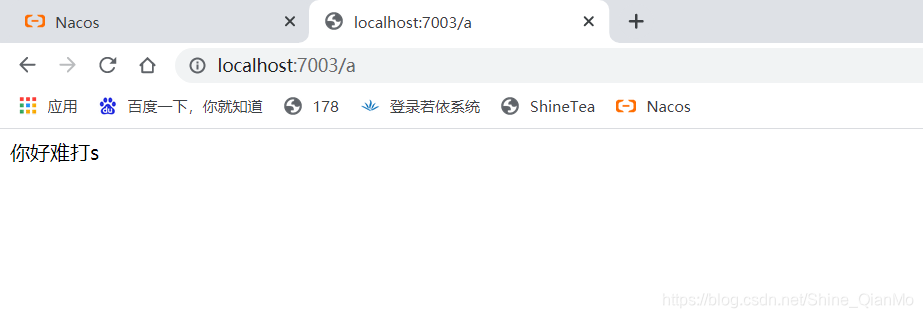
7003请求正常通过
然后测试路由转发7002
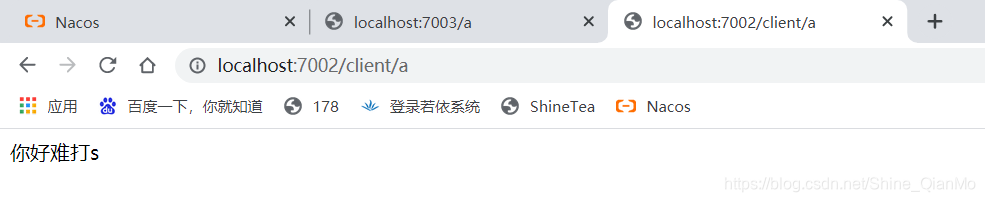
完成,期间nacos遇到一些问题,还有gateway也有问题,后续将放到其他文章。





 扫一扫
扫一扫


 2979
2979

 被折叠的 条评论
为什么被折叠?
被折叠的 条评论
为什么被折叠?
 到【灌水乐园】发言





