



界面搭建
图形化界面(GUI)
图形化的方式显示界面:AWT/Swing包
主界面分析
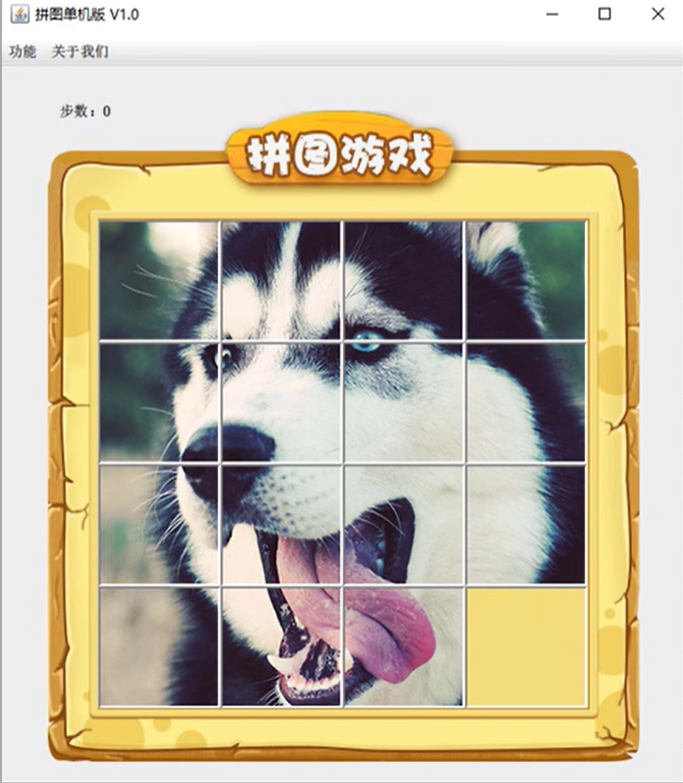
组件
1、JFrame:外层窗体
2、JMenuBar:上层菜单
3、JLabel:管理图片和文字的容器
界面搭建业务逻辑
游戏界面、注册界面、登录界面分别创建三个不同的类,对应的业务逻辑代码在相应的类中编写,main函数只作为程序运行入口调用相关类里的方法
可视化界面:将三个类继承于JFrame,调用setSize以及sitVisible等JFrame中的方法即可实现界面参数的设置以及可视化等操作
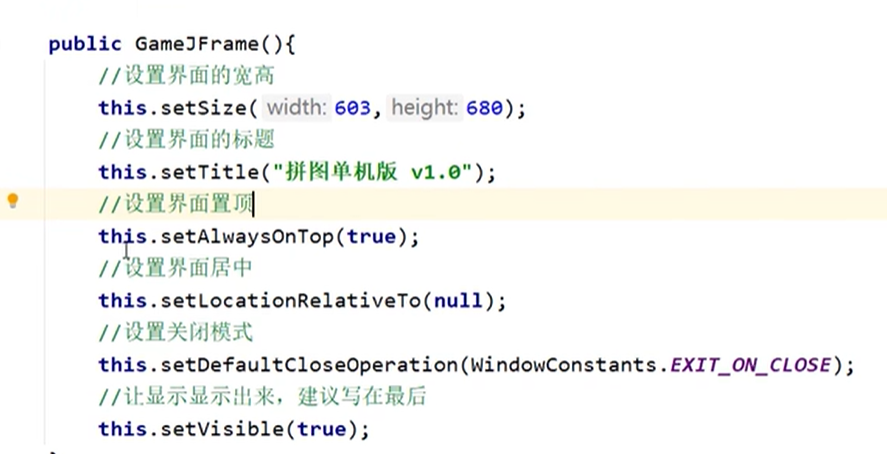
菜单制作
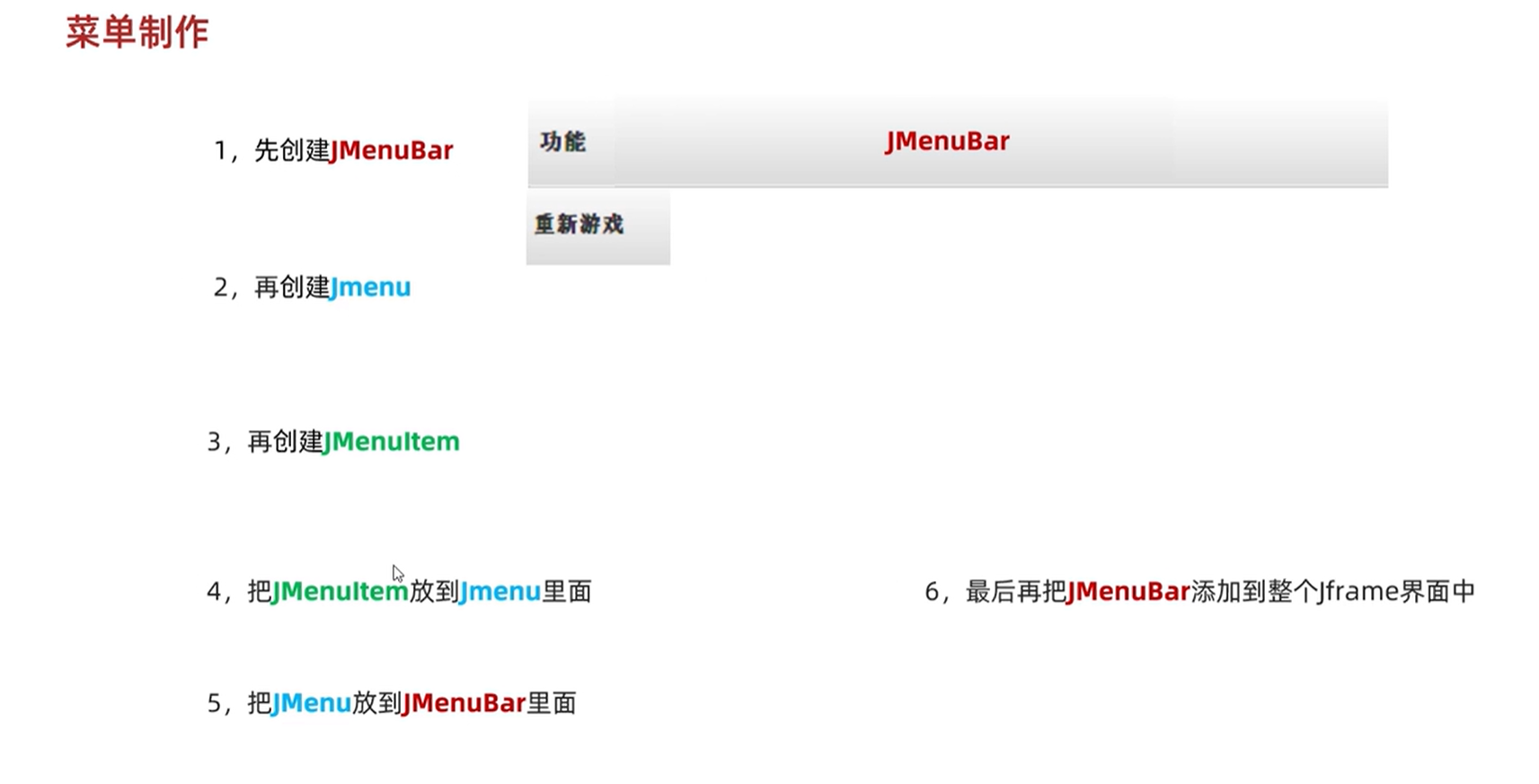
代码实现:
图片处理
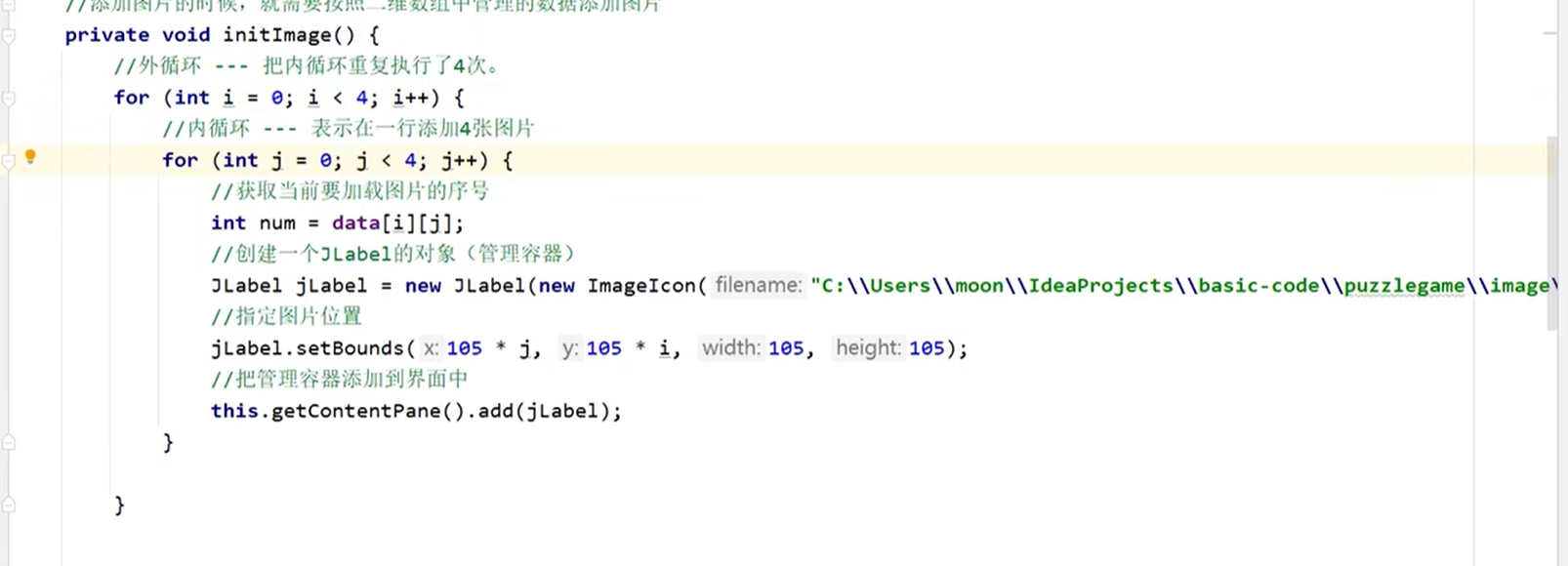
添加图片
一张图片就是一个ImageIcon类,创建一个JLabel对象并创建一个ImageIcon的对象放置在JLable中,最后再将JLable放置于JFrame中
添加图片时,需要先取消主界面中默认的图片放置方式(setLayout(null)),图片才能根据设定的坐标放置
JFrame内实际有一个默认容器,左上角的点坐标为(0,0)
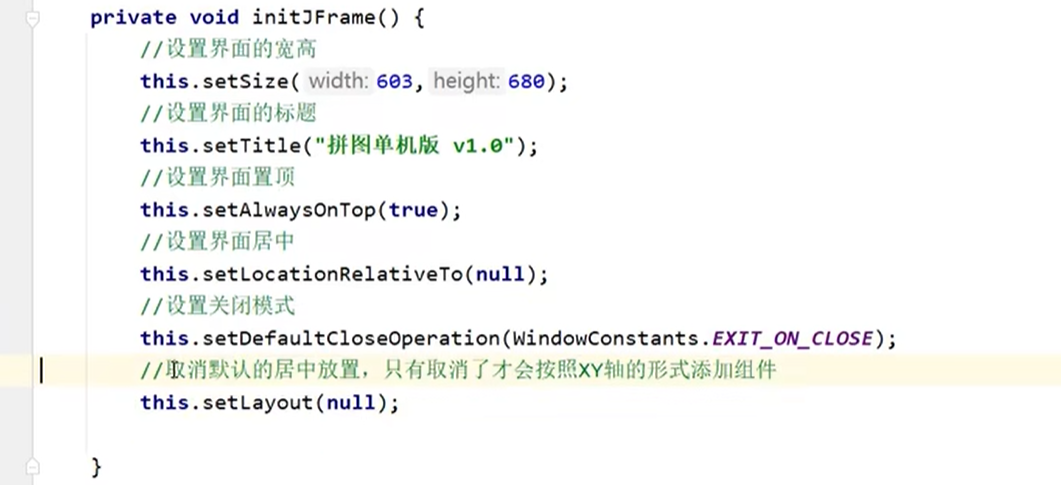 添加图片具体代码实现
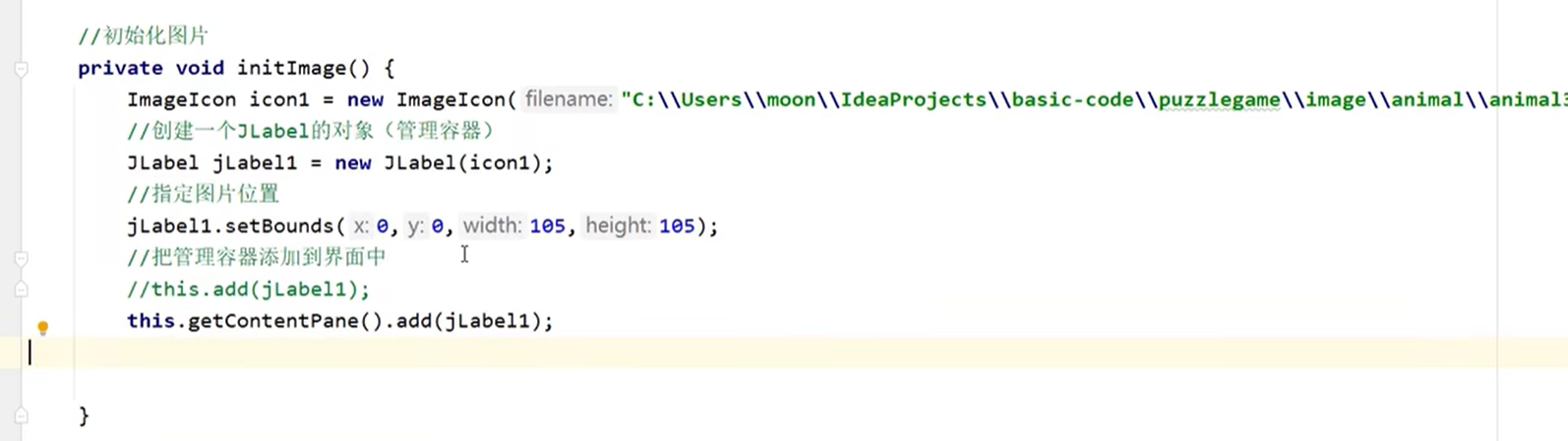
最后再通过循环将每张图片分别添加至主界面中
图片打乱
通过二维数组来管理16张图片
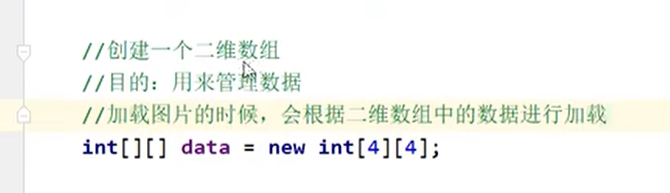
将16张图片打乱,随即放入4*4的二维数组中,即做到打乱图片顺序
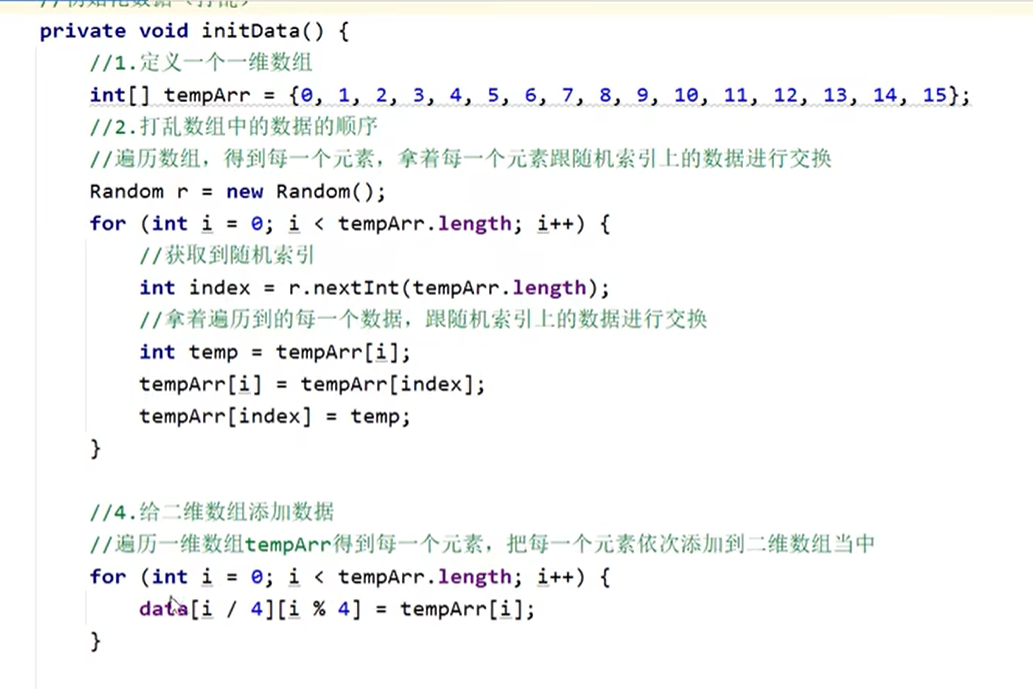
随即在添加图片步骤中,用二维数组进行替换文件名的索引
事件
1、事件源:按钮、图片、窗体...
2、事件:进行的操作:点击鼠标,鼠标划入
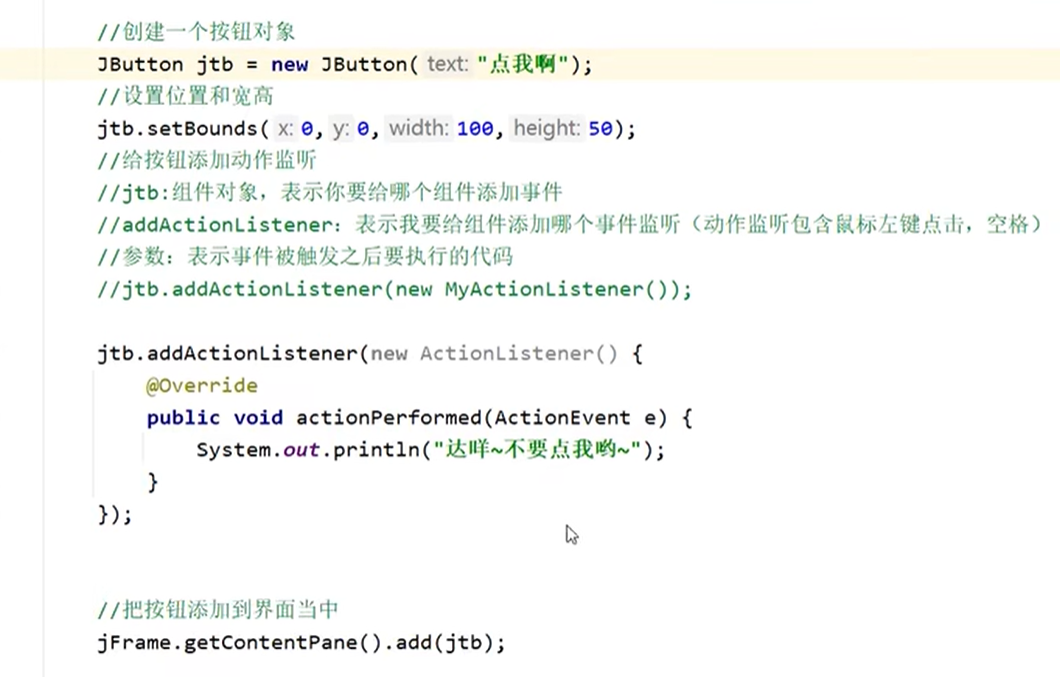
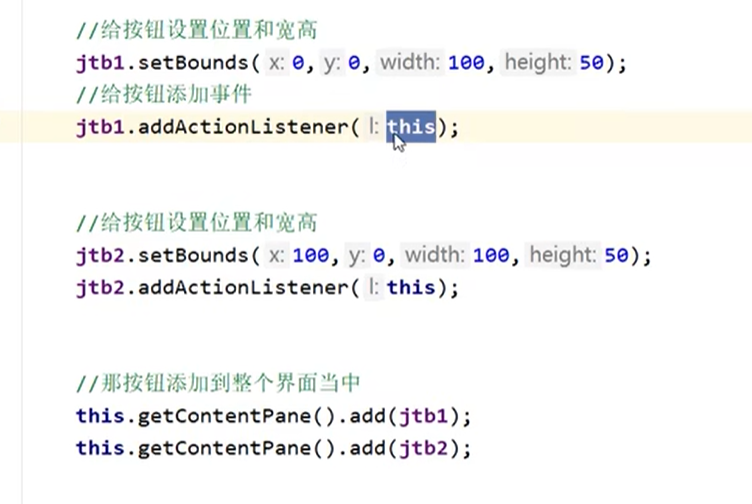
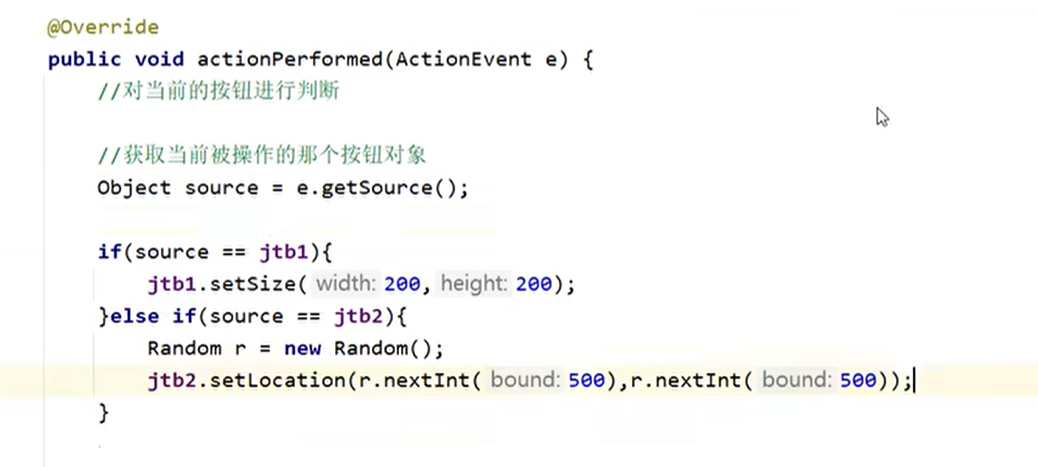
3、绑定监听:若事件源发生了某个事件,则执行某段代码,具体包含

对按钮进行操作
添加按钮
第一种方法
第二种方法
添加游戏边框
将边框图片添加到游戏界面中
注:要讲边框图片放置在添加图片的代码以后,添加图片的顺序是先添加的在上方,后添加的在图层下方

文件路径
相对路径:相对于当前项目,文件所在路径
绝对路径:一定从盘符开始
游戏操作
展示全图
code=81
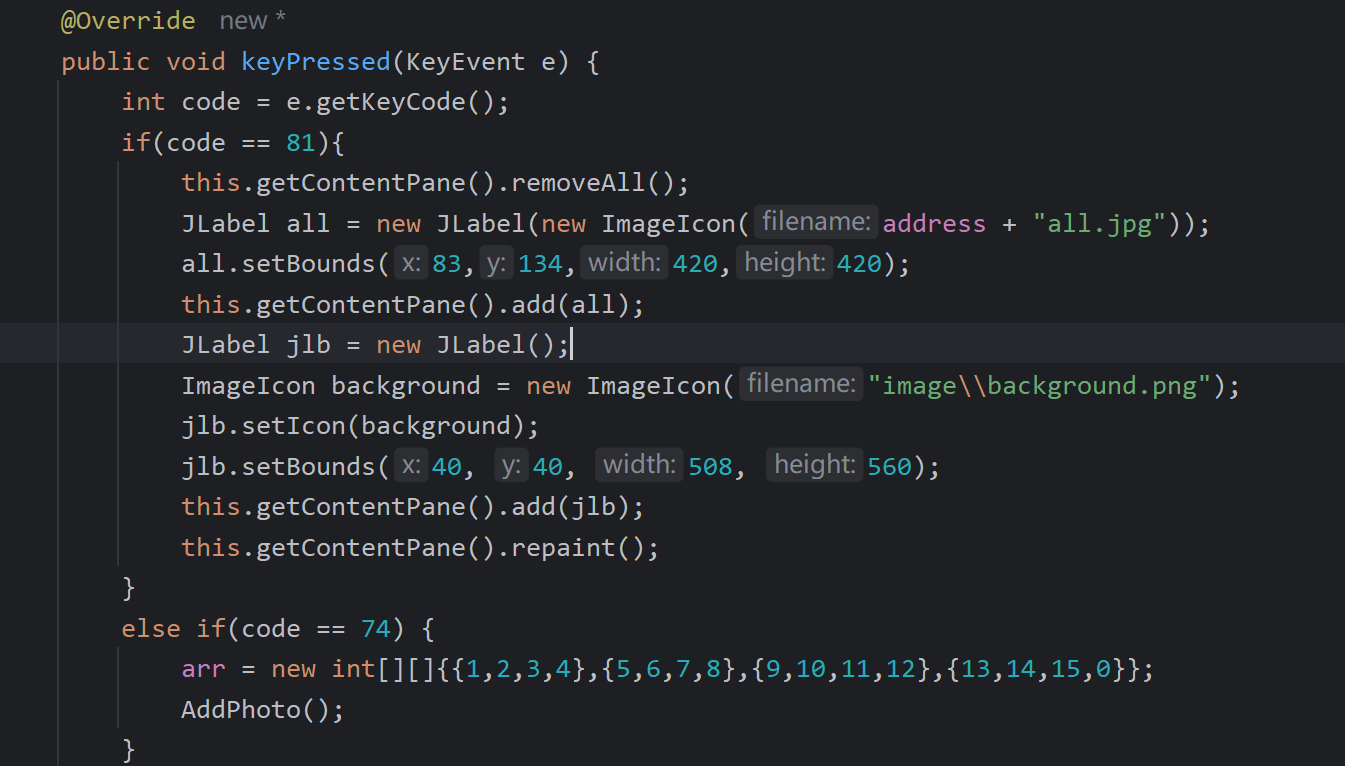
直接胜利
code=74
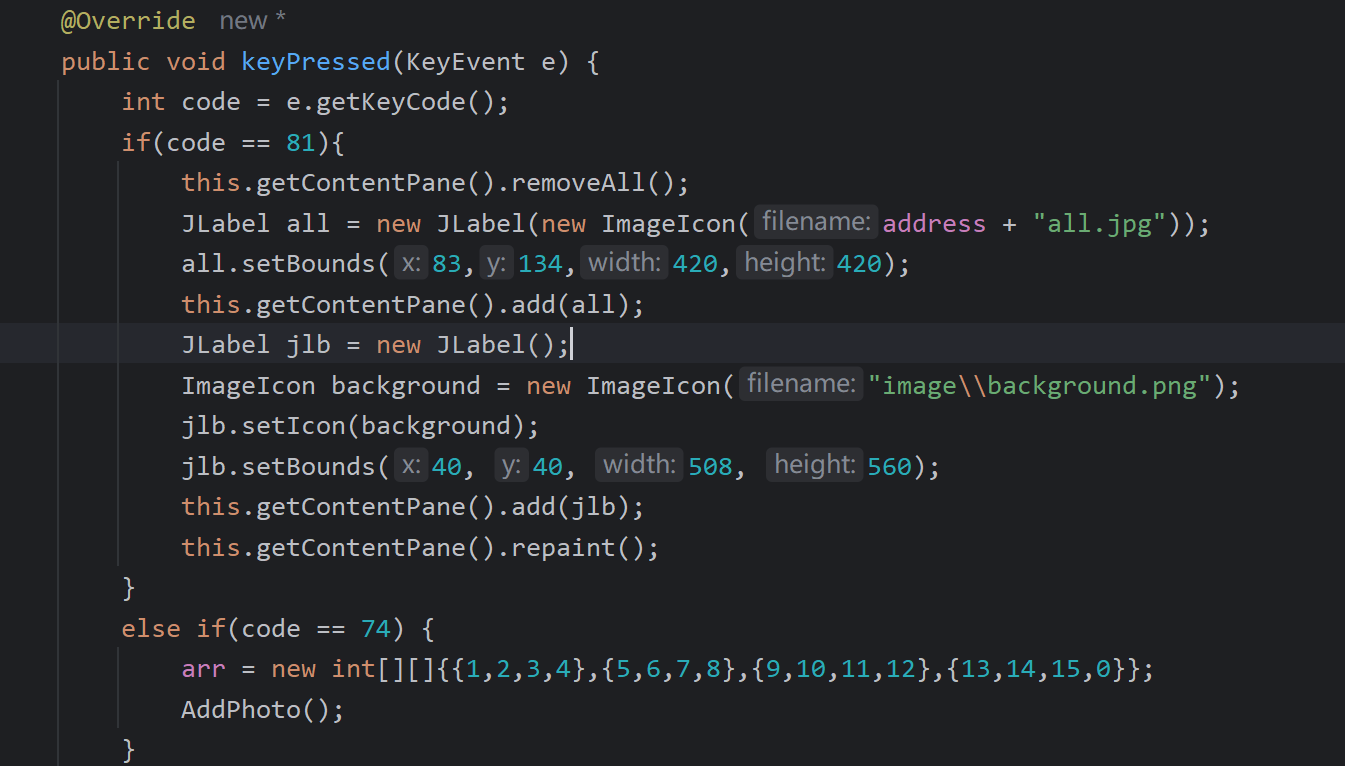
移动图片
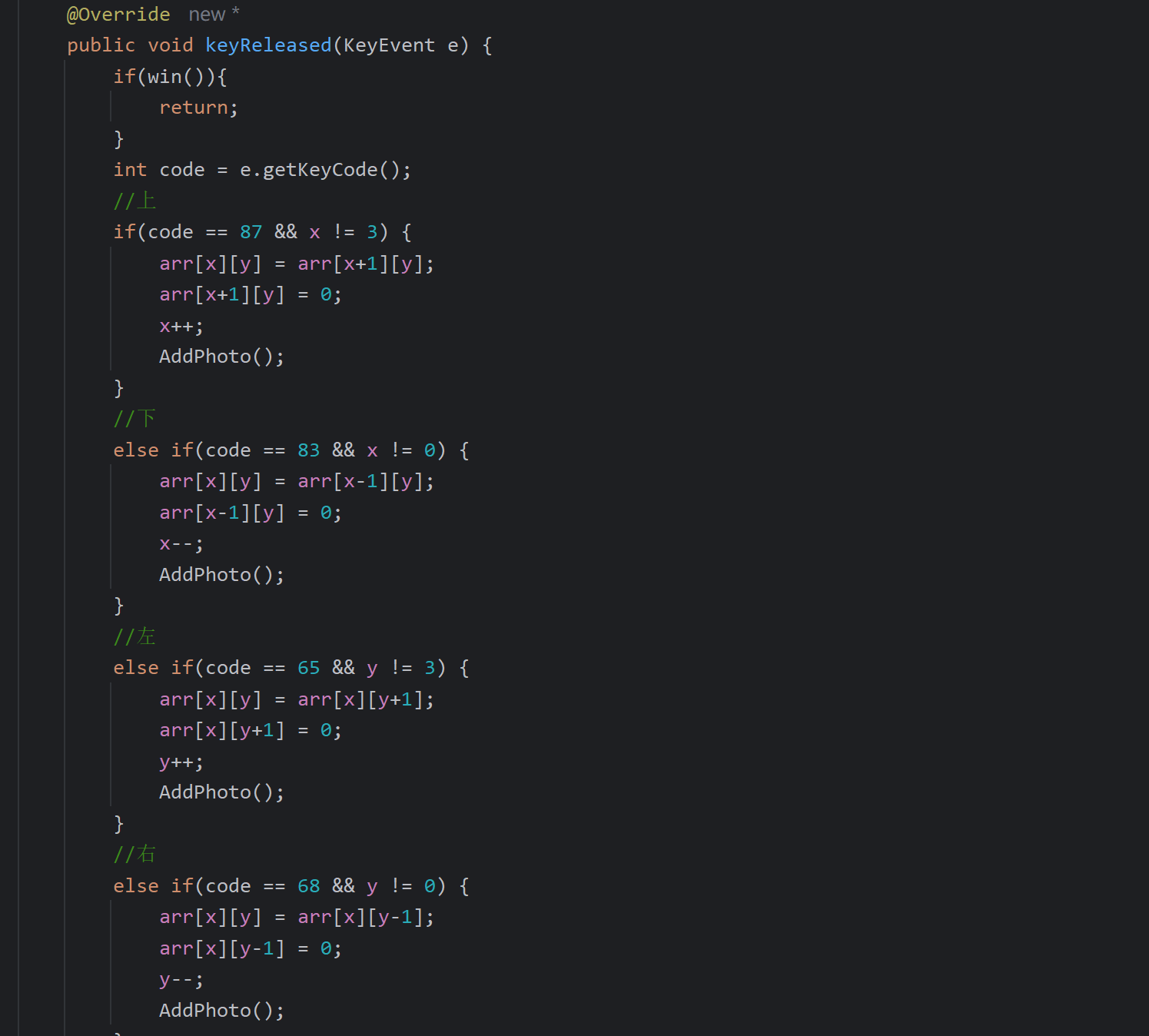
程序实现
程序入口
import com.itheima.ui.GameJFrame;
import com.itheima.ui.Log;
import com.itheima.ui.RegisterJFrame;

public class APP {
    public static void main(String[] args) {
        new Log();
    }
}
登录界面及功能实现
package com.itheima.ui;

import com.itheima.Users;
import com.itheima.CodeUtil;

import javax.swing.*;
import java.awt.event.ActionEvent;
import java.awt.event.ActionListener;
import java.awt.event.MouseEvent;
import java.awt.event.MouseListener;
import java.util.ArrayList;

public class Log extends JFrame implements MouseListener {
    //创建一个集合存储正确的用户名和密码
    ArrayList<Users> userlist = new ArrayList<>();

    {
        userlist.add(new Users("001", "123456"));
        userlist.add(new Users("002", "123456"));
    }

    JButton login = new JButton();
    JButton register = new JButton();
    JTextField code = new JTextField();
    JTextField username = new JTextField();
    JPasswordField password = new JPasswordField();
    JLabel rightCode = new JLabel();

    public Log() {
        //初始化界面
        initJFrame();
        //在这个界面中添加内容
        initView();
        //让当前界面显示出来
        this.setVisible(true);
    }

    public void initView() {
        //1. 添加用户名文字
        JLabel usernameText = new JLabel(new ImageIcon("image\\login\\用户名.png"));
        usernameText.setBounds(116, 135, 47, 17);
        this.getContentPane().add(usernameText);
        //2.添加用户名输入框
        username.setBounds(195, 134, 200, 30);
        this.getContentPane().add(username);
        //3.添加密码文字
        JLabel passwordText = new JLabel(new ImageIcon("image\\login\\密码.png"));
        passwordText.setBounds(130, 195, 32, 16);
        this.getContentPane().add(passwordText);
        //4.密码输入框
        password.setBounds(195, 195, 200, 30);
        this.getContentPane().add(password);
        //验证码提示
        JLabel codeText = new JLabel(new ImageIcon("image\\login\\验证码.png"));
        codeText.setBounds(133, 256, 50, 30);
        this.getContentPane().add(codeText);
        //验证码的输入框
        code.setBounds(195, 256, 100, 30);
        this.getContentPane().add(code);
        //生成随机验证码
        String codeStr = CodeUtil.getCode();
        //设置内容
        rightCode.setText(codeStr);
        rightCode.addMouseListener(this);
        //位置和宽高
        rightCode.setBounds(300, 256, 50, 30);
        //添加到界面
        this.getContentPane().add(rightCode);
        //5.添加登录按钮
        login.addMouseListener(this);
        login.setBounds(123, 310, 128, 47);
        login.setIcon(new ImageIcon("image\\login\\登录按钮.png"));
        //去除按钮的默认边框
        login.setBorderPainted(false);
        //去除按钮的默认背景
        login.setContentAreaFilled(false);
        this.getContentPane().add(login);
        //6.添加注册按钮
        register.setBounds(256, 310, 128, 47);
        register.setIcon(new ImageIcon("image\\login\\注册按钮.png"));
        //去除按钮的默认边框
        register.setBorderPainted(false);
        //去除按钮的默认背景
        register.setContentAreaFilled(false);
        this.getContentPane().add(register);
        //7.添加背景图片
        JLabel background = new JLabel(new ImageIcon("image\\login\\background.png"));
        background.setBounds(0, 0, 470, 390);
        this.getContentPane().add(background);
    }

    public void initJFrame() {
        this.setSize(488, 430);//设置宽高
        this.setTitle("拼图游戏 V1.0登录");//设置标题
        this.setDefaultCloseOperation(3);//设置关闭模式
        this.setLocationRelativeTo(null);//居中
        this.setAlwaysOnTop(true);//置顶
        this.setLayout(null);//取消内部默认布局
    }

    //要展示用户名或密码错误
    public void showJDialog(String content) {
        //创建一个弹框对象
        JDialog jDialog = new JDialog();
        //给弹框设置大小
        jDialog.setSize(200, 150);
        //让弹框置顶
        jDialog.setAlwaysOnTop(true);
        //让弹框居中
        jDialog.setLocationRelativeTo(null);
        //弹框不关闭永远无法操作下面的界面
        jDialog.setModal(true);

        //创建Jlabel对象管理文字并添加到弹框当中
        JLabel warning = new JLabel(content);
        warning.setBounds(0, 0, 200, 150);
        jDialog.getContentPane().add(warning);

        //让弹框展示出来
        jDialog.setVisible(true);
    }

    //判断用户名与密码是否相符
    public boolean userLogin(String username, String password) {
        for (int i = 0; i < userlist.size(); i++) {
            if (userlist.get(i).getId().equals(username) && userlist.get(i).getPassword().equals(password)) {
                return true;
            }
        }
        return false;
    }

    //判断用户是否存在
    public boolean userexist(String username) {
        for (int i = 0; i < userlist.size(); i++) {
            if (userlist.get(i).getId().equals(username)) {
                return true;
            }
        }
        return false;
    }

    //返回用户名索引
    public int index(String username) {
        for (int i = 0; i < userlist.size(); i++) {
            if (userlist.get(i).getId().equals(username)) {
                return i;
            }
        }
        return -1;
    }

    //判断验证码是否正确
    public boolean Code(String codeutil) {
        for (int i = 0; i < userlist.size(); i++) {
            if (codeutil.equalsIgnoreCase(rightCode.getText())) {
                return true;
            }
        }
        return false;
    }

    //清除所有内容
    public void clearup() {
        code.setText("");
        username.setText("");
        password.setText("");
        rightCode.setText(CodeUtil.getCode());
    }

    @Override
    public void mouseClicked(MouseEvent e) {
        Object obj = e.getSource();
        int index = 0;
        if (obj == login) {
            //判断用户名和密码以及验证码是否正确
            String usernameStr = username.getText();
            String passwordStr = new String(password.getPassword());
            String codeStr = code.getText();
            if (userexist(usernameStr)) {
                index = index(usernameStr);
                if (userLogin(usernameStr, passwordStr)) {
                    if (Code(codeStr)) {
                        new GameJFrame();
                    } else {
                        showJDialog("验证码错误");
                        clearup();
                    }
                } else {
                    showJDialog("密码错误");
                    clearup();
                }
            } else {
                showJDialog("用户名不存在");
                clearup();
            }
        }
        //注册
        else if (obj == register) {
            new RegisterJFrame();
        } else if (obj == rightCode) {
            rightCode.setText(CodeUtil.getCode());
        }
    }

    @Override
    public void mousePressed(MouseEvent e) {
        if (e.getSource() == login) {
            login.setIcon(new ImageIcon("image\\login\\登录按下.png"));
        }
    }

    @Override
    public void mouseReleased(MouseEvent e) {
        if (e.getSource() == login) {
            login.setIcon(new ImageIcon("image\\login\\登录按钮.png"));
        }
    }

    @Override
    public void mouseEntered(MouseEvent e) {

    }

    @Override
    public void mouseExited(MouseEvent e) {

    }
}
注册界面(未实现注册功能)
package com.itheima.ui;

import javax.swing.*;
import java.awt.event.ActionEvent;
import java.awt.event.ActionListener;

public class RegisterJFrame extends JFrame{
    public RegisterJFrame() {
        this.setSize(488,500);
        this.setTitle("注册");
        this.setAlwaysOnTop(true);
        this.setDefaultCloseOperation(JFrame.EXIT_ON_CLOSE);
        this.setLocationRelativeTo(null);
        this.setVisible(true);
    }
}
游戏界面
package com.itheima.ui;

import javax.swing.*;
import javax.swing.border.BevelBorder;
import java.awt.event.ActionEvent;
import java.awt.event.ActionListener;
import java.awt.event.KeyEvent;
import java.awt.event.KeyListener;
import java.util.Random;

public class GameJFrame extends JFrame implements KeyListener, ActionListener {
    int count = 0;
    String address = "image\\girl\\girl1\\";
    int x, y;
    int arr[][] = Randomnum();
    int win[][] = new int[][]{{1, 2, 3, 4}, {5, 6, 7, 8}, {9, 10, 11, 12}, {13, 14, 15, 0}};


    JMenu Function = new JMenu("功能");
    JMenu About = new JMenu("关于");
    JMenu Change = new JMenu("更换图片");

    JMenuItem Restart = new JMenuItem("重新游戏");
    JMenuItem Relog = new JMenuItem("重新登录");
    JMenuItem exit = new JMenuItem("退出游戏");
    JMenuItem Aboutgame = new JMenuItem("公众号");
    JMenuItem girls = new JMenuItem("女孩");
    JMenuItem animals = new JMenuItem("动物");
    JMenuItem sports = new JMenuItem("运动");

    public GameJFrame() {
        Frame();
        Menu();
        AddPhoto();
        this.setVisible(true);
    }

    private void Frame() {
        this.setSize(603, 680);
        this.setTitle("拼图游戏");
        this.setAlwaysOnTop(true);
        this.setDefaultCloseOperation(JFrame.EXIT_ON_CLOSE);//设置关闭模式
        this.setLocationRelativeTo(null);
        this.setLayout(null);
        this.addKeyListener(this);
    }

    private void Menu() {
        //初始化菜单
        JMenuBar menuBar = new JMenuBar();
        menuBar.setSize(514, 20);

        About.add(Aboutgame);
        Function.add(Change);
        Change.add(girls);
        Change.add(animals);
        Change.add(sports);
        Function.add(Relog);
        Function.add(Restart);
        Function.add(exit);

        menuBar.add(Function);
        menuBar.add(About);

        //添加事件监听
        Aboutgame.addActionListener(this);
        exit.addActionListener(this);
        Restart.addActionListener(this);
        Relog.addActionListener(this);
        girls.addActionListener(this);
        animals.addActionListener(this);
        sports.addActionListener(this);

        this.setJMenuBar(menuBar);
    }

    private void AddPhoto() {
        //清空内容
        this.getContentPane().removeAll();
        //胜利判断
        if (win()) {
            JLabel win = new JLabel(new ImageIcon("D:\\code\\java_beginer\\Project\\PinTuGame\\image\\win.png"));
            win.setBounds(203, 283, 197, 73);
            this.getContentPane().add(win);
        }
        //添加步数记录
        JLabel step = new JLabel("步数:" + count);
        step.setBounds(50, 30, 100, 20);
        this.getContentPane().add(step);
        //添加打乱图片
        int number = 0;
        this.setLayout(null);
        //System.out.println(address);
        for (int i = 0; i < 4; i++) {
            for (int j = 0; j < 4; j++) {
                number = arr[i][j];
                JLabel lable = new JLabel();
                ImageIcon photo = new ImageIcon(address + number + ".jpg");
                lable.setIcon(photo);
                lable.setBounds(105 * j + 83, 105 * i + 134, 100, 100);
                lable.setBorder(new BevelBorder(0));
                this.getContentPane().add(lable);
            }
        }
        JLabel jlb = new JLabel();
        ImageIcon background = new ImageIcon("image\\background.png");
        jlb.setIcon(background);
        jlb.setBounds(40, 40, 508, 560);
        this.getContentPane().add(jlb);
        //更新界面
        this.getContentPane().repaint();
    }

    private int[][] Randomnum() {
        int[] a = {0, 1, 2, 3, 4, 5, 6, 7, 8, 9, 10, 11, 12, 13, 14, 15};
        int[][] arr = new int[4][4];
        Random rand = new Random();
        int temp = 0;
        int r = 0;
        for (int i = 0; i < 16; i++) {
            r = rand.nextInt(15);
            temp = a[i];
            a[i] = a[r];
            a[r] = temp;
        }
        for (int i = 0; i < a.length; i++) {
            if (a[i] == 0) {
                x = i / 4;
                y = i % 4;
            }
            arr[i / 4][i % 4] = a[i];
        }
        return arr;
    }

    @Override
    public void keyTyped(KeyEvent e) {

    }

    @Override
    public void keyPressed(KeyEvent e) {
        if (win()) {
            return;
        }
        //查看原图
        int code = e.getKeyCode();
        if (code == 81) {
            this.getContentPane().removeAll();
            JLabel all = new JLabel(new ImageIcon(address + "all.jpg"));
            all.setBounds(83, 134, 420, 420);
            this.getContentPane().add(all);
            JLabel jlb = new JLabel();
            ImageIcon background = new ImageIcon("image\\background.png");
            jlb.setIcon(background);
            jlb.setBounds(40, 40, 508, 560);
            this.getContentPane().add(jlb);
            this.getContentPane().repaint();
        }
        //一键胜利
        else if (code == 74) {
            arr = new int[][]{{1, 2, 3, 4}, {5, 6, 7, 8}, {9, 10, 11, 12}, {13, 14, 15, 0}};
            AddPhoto();
        }
    }

    @Override
    public void keyReleased(KeyEvent e) {
        if (win()) {
            return;
        }
        int code = e.getKeyCode();
        //上
        if (code == 87 && x != 3) {
            arr[x][y] = arr[x + 1][y];
            arr[x + 1][y] = 0;
            x++;
            count += 1;
            AddPhoto();
        }
        //下
        else if (code == 83 && x != 0) {
            arr[x][y] = arr[x - 1][y];
            arr[x - 1][y] = 0;
            x--;
            count += 1;
            AddPhoto();
        }
        //左
        else if (code == 65 && y != 3) {
            arr[x][y] = arr[x][y + 1];
            arr[x][y + 1] = 0;
            y++;
            count += 1;
            AddPhoto();
        }
        //右
        else if (code == 68 && y != 0) {
            arr[x][y] = arr[x][y - 1];
            arr[x][y - 1] = 0;
            y--;
            count += 1;
            AddPhoto();
        } else if (code == 81) {
            AddPhoto();
        } else {
            return;
        }
    }

    public boolean win() {
        for (int i = 0; i < arr.length; i++) {
            for (int i1 = 0; i1 < arr[i].length; i1++) {
                if (arr[i][i1] != win[i][i1]) {
                    return false;
                }
            }
        }
        return true;
    }

    @Override
    //判断点击的是什么按钮
    public void actionPerformed(ActionEvent e) {
        Random rand = new Random();
        int r = 0;
        Object source = e.getSource();
        if (source == Restart) {
            //计步器归零
            count = 0;
            //重新打乱
            arr = Randomnum();
            //游戏界面
            AddPhoto();
        }
        else if (source == Relog) {
            //关闭游戏界面
            this.dispose();
            //打开登录界面
            new Log();
        }
        else if (source == exit) {
            //关闭程序
            System.exit(0);
        }
        else if (source == Aboutgame) {
            //打开关于游戏界面
            ImageIcon aboutImage = new ImageIcon("image\\南雄中学.png");
            JLabel label = new JLabel(aboutImage);//将图片放入label
            JDialog aboutDialog = new JDialog();
            label.setBounds(0, 0, 258, 258);//设置label规格
            aboutDialog.getContentPane().add(label);//将label放入弹框
            aboutDialog.setSize(344, 344);//设置弹框规格
            aboutDialog.setAlwaysOnTop(true);//弹框置顶
            aboutDialog.setLocationRelativeTo(null);//弹框居中
            aboutDialog.setModal(true);//弹框不关闭则无法继续
            aboutDialog.setVisible(true);//弹框可视化
        }
        else if (source == animals) {
            r = rand.nextInt(8) + 1;
            address = "image\\animal\\animal" + r + "\\";
            arr = Randomnum();
            count = 0;
            AddPhoto();
        }
        else if (source == girls) {
            r = rand.nextInt(13) + 1;
            address = "image\\girl\\girl" + r + "\\";
            arr = Randomnum();
            count = 0;
            AddPhoto();
        }
        else if (source == sports) {
            r = rand.nextInt(10) + 1;
            address = "image\\sport\\sport" + r + "\\";
            arr = Randomnum();
            count = 0;
            AddPhoto();
        }
    }
}
所调用的类
//存储用户信息
package com.itheima;

public class Users {
    public String id;
    public String password;

    public String getId() {
        return id;
    }

    public void setId(String id) {
        this.id = id;
    }

    public String getPassword() {
        return password;
    }

    public void setPassword(String password) {
        this.password = password;
    }

    public Users() {
    }

    public Users(String id, String password) {
        this.id = id;
        this.password = password;
    }
}


//生成随机验证码
package com.itheima;

import java.util.Random;

public class CodeUtil {
    public static String getCode() {
        String code = "";
        String data = "ABCDEFGHIJKLMNOPQRSTUVWXYZabcdefghijklmnopqrstuvwxyz0123456789";
        Random random = new Random();
        for (int i = 0; i < 4; i++) {
            int index = random.nextInt(data.length());
            code += data.charAt(index);
        }
        return code;
    }
}





 扫一扫
扫一扫


 362
362

 被折叠的 条评论
为什么被折叠?
被折叠的 条评论
为什么被折叠?
 到【灌水乐园】发言





