



 本文介绍了一个Go语言版本的ReactiveX库的改进与扩展过程,包括对现有代码的优化及新增filtering操作符的实现。文章详细记录了从理解原有库结构到新增功能的全过程,同时提供了丰富的示例代码验证各项功能。
简介
ReactiveX是Reactive Extensions的缩写,一般简写为Rx,最初是LINQ的一个扩展,由微软的架构师Erik Meijer领导的团队开发,在2012年11月开源,Rx是一个编程模型,目标是提供一致的编程接口,帮助开发者更方便的处理异步数据流,Rx库支持.NET、JavaScript和C++,Rx近几年越来越流行了,现在已经支持几乎全部的流行编程语言了,Rx的大部分语言库由ReactiveX这个组织负责维护,比较流行的有RxJava/RxJS/Rx.NET,社区网站是 reactivex.io。中文文档
为什么要重写
Go 语言的 RxGo 看上去就像 go 入门不久的人写的,很怪异。 但 RxJava 库写的很好。
pmlpml/RxGo 模仿 Java 版写了 Go 版本新实现,已基本实现了 Creating Observables 和 Transforming Observables 两类算子。
课程任务
阅读 ReactiveX 文档。请在 pmlpml/RxGo 基础上,
- 修改、改进它的实现
- 或添加一组新的操作,如 filtering
该库的基本组成:
rxgo.go给出了基础类型、抽象定义、框架实现、Debug工具等
generators.go 给出了 sourceOperater 的通用实现和具体函数实现
transforms.go 给出了 transOperater 的通用实现和具体函数实现
实验要求
- 在 Gitee 或 Github 提交程序,并在
specification.md文件中描述设计说明,单元或集成测试结果,功能测试结果。 - 如果你写了 关于 golang 或其他与课程相关的博客,请在作业提交时填写 url
操作系统
按照实验要求,结合自己的电脑设备与系统等条件,使用VirtualBox下Ubuntu 20.04系统完成实验。虚拟机相关设置与上一次实验相同。
环境准备
虚拟机下的实验环境与上一次实验的相同,不需要额外的配置。
开发实践
根据go的工作空间目录结构,由于现在考虑改进pmlpml的go语言的ReactiveX包,因此下文的工作目录默认在"$GOPATH/src/gitee.com/pmlpml/rxgo"下。而使用改进后pmlpml/rxgo包的包路径位于"$GOPATH/src/gitee.com/alphabstc/useRxGo"下(alphabstc为我的gitee和github的用户id)。
对pmlpml/RxGo包的了解和使用
下载包原始版本到本地
首先将老师编写的go语言的ReactiveX包下载到工作目录"$GOPATH/src/gitee.com/pmlpml/rxgo"下:

之后,可以看到工作路径下成功下载了pmlpml/rxgo包。
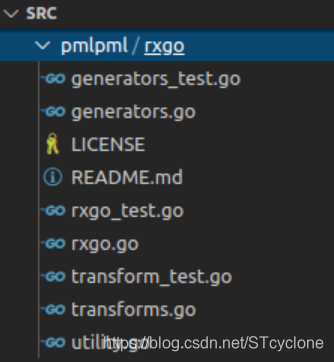
这样,就成功下载了pmlpml/RxGo包原始版本到本地。
可以阅读Readme.md和代码文件,了解该包的基本组成:
rxgo.go给出了基础类型、抽象定义、框架实现、Debug工具等generators.go给出了 sourceOperater 的通用实现和具体函数实现transforms.go给出了 transOperater 的通用实现和具体函数实现
之后根据Readme.md文档中的例子等内容,尝试使用RxGO包。
Hello World
学习一门语言,使用一个包,一般都是从"Hello World"入手。
该"Hello world"示例使用了generators.go中的Just方法。
根据文档中对Just方法的描述:
Just将单个数据转换为发射那个数据的Observable。
Just类似于From,但是From会将数组或Iterable的数据取出然后逐个发射,而Just只是简单的原样发射,将数组或Iterable当做单个数据。
注意:如果你传递null给Just,它会返回一个发射null值的Observable。不要误认为它会返回一个空Observable(完全不发射任何数据的Observable),如果需要空Observable你应该使用Empty操作符。
RxJava将这个操作符实现为just函数,它接受一至九个参数,返回一个按参数列表顺序发射这些数据的Observable。
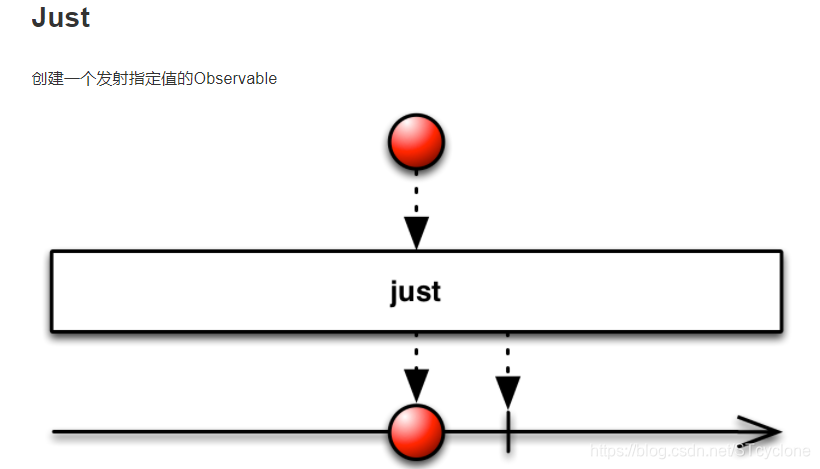
在目录"$GOPATH/src/gitee.com/alphabstc/useRxGo"下新建helloworld.go文件,输入以下代码:
package main

import (
	"fmt"
	RxGo "github.com/pmlpml/rxgo"
)

func main() {
	RxGo.Just("Hello", "World", "!").Subscribe(func(x string) {
		fmt.Println(x)
	})
}
之后运行:

可以看见,其将Just函数的三个参数"Hello", “World”, "!"分别在一行中输出,符合要求。
数据流上链操作
RxGo中的数据流由一个源、零个或多个中间步骤组成,接下来是一个数据消费者或组合者步骤(其中该步骤负责以某种方式消费数据流)。
上面已经实践了简单单个操作的情况,现在考虑通过一个例子使用与实践数据流上的链操作。
在目录"$GOPATH/src/gitee.com/alphabstc/useRxGo"下新建chainedOperations.go文件,输入以下代码:
package main

import (
	"fmt"
	RxGo "github.com/pmlpml/rxgo"
)

func fibonacci(max int) func() (int, bool) {
	a, b := 0, 1
	return func() (r int, end bool) {
		r = a
		a, b = b, a+b
		if r > max {
			end = true
		}
		return
	}
}

func main() {
	RxGo.Start(fibonacci(10)).Map(func(x int) int {
		return 2*x
	}).Subscribe(func(x int) {
		fmt.Println(x)
	})
}
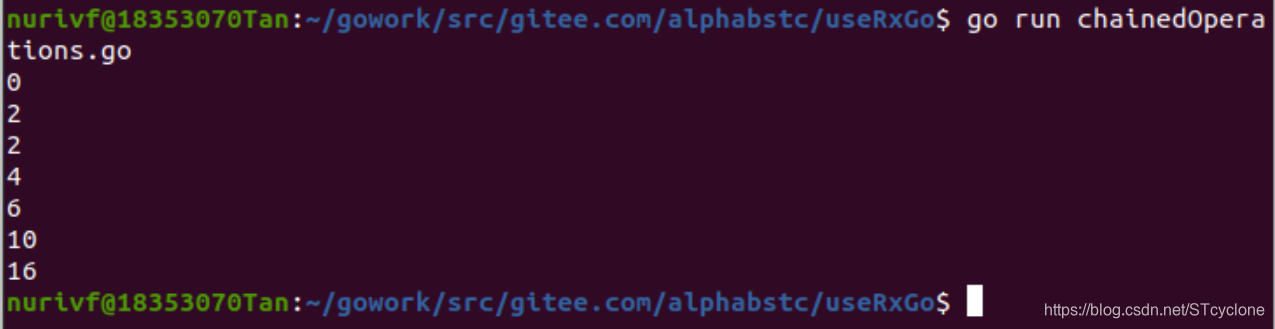
分析上面的代码,其定义了fibonacci函数,该函数为一个闭包,第i次调用会返回斐波那契数列中第i项的结果,并且在斐波那契数列中第i项的结果超过max时,将end设置为true。主函数通过调用Start(fibonacci(10))使得产生了斐波那契数列不超过10的前几项,然后通过Map(func(x int) int {return 2*x})将这些值乘以2,之后再用Subscribe(func(x int) {fmt.Println(x)})将上面Map的结果输出。

可以看见,输出了上面Map操作结果,由于采取println输出,因此每行输出一个数,符合要求。
可连接的observables
可连接的Observable类似于普通的Observable,但它在subscribed 时不开始发射item,而只在调用其connect()方法时才开始发出项。
数据管道有两个阶段:
- 第一个阶段叫做定义。我们为管道定义源函数或运算符,这与为每个节点分配工作角色相同
- 下一个阶段称为运行时。当任何observable调用Subscribe(…)时,包含该observable的管道将connect它的所有节点或指定一个或多个工作线程站在每个节点旁边。如果前置工作线程发出数据,则该工作进程将扮演之前定义阶段指定的角色,并将结果发送给下一个工作进程。
在目录"$GOPATH/src/gitee.com/alphabstc/useRxGo"下新建connect.go文件,输入以下代码:
package main

import (
	"fmt"
	RxGo "github.com/pmlpml/rxgo"
)

func main() {
    //define pipeline
	source := RxGo.Just("Hello", "World", "!")
	next := source.Map(func(s string) string {
		return s + " "
	})
    //run pipeline
	next.Subscribe(func(x string) {
		fmt.Print(x)
	})
	fmt.Println()
	source.Subscribe(func(x string) {
		fmt.Print(x)
	})
}
运行这份代码,会输出下面的结果:

可以看到,上面的程序展示了管道重启的功能,输出了两次"Hello World ! "
修改已有实现
先测试
先在rxgo包的目录下运行一次测试:
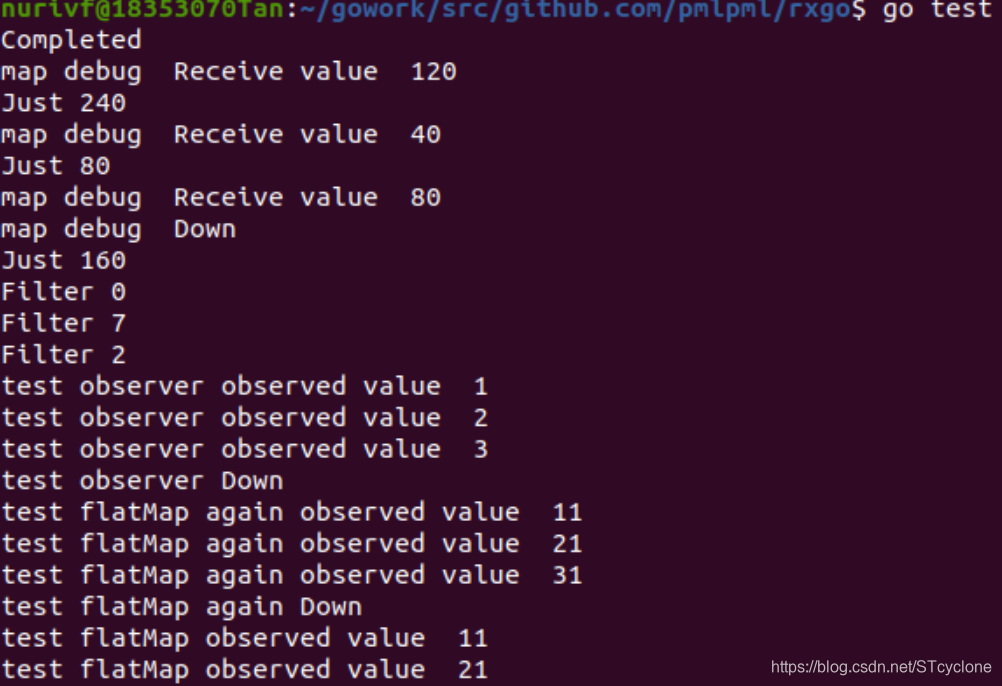

可以看到通过了测试,符合要求。
改写
现在尝试改进包的代码。
首先,可以去掉transforms.go中flatMapOperater的定义的多余的if !end 条件判断部分,将会产生相同结果的分支进行合并,得到如下的结果:
var flatMapOperater = transOperater{func(ctx context.Context, o *Observable, x reflect.Value, out chan interface{}) (end bool) {

	fv := reflect.ValueOf(o.flip)
	var params = []reflect.Value{x}
	//fmt.Println("x is ", x)
	rs, skip, stop, e := userFuncCall(fv, params)

	var item = rs[0].Interface().(*Observable)

	if stop {
		end = true
		return
	}
	if skip {
		return
	}
	if e != nil {
		end = o.sendToFlow(ctx, e, out)
		return
	}
	// send data
	if !end {
		if item != nil {
			// subscribe ro without any ObserveOn model
			ro := item
			for ; ro.next != nil; ro = ro.next {
			}
			ro.connect(ctx)

			ch := ro.outflow
			for x := range ch {
				end = o.sendToFlow(ctx, x, out)
				if end {
					return
				}
			}
		}
	}
	return
}}
对于transforms.go中的op,在其中创建的go程内部,一旦end变为了true之后就不会变为false。因此,可以将if end { continue }修改为if end { break }。使得一旦循环后面的语句都不会运行,就可以直接退出循环,不用反复进行判断,提高程序运行效率。
func (tsop transOperater) op(ctx context.Context, o *Observable) {
	// must hold defintion of flow resourcs here, such as chan etc., that is allocated when connected
	// this resurces may be changed when operation routine is running.
	in := o.pred.outflow
	out := o.outflow
	//fmt.Println(o.name, "operator in/out chan ", in, out)
	var wg sync.WaitGroup

	go func() {
		end := false
		for x := range in {
			if end {
				break
			}
			// can not pass a interface as parameter (pointer) to gorountion for it may change its value outside!
			xv := reflect.ValueOf(x)
			// send an error to stream if the flip not accept error
			if e, ok := x.(error); ok && !o.flip_accept_error {
				o.sendToFlow(ctx, e, out)
				continue
			}
			// scheduler
			switch threading := o.threading; threading {
			case ThreadingDefault:
				if tsop.opFunc(ctx, o, xv, out) {
					end = true
				}
			case ThreadingIO:
				fallthrough
			case ThreadingComputing:
				wg.Add(1)
				go func() {
					defer wg.Done()
					if tsop.opFunc(ctx, o, xv, out) {
						end = true
					}
				}()
			default:
			}
		}

		wg.Wait() //waiting all go-routines completed
		o.closeFlow(out)
	}()
}
单元测试和集成测试
进行上述修改后,再次测试如下:
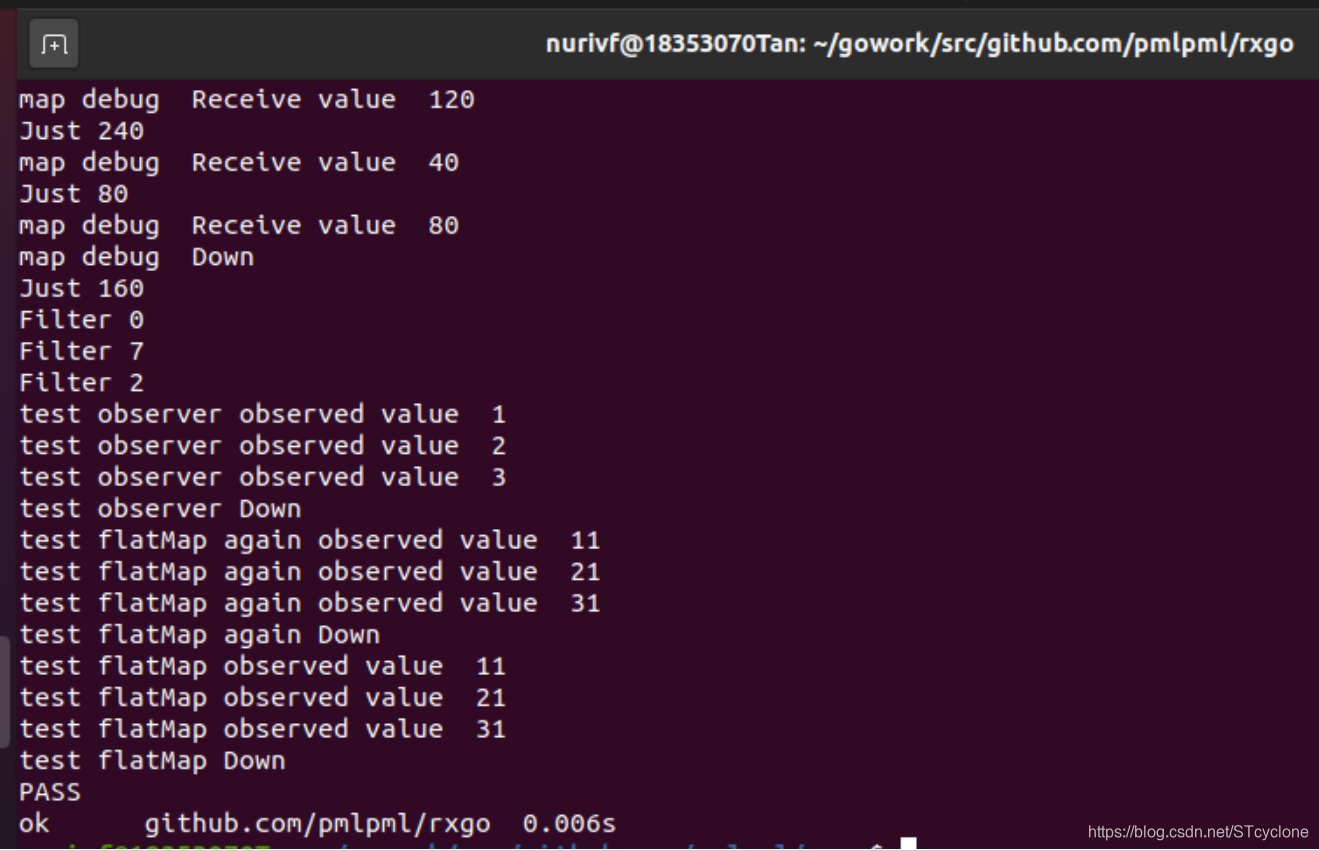
依然可以正常通过单元测试和集成测试,符合要求。
功能测试
再次运行之前的使用示例代码,结果如下:


可见三份使用RxGo包的示例代码目前功能仍然正常,符合要求。
添加一组新的操作
现在考虑在包中添加一组新的操作,这里选择添加filtering组中的操作。
Filtering Observables有着如下的功能:
Debounce— only emit an item from an Observable if a particular timespan has passed without it emitting another itemDistinct— suppress duplicate items emitted by an ObservableElementAt— emit only item n emitted by an ObservableFilter— emit only those items from an Observable that pass a predicate testFirst— emit only the first item, or the first item that meets a condition, from an ObservableIgnoreElements— do not emit any items from an Observable but mirror its termination notificationLast— emit only the last item emitted by an ObservableSample— emit the most recent item emitted by an Observable within periodic time intervalsSkip— suppress the first n items emitted by an ObservableSkipLast— suppress the last n items emitted by an ObservableTake— emit only the first n items emitted by an ObservableTakeLast— emit only the last n items emitted by an Observable
设计思路
首先学习老师pmlpml已经编写的代码。可以看到老师编写的代码包rxgo中,transforms.go实现了Transforming Observable Items中的各个操作。这些操作被使用时,会先通过Start()函数创建一个新的observable,并根据操作类型赋予其相应属性,这仅仅是设置了相应属性的初始值,并没有计算出这些操作相应的结果。直到这些操作被Subscribe()调用时,才会真正启动这些操作并计算出结果。而这是通过Subscribe()调用connect函数, connect函数最终调用op实现的。而op函数就是具体操作的重点,其根据之前赋值的相应属性值,计算出最终操作的结果并交给下一个操作。
首先,rxgo.go定义了整个项目中非常重要的Observable结构。类比transforms.go的实现方法,在实现filtering这组新操作时,也在rxgo.go定义的Observable结构中增加新的字段,用于存储上述filtering操作的关键属性。添加字段后的Observable结构的定义代码如下:
// An Observable is a 'collection of items that arrive over time'. Observables can be used to model asynchronous events.
// Observables can also be chained by operators to transformed, combined those items
// The Observable's operators, by default, run with a channel size of 128 elements except that the source (first) observable has no buffer
type Observable struct {
	Name string
	mu   sync.Mutex // lock all when creating subscriber
	//
	flip     interface{} // transformation function
	outflow  chan interface{}
	operator streamOperator
	// chain of Observables
	root *Observable
	next *Observable
	pred *Observable
	// control model
	threading ThreadModel //threading model. if this is root, it represents obseverOn model
	buf_len   uint
	// utility vars
	debug             Observer
	flip_sup_ctx      bool //indicate that flip function use context as first paramter
	flip_accept_error bool // indicate that flip function input's data is type interface{} or error
	debounce   time.Duration // 指定一段时间,仅在过了这段时间还没发射数据时才发射一个数据
	sample     time.Duration // 指定采样时间,每次会发射上次采样后的第一个数据
	takeSkipFlag bool          // 确定take/Skip操作的类型
	distinct   bool          // 是否去掉重复元素
	first      bool          // 选择第一个元素的标志
	last       bool          // 选择最后一个元素的标志
	elementAt  int           // 选择指定的索引元素的编号
	skip       int           // 正值表示跳过前几项元素,负值表示跳过后几项元素
	take       int           // 正值表示选择前几项元素,负值表示选择后几项元素
}
之后新建filtering.go文件,在其中类比transforms.go具体实现各个操作。
数据结构
由于下面filtering需要经常处理越界错误,因此定义了越界的自定义错误如下:
var OutOfBound = errors.New("Out of bound!") // 越界错误
此外,类比transforms.go中对transOperater的定义,定义过滤操作filterOperator的type如下:
// 过滤操作的type
type filterOperator struct {
	opFunc func(ctx context.Context, o *Observable, item reflect.Value, out chan interface{}) (end bool)
}
同样,对于创建一个新的FilterObservable,类比transforms.go中的对应代码定义FilterObservable的"构造函数"如下:
// 初始化FilterObservable的构造函数
func (parent *Observable) newFilterObservable(name string) (o *Observable) {
	//new Observable
	o = newObservable()
	o.Name = name

	//chain Observables
	parent.next = o
	o.pred = parent
	o.root = parent.root

	//set options
	o.buf_len = BufferLen
	return
}
Filter
该操作只发射通过了给定谓词测试的数据项。
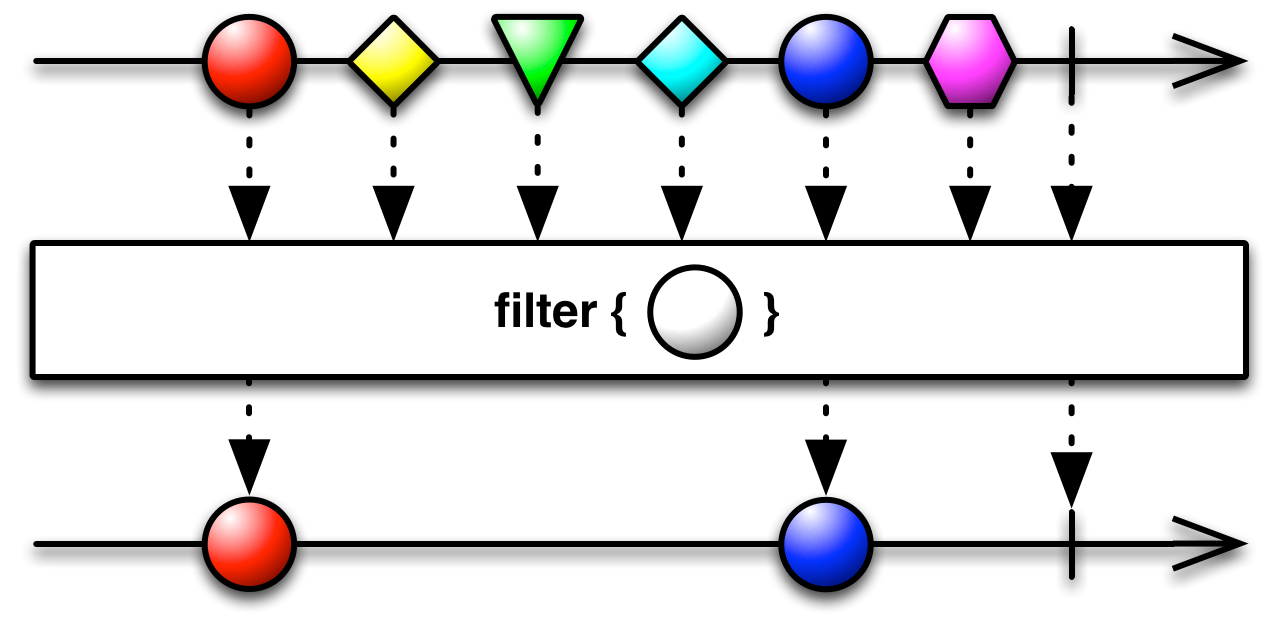
Filter已经由老师在transforms.go中进行了实现,这里并不需要修改和重新实现。并且可以参考老师的实现方式,实现其他的filtering操作。
Debounce
Debounce只有在空闲了一段时间后才发射数据,通俗的说,就是如果一段时间没有操作,就执行一次操作。
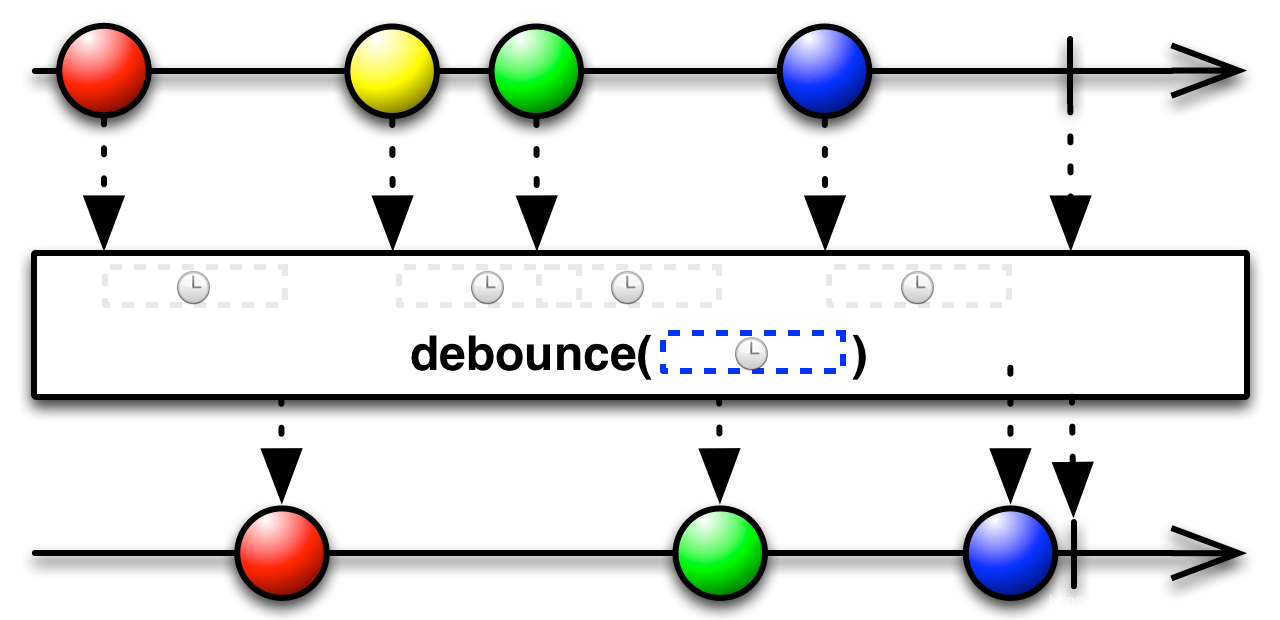
Debounce操作符会过滤掉发射速率过快的数据项。可以根据要求完成Debounce操作的定义如下:
// 仅在过了一段指定的时间还没发射数据时才发射一个数据
func (parent *Observable) Debounce(_debounce_time time.Duration) (o *Observable) {
	o = parent.newFilterObservable("debounce")
	o.debounce, o.take, o.skip = _debounce_time, 0, 0//设置debounce时间
	o.operator = lastOperator
	return o
}

var debounceOperator = filterOperator{opFunc: func(ctx context.Context, o *Observable, x reflect.Value, out chan interface{}) (end bool) {
	var params = []reflect.Value{x}
	x = params[0]

	// 发射数据项
	if !end {
		end = o.sendToFlow(ctx, x.Interface(), out)
	}
	return
},
}
Distinct
Distinct操作过滤掉重复的数据项,也就是完成去重操作。
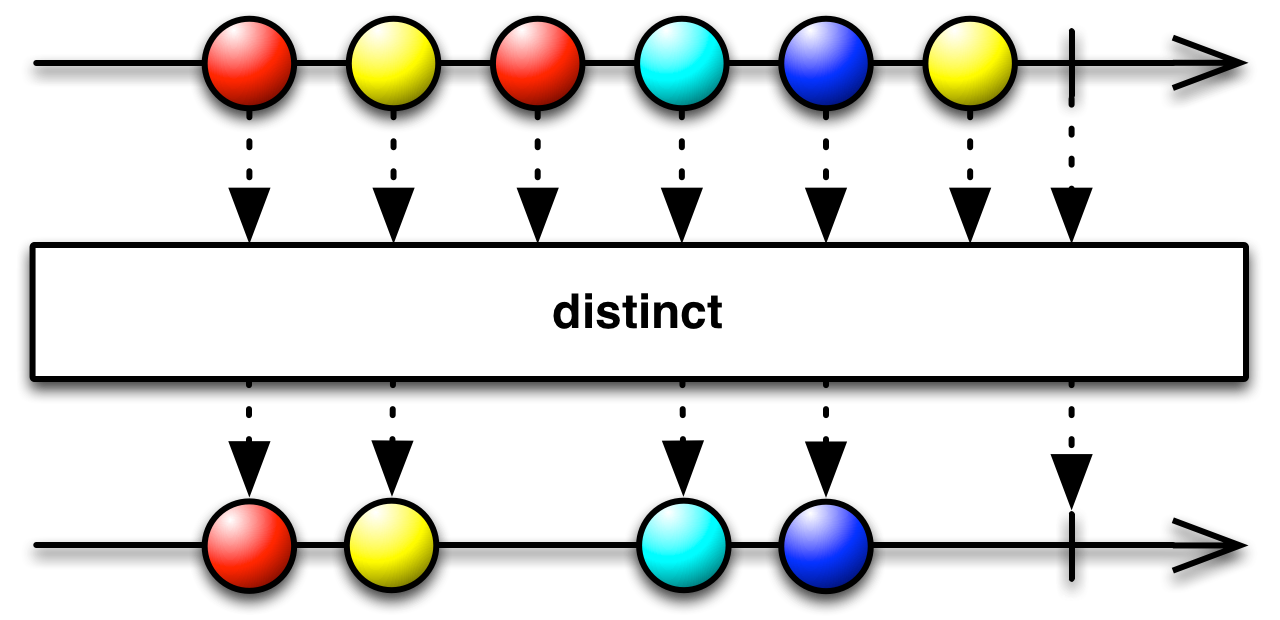
Distinct操作符会过滤掉重复的数据项。可以根据要求完成Distinct操作的定义如下:
// 抑制(过滤掉)重复的数据项
func (parent *Observable) Distinct() (o *Observable) {
	o = parent.newFilterObservable("distinct")
	o.distinct = true//设置distinct为true
	o.debounce, o.take, o.skip = 0, 0, 0
	o.operator = distinctOperator
	return o
}

var distinctOperator = filterOperator{opFunc: func(ctx context.Context, o *Observable, x reflect.Value, out chan interface{}) (end bool) {
	var params = []reflect.Value{x}
	x = params[0]

	// 发射数据项
	if !end {
		end = o.sendToFlow(ctx, x.Interface(), out)
	}
	return
},
}
ElementAt
ElementAt只发射第N项数据。
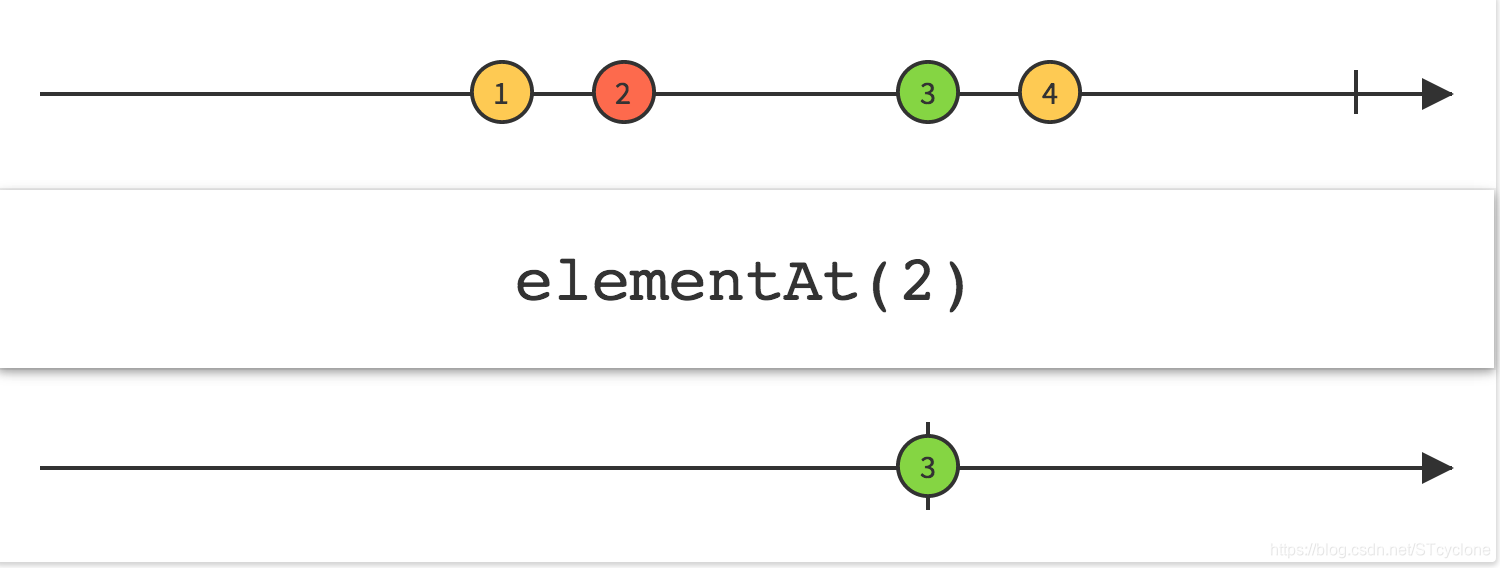
ElementAt操作符获取原始Observable发射的数据序列指定索引位置的数据项,然后当做自己的唯一数据发射。可以根据要求完成ElementAt操作的定义如下:
// 只发射第N项数据
func (parent *Observable) ElementAt(index int) (o *Observable) {
	o = parent.newFilterObservable("elementAt")
	o.debounce, o.skip, o.take, o.elementAt = 0, 0, 0, index + 1//设置ElementAt的索引
	o.operator = elementAtOperator
	return o
}

var elementAtOperator = filterOperator{opFunc: func(ctx context.Context, o *Observable, x reflect.Value, out chan interface{}) (end bool) {
	var params = []reflect.Value{x}
	x = params[0]

	// 发射数据项
	if !end {
		end = o.sendToFlow(ctx, x.Interface(), out)
	}
	return
},
}
First
只发射第一项(或者满足某个条件的第一项)数据
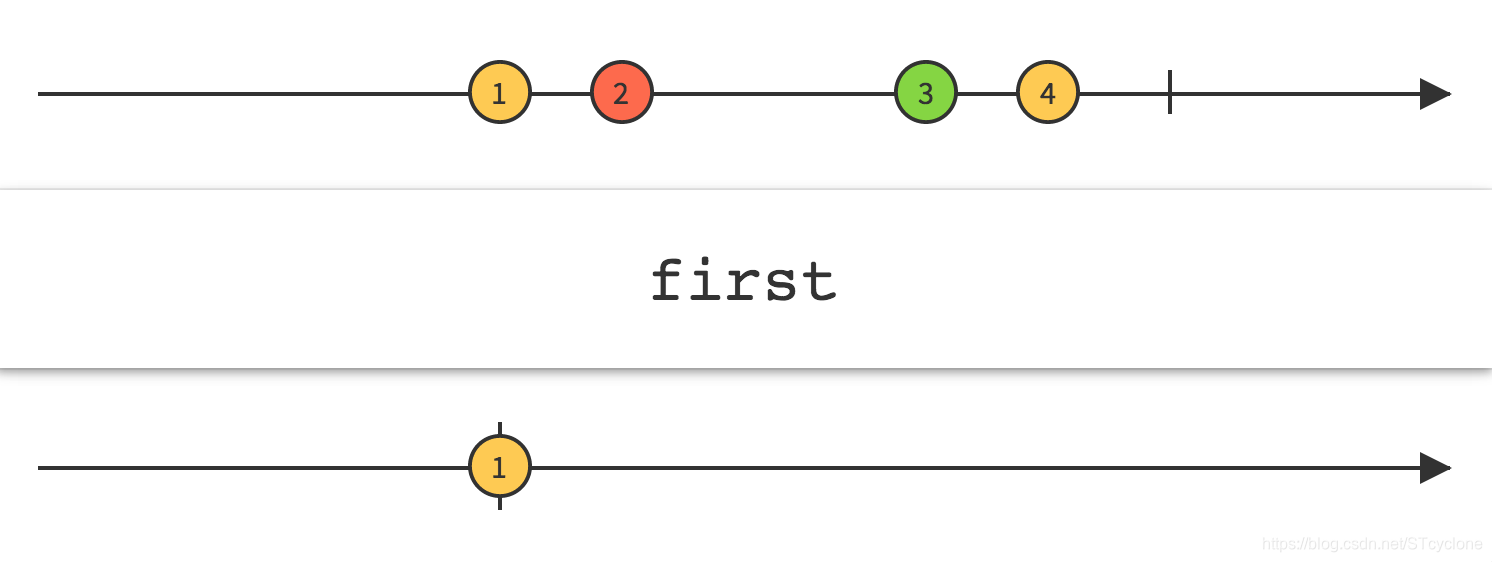
First操作符只获取第一项数据并将其当做自己的唯一数据发射。可以根据要求完成First操作的定义如下:
// 只发射第一项(或者满足某个条件的第一项)数据
func (parent *Observable) First() (o *Observable) {
	o = parent.newFilterObservable("first")
	o.first = true//设置只发送第一项
	o.debounce, o.take, o.skip = 0, 0, 0
	o.operator = firstOperator
	return o
}

var firstOperator = filterOperator{func(ctx context.Context, o *Observable, x reflect.Value, out chan interface{}) (end bool) {
	var params = []reflect.Value{x}
	x = params[0]

	// 发射数据项
	if !end {
		end = o.sendToFlow(ctx, x.Interface(), out)
	}
	return
},
}
IgnoreElements
不发射任何数据,只发射Observable的终止通知。
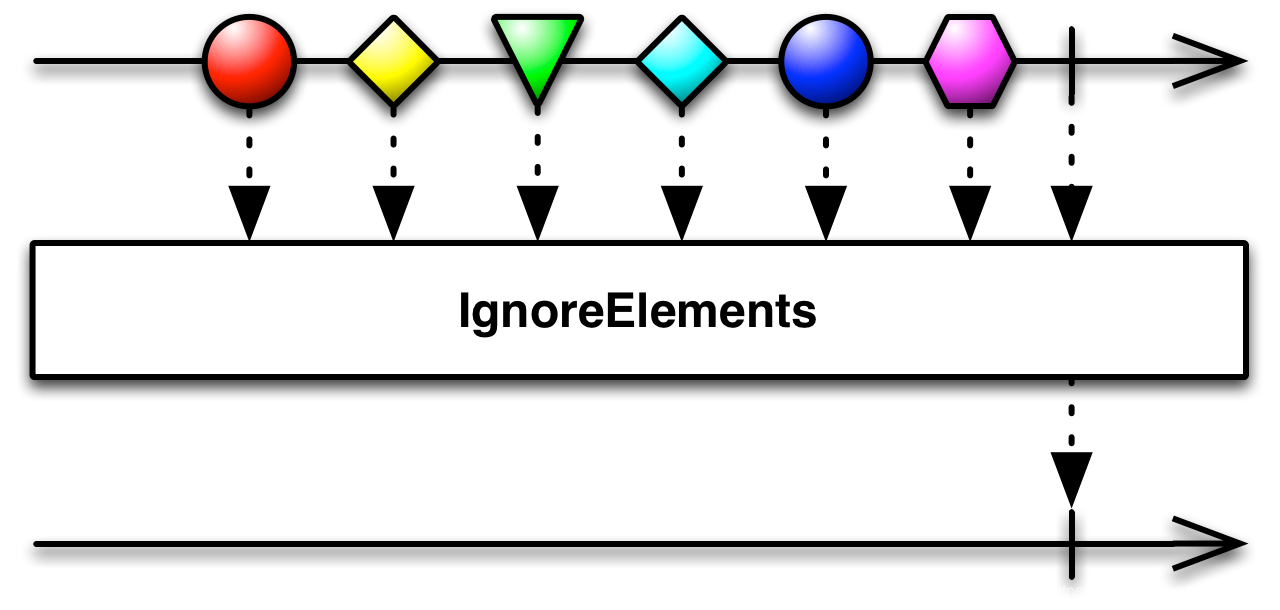
IgnoreElements操作符抑制原始Observable发射的所有数据,只允许它的终止通知(onError或onCompleted)通过。可以根据要求完成IgnoreElements操作的定义如下:
func (parent *Observable) IgnoreElements() (o *Observable) {
	o = parent.newFilterObservable("ignoreElements")
	o.operator = ignoreElementsOperator
	o.take = 0;
	return o
}

var ignoreElementsOperator = filterOperator{func(ctx context.Context, o *Observable, x reflect.Value, out chan interface{}) (end bool) {
	var params = []reflect.Value{x}
	x = params[0]

	// 发射数据项
	if !end {
		end = o.sendToFlow(ctx, x.Interface(), out)
	}
	return
},
}
Last
只发射最后一项(或者满足某个条件的最后一项)数据
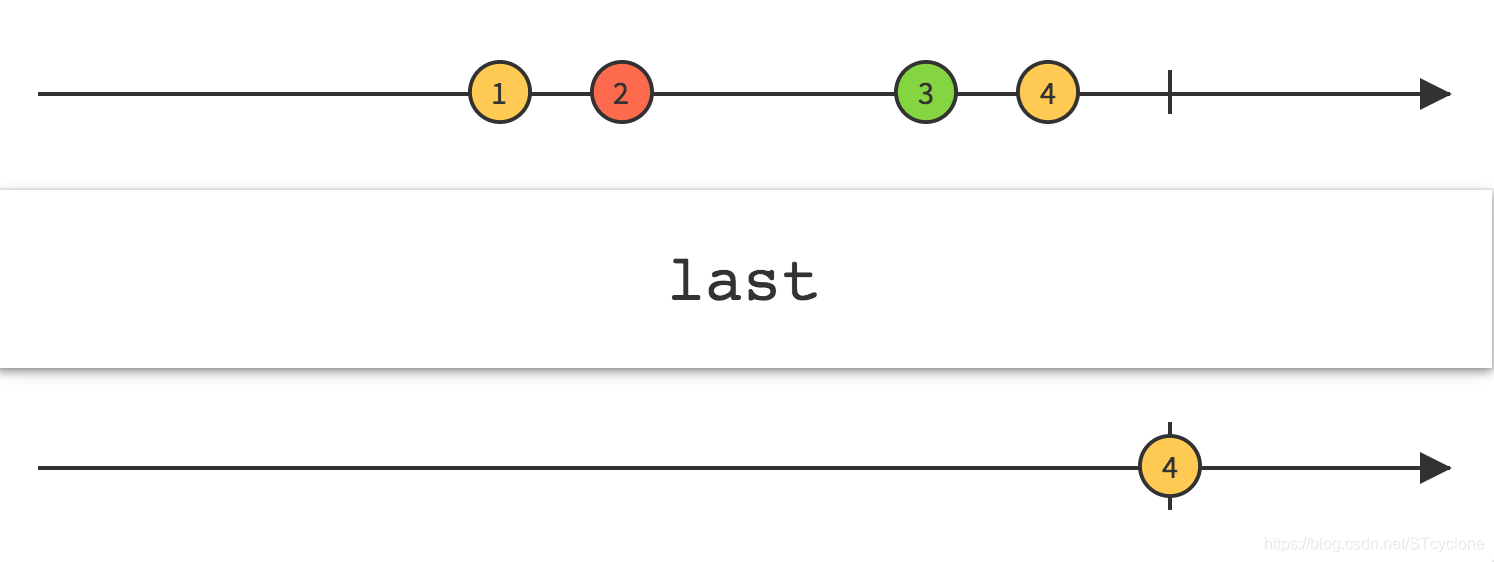
Last操作符只获取最后一项数据并将其当做自己的唯一数据发射。可以根据要求完成Last操作的定义如下:
// 只发射最后一项(或者满足某个条件的最后一项)数据
func (parent *Observable) Last() (o *Observable) {
	o = parent.newFilterObservable("last")
	o.last = true//只发射最后一项数据
	o.debounce, o.take, o.skip = 0, 0, 0
	o.operator = lastOperator
	return o
}

var lastOperator = filterOperator{func(ctx context.Context, o *Observable, x reflect.Value, out chan interface{}) (end bool) {
	var params = []reflect.Value{x}
	x = params[0]

	// 发射数据项
	if !end {
		end = o.sendToFlow(ctx, x.Interface(), out)
	}
	return
},
}
Sample
Sample定期发射Observable最近发射的数据项。
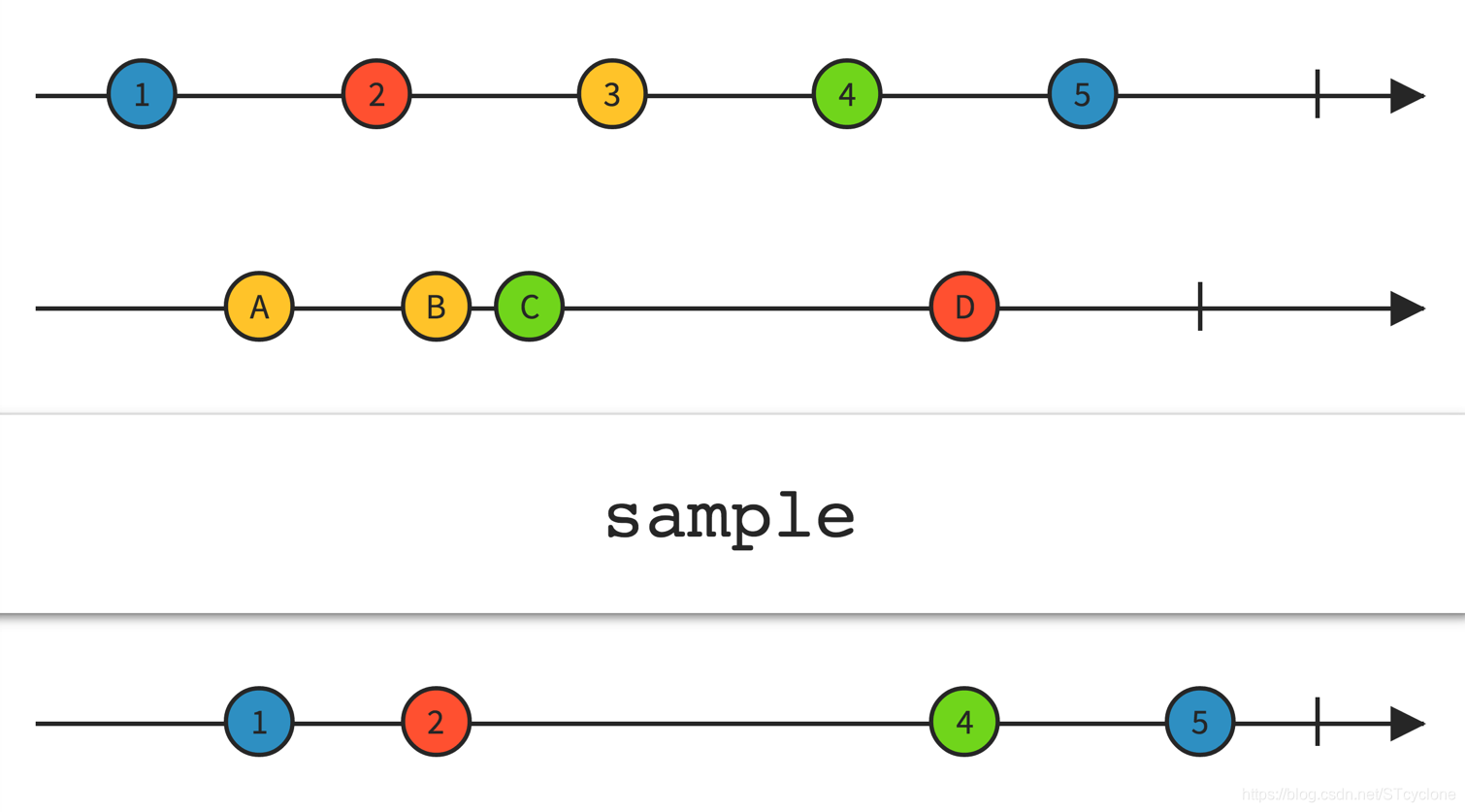
Sample操作符定时查看一个Observable,然后发射自上次采样以来它最近发射的数据。如果自上次采样以来,原始Observable没有发射任何数据,这个操作返回的Observable在那段时间内也不会发射任何数据。可以根据要求完成Sample操作的定义如下:
// 定期发射Observable最近发射的数据项
func (parent *Observable) Sample(_sample_time time.Duration) (o *Observable) {
	o = parent.newFilterObservable("sample")
	o.debounce, o.skip, o.take, o.elementAt, o.sample = 0, 0, 0, 0, _sample_time//设置采样时间
	o.operator = sampleOperator
	return o
}

var sampleOperator = filterOperator{opFunc: func(ctx context.Context, o *Observable, x reflect.Value, out chan interface{}) (end bool) {
	var params = []reflect.Value{x}
	x = params[0]

	// 发射数据项
	if !end {
		end = o.sendToFlow(ctx, x.Interface(), out)
	}
	return
},
}
Skip
Skip抑制Observable发射的前N项数据。
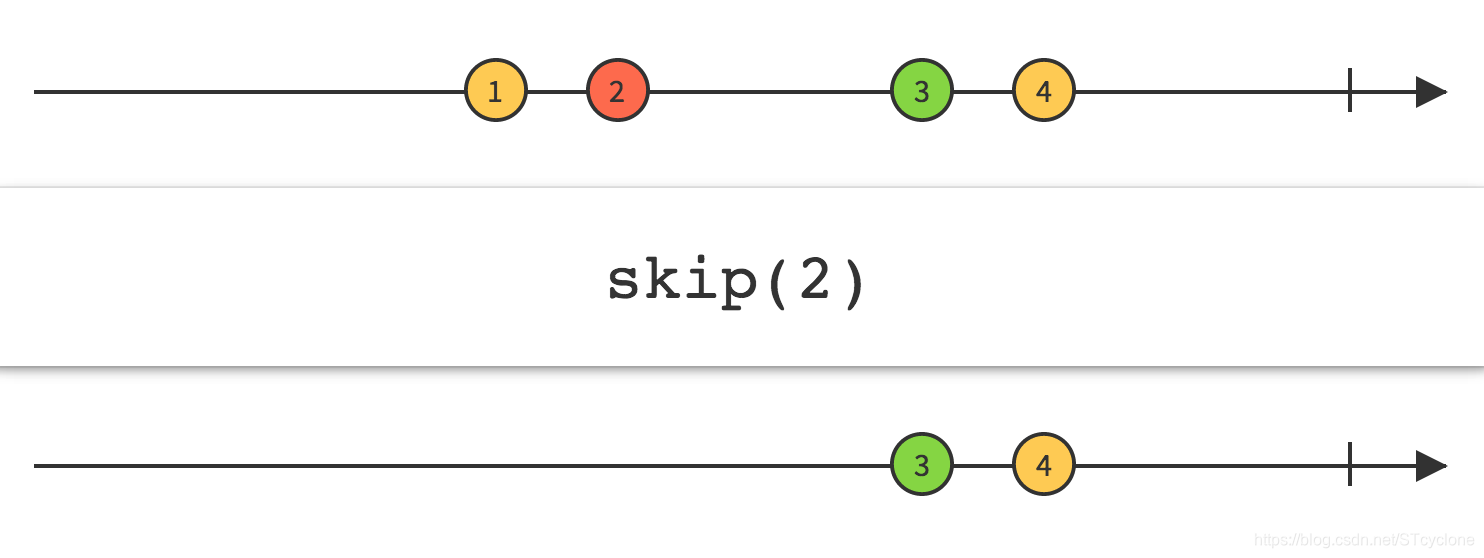
使用Skip操作符,可以忽略Observable’发射的前N项数据,只保留之后的数据。可以根据要求完成Skip操作的定义如下:
// 抑制Observable发射的前N项数据
func (parent *Observable) Skip(num int) (o *Observable) {
	o = parent.newFilterObservable("skip")
	o.debounce, o.take, o.skip = 0, 0, num//设置跳过元素个数
	o.operator = skipOperator
	return o
}

var skipOperator = filterOperator{opFunc: func(ctx context.Context, o *Observable, x reflect.Value, out chan interface{}) (end bool) {
	var params = []reflect.Value{x}
	x = params[0]

	// 发射数据项
	if !end {
		end = o.sendToFlow(ctx, x.Interface(), out)
	}
	return
},
}
SkipLast
SkipLast抑制Observable发射的后N项数据
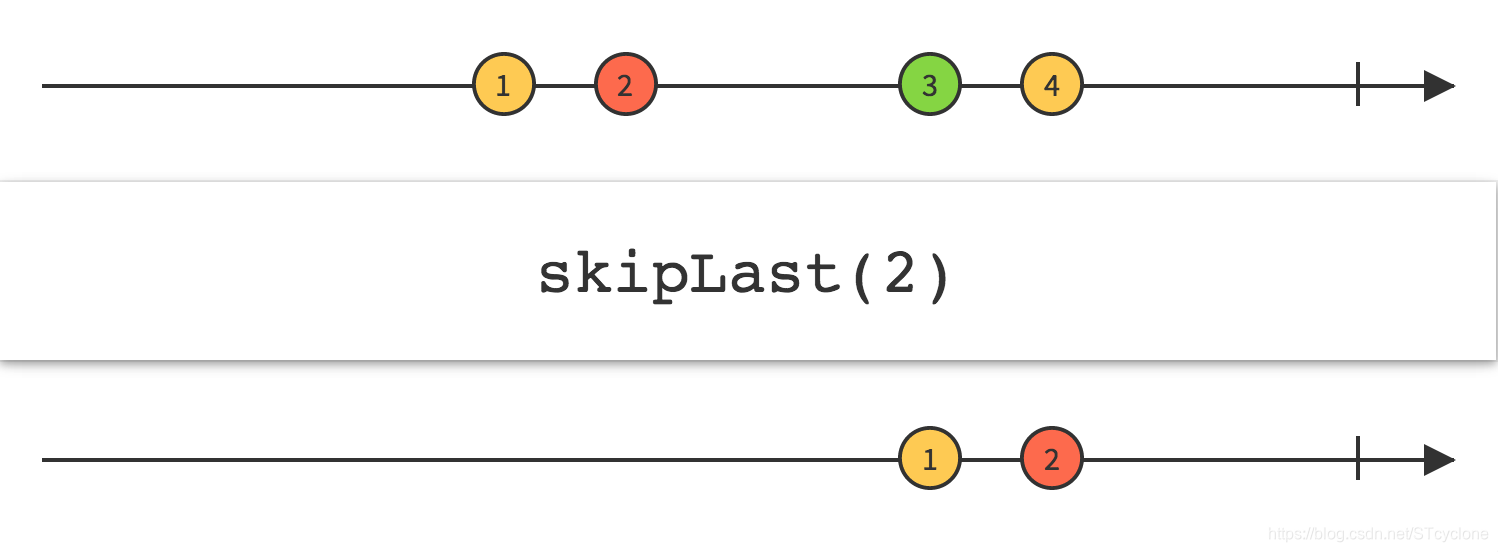
使用SkipLast操作符修改原始Observable,可以忽略Observable’发射的后N项数据,只保留前面的数据。可以根据要求完成SkipLast操作的定义如下:
// 抑制Observable发射的后N项数据
func (parent *Observable) SkipLast(num int) (o *Observable) {
	o = parent.newFilterObservable("skipLast")
	o.debounce, o.take, o.skip = 0, 0, -num//设置跳过尾部元素个数
	o.operator = skipLastOperator
	return o
}

var skipLastOperator = filterOperator{opFunc: func(ctx context.Context, o *Observable, x reflect.Value, out chan interface{}) (end bool) {
	var params = []reflect.Value{x}
	x = params[0]

	// 发射数据项
	if !end {
		end = o.sendToFlow(ctx, x.Interface(), out)
	}
	return
},
}
Take
Take只发射前面的N项数据。
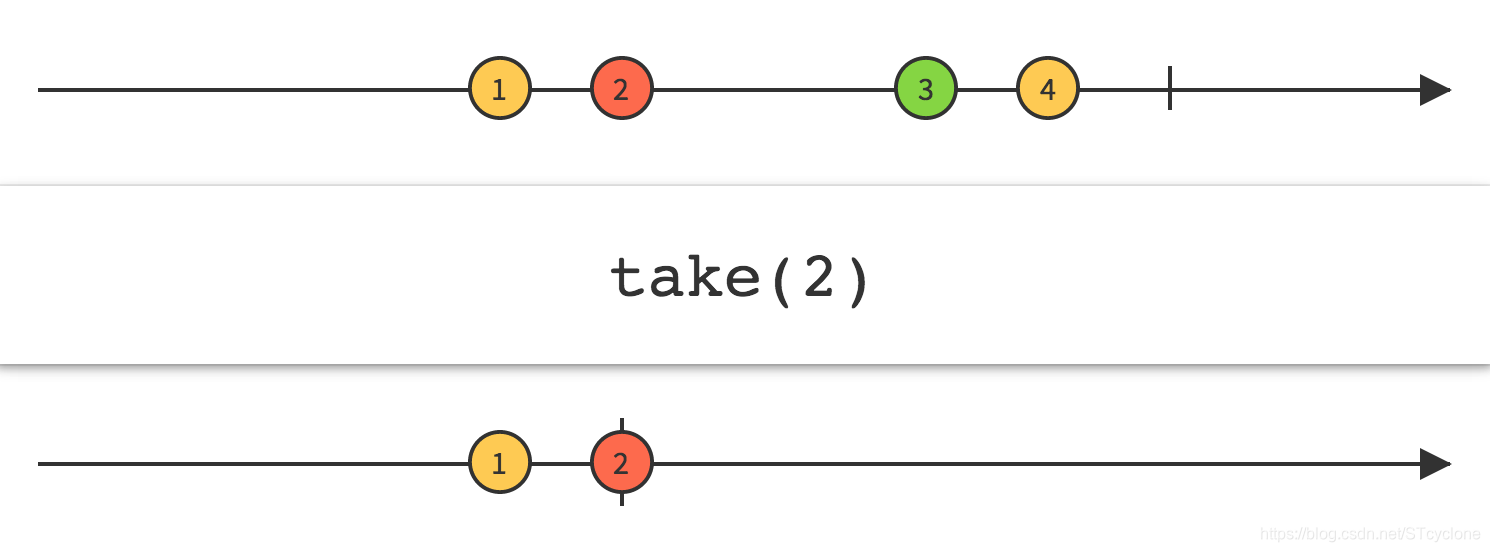
使用Take操作符可以修改Observable的行为,只返回前面的N项数据,然后发射完成通知,忽略剩余的数据。可以根据要求完成Take操作的定义如下:
// 只发射前面的N项数据
func (parent *Observable) Take(num int) (o *Observable) {
	o = parent.newFilterObservable("Take")
	o.takeSkipFlag = true//为take
	o.debounce, o.skip, o.take = 0, 0, num//设置只发射前面元素的个数
	o.operator = takeOperator
	return o
}

var takeOperator = filterOperator{opFunc: func(ctx context.Context, o *Observable, x reflect.Value, out chan interface{}) (end bool) {
	var params = []reflect.Value{x}
	x = params[0]

	// 发射数据项
	if !end {
		end = o.sendToFlow(ctx, x.Interface(), out)
	}
	return
},
}
TakeLast
TakeLast发射Observable的最后N项数据。
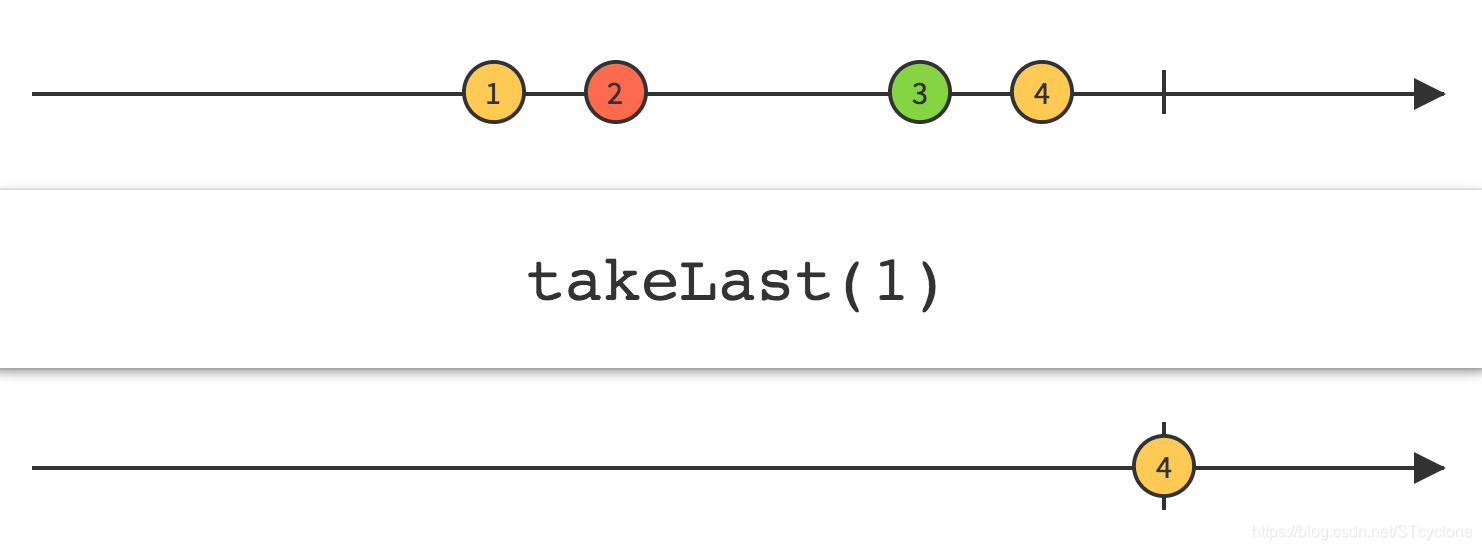
使用TakeLast操作符修改原始Observable,可以只发射Observable’发射的后N项数据,忽略前面的数据。可以根据要求完成TakeLast操作的定义如下:
// 发射Observable发射的最后N项数据
func (parent *Observable) TakeLast(num int) (o *Observable) {
	o = parent.newFilterObservable("takeLast")
	o.takeSkipFlag = true//为take
	o.debounce, o.skip, o.take = 0, 0, -num//设置只发射后面元素的个数
	o.operator = takeLastOperator
	return o
}

var takeLastOperator = filterOperator{opFunc: func(ctx context.Context, o *Observable, x reflect.Value, out chan interface{}) (end bool) {
	var params = []reflect.Value{x}
	x = params[0]

	// 发射数据项
	if !end {
		end = o.sendToFlow(ctx, x.Interface(), out)
	}
	return
},
}
op函数
类比于tranrforms.go的框架。op函数实现了上述各个操作的具体操作和错误处理等功能。根据上面的定义描述,可以具体完成op函数如下,具体分析详见下面代码注释。
func (tsop filterOperator) op(ctx context.Context, o *Observable) {
	var _wait_group sync.WaitGroup

	var _out []interface{}

	in := o.pred.outflow// 输入
	out := o.outflow// 输出

	go func() {
		end := false// 结束标志
		_item_exist := make(map[interface{}]bool)// 用于标识数据项是否存在 以便去重

		start := time.Now()// 获取开始的时间
		sample_time := start// 采样时间为当前时间

		for x := range in {//遍历每个输入元素
			_interval := time.Since(start)//当前经过的时间
			_sample_interval := time.Since(sample_time)//距离上一次采样的时间
			start = time.Now()

			if end {// 结束则break
				break
			}

			xv := reflect.ValueOf(x)// 不可以将接口作为参数(指针)传递给GoRuntation,因为它可能会在外部更改其值
			if o.distinct && _item_exist[xv.Interface()] {
				continue
			}

			if o.debounce > time.Duration(0) && _interval < o.debounce {// 需要debounce 且距离上一个元素时间小于debounce_time
				continue // 忽略当前元素
			}

			if o.sample > time.Duration(0) && _sample_interval < o.sample {// 需要采样 且距离上一个采样时间小于sample_time
				continue // 忽略当前元素
			}

			if e, ok := x.(error); ok && !o.flip_accept_error {// 如果flip不接受错误,则向流发送错误
				o.sendToFlow(ctx, e, out)
				continue
			}

			o.mu.Lock()//信号量加锁
			_out = append(_out, x)//加入x
			_item_exist[xv.Interface()] = true//设置存在
			o.mu.Unlock()//信号量解锁

			if o.elementAt > 0 {//取特定索引位置
				continue
			}

			if o.take != 0 || o.skip != 0 {//take或者skip
				continue
			}

			if o.last {//取结尾
				continue
			}

			// scheduler
			switch threading := o.threading; threading {
				case ThreadingDefault:
					for ; o.sample > 0 && sample_time.Add(o.sample).Before(time.Now()); {//到下一个采样时间点
						sample_time = sample_time.Add(o.sample)//增加采样时间
					}
					if tsop.opFunc(ctx, o, xv, out) {
						end = true// end为true
					}
				case ThreadingIO:
					fallthrough
				case ThreadingComputing:
					_wait_group.Add(1)//添加_wait_group
					for ; o.sample > 0 && sample_time.Add(o.sample).Before(time.Now()); {//到下一个采样时间点
						sample_time = sample_time.Add(o.sample)//增加采样时间
					}
					go func() {
						defer _wait_group.Done()
						if tsop.opFunc(ctx, o, xv, out) {
							end = true// end为true
						}
					}()
				default:
			}
			if o.first {//是第一个元素 需要break
				break
			}
		}

		if o.last && len(_out) > 0 {//处理last
			_wait_group.Add(1)
			go func() {
				defer _wait_group.Done()
				xv := reflect.ValueOf(_out[len(_out)-1])//获得最后一个元素
				tsop.opFunc(ctx, o, xv, out)
			}()
		}

		if o.take != 0 || o.skip != 0 {//处理take和skip
			_wait_group.Add(1)
			go func() {
				defer _wait_group.Done()
				var num int
				if o.takeSkipFlag {//根据标志选择take或者skip
					num = o.take
				} else {
					num = o.skip
				}
				new_in, err := seleteItems(o.takeSkipFlag, num, _out)//选择出对应的元素

				if err != nil {
					o.sendToFlow(ctx, err, out)//发送错误
				} else {
					xv := new_in
					for _, val := range xv {
						tsop.opFunc(ctx, o, reflect.ValueOf(val), out)
					}
				}
			}()
		}

		if o.elementAt != 0 {//处理选择某个索引元素
			if o.elementAt <= 0 || o.elementAt > len(_out) {//越界错误
				o.sendToFlow(ctx, OutOfBound, out)
			} else {
				xv := reflect.ValueOf(_out[o.elementAt - 1])//取对应元素
				tsop.opFunc(ctx, o, xv, out)
			}
		}

		_wait_group.Wait() //等待所有go程结束
		if (o.last || o.first) && len(_out) == 0 && !o.flip_accept_error {//对于这些还没有处理的情况
			o.sendToFlow(ctx, errors.New("There is no input!"), out)//缺少输入
		}
		o.closeFlow(out)
	}()

}
其中,上面用到的seleteItems函数根据具体的take和skip等参数,具体从输入的数据中选择出对应需要保留的数据发射,其实现如下,具体分析详见代码注释:
// 根据take和skip参数选择出元素
func seleteItems(flag bool, num int, in []interface{}) ([]interface{}, error) {
	if (flag && num > 0) || (!flag && num < 0) {// 取前面的 或者跳过后面的
		if !flag {
			num = len(in) + num// 转换为取前面的情况
		}
		if num >= len(in) || num <= 0 { // 越界
			return nil, OutOfBound
		}
		return in[:num], nil // 返回前面num个元素
	}

	if (flag && num < 0) || (!flag && num > 0) { // 取后面的 或者跳过前面的
		if flag {
			num = len(in) + num// 转换为取后面的情况
		}
		if num >= len(in) || num <= 0 { // 越界
			return nil, OutOfBound
		}
		return in[num:], nil // 返回后面num个元素
	}
	return nil, OutOfBound // 越界
}
单元测试
对于上面实现的操作,类比transforms_test.go,编写对于filtering.go的测试如下:
package rxgo_test

import (
	"time"
	"testing"

	"github.com/pmlpml/rxgo"
	"github.com/stretchr/testify/assert"
)

func TestDebounce(t *testing.T) {
	res := []int{}
	ob := rxgo.Just(10, 20, 30, 40, 50).Map(func(x int) int {
		switch x {
			case 10:
				time.Sleep(1 * time.Millisecond)
			case 20:
				time.Sleep(2 * time.Millisecond)
			case 30:
				time.Sleep(3 * time.Millisecond)
			case 40:
				time.Sleep(6 * time.Millisecond)
			default:
				time.Sleep(10 * time.Millisecond)
		}
		return x
	}).Debounce(3 * time.Millisecond)
	ob.Subscribe(func(x int) {
		res = append(res, x)
	})

	assert.Equal(t, []int{30, 40, 50}, res, "Debounce test failed!")
}

func TestDistinct(t *testing.T) {
	res := []int{}
	ob := rxgo.Just(10, 20, 10, 30, 40, 50, 30, 40).Distinct()
	ob.Subscribe(func(x int) {
		res = append(res, x)
	})
	assert.Equal(t, []int{10, 20, 30, 40, 50}, res, "Distinct test failed!")
}

func TestElementAt(t *testing.T) {
	res := []int{}
	ob := rxgo.Just(10, 20, 30, 40, 50).ElementAt(3)
	ob.Subscribe(func(x int) {
		res = append(res, x)
	})
	assert.Equal(t, []int{40}, res, "ElementAt test failed!")
}

func TestFirst(t *testing.T) {
	res := []int{}
	ob := rxgo.Just(10, 20, 30, 40, 50).First()
	ob.Subscribe(func(x int) {
		res = append(res, x)
	})

	assert.Equal(t, []int{10}, res, "First test failed!")
}

func TestLast(t *testing.T) {
	res := []int{}
	ob := rxgo.Just(10, 20, 30, 40, 50).Last()
	ob.Subscribe(func(x int) {
		res = append(res, x)
	})

	assert.Equal(t, []int{50}, res, "Last test failed!")
}

func TestSample(t *testing.T) {
	res := []int{}
	rxgo.Just(10, 20, 30, 40, 50).Map(func(x int) int {
		switch x {
			case 10:
				time.Sleep(10 * time.Millisecond)
			case 20:
				time.Sleep(20 * time.Millisecond)
			case 30:
				time.Sleep(40 * time.Millisecond)
			case 40:
				time.Sleep(80 * time.Millisecond)
			default:
				time.Sleep(160 * time.Millisecond)
		}
		return x
	}).Sample(20 * time.Millisecond).Subscribe(func(x int) {
		res = append(res, x)
	})
	assert.Equal(t, []int{20, 30, 40, 50}, res, "Sample test failed!")
}

func TestSkip(t *testing.T) {
	res := []int{}
	ob := rxgo.Just(10, 20, 30, 40, 50).Skip(2)
	ob.Subscribe(func(x int) {
		res = append(res, x)
	})
	assert.Equal(t, []int{30, 40, 50}, res, "Skip test failed!")
}

func TestSkipLast(t *testing.T) {
	res := []int{}
	ob := rxgo.Just(10, 20, 30, 40, 50).SkipLast(3)
	ob.Subscribe(func(x int) {
		res = append(res, x)
	})
	assert.Equal(t, []int{10, 20}, res, "SkipLast test failed!")
}

func TestTake(t *testing.T) {
	res := []int{}
	ob := rxgo.Just(11, 22, 33, 44, 55).Take(4)
	ob.Subscribe(func(x int) {
		res = append(res, x)
	})
	assert.Equal(t, []int{11, 22, 33, 44}, res, "Take test failed!")
}

func TestTakeLast(t *testing.T) {
	res := []int{}
	ob := rxgo.Just(10, 20, 30, 40, 50, 60).TakeLast(4)
	ob.Subscribe(func(x int) {
		res = append(res, x)
	})
	assert.Equal(t, []int{30, 40, 50, 60}, res, "TakeLast test failed!")
}
测试结果如下:
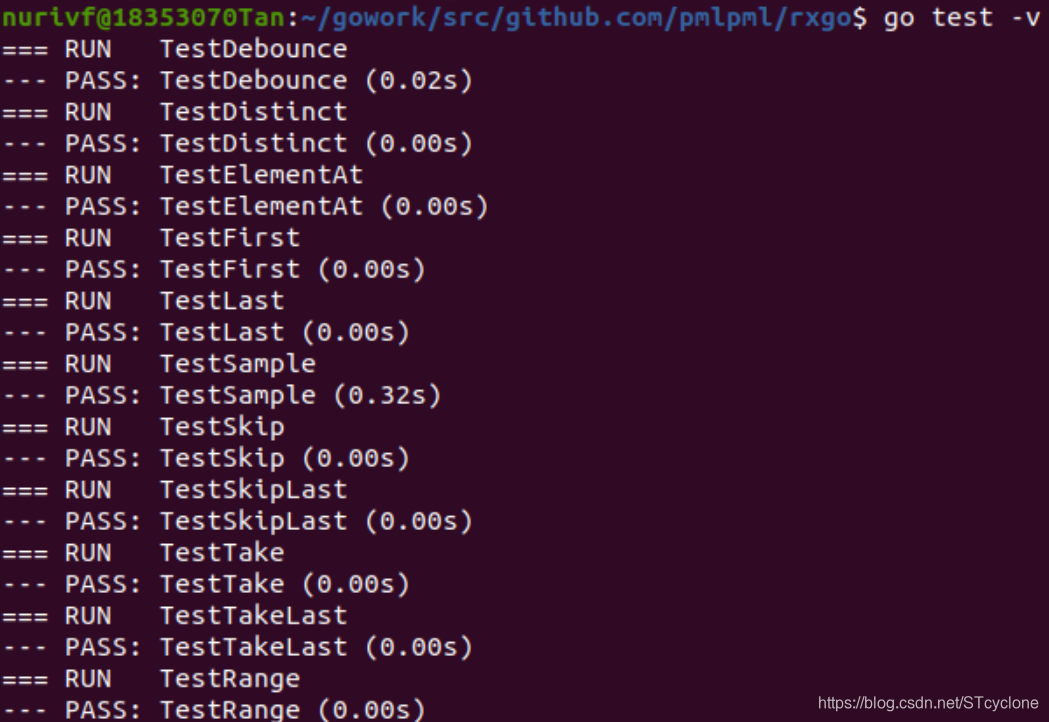
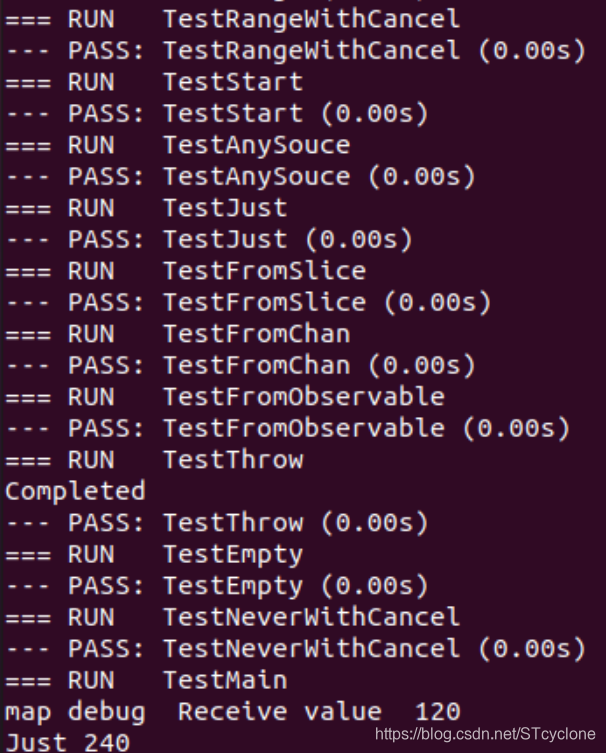
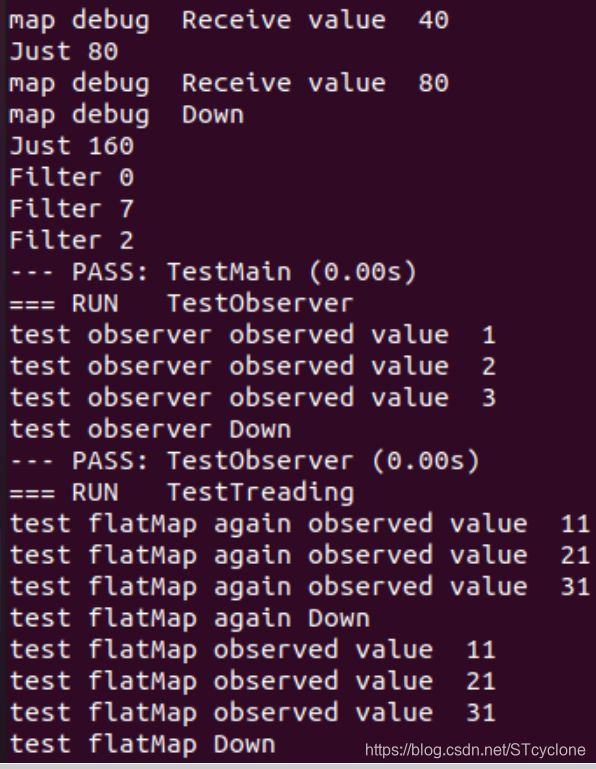
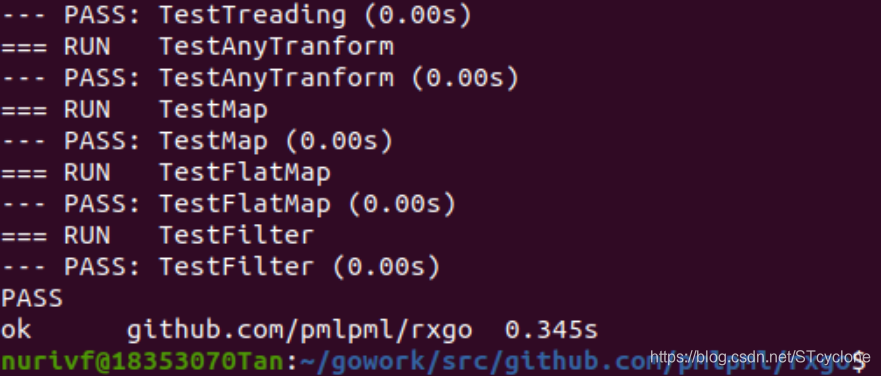
可见,通过了上面的各个单元测试(包括以前的单元测试),功能正常,符合要求。
功能测试
在目录"$GOPATH/src/gitee.com/alphabstc/useRxGo"下新建useFiltering.go文件,输入以下代码:
package main

import (
	"fmt"
	"time"

	"github.com/pmlpml/rxgo"
)

func main() {
	fmt.Println("Input items: 100, 200, 300, 400, 500")
	res := []int{}
	ob := rxgo.Just(100, 200, 300, 400, 500).Map(func(x int) int {
		switch x {
			case 10:
				time.Sleep(1 * time.Millisecond)
			case 20:
				time.Sleep(2 * time.Millisecond)
			case 30:
				time.Sleep(3 * time.Millisecond)
			case 40:
				time.Sleep(6 * time.Millisecond)
			default:
				time.Sleep(10 * time.Millisecond)
		}
		return x
	}).Debounce(3 * time.Millisecond)
	ob.Subscribe(func(x int) {
		res = append(res, x)
	})
	fmt.Print("After Debounce(3): ")
	for _, val := range res {
		fmt.Print(val, "  ")
	}
	fmt.Println("\n")

	fmt.Println("Input items: 10, 20, 30, 40, 50, 30, 40, 50, 30")
	res = []int{}
	ob = rxgo.Just(10, 20, 30, 40, 50, 30, 40, 50, 30).Map(func(x int) int {
		return x
	}).Distinct()
	ob.Subscribe(func(x int) {
		res = append(res, x)
	})
	fmt.Print("After Distinct: ")
	for _, val := range res {
		fmt.Print(val, "  ")
	}
	fmt.Println("\n")

	fmt.Println("Input items: 10, 20, 30, 40, 50, 60")
	res = []int{}
	ob = rxgo.Just(10, 20, 30, 40, 50, 60).Map(func(x int) int {
		return x
	}).ElementAt(2)
	ob.Subscribe(func(x int) {
		res = append(res, x)
	})
	fmt.Println("After ElementAt(2): ", res[0])
	fmt.Print("\n")

	fmt.Println("Input items: 10, 20, 30, 40, 50, 60")
	res = []int{}
	ob = rxgo.Just(10, 20, 30, 40, 50, 60).Map(func(x int) int {
		return x
	}).First()
	ob.Subscribe(func(x int) {
		res = append(res, x)
	})
	fmt.Println("After First: ", res[0])
	fmt.Print("\n")

	fmt.Println("Input items: 10, 20, 30, 40, 50, 60")
	res = []int{}
	ob = rxgo.Just(10, 20, 30, 40, 50, 60).Map(func(x int) int {
		return x
	}).Last()
	ob.Subscribe(func(x int) {
		res = append(res, x)
	})
	fmt.Println("After Last: ", res[0])
	fmt.Print("\n")

	fmt.Println("Input items: 10, 20, 30, 40, 50")
	res = []int{}
	rxgo.Just(10, 20, 30, 40, 50).Map(func(x int) int {
		switch x {
			case 10:
				time.Sleep(10 * time.Millisecond)
			case 20:
				time.Sleep(20 * time.Millisecond)
			case 30:
				time.Sleep(40 * time.Millisecond)
			case 40:
				time.Sleep(80 * time.Millisecond)
			default:
				time.Sleep(160 * time.Millisecond)
		}
		return x
	}).Sample(20 * time.Millisecond).Subscribe(func(x int) {
		res = append(res, x)
	})
	fmt.Print("After Sample: ")
	for _, val := range res {
		fmt.Print(val, "  ")
	}
	fmt.Println("\n")

	fmt.Println("Input items: 10, 20, 30, 40, 50, 60")
	res = []int{}
	ob = rxgo.Just(10, 20, 30, 40, 50, 60).Map(func(x int) int {
		return x
	}).Skip(2)
	ob.Subscribe(func(x int) {
		res = append(res, x)
	})
	fmt.Print("After Skip(2): ")
	for _, val := range res {
		fmt.Print(val, "  ")
	}
	fmt.Println("\n")

	fmt.Println("Input items: 10, 20, 30, 40, 50, 60")
	res = []int{}
	ob = rxgo.Just(10, 20, 30, 40, 50, 60).Map(func(x int) int {
		return x
	}).SkipLast(3)
	ob.Subscribe(func(x int) {
		res = append(res, x)
	})
	fmt.Print("After SkipLast(3): ")
	for _, val := range res {
		fmt.Print(val, "  ")
	}
	fmt.Println("\n")

	fmt.Println("Input items: 10, 20, 30, 40, 50, 60")
	res = []int{}
	ob = rxgo.Just(10, 20, 30, 40, 50, 60).Map(func(x int) int {
		return x
	}).Take(3)
	ob.Subscribe(func(x int) {
		res = append(res, x)
	})
	fmt.Print("After Take(3): ")
	for _, val := range res {
		fmt.Print(val, "  ")
	}
	fmt.Println("\n")

	fmt.Println("Input items: 10, 20, 30, 40, 50, 60")
	res = []int{}
	ob = rxgo.Just(10, 20, 30, 40, 50, 60).Map(func(x int) int {
		return x
	}).TakeLast(3)
	ob.Subscribe(func(x int) {
		res = append(res, x)
	})
	fmt.Print("After TakeLast(3): ")
	for _, val := range res {
		fmt.Print(val, "  ")
	}
	fmt.Print("\n")
}
运行结果如下:
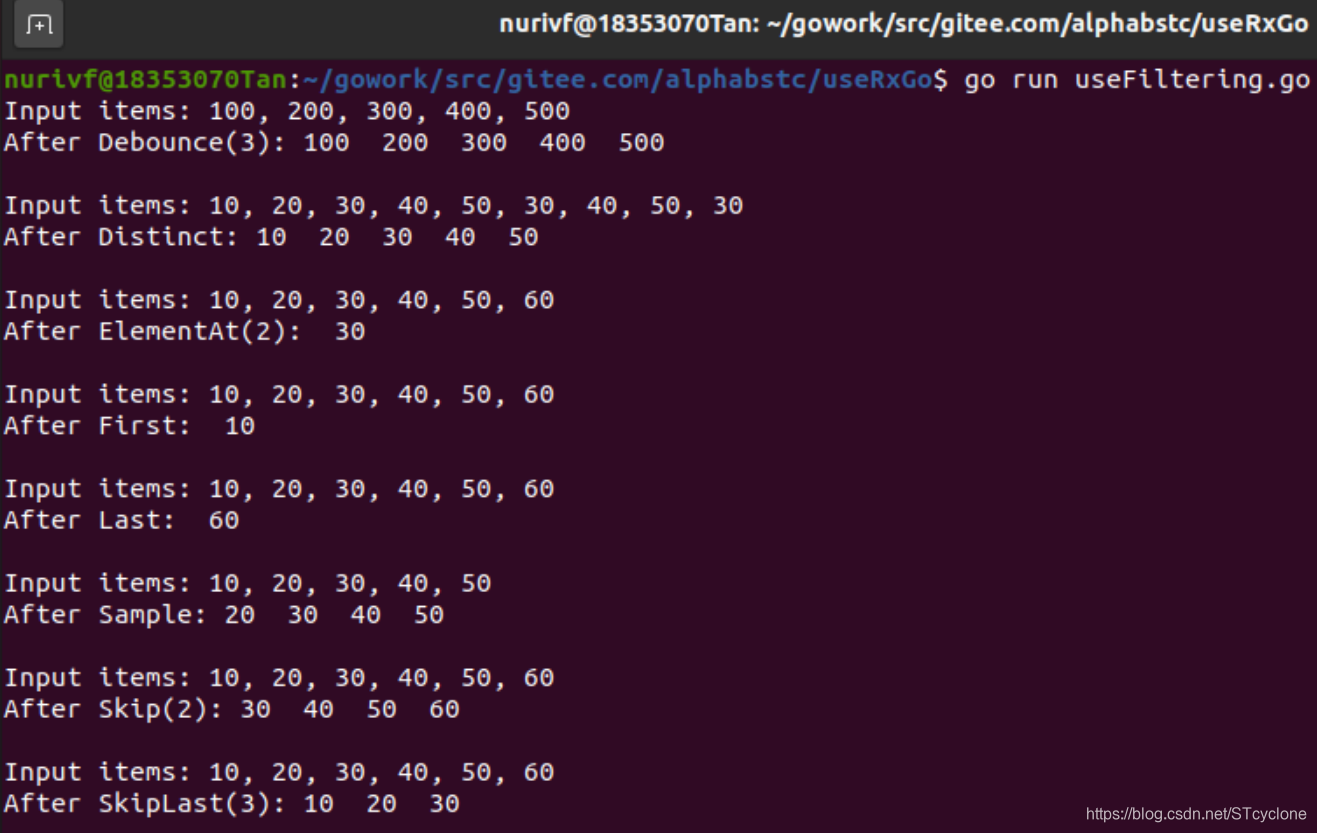
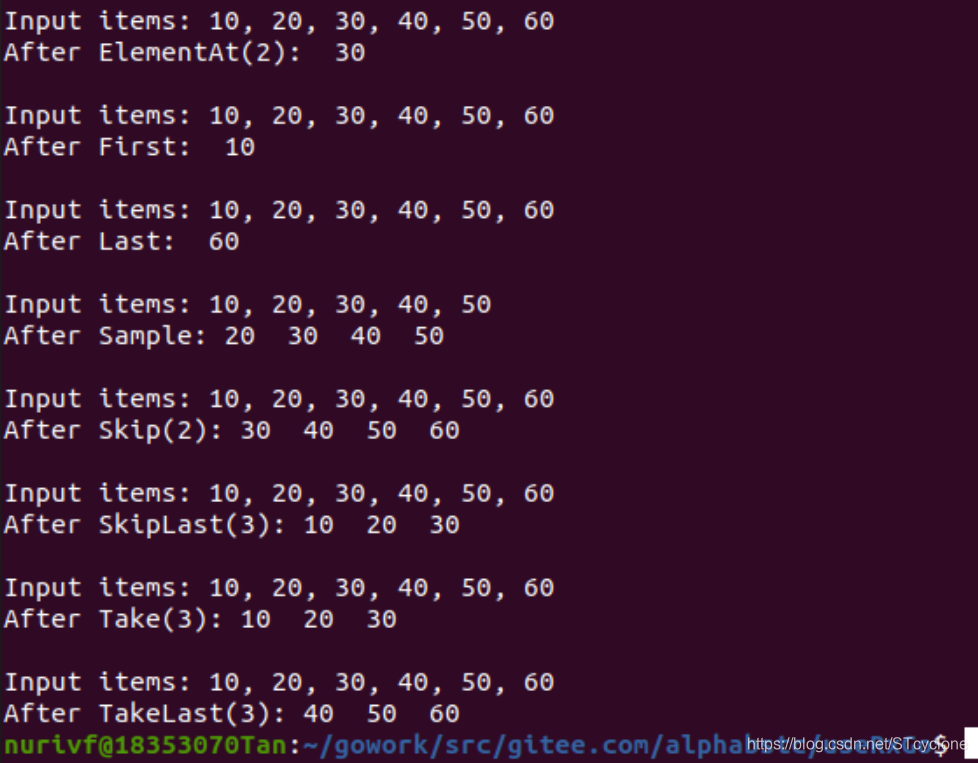
可见,功能测试结果符合要求。
以上功能测试说明改进和添加功能的rxgo包功能基本正确。
生成API文档
先使用命令go get golang.org/x/tools/cmd/godoc来安装godoc。该命令会访问官网下载godoc,有可能访问超时。为此,需要在Bash下设置如下的环境变量:
export GOPROXY=https://goproxy.io
export GO111MODULE=on
这样就可以顺利安装godoc:

然后在bash下运行命令go build golang.org/x/tools/cmd/godoc

再运行godoc就可以在浏览器通过http://localhost:6060/来访问godoc了。

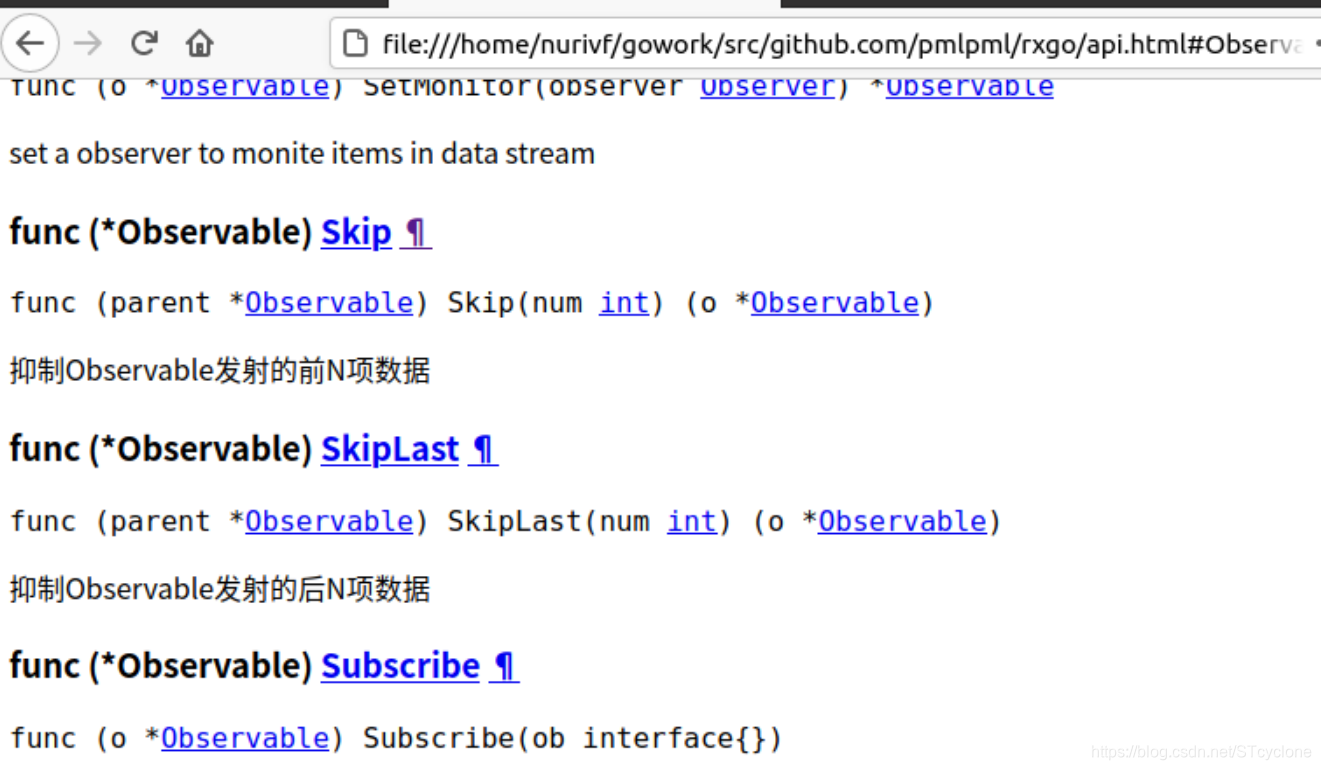
之后,还可以将文档导出出来:
godoc -url "http://localhost:6060/pkg/github.com/pmlpml/rxgo" > api.html
项目链接
https://gitee.com/alphabstc/service-computing-reactive-x





 扫一扫
扫一扫


 被折叠的 条评论
为什么被折叠?
被折叠的 条评论
为什么被折叠?
 到【灌水乐园】发言





