


项目中用到了高德地图导航# 项目中用到了高德地图导航
对于高德地图的使用做简单记录对于高德地图的使用做简单记录
-
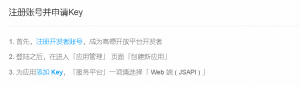
首先注册高德地图账号并获得秘钥
-
在页面添加 JS API 的入口脚本标签,并将其中「您申请的key值」替换为您刚刚申请的 key;
<script type="text/javascript" src="https://webapi.amap.com/maps?v=1.4.15&key=您申请的key值"></script>
- 添加div标签作为地图容器,同时为该div指定id属性;
HTML
<div id="container"></div>
- 为地图容器指定高度、宽度;
CSS
#container {width:300px; height: 180px; }
- 进行移动端开发时,请在head内添加viewport设置,以达到最佳的绘制性能;
HTML
<meta name="viewport" content="initial-scale=1.0, user-scalable=no">
- 最后可以开始着手准备页面了
1.创建地图只需要一行代码
var map = new AMap.Map('container');
2.也可以给地图设置中心点、级别、显示模式、自定义样式等属性:
var map = new AMap.Map('container', {
        zoom:11,//级别
        center: [116.397428, 39.90923],//中心点坐标
        viewMode:'3D'//使用3D视图
    });
3.点击坐标获取经纬度:css
    html,body{
        width: 100%;
        height: 100%;
        margin: 0px;
    }
    .map{
        height: 100%;
        width: 100%;
        float: left;
    }
html
<div id="container" class="map"></div>
<div class="input-card">
    <h4>左击获取经纬度:</h4>
    <div class="input-item">
      <input type="text" readonly="true" id="lnglat">
    </div>
</div>
JavaScript
<script type="text/javascript">
    var map = new AMap.Map("container", {
        resizeEnable: true
    });
    //为地图注册click事件获取鼠标点击出的经纬度坐标
    map.on('click', function(e) {
        document.getElementById("lnglat").value = e.lnglat.getLng() + ',' + e.lnglat.getLat()
    });
    var auto = new AMap.Autocomplete({
        input: "tipinput"
    });
    AMap.event.addListener(auto, "select", select);//注册监听,当选中某条记录时会触发
    function select(e) {
        if (e.poi && e.poi.location) {
            map.setZoom(15);
            map.setCenter(e.poi.location);
        }
    }
</script>





 扫一扫
扫一扫


 1543
1543

 被折叠的 条评论
为什么被折叠?
被折叠的 条评论
为什么被折叠?
 到【灌水乐园】发言





