



 本文介绍如何在Sublime Text中创建和修改代码片段,包括自定义代码片段的方法及步骤,适用于多种编程语言。
一、自己创建代码片段:
点击 工具 -> 插件开发 -> 新建代码片段,或者英文 Tools -> Develoer -> New snippet
之后会打开如下文件:
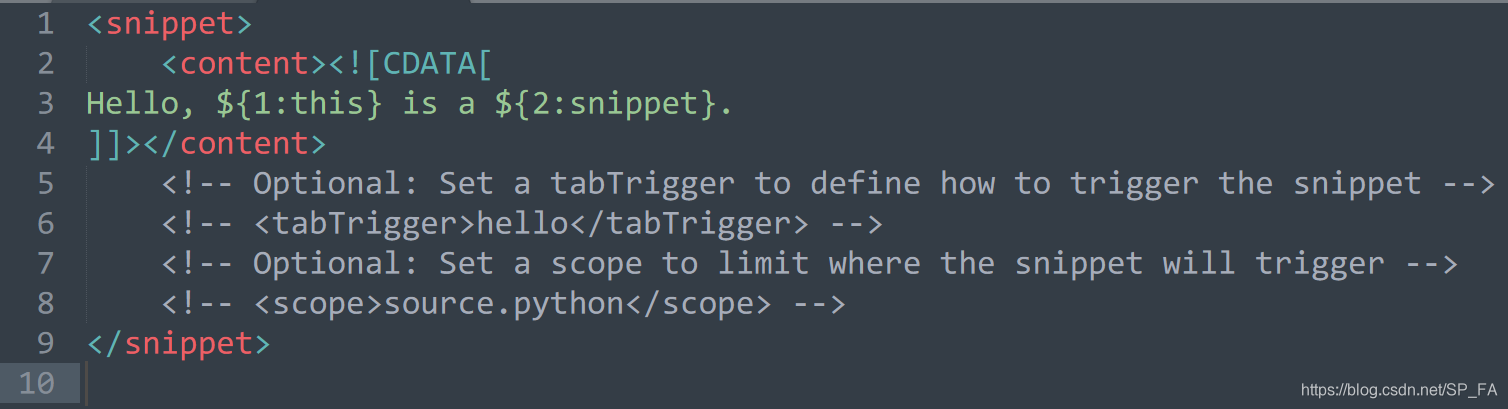
其中 “ [CDATA[ ” 和 “ ]] ” 之间可以插入想要补全的代码,${1:} 表示起始光标的位置,按 Tab 键可以进行位置切换,若在 ${1:} 之中输入内容,则起始时会默认选中这些内容。
标签 <tabTrigger> </tabTrigger> 中间是要触发提示的字符或短语,<scope> </scope> 中间是该代码提示适用的文件类型,按 Ctrl + Shift + Alt + P 可以查看当前文件的 scope。另外可以通过 <description> </description> 标签来添加对代码提示的描述。
完成后按 Ctrl + S 进行保存,可以保存在默认路径中,或者在默认路径下创建文件夹来保存,文件默认后缀是 .sublime-snippet ,保留就好。
二、修改默认代码片段:
先进入 (Sublime Text 3 path)\Packages ,里面有很多后缀为 .sublime-package 的文件,用压缩软件打开对应语言的文件,有一个 snippets 文件夹,在文件夹内找到要修改的代码提示关键字,点击打开即可修改,重启 Sublime 后生效。
通过这种方法进行的修改可能会因为更新而重置。
三、关于 <scope> 的官方定义:
ActionScript: source.actionscript.2
AppleScript: source.applescript
ASP: source.asp
Batch FIle: source.dosbatch
C#: source.cs
C++: source.c++
Clojure: source.clojure
CoffeeScript: source.coffee
CSS: source.css
D: source.d
Diff: source.diff
Erlang: source.erlang
Go: source.go
GraphViz: source.dot
Groovy: source.groovy
Haskell: source.haskell
HTML: text.html(.basic)
JSP: text.html.jsp
Java: source.java
Java Properties: source.java-props
Java Doc: text.html.javadoc
JSON: source.json
Javascript: source.js
BibTex: source.bibtex
Latex Log: text.log.latex
Latex Memoir: text.tex.latex.memoir
Latex: text.tex.latex
LESS: source.css.less
TeX: text.tex
Lisp: source.lisp
Lua: source.lua
MakeFile: source.makefile
Markdown: text.html.markdown
Multi Markdown: text.html.markdown.multimarkdown
Matlab: source.matlab
Objective-C: source.objc
Objective-C++: source.objc++
OCaml campl4: source.camlp4.ocaml
OCaml: source.ocaml
OCamllex: source.ocamllex
Perl: source.perl
PHP: source.php
Regular Expression(python): source.regexp.python
Python: source.python
R Console: source.r-console
R: source.r
Ruby on Rails: source.ruby.rails
Ruby HAML: text.haml
SQL(Ruby): source.sql.ruby
Regular Expression: source.regexp
RestructuredText: text.restructuredtext
Ruby: source.ruby
SASS: source.sass
Scala: source.scala
Shell Script: source.shell
SQL: source.sql
Stylus: source.stylus
TCL: source.tcl
HTML(TCL): text.html.tcl
Plain text: text.plain
Textile: text.html.textile
XML: text.xml
XSL: text.xml.xsl
YAML: source.yaml





 扫一扫
扫一扫


 2250
2250

 被折叠的 条评论
为什么被折叠?
被折叠的 条评论
为什么被折叠?
 到【灌水乐园】发言





