


一、Cellranger以及参考基因组的下载(linux)
截至目前10×Genomics的官网显示Cellranger的最新版为“Cell Ranger (tar.gz compression) - 7.2.0” ,我们首先在Xshell执行下列代码之一下载Linux 64-bit的安装包:
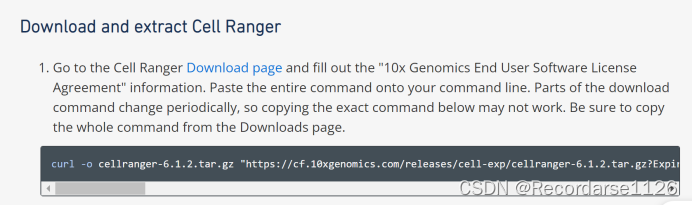
10x官网有教程,可以一步步来,但是我后面下载了miniconda,activate了一个Cellranger环境,方便我后面使用,以上blog不展示此内容,也可以mkdir一个cellapps文件夹下(新手建议)。
安装miniconda:
wget https://mirrors.tuna.tsinghua.edu.cn/anaconda/miniconda/Miniconda3-latest-Linux-x86_64.sh参考链接:
Linux下conda安装及使用 - 简书 (jianshu.com)
Day3-单细胞数据fastq及cellranger - 简书 (jianshu.com)
遇到错误:例如直接在官网复制这段代码下载6.1.2版本,就会显示下载成功,但一直解压不成功等错误
错误显示:
yulab1@nuca:~/XiaoDi/cellapps$ tar -zxvf cellranger-6.1.2.tar.gz
gzip: stdin: not in gzip format
tar: Child returned status 1
tar: Error is not recoverable: exiting now
解决方法:下载命令的某些部分会定期更改,因此复制官网上面的确切命令可能不起作用。确保从Download page界面复制整个命令:
https://www.10xgenomics.com/support/software/cell-ranger/downloads#download-links
遇到错误:明明已经保存了环境,每次打开cellranger总是找不到命令:(环境总是添加不上,师姐也失败,可能是没有权限)
错误显示:command not found

解决方案:
export PATH=/home/yulab1/XiaoDi/apps/cellranger-7.2.0:$PATH
每次登都临时开一个cellranger


 4039


 扫一扫


 被折叠的 条评论
为什么被折叠?
 到【灌水乐园】发言


