



 文章详细介绍了如何在OpenGL中创建和使用立方体贴图,包括加载天空盒、显示天空盒的优化方法,以及环境映射的概念,如反射和折射。通过立方体贴图,可以模拟天空盒和物体的反射效果,提高场景的真实感。此外,还讨论了动态环境贴图,即通过帧缓冲动态生成环境映射,以实现更真实的反射和折射效果,尽管这种方法对性能有一定影响。
立方体贴图
将多个纹理组合起来映射到一张纹理上的一种纹理类型。
立方体贴图就是一个包含了6个2D纹理的纹理,每个2D纹理都组成了立方体的一个面:一个有纹理的立方体。特性:可以通过一个方向向量来进行索引、采样。方向向量的原点位于它的中心。使用一个橘黄色的方向向量来从立方体贴图上采样一个纹理值会像是这样:
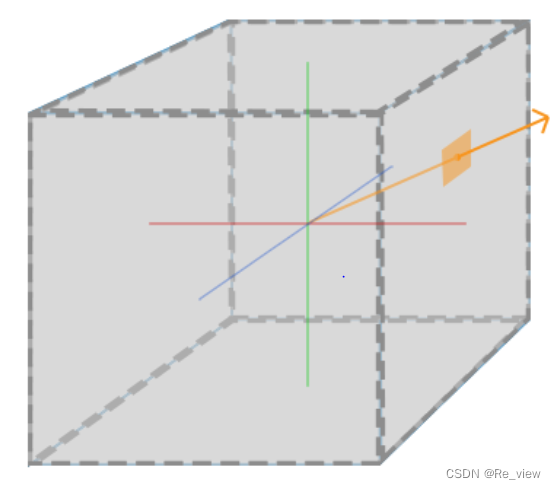
如果我们假设将这样的立方体贴图应用到一个立方体上,采样立方体贴图所使用的方向向量将和立方体(插值的)顶点位置非常相像。这样子,只要立方体的中心位于原点,我们就能使用立方体的实际位置向量来对立方体贴图进行采样了。接下来,我们可以将所有顶点的纹理坐标当做是立方体的顶点位置。最终得到的结果就是可以访问立方体贴图上正确面(Face)纹理的一个纹理坐标。
创建立方体贴图
要创建一个立方体贴图,需要生成一个纹理,并将其绑定到纹理目标上,之后再做其他的纹理操作。
unsigned int textureID;
glGenTextures(1, &textureID);
glBindTexture(GL_TEXTURE_CUBE_MAP, textureID);
因为立方体贴图包含6个纹理,每个面一个,需要调用glTexImage2D函数6次,需要将纹理目标参数设置为立方体贴图的一个特定的面,告诉OpenGL是在立方体贴图的哪一个面创建纹理。
由于我们有6个面,OpenGL给我们提供了6个特殊的纹理目标,专门对应立方体贴图的一个面:
GL_TEXTURE_CUBE_MAP_POSITIVE_X 右
GL_TEXTURE_CUBE_MAP_NEGATIVE_X 左
GL_TEXTURE_CUBE_MAP_POSITIVE_Y 上
GL_TEXTURE_CUBE_MAP_NEGATIVE_Y 下
GL_TEXTURE_CUBE_MAP_POSITIVE_Z 后
GL_TEXTURE_CUBE_MAP_NEGATIVE_Z 前
和OpenGL的很多枚举(Enum)一样,它们背后的int值是线性递增的,所以如果我们有一个纹理位置的数组或者vector,我们就可以从GL_TEXTURE_CUBE_MAP_POSITIVE_X开始遍历它们,在每个迭代中对枚举值加1,遍历了整个纹理目标:
int width, height, nrChannels;
unsigned char *data;
for(unsigned int i = 0; i < textures_faces.size(); i++)
{
    data = stbi_load(textures_faces[i].c_str(), &width, &height, &nrChannels, 0);
    glTexImage2D(
        GL_TEXTURE_CUBE_MAP_POSITIVE_X + i,
        0, GL_RGB, width, height, 0, GL_RGB, GL_UNSIGNED_BYTE, data
    );
}
上述代码用到了叫做textures_faces的vector,它包含了立方体贴图所需的所有纹理路径,并以表中的顺序排列。这将为当前绑定的立方体贴图中的每个面生成一个纹理。
因为立方体贴图和其它纹理没什么不同,我们也需要设定它的环绕和过滤方式:
glTexParameteri(GL_TEXTURE_CUBE_MAP, GL_TEXTURE_MAG_FILTER, GL_LINEAR);
glTexParameteri(GL_TEXTURE_CUBE_MAP, GL_TEXTURE_MIN_FILTER, GL_LINEAR);
glTexParameteri(GL_TEXTURE_CUBE_MAP, GL_TEXTURE_WRAP_S, GL_CLAMP_TO_EDGE);
glTexParameteri(GL_TEXTURE_CUBE_MAP, GL_TEXTURE_WRAP_T, GL_CLAMP_TO_EDGE);
glTexParameteri(GL_TEXTURE_CUBE_MAP, GL_TEXTURE_WRAP_R, GL_CLAMP_TO_EDGE);
不要被GL_TEXTURE_WRAP_R吓到,它仅仅是为纹理的R坐标设置了环绕方式,它对应的是纹理的第三个维度(和位置的z一样)。我们将环绕方式设置为GL_CLAMP_TO_EDGE,这是因为正好处于两个面之间的纹理坐标可能不能击中一个面(由于一些硬件限制),所以通过使用GL_CLAMP_TO_EDGE,OpenGL将在我们对两个面之间采样的时候,永远返回它们的边界值。
在绘制使用立方体贴图的物体之前,我们要先激活对应的纹理单元,并绑定立方体贴图,这和普通的2D纹理没什么区别。
在片段着色器中,我们使用了一个不同类型的采样器,samplerCube,我们将使用texture函数使用它进行采样,但这次我们将使用一个vec3的方向向量而不是vec2。使用立方体贴图的片段着色器会像是这样的:
in vec3 textureDir; // 代表3D纹理坐标的方向向量
uniform samplerCube cubemap; // 立方体贴图的纹理采样器

void main()
{
    FragColor = texture(cubemap, textureDir);
}
天空盒
天空盒是一个包含整个场景的大立方体,包含周围环境的6个图像,让玩家以为处于一个比实际大的多的环境中。
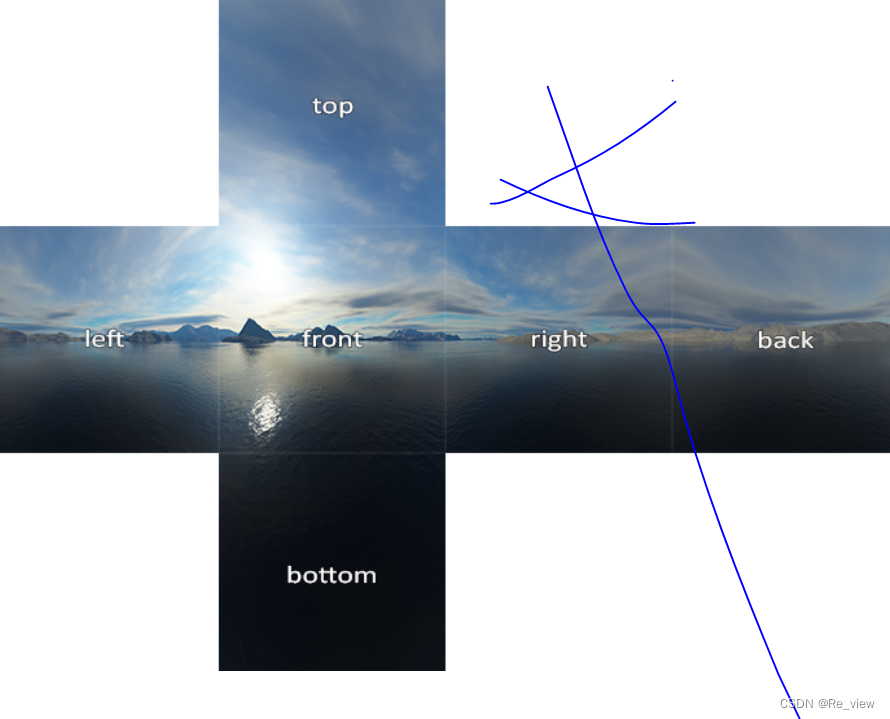
如果你将这六个面折成一个立方体,你就会得到一个完全贴图的立方体,模拟一个巨大的场景。一些资源可能会提供了这样格式的天空盒,你必须手动提取六个面的图像,但在大部分情况下它们都是6张单独的纹理图像。
加载天空盒
加载天空盒和之前加载立方体贴图时没有什么区别。使用下面的函数,它接受一个包含6个纹理路径的vector:
unsigned int loadCubemap(vector<std::string> faces)
{
    unsigned int textureID;
    glGenTextures(1, &textureID);
    glBindTexture(GL_TEXTURE_CUBE_MAP, textureID);

    int width, height, nrChannels;
    for (unsigned int i = 0; i < faces.size(); i++)
    {
        unsigned char *data = stbi_load(faces[i].c_str(), &width, &height, &nrChannels, 0);
        if (data)
        {
            glTexImage2D(GL_TEXTURE_CUBE_MAP_POSITIVE_X + i,
                         0, GL_RGB, width, height, 0, GL_RGB, GL_UNSIGNED_BYTE, data
            );
            stbi_image_free(data);
        }
        else
        {
            std::cout << "Cubemap texture failed to load at path: " << faces[i] << std::endl;
            stbi_image_free(data);
        }
    }
    glTexParameteri(GL_TEXTURE_CUBE_MAP, GL_TEXTURE_MIN_FILTER, GL_LINEAR);
    glTexParameteri(GL_TEXTURE_CUBE_MAP, GL_TEXTURE_MAG_FILTER, GL_LINEAR);
    glTexParameteri(GL_TEXTURE_CUBE_MAP, GL_TEXTURE_WRAP_S, GL_CLAMP_TO_EDGE);
    glTexParameteri(GL_TEXTURE_CUBE_MAP, GL_TEXTURE_WRAP_T, GL_CLAMP_TO_EDGE);
    glTexParameteri(GL_TEXTURE_CUBE_MAP, GL_TEXTURE_WRAP_R, GL_CLAMP_TO_EDGE);

    return textureID;
}
基本就是上一部分中立方体贴图的代码,只不过合并到了一个便于管理的函数中。之后,在调用这个函数之前,我们需要将合适的纹理路径按照立方体贴图枚举指定的顺序加载到一个vector中。
vector<std::string> faces
{
    "right.jpg",
    "left.jpg",
    "top.jpg",
    "bottom.jpg",
    "front.jpg",
    "back.jpg"
};
unsigned int cubemapTexture = loadCubemap(faces);
现在就将这个天空盒加载为一个立方体贴图了,它的id是cubemapTexture。我们可以将它绑定到一个立方体中,替换纯色背景。
显示天空盒
天空盒是绘制在一个立方体上的,和其他物体一样,需要另一个VAO,VBO以及新的一组顶点。
用于贴图3D立方体的立方体贴图可以使用立方体的位置作为纹理坐标来采样,当立方体处于原点(0,0,0)时,它的每一个位置向量都是从原点出发的方向向量。这个方向向量是获取立方体上特定位置的纹理值所需要的。所以,我们只需要提供位置向量而不用纹理坐标。
要渲染天空盒,需要一组新的着色器,只有一个顶点属性,顶点着色器如下:
#version 330 core
layout (location = 0) in vec3 aPos;

out vec3 TexCoords;

uniform mat4 projection;
uniform mat4 view;

void main()
{
    TexCoords = aPos;
    gl_Position = projection * view * vec4(aPos, 1.0);
}
顶点着色器中很有意思的部分是,我们将输入的位置向量作为输出给片段着色器的纹理坐标。片段着色器会将它作为输入来采样samplerCube:
#version 330 core
out vec4 FragColor;

in vec3 TexCoords;

uniform samplerCube skybox;

void main()
{
    FragColor = texture(skybox, TexCoords);
}
片段着色器非常直观。我们将顶点属性的位置向量作为纹理的方向向量,并使用它从立方体贴图中采样纹理值。
有了立方体贴图纹理,渲染天空盒现在就非常简单了,我们只需要绑定立方体贴图纹理,skybox采样器就会自动填充上天空盒立方体贴图了。绘制天空盒时,我们需要将它变为场景中的第一个渲染的物体,并且禁用深度写入。这样子天空盒就会永远被绘制在其它物体的背后了。
glDepthMask(GL_FALSE);
skyboxShader.use();
// ... 设置观察和投影矩阵
glBindVertexArray(skyboxVAO);
glBindTexture(GL_TEXTURE_CUBE_MAP, cubemapTexture);
glDrawArrays(GL_TRIANGLES, 0, 36);
glDepthMask(GL_TRUE);
// ... 绘制剩下的场景
glBindTexture(GL_TEXTURE_CUBE_MAP, cubemapTexture);
我们希望天空盒是以玩家为中心的,这样不论玩家移动了多远,天空盒都不会变近,让玩家产生周围环境非常大的印象。然而,当前的观察矩阵会旋转、缩放和位移来变换天空盒的所有位置,所以当玩家移动的时候,立方体贴图也会移动!我们希望移除观察矩阵中的位移部分,让移动不会影响天空盒的位置向量。
我们可以通过取4x4矩阵左上角的3x3矩阵来移除变换矩阵的位移部分。我们可以将观察矩阵转换为3x3矩阵(移除位移),再将其转换回4x4矩阵,来达到类似的效果。
glm::mat4 view = glm::mat4(glm::mat3(camera.GetViewMatrix()));
这将移除任何的位移,但保留旋转变换,让玩家仍然能够环顾场景。
优化
当前是先渲染天空盒,再渲染场景中的其他物体。这样可以工作,但不高效。
因为先渲染天空盒,会对屏幕上的每一个像素运行一遍片段着色器,即使只有一部分天空盒是可见的。
优化:可以提前使用深度测试,来丢弃看不到的片段,节省资源。
则,最后渲染天空盒,可以获得性能提升。但是,深度缓冲会填充满所有物体的深度值,我们需要在提前深度测试通过的地方渲染天空盒的片段即可,很大程度减少了片段着色器的调用。
但是天空盒很可能会渲染在所有其他对象之上,因为它只是一个1x1x1的立方体(意味着距离摄像机的距离也只有1),会通过大部分的深度测试。不用深度测试来进行渲染不是解决方案,因为天空盒将会复写场景中的其它物体。我们需要欺骗深度缓冲,让它认为天空盒有着最大的深度值1.0,只要它前面有一个物体,深度测试就会失败。
在坐标系统中知道:透视除法是在顶点着色器运行之后执行的,将gl_Position的xyz坐标除以w分量。z在深度测试中知道:相除结果的z分量等于顶点的深度值。
使用上述信息,我们可以将输出位置的z分量等于它的w分量,让z分量永远等于1.0,这样子的话,当透视除法执行之后,z分量会变为w / w = 1.0。
void main()
{
    TexCoords = aPos;
    vec4 pos = projection * view * vec4(aPos, 1.0);
    gl_Position = pos.xyww;
}
最终的标准化设备坐标将永远会有一个等于1.0的z值:最大的深度值。结果就是天空盒只会在没有可见物体的地方渲染了(只有这样才能通过深度测试,其它所有的东西都在天空盒前面)。
我们还要改变一下深度函数,将它从默认的GL_LESS改为GL_LEQUAL。深度缓冲将会填充上天空盒的1.0值,所以我们需要保证天空盒在值小于或等于深度缓冲而不是小于时通过深度测试。
综上,代码如下:
#include <glad/glad.h>
#include <GLFW/glfw3.h>
#include <stb_image.h>

#include <glm/glm.hpp>
#include <glm/gtc/matrix_transform.hpp>
#include <glm/gtc/type_ptr.hpp>

#include <learnopengl/shader_m.h>
#include <learnopengl/camera.h>
#include <learnopengl/model.h>

#include <iostream>

void framebuffer_size_callback(GLFWwindow* window, int width, int height);
void mouse_callback(GLFWwindow* window, double xpos, double ypos);
void scroll_callback(GLFWwindow* window, double xoffset, double yoffset);
void processInput(GLFWwindow *window);
unsigned int loadTexture(const char *path);
unsigned int loadCubemap(vector<std::string> faces);

// settings
const unsigned int SCR_WIDTH = 800;
const unsigned int SCR_HEIGHT = 600;

// camera
Camera camera(glm::vec3(0.0f, 0.0f, 3.0f));
float lastX = (float)SCR_WIDTH / 2.0;
float lastY = (float)SCR_HEIGHT / 2.0;
bool firstMouse = true;

// timing
float deltaTime = 0.0f;
float lastFrame = 0.0f;

int main()
{
    // glfw: initialize and configure
    // ------------------------------
    glfwInit();
    glfwWindowHint(GLFW_CONTEXT_VERSION_MAJOR, 3);
    glfwWindowHint(GLFW_CONTEXT_VERSION_MINOR, 3);
    glfwWindowHint(GLFW_OPENGL_PROFILE, GLFW_OPENGL_CORE_PROFILE);

#ifdef __APPLE__
    glfwWindowHint(GLFW_OPENGL_FORWARD_COMPAT, GL_TRUE);
#endif

    // glfw window creation
    // --------------------
    GLFWwindow* window = glfwCreateWindow(SCR_WIDTH, SCR_HEIGHT, "LearnOpenGL", NULL, NULL);
    if (window == NULL)
    {
        std::cout << "Failed to create GLFW window" << std::endl;
        glfwTerminate();
        return -1;
    }
    glfwMakeContextCurrent(window);
    glfwSetFramebufferSizeCallback(window, framebuffer_size_callback);
    glfwSetCursorPosCallback(window, mouse_callback);
    glfwSetScrollCallback(window, scroll_callback);

    // tell GLFW to capture our mouse
    glfwSetInputMode(window, GLFW_CURSOR, GLFW_CURSOR_DISABLED);

    // glad: load all OpenGL function pointers
    // ---------------------------------------
    if (!gladLoadGLLoader((GLADloadproc)glfwGetProcAddress))
    {
        std::cout << "Failed to initialize GLAD" << std::endl;
        return -1;
    }

    // configure global opengl state
    // -----------------------------
    glEnable(GL_DEPTH_TEST);

    // build and compile shaders
    // -------------------------
    Shader shader("6.1.cubemaps.vs", "6.1.cubemaps.fs");
    Shader skyboxShader("6.1.skybox.vs", "6.1.skybox.fs");

    // set up vertex data (and buffer(s)) and configure vertex attributes
    // ------------------------------------------------------------------
    float cubeVertices[] = {
        // positions          // texture Coords
        -0.5f, -0.5f, -0.5f,  0.0f, 0.0f,
         0.5f, -0.5f, -0.5f,  1.0f, 0.0f,
         0.5f,  0.5f, -0.5f,  1.0f, 1.0f,
         0.5f,  0.5f, -0.5f,  1.0f, 1.0f,
        -0.5f,  0.5f, -0.5f,  0.0f, 1.0f,
        -0.5f, -0.5f, -0.5f,  0.0f, 0.0f,

        -0.5f, -0.5f,  0.5f,  0.0f, 0.0f,
         0.5f, -0.5f,  0.5f,  1.0f, 0.0f,
         0.5f,  0.5f,  0.5f,  1.0f, 1.0f,
         0.5f,  0.5f,  0.5f,  1.0f, 1.0f,
        -0.5f,  0.5f,  0.5f,  0.0f, 1.0f,
        -0.5f, -0.5f,  0.5f,  0.0f, 0.0f,

        -0.5f,  0.5f,  0.5f,  1.0f, 0.0f,
        -0.5f,  0.5f, -0.5f,  1.0f, 1.0f,
        -0.5f, -0.5f, -0.5f,  0.0f, 1.0f,
        -0.5f, -0.5f, -0.5f,  0.0f, 1.0f,
        -0.5f, -0.5f,  0.5f,  0.0f, 0.0f,
        -0.5f,  0.5f,  0.5f,  1.0f, 0.0f,

         0.5f,  0.5f,  0.5f,  1.0f, 0.0f,
         0.5f,  0.5f, -0.5f,  1.0f, 1.0f,
         0.5f, -0.5f, -0.5f,  0.0f, 1.0f,
         0.5f, -0.5f, -0.5f,  0.0f, 1.0f,
         0.5f, -0.5f,  0.5f,  0.0f, 0.0f,
         0.5f,  0.5f,  0.5f,  1.0f, 0.0f,

        -0.5f, -0.5f, -0.5f,  0.0f, 1.0f,
         0.5f, -0.5f, -0.5f,  1.0f, 1.0f,
         0.5f, -0.5f,  0.5f,  1.0f, 0.0f,
         0.5f, -0.5f,  0.5f,  1.0f, 0.0f,
        -0.5f, -0.5f,  0.5f,  0.0f, 0.0f,
        -0.5f, -0.5f, -0.5f,  0.0f, 1.0f,

        -0.5f,  0.5f, -0.5f,  0.0f, 1.0f,
         0.5f,  0.5f, -0.5f,  1.0f, 1.0f,
         0.5f,  0.5f,  0.5f,  1.0f, 0.0f,
         0.5f,  0.5f,  0.5f,  1.0f, 0.0f,
        -0.5f,  0.5f,  0.5f,  0.0f, 0.0f,
        -0.5f,  0.5f, -0.5f,  0.0f, 1.0f
    };
    float skyboxVertices[] = {
        // positions
        -1.0f,  1.0f, -1.0f,
        -1.0f, -1.0f, -1.0f,
         1.0f, -1.0f, -1.0f,
         1.0f, -1.0f, -1.0f,
         1.0f,  1.0f, -1.0f,
        -1.0f,  1.0f, -1.0f,

        -1.0f, -1.0f,  1.0f,
        -1.0f, -1.0f, -1.0f,
        -1.0f,  1.0f, -1.0f,
        -1.0f,  1.0f, -1.0f,
        -1.0f,  1.0f,  1.0f,
        -1.0f, -1.0f,  1.0f,

         1.0f, -1.0f, -1.0f,
         1.0f, -1.0f,  1.0f,
         1.0f,  1.0f,  1.0f,
         1.0f,  1.0f,  1.0f,
         1.0f,  1.0f, -1.0f,
         1.0f, -1.0f, -1.0f,

        -1.0f, -1.0f,  1.0f,
        -1.0f,  1.0f,  1.0f,
         1.0f,  1.0f,  1.0f,
         1.0f,  1.0f,  1.0f,
         1.0f, -1.0f,  1.0f,
        -1.0f, -1.0f,  1.0f,

        -1.0f,  1.0f, -1.0f,
         1.0f,  1.0f, -1.0f,
         1.0f,  1.0f,  1.0f,
         1.0f,  1.0f,  1.0f,
        -1.0f,  1.0f,  1.0f,
        -1.0f,  1.0f, -1.0f,

        -1.0f, -1.0f, -1.0f,
        -1.0f, -1.0f,  1.0f,
         1.0f, -1.0f, -1.0f,
         1.0f, -1.0f, -1.0f,
        -1.0f, -1.0f,  1.0f,
         1.0f, -1.0f,  1.0f
    };

    // cube VAO
    unsigned int cubeVAO, cubeVBO;
    glGenVertexArrays(1, &cubeVAO);
    glGenBuffers(1, &cubeVBO);
    glBindVertexArray(cubeVAO);
    glBindBuffer(GL_ARRAY_BUFFER, cubeVBO);
    glBufferData(GL_ARRAY_BUFFER, sizeof(cubeVertices), &cubeVertices, GL_STATIC_DRAW);
    glEnableVertexAttribArray(0);
    glVertexAttribPointer(0, 3, GL_FLOAT, GL_FALSE, 5 * sizeof(float), (void*)0);
    glEnableVertexAttribArray(1);
    glVertexAttribPointer(1, 2, GL_FLOAT, GL_FALSE, 5 * sizeof(float), (void*)(3 * sizeof(float)));
    // skybox VAO
    unsigned int skyboxVAO, skyboxVBO;
    glGenVertexArrays(1, &skyboxVAO);
    glGenBuffers(1, &skyboxVBO);
    glBindVertexArray(skyboxVAO);
    glBindBuffer(GL_ARRAY_BUFFER, skyboxVBO);
    glBufferData(GL_ARRAY_BUFFER, sizeof(skyboxVertices), &skyboxVertices, GL_STATIC_DRAW);
    glEnableVertexAttribArray(0);
    glVertexAttribPointer(0, 3, GL_FLOAT, GL_FALSE, 3 * sizeof(float), (void*)0);

    // load textures
    // -------------
    unsigned int cubeTexture = loadTexture(FileSystem::getPath("resources/textures/container.jpg").c_str());

    vector<std::string> faces
    {
        FileSystem::getPath("resources/textures/skybox/right.jpg"),
        FileSystem::getPath("resources/textures/skybox/left.jpg"),
        FileSystem::getPath("resources/textures/skybox/top.jpg"),
        FileSystem::getPath("resources/textures/skybox/bottom.jpg"),
        FileSystem::getPath("resources/textures/skybox/front.jpg"),
        FileSystem::getPath("resources/textures/skybox/back.jpg")
    };
    unsigned int cubemapTexture = loadCubemap(faces);

    // shader configuration
    // --------------------
    shader.use();
    shader.setInt("texture1", 0);

    skyboxShader.use();
    skyboxShader.setInt("skybox", 0);

    // render loop
    // -----------
    while (!glfwWindowShouldClose(window))
    {
        // per-frame time logic
        // --------------------
        float currentFrame = static_cast<float>(glfwGetTime());
        deltaTime = currentFrame - lastFrame;
        lastFrame = currentFrame;

        // input
        // -----
        processInput(window);

        // render
        // ------
        glClearColor(0.1f, 0.1f, 0.1f, 1.0f);
        glClear(GL_COLOR_BUFFER_BIT | GL_DEPTH_BUFFER_BIT);

        // draw scene as normal
        shader.use();
        glm::mat4 model = glm::mat4(1.0f);
        glm::mat4 view = camera.GetViewMatrix();
        glm::mat4 projection = glm::perspective(glm::radians(camera.Zoom), (float)SCR_WIDTH / (float)SCR_HEIGHT, 0.1f, 100.0f);
        shader.setMat4("model", model);
        shader.setMat4("view", view);
        shader.setMat4("projection", projection);
        // cubes
        glBindVertexArray(cubeVAO);
        glActiveTexture(GL_TEXTURE0);
        glBindTexture(GL_TEXTURE_2D, cubeTexture);
        glDrawArrays(GL_TRIANGLES, 0, 36);
        glBindVertexArray(0);

        // draw skybox as last
        glDepthFunc(GL_LEQUAL);  // change depth function so depth test passes when values are equal to depth buffer's content
        skyboxShader.use();
        view = glm::mat4(glm::mat3(camera.GetViewMatrix())); // remove translation from the view matrix
        skyboxShader.setMat4("view", view);
        skyboxShader.setMat4("projection", projection);
        // skybox cube
        glBindVertexArray(skyboxVAO);
        glActiveTexture(GL_TEXTURE0);
        glBindTexture(GL_TEXTURE_CUBE_MAP, cubemapTexture);
        glDrawArrays(GL_TRIANGLES, 0, 36);
        glBindVertexArray(0);
        glDepthFunc(GL_LESS); // set depth function back to default

        // glfw: swap buffers and poll IO events (keys pressed/released, mouse moved etc.)
        // -------------------------------------------------------------------------------
        glfwSwapBuffers(window);
        glfwPollEvents();
    }

    // optional: de-allocate all resources once they've outlived their purpose:
    // ------------------------------------------------------------------------
    glDeleteVertexArrays(1, &cubeVAO);
    glDeleteVertexArrays(1, &skyboxVAO);
    glDeleteBuffers(1, &cubeVBO);
    glDeleteBuffers(1, &skyboxVBO);

    glfwTerminate();
    return 0;
}

// process all input: query GLFW whether relevant keys are pressed/released this frame and react accordingly
// ---------------------------------------------------------------------------------------------------------
void processInput(GLFWwindow *window)
{
    if (glfwGetKey(window, GLFW_KEY_ESCAPE) == GLFW_PRESS)
        glfwSetWindowShouldClose(window, true);

    if (glfwGetKey(window, GLFW_KEY_W) == GLFW_PRESS)
        camera.ProcessKeyboard(FORWARD, deltaTime);
    if (glfwGetKey(window, GLFW_KEY_S) == GLFW_PRESS)
        camera.ProcessKeyboard(BACKWARD, deltaTime);
    if (glfwGetKey(window, GLFW_KEY_A) == GLFW_PRESS)
        camera.ProcessKeyboard(LEFT, deltaTime);
    if (glfwGetKey(window, GLFW_KEY_D) == GLFW_PRESS)
        camera.ProcessKeyboard(RIGHT, deltaTime);
}

// glfw: whenever the window size changed (by OS or user resize) this callback function executes
// ---------------------------------------------------------------------------------------------
void framebuffer_size_callback(GLFWwindow* window, int width, int height)
{
    // make sure the viewport matches the new window dimensions; note that width and
    // height will be significantly larger than specified on retina displays.
    glViewport(0, 0, width, height);
}

// glfw: whenever the mouse moves, this callback is called
// -------------------------------------------------------
void mouse_callback(GLFWwindow* window, double xposIn, double yposIn)
{
    float xpos = static_cast<float>(xposIn);
    float ypos = static_cast<float>(yposIn);
    if (firstMouse)
    {
        lastX = xpos;
        lastY = ypos;
        firstMouse = false;
    }

    float xoffset = xpos - lastX;
    float yoffset = lastY - ypos; // reversed since y-coordinates go from bottom to top

    lastX = xpos;
    lastY = ypos;

    camera.ProcessMouseMovement(xoffset, yoffset);
}

// glfw: whenever the mouse scroll wheel scrolls, this callback is called
// ----------------------------------------------------------------------
void scroll_callback(GLFWwindow* window, double xoffset, double yoffset)
{
    camera.ProcessMouseScroll(static_cast<float>(yoffset));
}

// utility function for loading a 2D texture from file
// ---------------------------------------------------
unsigned int loadTexture(char const * path)
{
    unsigned int textureID;
    glGenTextures(1, &textureID);

    int width, height, nrComponents;
    unsigned char *data = stbi_load(path, &width, &height, &nrComponents, 0);
    if (data)
    {
        GLenum format;
        if (nrComponents == 1)
            format = GL_RED;
        else if (nrComponents == 3)
            format = GL_RGB;
        else if (nrComponents == 4)
            format = GL_RGBA;

        glBindTexture(GL_TEXTURE_2D, textureID);
        glTexImage2D(GL_TEXTURE_2D, 0, format, width, height, 0, format, GL_UNSIGNED_BYTE, data);
        glGenerateMipmap(GL_TEXTURE_2D);

        glTexParameteri(GL_TEXTURE_2D, GL_TEXTURE_WRAP_S, GL_REPEAT);
        glTexParameteri(GL_TEXTURE_2D, GL_TEXTURE_WRAP_T, GL_REPEAT);
        glTexParameteri(GL_TEXTURE_2D, GL_TEXTURE_MIN_FILTER, GL_LINEAR_MIPMAP_LINEAR);
        glTexParameteri(GL_TEXTURE_2D, GL_TEXTURE_MAG_FILTER, GL_LINEAR);

        stbi_image_free(data);
    }
    else
    {
        std::cout << "Texture failed to load at path: " << path << std::endl;
        stbi_image_free(data);
    }

    return textureID;
}

// loads a cubemap texture from 6 individual texture faces
// order:
// +X (right)
// -X (left)
// +Y (top)
// -Y (bottom)
// +Z (front)
// -Z (back)
// -------------------------------------------------------
unsigned int loadCubemap(vector<std::string> faces)
{
    unsigned int textureID;
    glGenTextures(1, &textureID);
    glBindTexture(GL_TEXTURE_CUBE_MAP, textureID);

    int width, height, nrChannels;
    for (unsigned int i = 0; i < faces.size(); i++)
    {
        unsigned char *data = stbi_load(faces[i].c_str(), &width, &height, &nrChannels, 0);
        if (data)
        {
            glTexImage2D(GL_TEXTURE_CUBE_MAP_POSITIVE_X + i, 0, GL_RGB, width, height, 0, GL_RGB, GL_UNSIGNED_BYTE, data);
            stbi_image_free(data);
        }
        else
        {
            std::cout << "Cubemap texture failed to load at path: " << faces[i] << std::endl;
            stbi_image_free(data);
        }
    }
    glTexParameteri(GL_TEXTURE_CUBE_MAP, GL_TEXTURE_MIN_FILTER, GL_LINEAR);
    glTexParameteri(GL_TEXTURE_CUBE_MAP, GL_TEXTURE_MAG_FILTER, GL_LINEAR);
    glTexParameteri(GL_TEXTURE_CUBE_MAP, GL_TEXTURE_WRAP_S, GL_CLAMP_TO_EDGE);
    glTexParameteri(GL_TEXTURE_CUBE_MAP, GL_TEXTURE_WRAP_T, GL_CLAMP_TO_EDGE);
    glTexParameteri(GL_TEXTURE_CUBE_MAP, GL_TEXTURE_WRAP_R, GL_CLAMP_TO_EDGE);

    return textureID;
}
环境映射
将整个环境映射到一个纹理对象上,不仅仅是天空盒的专用。通过使用环境的立方体贴图,可以给物体反射和折射的属性。这样使用环境立方体贴图的计数是:环境映射
反射

我们根据观察方向向量I¯和物体的法向量N¯,来计算反射向量R¯。我们可以使用GLSL内建的reflect函数来计算这个反射向量。最终的R¯向量将会作为索引/采样立方体贴图的方向向量,返回环境的颜色值。最终的结果是物体看起来反射了天空盒。
因为我们已经在场景中配置好天空盒了,创建反射效果并不会很难。我们将会改变箱子的片段着色器,让箱子有反射性:
#version 330 core
out vec4 FragColor;

in vec3 Normal;
in vec3 Position;

uniform vec3 cameraPos;
uniform samplerCube skybox;

void main()
{
    vec3 I = normalize(Position - cameraPos);
    vec3 R = reflect(I, normalize(Normal));
    FragColor = vec4(texture(skybox, R).rgb, 1.0);
}
我们先计算了观察/摄像机方向向量I,并使用它来计算反射向量R,之后我们将使用R来从天空盒立方体贴图中采样。注意,我们现在又有了片段的插值Normal和Position变量,所以我们需要更新一下顶点着色器。
#version 330 core
layout (location = 0) in vec3 aPos;
layout (location = 1) in vec3 aNormal;

out vec3 Normal;
out vec3 Position;

uniform mat4 model;
uniform mat4 view;
uniform mat4 projection;

void main()
{
    Normal = mat3(transpose(inverse(model))) * aNormal;
    Position = vec3(model * vec4(aPos, 1.0));
    gl_Position = projection * view * model * vec4(aPos, 1.0);
}
我们现在使用了一个法向量,所以我们将再次使用法线矩阵(Normal Matrix)来变换它们。Position输出向量是一个世界空间的位置向量。顶点着色器的这个Position输出将用来在片段着色器内计算观察方向向量。
因为我们使用了法线,你还需要更新一下顶点数据,并更新属性指针。还要记得去设置cameraPos这个uniform。
在渲染箱子之前先绑定立方体贴图纹理:
glBindVertexArray(cubeVAO);
glBindTexture(GL_TEXTURE_CUBE_MAP, skyboxTexture);
glDrawArrays(GL_TRIANGLES, 0, 36);
综上,代码如下:
#include <glad/glad.h>
#include <GLFW/glfw3.h>
#include <stb_image.h>

#include <glm/glm.hpp>
#include <glm/gtc/matrix_transform.hpp>
#include <glm/gtc/type_ptr.hpp>

#include <learnopengl/shader_m.h>
#include <learnopengl/camera.h>
#include <learnopengl/model.h>

#include <iostream>

void framebuffer_size_callback(GLFWwindow* window, int width, int height);
void mouse_callback(GLFWwindow* window, double xpos, double ypos);
void scroll_callback(GLFWwindow* window, double xoffset, double yoffset);
void processInput(GLFWwindow *window);
unsigned int loadTexture(const char *path);
unsigned int loadCubemap(vector<std::string> faces);

// settings
const unsigned int SCR_WIDTH = 800;
const unsigned int SCR_HEIGHT = 600;

// camera
Camera camera(glm::vec3(0.0f, 0.0f, 3.0f));
float lastX = (float)SCR_WIDTH / 2.0;
float lastY = (float)SCR_HEIGHT / 2.0;
bool firstMouse = true;

// timing
float deltaTime = 0.0f;
float lastFrame = 0.0f;

int main()
{
    // glfw: initialize and configure
    // ------------------------------
    glfwInit();
    glfwWindowHint(GLFW_CONTEXT_VERSION_MAJOR, 3);
    glfwWindowHint(GLFW_CONTEXT_VERSION_MINOR, 3);
    glfwWindowHint(GLFW_OPENGL_PROFILE, GLFW_OPENGL_CORE_PROFILE);

#ifdef __APPLE__
    glfwWindowHint(GLFW_OPENGL_FORWARD_COMPAT, GL_TRUE);
#endif

    // glfw window creation
    // --------------------
    GLFWwindow* window = glfwCreateWindow(SCR_WIDTH, SCR_HEIGHT, "LearnOpenGL", NULL, NULL);
    if (window == NULL)
    {
        std::cout << "Failed to create GLFW window" << std::endl;
        glfwTerminate();
        return -1;
    }
    glfwMakeContextCurrent(window);
    glfwSetFramebufferSizeCallback(window, framebuffer_size_callback);
    glfwSetCursorPosCallback(window, mouse_callback);
    glfwSetScrollCallback(window, scroll_callback);

    // tell GLFW to capture our mouse
    glfwSetInputMode(window, GLFW_CURSOR, GLFW_CURSOR_DISABLED);

    // glad: load all OpenGL function pointers
    // ---------------------------------------
    if (!gladLoadGLLoader((GLADloadproc)glfwGetProcAddress))
    {
        std::cout << "Failed to initialize GLAD" << std::endl;
        return -1;
    }

    // configure global opengl state
    // -----------------------------
    glEnable(GL_DEPTH_TEST);

    // build and compile shaders
    // -------------------------
    Shader shader("6.2.cubemaps.vs", "6.2.cubemaps.fs");
    Shader skyboxShader("6.2.skybox.vs", "6.2.skybox.fs");

    // set up vertex data (and buffer(s)) and configure vertex attributes
    // ------------------------------------------------------------------
    float cubeVertices[] = {
        // positions          // normals
        -0.5f, -0.5f, -0.5f,  0.0f,  0.0f, -1.0f,
         0.5f, -0.5f, -0.5f,  0.0f,  0.0f, -1.0f,
         0.5f,  0.5f, -0.5f,  0.0f,  0.0f, -1.0f,
         0.5f,  0.5f, -0.5f,  0.0f,  0.0f, -1.0f,
        -0.5f,  0.5f, -0.5f,  0.0f,  0.0f, -1.0f,
        -0.5f, -0.5f, -0.5f,  0.0f,  0.0f, -1.0f,

        -0.5f, -0.5f,  0.5f,  0.0f,  0.0f, 1.0f,
         0.5f, -0.5f,  0.5f,  0.0f,  0.0f, 1.0f,
         0.5f,  0.5f,  0.5f,  0.0f,  0.0f, 1.0f,
         0.5f,  0.5f,  0.5f,  0.0f,  0.0f, 1.0f,
        -0.5f,  0.5f,  0.5f,  0.0f,  0.0f, 1.0f,
        -0.5f, -0.5f,  0.5f,  0.0f,  0.0f, 1.0f,

        -0.5f,  0.5f,  0.5f, -1.0f,  0.0f,  0.0f,
        -0.5f,  0.5f, -0.5f, -1.0f,  0.0f,  0.0f,
        -0.5f, -0.5f, -0.5f, -1.0f,  0.0f,  0.0f,
        -0.5f, -0.5f, -0.5f, -1.0f,  0.0f,  0.0f,
        -0.5f, -0.5f,  0.5f, -1.0f,  0.0f,  0.0f,
        -0.5f,  0.5f,  0.5f, -1.0f,  0.0f,  0.0f,

         0.5f,  0.5f,  0.5f,  1.0f,  0.0f,  0.0f,
         0.5f,  0.5f, -0.5f,  1.0f,  0.0f,  0.0f,
         0.5f, -0.5f, -0.5f,  1.0f,  0.0f,  0.0f,
         0.5f, -0.5f, -0.5f,  1.0f,  0.0f,  0.0f,
         0.5f, -0.5f,  0.5f,  1.0f,  0.0f,  0.0f,
         0.5f,  0.5f,  0.5f,  1.0f,  0.0f,  0.0f,

        -0.5f, -0.5f, -0.5f,  0.0f, -1.0f,  0.0f,
         0.5f, -0.5f, -0.5f,  0.0f, -1.0f,  0.0f,
         0.5f, -0.5f,  0.5f,  0.0f, -1.0f,  0.0f,
         0.5f, -0.5f,  0.5f,  0.0f, -1.0f,  0.0f,
        -0.5f, -0.5f,  0.5f,  0.0f, -1.0f,  0.0f,
        -0.5f, -0.5f, -0.5f,  0.0f, -1.0f,  0.0f,

        -0.5f,  0.5f, -0.5f,  0.0f,  1.0f,  0.0f,
         0.5f,  0.5f, -0.5f,  0.0f,  1.0f,  0.0f,
         0.5f,  0.5f,  0.5f,  0.0f,  1.0f,  0.0f,
         0.5f,  0.5f,  0.5f,  0.0f,  1.0f,  0.0f,
        -0.5f,  0.5f,  0.5f,  0.0f,  1.0f,  0.0f,
        -0.5f,  0.5f, -0.5f,  0.0f,  1.0f,  0.0f
    };
    float skyboxVertices[] = {
        // positions
        -1.0f,  1.0f, -1.0f,
        -1.0f, -1.0f, -1.0f,
         1.0f, -1.0f, -1.0f,
         1.0f, -1.0f, -1.0f,
         1.0f,  1.0f, -1.0f,
        -1.0f,  1.0f, -1.0f,

        -1.0f, -1.0f,  1.0f,
        -1.0f, -1.0f, -1.0f,
        -1.0f,  1.0f, -1.0f,
        -1.0f,  1.0f, -1.0f,
        -1.0f,  1.0f,  1.0f,
        -1.0f, -1.0f,  1.0f,

         1.0f, -1.0f, -1.0f,
         1.0f, -1.0f,  1.0f,
         1.0f,  1.0f,  1.0f,
         1.0f,  1.0f,  1.0f,
         1.0f,  1.0f, -1.0f,
         1.0f, -1.0f, -1.0f,

        -1.0f, -1.0f,  1.0f,
        -1.0f,  1.0f,  1.0f,
         1.0f,  1.0f,  1.0f,
         1.0f,  1.0f,  1.0f,
         1.0f, -1.0f,  1.0f,
        -1.0f, -1.0f,  1.0f,

        -1.0f,  1.0f, -1.0f,
         1.0f,  1.0f, -1.0f,
         1.0f,  1.0f,  1.0f,
         1.0f,  1.0f,  1.0f,
        -1.0f,  1.0f,  1.0f,
        -1.0f,  1.0f, -1.0f,

        -1.0f, -1.0f, -1.0f,
        -1.0f, -1.0f,  1.0f,
         1.0f, -1.0f, -1.0f,
         1.0f, -1.0f, -1.0f,
        -1.0f, -1.0f,  1.0f,
         1.0f, -1.0f,  1.0f
    };

    // cube VAO
    unsigned int cubeVAO, cubeVBO;
    glGenVertexArrays(1, &cubeVAO);
    glGenBuffers(1, &cubeVBO);
    glBindVertexArray(cubeVAO);
    glBindBuffer(GL_ARRAY_BUFFER, cubeVBO);
    glBufferData(GL_ARRAY_BUFFER, sizeof(cubeVertices), &cubeVertices, GL_STATIC_DRAW);
    glEnableVertexAttribArray(0);
    glVertexAttribPointer(0, 3, GL_FLOAT, GL_FALSE, 6 * sizeof(float), (void*)0);
    glEnableVertexAttribArray(1);
    glVertexAttribPointer(1, 3, GL_FLOAT, GL_FALSE, 6 * sizeof(float), (void*)(3 * sizeof(float)));
    // skybox VAO
    unsigned int skyboxVAO, skyboxVBO;
    glGenVertexArrays(1, &skyboxVAO);
    glGenBuffers(1, &skyboxVBO);
    glBindVertexArray(skyboxVAO);
    glBindBuffer(GL_ARRAY_BUFFER, skyboxVBO);
    glBufferData(GL_ARRAY_BUFFER, sizeof(skyboxVertices), &skyboxVertices, GL_STATIC_DRAW);
    glEnableVertexAttribArray(0);
    glVertexAttribPointer(0, 3, GL_FLOAT, GL_FALSE, 3 * sizeof(float), (void*)0);

    // load textures
    // -------------
    vector<std::string> faces
    {
        FileSystem::getPath("resources/textures/skybox/right.jpg"),
        FileSystem::getPath("resources/textures/skybox/left.jpg"),
        FileSystem::getPath("resources/textures/skybox/top.jpg"),
        FileSystem::getPath("resources/textures/skybox/bottom.jpg"),
        FileSystem::getPath("resources/textures/skybox/front.jpg"),
        FileSystem::getPath("resources/textures/skybox/back.jpg"),
    };
    unsigned int cubemapTexture = loadCubemap(faces);

    // shader configuration
    // --------------------
    shader.use();
    shader.setInt("skybox", 0);

    skyboxShader.use();
    skyboxShader.setInt("skybox", 0);

    // render loop
    // -----------
    while (!glfwWindowShouldClose(window))
    {
        // per-frame time logic
        // --------------------
        float currentFrame = static_cast<float>(glfwGetTime());
        deltaTime = currentFrame - lastFrame;
        lastFrame = currentFrame;

        // input
        // -----
        processInput(window);

        // render
        // ------
        glClearColor(0.1f, 0.1f, 0.1f, 1.0f);
        glClear(GL_COLOR_BUFFER_BIT | GL_DEPTH_BUFFER_BIT);

        // draw scene as normal
        shader.use();
        glm::mat4 model = glm::mat4(1.0f);
        glm::mat4 view = camera.GetViewMatrix();
        glm::mat4 projection = glm::perspective(glm::radians(camera.Zoom), (float)SCR_WIDTH / (float)SCR_HEIGHT, 0.1f, 100.0f);
        shader.setMat4("model", model);
        shader.setMat4("view", view);
        shader.setMat4("projection", projection);
        shader.setVec3("cameraPos", camera.Position);
        // cubes
        glBindVertexArray(cubeVAO);
        glActiveTexture(GL_TEXTURE0);
        glBindTexture(GL_TEXTURE_CUBE_MAP, cubemapTexture);
        glDrawArrays(GL_TRIANGLES, 0, 36);
        glBindVertexArray(0);

        // draw skybox as last
        glDepthFunc(GL_LEQUAL);  // change depth function so depth test passes when values are equal to depth buffer's content
        skyboxShader.use();
        view = glm::mat4(glm::mat3(camera.GetViewMatrix())); // remove translation from the view matrix
        skyboxShader.setMat4("view", view);
        skyboxShader.setMat4("projection", projection);
        // skybox cube
        glBindVertexArray(skyboxVAO);
        glActiveTexture(GL_TEXTURE0);
        glBindTexture(GL_TEXTURE_CUBE_MAP, cubemapTexture);
        glDrawArrays(GL_TRIANGLES, 0, 36);
        glBindVertexArray(0);
        glDepthFunc(GL_LESS); // set depth function back to default

        // glfw: swap buffers and poll IO events (keys pressed/released, mouse moved etc.)
        // -------------------------------------------------------------------------------
        glfwSwapBuffers(window);
        glfwPollEvents();
    }

    // optional: de-allocate all resources once they've outlived their purpose:
    // ------------------------------------------------------------------------
    glDeleteVertexArrays(1, &cubeVAO);
    glDeleteVertexArrays(1, &skyboxVAO);
    glDeleteBuffers(1, &cubeVBO);
    glDeleteBuffers(1, &skyboxVBO);

    glfwTerminate();
    return 0;
}

// process all input: query GLFW whether relevant keys are pressed/released this frame and react accordingly
// ---------------------------------------------------------------------------------------------------------
void processInput(GLFWwindow *window)
{
    if (glfwGetKey(window, GLFW_KEY_ESCAPE) == GLFW_PRESS)
        glfwSetWindowShouldClose(window, true);

    if (glfwGetKey(window, GLFW_KEY_W) == GLFW_PRESS)
        camera.ProcessKeyboard(FORWARD, deltaTime);
    if (glfwGetKey(window, GLFW_KEY_S) == GLFW_PRESS)
        camera.ProcessKeyboard(BACKWARD, deltaTime);
    if (glfwGetKey(window, GLFW_KEY_A) == GLFW_PRESS)
        camera.ProcessKeyboard(LEFT, deltaTime);
    if (glfwGetKey(window, GLFW_KEY_D) == GLFW_PRESS)
        camera.ProcessKeyboard(RIGHT, deltaTime);
}

// glfw: whenever the window size changed (by OS or user resize) this callback function executes
// ---------------------------------------------------------------------------------------------
void framebuffer_size_callback(GLFWwindow* window, int width, int height)
{
    // make sure the viewport matches the new window dimensions; note that width and
    // height will be significantly larger than specified on retina displays.
    glViewport(0, 0, width, height);
}

// glfw: whenever the mouse moves, this callback is called
// -------------------------------------------------------
void mouse_callback(GLFWwindow* window, double xposIn, double yposIn)
{
    float xpos = static_cast<float>(xposIn);
    float ypos = static_cast<float>(yposIn);
    if (firstMouse)
    {
        lastX = xpos;
        lastY = ypos;
        firstMouse = false;
    }

    float xoffset = xpos - lastX;
    float yoffset = lastY - ypos; // reversed since y-coordinates go from bottom to top

    lastX = xpos;
    lastY = ypos;

    camera.ProcessMouseMovement(xoffset, yoffset);
}

// glfw: whenever the mouse scroll wheel scrolls, this callback is called
// ----------------------------------------------------------------------
void scroll_callback(GLFWwindow* window, double xoffset, double yoffset)
{
    camera.ProcessMouseScroll(static_cast<float>(yoffset));
}

// utility function for loading a 2D texture from file
// ---------------------------------------------------
unsigned int loadTexture(char const * path)
{
    unsigned int textureID;
    glGenTextures(1, &textureID);

    int width, height, nrComponents;
    unsigned char *data = stbi_load(path, &width, &height, &nrComponents, 0);
    if (data)
    {
        GLenum format;
        if (nrComponents == 1)
            format = GL_RED;
        else if (nrComponents == 3)
            format = GL_RGB;
        else if (nrComponents == 4)
            format = GL_RGBA;

        glBindTexture(GL_TEXTURE_2D, textureID);
        glTexImage2D(GL_TEXTURE_2D, 0, format, width, height, 0, format, GL_UNSIGNED_BYTE, data);
        glGenerateMipmap(GL_TEXTURE_2D);

        glTexParameteri(GL_TEXTURE_2D, GL_TEXTURE_WRAP_S, GL_REPEAT);
        glTexParameteri(GL_TEXTURE_2D, GL_TEXTURE_WRAP_T, GL_REPEAT);
        glTexParameteri(GL_TEXTURE_2D, GL_TEXTURE_MIN_FILTER, GL_LINEAR_MIPMAP_LINEAR);
        glTexParameteri(GL_TEXTURE_2D, GL_TEXTURE_MAG_FILTER, GL_LINEAR);

        stbi_image_free(data);
    }
    else
    {
        std::cout << "Texture failed to load at path: " << path << std::endl;
        stbi_image_free(data);
    }

    return textureID;
}

// loads a cubemap texture from 6 individual texture faces
// order:
// +X (right)
// -X (left)
// +Y (top)
// -Y (bottom)
// +Z (front)
// -Z (back)
// -------------------------------------------------------
unsigned int loadCubemap(vector<std::string> faces)
{
    unsigned int textureID;
    glGenTextures(1, &textureID);
    glBindTexture(GL_TEXTURE_CUBE_MAP, textureID);

    int width, height, nrComponents;
    for (unsigned int i = 0; i < faces.size(); i++)
    {
        unsigned char *data = stbi_load(faces[i].c_str(), &width, &height, &nrComponents, 0);
        if (data)
        {
            glTexImage2D(GL_TEXTURE_CUBE_MAP_POSITIVE_X + i, 0, GL_RGB, width, height, 0, GL_RGB, GL_UNSIGNED_BYTE, data);
            stbi_image_free(data);
        }
        else
        {
            std::cout << "Cubemap texture failed to load at path: " << faces[i] << std::endl;
            stbi_image_free(data);
        }
    }
    glTexParameteri(GL_TEXTURE_CUBE_MAP, GL_TEXTURE_MIN_FILTER, GL_LINEAR);
    glTexParameteri(GL_TEXTURE_CUBE_MAP, GL_TEXTURE_MAG_FILTER, GL_LINEAR);
    glTexParameteri(GL_TEXTURE_CUBE_MAP, GL_TEXTURE_WRAP_S, GL_CLAMP_TO_EDGE);
    glTexParameteri(GL_TEXTURE_CUBE_MAP, GL_TEXTURE_WRAP_T, GL_CLAMP_TO_EDGE);
    glTexParameteri(GL_TEXTURE_CUBE_MAP, GL_TEXTURE_WRAP_R, GL_CLAMP_TO_EDGE);

    return textureID;
}
v但在现实中大部分的模型都不具有完全反射性。我们可以引入反射贴图(Reflection Map),来给模型更多的细节。与漫反射和镜面光贴图一样,反射贴图也是可以采样的纹理图像,它决定这片段的反射性。通过使用反射贴图,我们可以知道模型的哪些部分该以什么强度显示反射。
折射
折射是光线由于传播介质的改变而产生的方向变化。

我们有一个观察向量I¯,一个法向量N¯,而这次是折射向量R¯。可以看到,观察向量的方向轻微弯曲了。弯折后的向量R¯将会用来从立方体贴图中采样。
折射可以使用GLSL的内建refract函数来轻松实现,它需要一个法向量、一个观察方向和两个材质之间的折射率(Refractive Index)。
补充:reflect函数计算反射向量
折射率决定了材质中光线弯曲的程度,每个材质都有自己的折射率。一些最常见的折射率可以在下表中找到:
| 材质 | 折射率 |
|---|---|
| 空气 | 1.00 |
| 水 | 1.33 |
| 冰 | 1.309 |
| 玻璃 | 1.52 |
| 钻石 | 2.42 |
| 举例:我们使用这些折射率来计算光传播的两种材质间的比值。在我们的例子中,光线/视线从空气进入玻璃(如果我们假设箱子是玻璃制的),所以比值为1/1.52=0.658 |
因为已经绑定了立方体贴图,提供了顶点数据和法线,并设置了摄像机位置的uniform,下面需要修改的是片段着色器:
void main()
{
    float ratio = 1.00 / 1.52;
    vec3 I = normalize(Position - cameraPos);
    vec3 R = refract(I, normalize(Normal), ratio);
    FragColor = vec4(texture(skybox, R).rgb, 1.0);
}
动态环境贴图
上述都是用静态图像的组合作为天空盒,没有在场景中包括可移动的物体。如果有一个镜子一样的物体,且周围还有多个物体,镜子中可见的只有天空盒,看起来就像它是场景中唯一一个物体一样。
通过使用帧缓冲,我们能够为物体的6个不同角度创建出场景的纹理,并在每个渲染迭代中将它们储存到一个立方体贴图中。之后我们就可以使用这个(动态生成的)立方体贴图来创建出更真实的,包含其它物体的,反射和折射表面了。这就叫做动态环境映射(Dynamic Environment Mapping),因为我们动态创建了物体周围的立方体贴图,并将其用作环境贴图。
虽然它看起来很棒,但它有一个很大的缺点:我们需要为使用环境贴图的物体渲染场景6次,这是对程序是非常大的性能开销。现代的程序通常会尽可能使用天空盒,并在可能的时候使用预编译的立方体贴图,只要它们能产生一点动态环境贴图的效果。虽然动态环境贴图是一个很棒的技术,但是要想在不降低性能的情况下让它工作还是需要非常多的技巧的。






 扫一扫
扫一扫


 1099
1099

 被折叠的 条评论
为什么被折叠?
被折叠的 条评论
为什么被折叠?
 到【灌水乐园】发言





