2021-鹤城杯部分Wp by Rewrite

本文回顾了2021年鹤城杯网络安全竞赛中关于Web和Misc类别的挑战。在Web方面,涉及了JSON弱类型比较、Spring Web Flow漏洞利用等,通过抓包和payload构造获取shell。Misc部分包括PDF隐写、流量分析中的布尔盲注、图片LSB隐写和压缩包解密,最终通过Wireshark分析数据包解决时间盲注问题。在Crypto部分,使用工具轻松解码加密内容。

Web狗的我今天上午满课,下午两节课,抽时间做了两个web,u1s1,两个web都是原题,pwn👴刚开始pwn本地全部打通了,然后远程死活不通,最后跑路永劫无间了。哈哈哈哈


WEB

MIDDLE_MAGIC

%0a绕过第一关最后加%23是#

数组绕过第二关

json 弱类型比较

payload

GET
aaa=%0apass_the_level_1%23
POST
admin[]=1&root_pwd[]=2&level_3={"result":0}

image.png

SPRING

题目为CVE-2017-4971-Spring Web Flow远程代码执行漏洞

A1UQ5FHEFC$2`HX3CG[@T}N.png

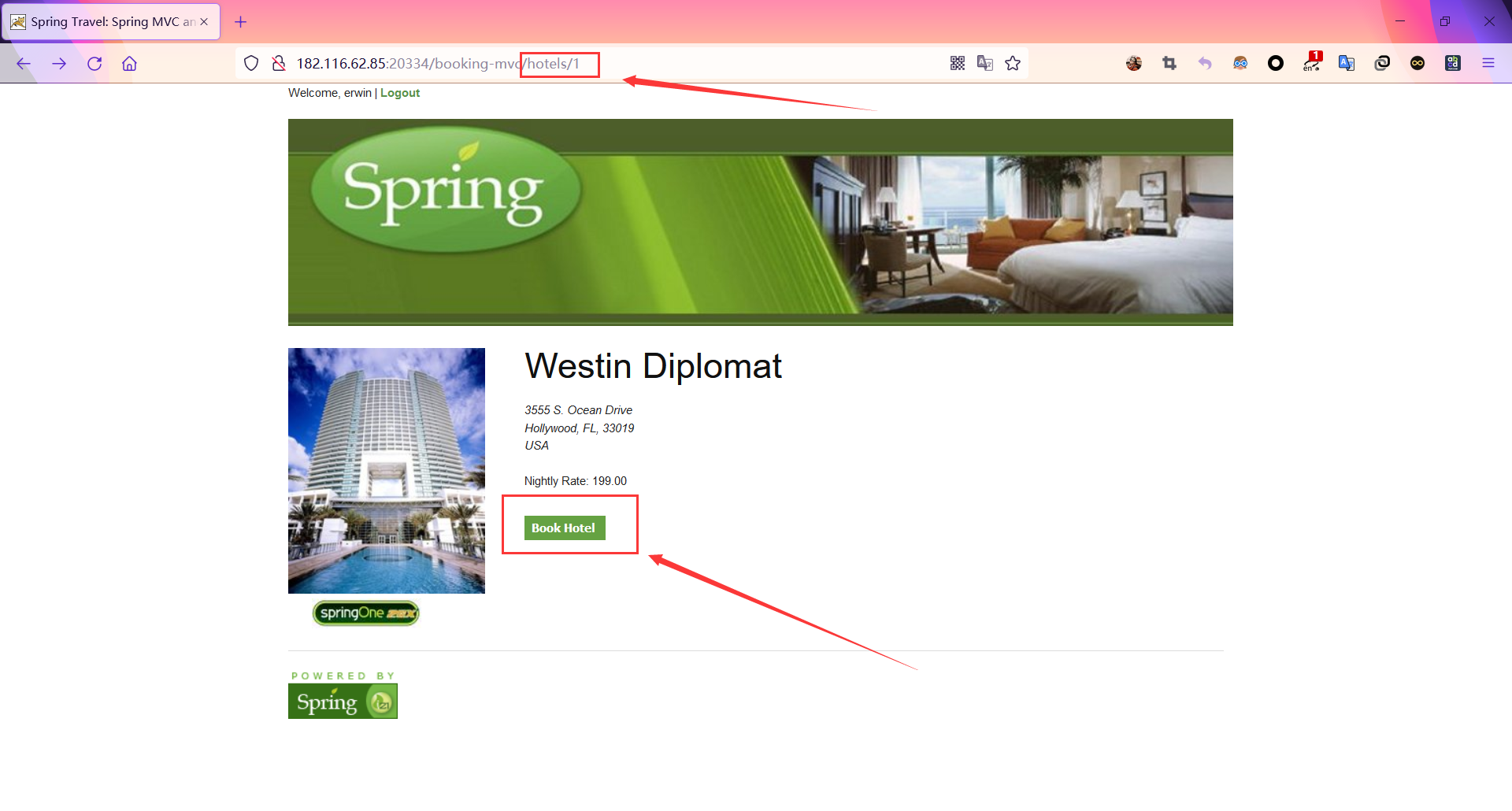
进入登录页面以后随便填一个给出的账号登录

然后进入http://ip/hotels/1页

### 错误分析 `ioctl` 调用失败返回错误码 -1,错误号 25(`ENOTTY`,Not a typewriter)通常意味着文件描述符对应的设备不支持 `ioctl` 操作。这可能由以下几种原因导致: #### 1. 文件描述符无效 在调用 `ioctl` 之前,需要确保文件描述符 `dev_fd` 是有效的。可以在 `open_dev_or_die` 函数中检查文件是否成功打开。 #### 2. 设备注册问题 在内核驱动中,杂项设备的注册可能存在问题,导致设备无法正常响应 `ioctl` 调用。 #### 3. 权限问题 用户空间程序可能没有足够的权限来访问设备文件。 ### 解决方案 #### 1. 检查文件描述符 在 `open_dev_or_die` 函数中添加错误检查,确保文件成功打开: ```c #include <stdio.h> #include <fcntl.h> #include <errno.h> int open_dev_or_die() { int fd = open("/dev/cvte_tof", O_RDWR); if (fd == -1) { fprintf(stderr, "open failed: %s\n", strerror(errno)); return -1; } return fd; } ``` #### 2. 检查内核驱动代码 确保杂项设备注册成功,并且 `file_operations` 结构体中的 `unlocked_ioctl` 和 `compat_ioctl` 函数指针正确指向 `nds01_ioctl` 函数。 ```c #include <linux/module.h> #include <linux/fs.h> #include <linux/miscdevice.h> #include <linux/i2c.h> struct nds01 { // 结构体成员 struct NDS01_Dev_t g_nds01_device; }; struct NDS01_Dev_t { struct NDS01_Platform_t platform; }; struct NDS01_Platform_t { struct miscdevice miscdev; }; static long nds01_ioctl(struct file *filp, unsigned int cmd, unsigned long arg) { struct nds01 *nds01 = filp->private_data; printk("tof ----------nds01_ioctl------------>\n"); printk("tof -----------> cmd = %d\n", cmd); return 0; } static int nds01_open(struct inode *inode, struct file *file) { printk("tof ----------nds01_open------------>\n"); struct miscdevice *miscdev = file->private_data; NDS01_Platform_t *platform = container_of(miscdev, NDS01_Platform_t, miscdev); NDS01_Dev_t *g_nds01_device = container_of(platform, NDS01_Dev_t, platform); struct nds01 *nds01 = container_of(g_nds01_device, struct nds01, g_nds01_device); file->private_data = nds01; return 0; } static const struct file_operations nds01_fops = { .open = nds01_open, .unlocked_ioctl = nds01_ioctl, .compat_ioctl = nds01_ioctl, }; static int __init nds01_init(struct i2c_client *client) { struct nds01 *nds01 = kzalloc(sizeof(struct nds01), GFP_KERNEL); if (!nds01) { return -ENOMEM; } nds01->g_nds01_device.platform.miscdev.minor = MISC_DYNAMIC_MINOR; nds01->g_nds01_device.platform.miscdev.name = "cvte_tof"; nds01->g_nds01_device.platform.miscdev.fops = &nds01_fops; nds01->g_nds01_device.platform.miscdev.parent = &client->dev; int ret = misc_register(&nds01->g_nds01_device.platform.miscdev); if (ret) { pr_err("misc_register failed\n"); kfree(nds01); return ret; } return 0; } static void __exit nds01_exit(void) { // 注销杂项设备 // ... } module_init(nds01_init); module_exit(nds01_exit); MODULE_LICENSE("GPL"); ``` #### 3. 检查权限 确保用户空间程序有足够的权限来访问设备文件。可以使用 `chmod` 命令修改设备文件的权限: ```sh sudo chmod 666 /dev/cvte_tof ``` ###
评论
添加红包

请填写红包祝福语或标题

红包个数最小为10个

红包金额最低5元

当前余额3.43前往充值 >
需支付:10.00
成就一亿技术人!
领取后你会自动成为博主和红包主的粉丝 规则
hope_wisdom
发出的红包
实付
使用余额支付
点击重新获取
扫码支付
钱包余额 0

抵扣说明:

1.余额是钱包充值的虚拟货币,按照1:1的比例进行支付金额的抵扣。
2.余额无法直接购买下载,可以购买VIP、付费专栏及课程。

余额充值