


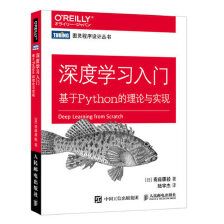
ch03 神经网络
1. pkl文件的创建与导入
python官方文档对pickle模块的定义:pickle
The pickle module implements binary protocols for serializing and de-serializing a Python object structure. “Pickling” is the process whereby a Python object hierarchy is converted into a byte stream, and “unpickling” is the inverse operation, whereby a byte stream (from a binary file or bytes-like object) is converted back into an object hierarchy. Pickling (and unpickling) is alternatively known as “serialization”, “marshalling,” 1 or “flattening”; however, to avoid confusion, the terms used here are “pickling” and “unpickling”.
pickle.dump(obj, file, protocol=None, *, fix_imports=True, buffer_callback=None)
Write the pickled representation of the object obj to the open file object file. This is equivalent to Pickler(file, protocol).dump(obj).
pickle.load(file, *, fix_imports=True, encoding=“ASCII”, errors=“strict”, buffers=None)
Read the pickled representation of an object from the open file object file and return the reconstituted object hierarchy specified therein. This is equivalent to Unpickler(file).load().
The protocol version of the pickle is detected automatically, so no protocol argument is needed. Bytes past the pickled representation of the object are ignored.
import _pickle as pickle

if __name__ == '__main__':
    a = {"name": "raymond",
         "age": 21}
    with open("./test.pkl", "wb") as f:
        pickle.dump(a, f)
    with open("./test.pkl", 'rb') as f:
        a = pickle.load(f)
    print(a, a.__class__)
2. 激活函数
2.1 恒等函数
def identity(x):
    return x
2.2 ReLU函数
import numpy as np
import matplotlib.pyplot as plt


def ReLU(x):
    return np.maximum(0, x)

if __name__ == '__main__':
    x = np.arange(-1.0, 1.0, 0.1)
    y = ReLU(x)
    plt.plot(x, y)
    plt.ylim(-0.1, 1.1)
    plt.show()
2.3 sigmoid函数
import numpy as np
import matplotlib.pyplot as plt


def sigmoid(x):
    return 1 / (1 + np.exp(-x))

if __name__ == '__main__':
    x = np.arange(-5.0, 5.0, 0.1)
    y = sigmoid(x)
    plt.plot(x, y)
    plt.ylim(-0.1, 1.1)
    plt.show()
2.4 softmax函数
import numpy as np


def softmax(x):
    # max 和 min效果上相同
    # 但是不使用min,因为min会导致overflow
    c = np.max(x)
    exp_x = np.exp(x - c)
    sum_exp = np.sum(exp_x)
    y = exp_x / sum_exp
    return y

# a = np.array([1, 10000, 10000])
# print(softmax(a))
2.5 阶跃函数
import numpy as np
import matplotlib.pyplot as plt


def step(x):
    return np.array(x > 0, dtype=np.int)

if __name__ == '__main__':
    x = np.arange(-5.0, 5.0, 0.1)
    y = step(x)
    plt.plot(x, y)
    plt.ylim(-0.1, 1.1)
    plt.show()
3. 神经网络前向传播的示例代码
import pickle
import sys, os
from functions.sigmoid_function import sigmoid
from functions.softmax_function import softmax

sys.path.append(os.pardir)
import numpy as np
from dataset.mnist import load_mnist


def get_data():
    (x_train, t_train), (x_test, t_test) = \
        load_mnist(normalize=True, flatten=True, one_hot_label=False)
    return x_test, t_test


# TODO:write sample_weight.pkl
def init_network():
    with open("sample_weight.pkl", "rb") as f:
        network = pickle.load(f)
    return network


def predict(network, x):
    W1, W2, W3 = network["W1"], network["W2"], network["W3"]
    b1, b2, b3 = network["b1"], network["b2"], network["b3"]
    a1 = np.dot(x, W1) + b1
    z1 = sigmoid(a1)
    a2 = np.dot(z1, W2) + b2
    z2 = sigmoid(a2)
    a3 = np.dot(z2, W3) + b3
    y = softmax(a3)
    return y


x, t = get_data()
network = init_network()
accuracy_cnt = 0
batch_size = 100
for i in range(0, len(x), batch_size):
    # 批处理加快速度
    x_batch = x[i: i + batch_size]
    y_batch = predict(network, x_batch)
    p = np.argmax(y_batch, axis=1)
    accuracy_cnt += np.sum(p == t[i: i + batch_size])
print("Accuracy:" + str(float(accuracy_cnt) / len(x)))
其中sample_weight.pkl文件可以通过如下方法生成(由于并未学习到如何通过训练得到较优的参数,所以这里是人为生成的):
import _pickle as pickle
import numpy as np

if __name__ == '__main__':
    network = {}
    network["W1"] = np.arange(0, 784 * 50, dtype=np.int).reshape((784, 50))
    network["W2"] = np.arange(0, 50 * 100).reshape(50, 100)
    network["W3"] = np.arange(0, 100 * 10).reshape(100, 10)
    network["b1"] = np.arange(0, 50)
    network["b2"] = np.arange(0, 100)
    network["b3"] = np.arange(0, 10)

with open("../sample_weight.pkl", "wb") as f:
    pickle.dump(network, f)
总结
- 神经网络中的激活函数使用平滑的sigmoid函数或者ReLU函数
- 通过巧妙地使用Numpy多维数组,可以高效地实现神经网络
- 机器学习的问题大体上可以分为回归问题和分类问题
- 关于输出层的激活函数,回归问题一般使用恒等函数,分类问题中一般使用softmax函数
- 分类问题中,输出层的神经元的数量设置为要分类的类别数
- 输入数据的集合成为批。通过以批为单位进行推理出来,能够实现高速的运算






 扫一扫
扫一扫


 2757
2757

 被折叠的 条评论
为什么被折叠?
被折叠的 条评论
为什么被折叠?
 到【灌水乐园】发言





