



 本文介绍了如何解决SQL Server中常见的连接错误“The user is not associated with a trusted SQL Server connection”。主要原因是实例仅设置为Windows身份验证而非混合模式。文章提供了通过SQL Server Management Studio或注册表编辑器更改设置的方法。
|
support.microsoft.com/kb/889615 If you have worked with SQL Server for some time, you must have faced this error at some time or the other:
This error can come due to a couple of reasons. The most common reason is that the instance that you are trying to connect to has been set up as one with only Windows Only Authentication rather than Windows and SQL Server Authentication. You can check that easily by either by SSMS (SQL Server Management Studio) or in the registry settings as well (in case you do not have the client tools loaded up on the instance where you are getting this error and you inherited this set up from someone). In SSMS, after you log in using your Windows Authentication, right click on the server and choose “Properties” and then go to the Security page and change the “Server Authentication” to be “SQL Server and Windows Authentication mode” as shown in the image below:
Once that is done, you will need to re-start the MSSQLServer service in order for the changes to take place. The place where it gets stored in the registry is:
HKLM/Software/Microsoft/Microsoft SQL Server/MSSQL.2005/MSSQLServer LoginMode - if it is 1, then it is Windows mode and if it is 2, it is mixed mode (Windows and SQL Server). Now, other times you can also get this error with a blank user name i.e: Login failed for user ”. The user is not associated with a trusted SQL Server connection You can get that error in a couple of scenarios: 1) If the server name has a space after it’s name, example: in the connection string you have specified: servername ,1433 i.e. that extra space after the servername (the instance name). a) When using Windows authentication and the machine from where the connection is being made, instead of using a domain account, a local account on that machine is being used for making the connection to the SQL Server instance. This is obviously because the domain controller and SQL Server cannot recognize the local account on other machines. b) In the case of web applications, the account that runs IIS does not have access to SQL Server. You have to impersonate a domain user account in ASP.Net for this. This KB article covers this in detail. c) Another common reason is when communication is being made across domains which do not have a trust relationship set up between them. d) We have also seen this in scenarios where because of heavy network load, communication between SQL Server and the Domain Controller is hindered. 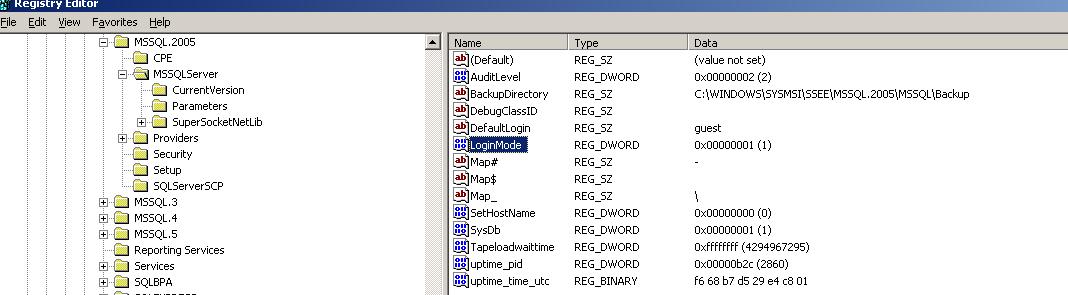


|





 扫一扫
扫一扫


 1628
1628

 被折叠的 条评论
为什么被折叠?
被折叠的 条评论
为什么被折叠?
 到【灌水乐园】发言





