



 本文详细介绍了如何使用IntelliJ IDEA创建一个基于Maven的SpringBoot多模块项目,包括设置父工程和子模块,以及配置依赖关系。项目结构包含父工程和四个子模块:pojo、dao、service和web,各模块之间有明确的依赖关系。在配置过程中,还涉及到SpringBoot的父pom声明、子模块的pom.xml配置,以及不同环境的应用配置文件如application.yml和application-dev.yml。
前言
在企业级的项目开发中,系统庞大时,会使用多模块(module)模式来构建项目,接下来我们就详细讲解多模块(module)模式。
工程结构:
父工程:father
子模块:pojo (实体类)
子模块:dao (用于持久化数据跟数据库交互)
子模块:utils (工具类)
子模块:service (业务逻辑)
子模块:web (页面,数据交互,有启动类的模块)
一、搭建工程
1、创建父工程
1、IDEA工具栏选择菜单File ->New -> Project

2、选择Spring Initializr,Initializr默认Default,点击Next
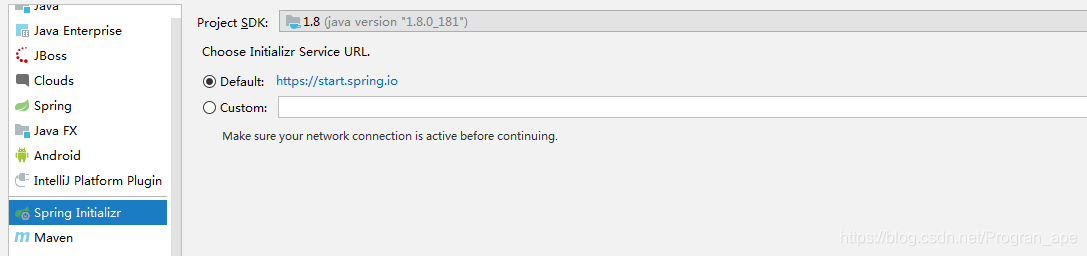
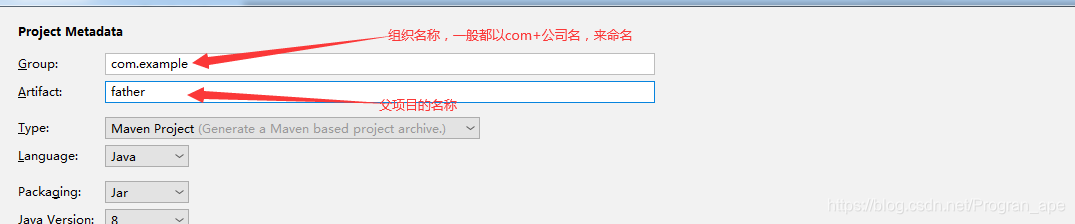
3、输入组织名称和项目名,点击Next
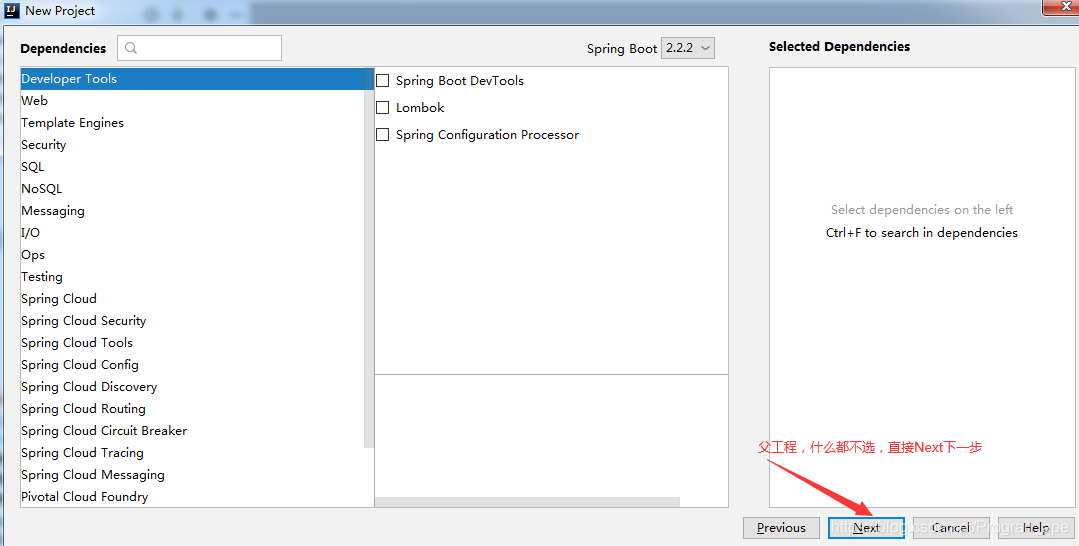
4、创建的是父工程,不需要选择,直接点Next
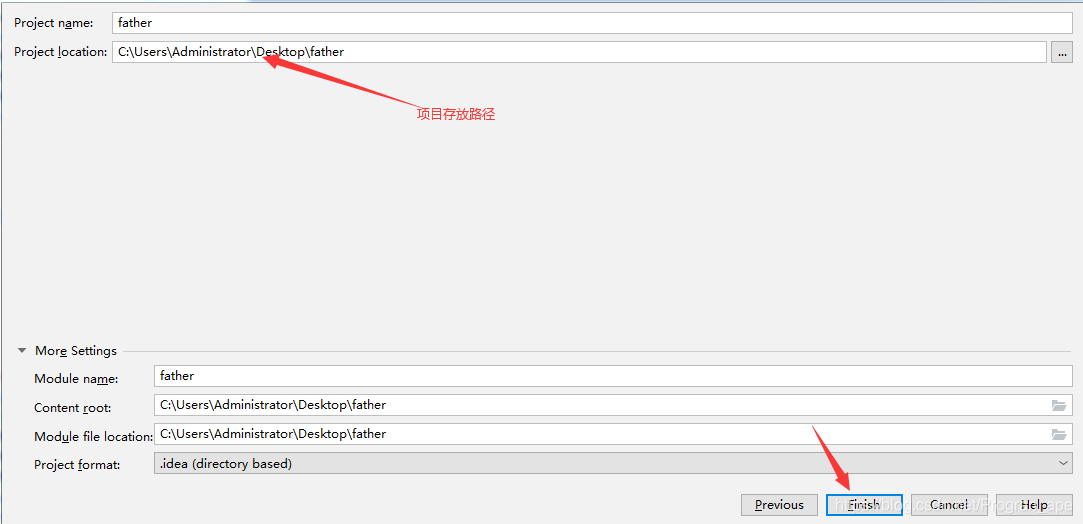
5、输入项目保存路径,点击Finish创建项目
6、项目工程结构如下
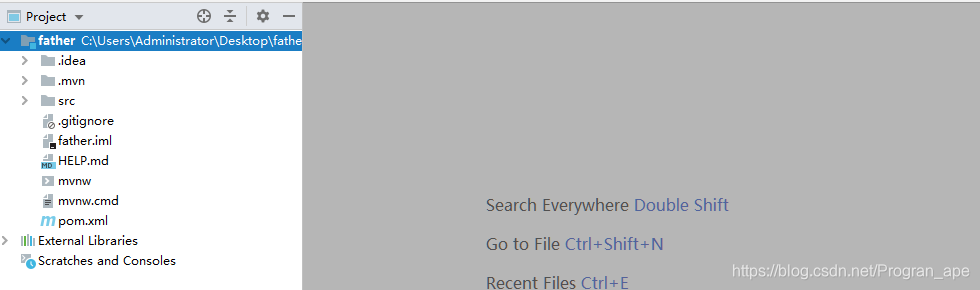
7、接下来删除无用的.mvn目录、src目录、mvnw及mvnw.cmd文件,最终只留.gitignore和pom.xml

2、创建子模块
1、右键选择项目根目录father,选择New -> Module

2、选择Maven,点击Next
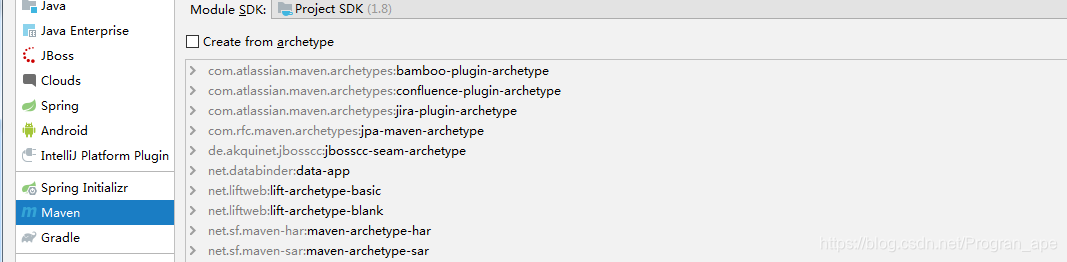
3、填写模块名,添加项目名前缀提升可读性,点击Finish
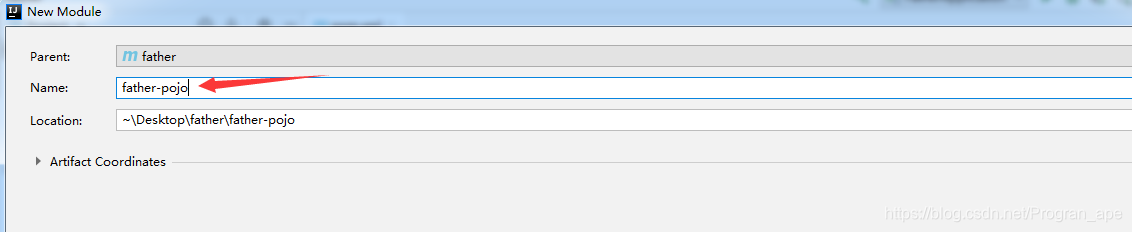
4、同理添加【father-dao】、【father-utils】、【father-service】、【father-web】子模块。
5、整理后的整个项目结构如下:
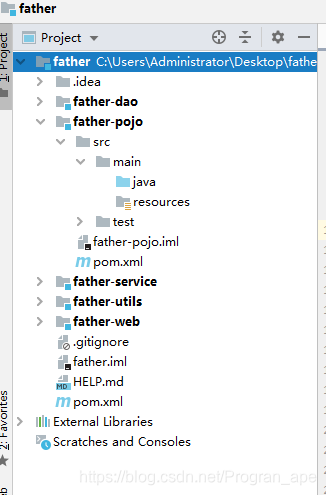
以上为项目创建的基本结构过程,接下来建立各自依赖关系
二、依赖关系
依赖关系:
pojo 独立,不依赖
dao 依赖 pojo
service 依赖 dao、pojo
web 依赖 service、dao、pojo
父pom文件中声明所有子模块及继承SpringBoot提供的父工程:
<?xml version="1.0" encoding="UTF-8"?>
<project xmlns="http://maven.apache.org/POM/4.0.0" xmlns:xsi="http://www.w3.org/2001/XMLSchema-instance"
         xsi:schemaLocation="http://maven.apache.org/POM/4.0.0 https://maven.apache.org/xsd/maven-4.0.0.xsd">
    <modelVersion>4.0.0</modelVersion>
    <packaging>pom</packaging>

    <!-- 模块说明:这里声明多个子模块 -->
    <modules>
        <module>father-pojo</module>
        <module>father-dao</module>
        <module>father-utils</module>
        <module>father-service</module>
        <module>father-web</module>
    </modules>

    <!-- 继承说明:这里继承SpringBoot提供的父工程 -->
    <parent>
        <groupId>org.springframework.boot</groupId>
        <artifactId>spring-boot-starter-parent</artifactId>
        <version>2.2.2.RELEASE</version>
        <relativePath/>
    </parent>

    <!-- 项目说明:这里作为聚合工程的父工程 -->
    <groupId>com.example</groupId>
    <artifactId>father</artifactId>
    <version>0.0.1-SNAPSHOT</version>
    <name>father</name>
</project>
pojo的pom.xml
<?xml version="1.0" encoding="UTF-8"?>
<project xmlns="http://maven.apache.org/POM/4.0.0"
         xmlns:xsi="http://www.w3.org/2001/XMLSchema-instance"
         xsi:schemaLocation="http://maven.apache.org/POM/4.0.0 http://maven.apache.org/xsd/maven-4.0.0.xsd">

    <!-- 继承本项目的父工程 -->
    <parent>
        <artifactId>father</artifactId>
        <groupId>com.example</groupId>
        <version>0.0.1-SNAPSHOT</version>
    </parent>
    <modelVersion>4.0.0</modelVersion>
    <!-- 基本信息 -->
    <artifactId>father-pojo</artifactId>
    <!-- 依赖包 -->
    <dependencies>
        <!-- lombok -->
        <dependency>
            <groupId>org.projectlombok</groupId>
            <artifactId>lombok</artifactId>
            <version>${lombok.version}</version>
        </dependency>
        <!--Jackson 序列化库-->
        <dependency>
            <groupId>com.fasterxml.jackson.core</groupId>
            <artifactId>jackson-databind</artifactId>
            <version>2.9.10</version>
        </dependency>
    </dependencies>
</project>
dao的pom.xml
<?xml version="1.0" encoding="UTF-8"?>
<project xmlns="http://maven.apache.org/POM/4.0.0"
         xmlns:xsi="http://www.w3.org/2001/XMLSchema-instance"
         xsi:schemaLocation="http://maven.apache.org/POM/4.0.0 http://maven.apache.org/xsd/maven-4.0.0.xsd">

    <!-- 继承本项目的父工程 -->
    <parent>
        <artifactId>father</artifactId>
        <groupId>com.example</groupId>
        <version>1.0-SNAPSHOT</version>
    </parent>
    <modelVersion>4.0.0</modelVersion>
    <!-- 基本信息 -->
    <artifactId>father-dao</artifactId>

    <!-- 依赖包 -->
    <dependencies>
        <!-- mysql -->
        <dependency>
            <groupId>mysql</groupId>
            <artifactId>mysql-connector-java</artifactId>
            <version>5.1.47</version>
            <scope>runtime</scope>
        </dependency>
        <!-- mybatis-plus -->
        <dependency>
            <groupId>com.baomidou</groupId>
            <artifactId>mybatis-plus-boot-starter</artifactId>
            <version>3.0.5</version>
        </dependency>
        <!-- druid -->
        <dependency>
            <groupId>com.alibaba</groupId>
            <artifactId>druid-spring-boot-starter</artifactId>
            <version>1.1.10</version>
        </dependency>

 		<!-- dao模块引入pojo模块 -->
        <dependency>
            <groupId>com.example</groupId>
            <artifactId>father-pojo</artifactId>
            <version>1.0-SNAPSHOT</version>
        </dependency>
    </dependencies>
 </project>
service的pom.xml
<?xml version="1.0" encoding="UTF-8"?>
<project xmlns="http://maven.apache.org/POM/4.0.0"
         xmlns:xsi="http://www.w3.org/2001/XMLSchema-instance"
         xsi:schemaLocation="http://maven.apache.org/POM/4.0.0 http://maven.apache.org/xsd/maven-4.0.0.xsd">

    <!-- 继承本项目的父工程 -->
    <parent>
        <artifactId>father</artifactId>
        <groupId>com.example</groupId>
        <version>1.0-SNAPSHOT</version>
    </parent>
    <modelVersion>4.0.0</modelVersion>
    <!-- 基本信息 -->
    <artifactId>father-service</artifactId>
    <!-- 依赖包 -->
    <dependencies>
        <!-- 工具 -->
        <dependency>
            <groupId>com.example</groupId>
            <artifactId>father-utils</artifactId>
            <!--排除这个slf4j-log4j12-->
            <exclusions>
                <exclusion>
                    <groupId>org.springframework.boot</groupId>
                    <artifactId>spring-boot-starter-log4j2</artifactId>
                </exclusion>
            </exclusions>
            <version>1.0-SNAPSHOT</version>
        </dependency>
        <!-- aop -->
        <dependency>
            <groupId>org.springframework.boot</groupId>
            <artifactId>spring-boot-starter-aop</artifactId>
            <version>2.0.6.RELEASE</version>
        </dependency>

   		<!-- service模块引入pojo模块 -->
        <dependency>
            <groupId>com.example</groupId>
            <artifactId>maodeng-pojo</artifactId>
            <version>1.0-SNAPSHOT</version>
        </dependency>
        <!-- service模块引入dao模块 -->
        <dependency>
            <groupId>com.example</groupId>
            <artifactId>maodeng-dao</artifactId>
            <version>1.0-SNAPSHOT</version>
        </dependency>
    </dependencies>
</project>
web的pom.xml
<?xml version="1.0" encoding="UTF-8"?>
<project xmlns="http://maven.apache.org/POM/4.0.0"
         xmlns:xsi="http://www.w3.org/2001/XMLSchema-instance"
         xsi:schemaLocation="http://maven.apache.org/POM/4.0.0 http://maven.apache.org/xsd/maven-4.0.0.xsd">

    <!-- 继承本项目的父工程 -->
    <parent>
        <artifactId>father</artifactId>
        <groupId>com.example</groupId>
        <version>1.0-SNAPSHOT</version>
    </parent>
    <modelVersion>4.0.0</modelVersion>

    <!-- 基本信息 -->
    <artifactId>maodeng-web</artifactId>
    <!--这里根据打包的需求配置jar包还是war包-->
    <packaging>war</packaging>

    <!-- 依赖包 -->
    <dependencies>
             <!-- 工具 -->
        <dependency>
            <groupId>com.example</groupId>
            <artifactId>father-utils</artifactId>
            <version>1.0-SNAPSHOT</version>
        </dependency>
        <!-- web模块 -->
        <dependency>
            <groupId>org.springframework.boot</groupId>
            <artifactId>spring-boot-starter-web</artifactId>
            <version>2.1.2.RELEASE</version>
            <exclusions>
                <exclusion>
                    <!--
                       在创建Spring Boot工程时,我们引入了spring-boot-starter,其中包含了spring-boot-starter-logging,
                       该依赖内容就是Spring Boot默认的日志框架Logback,所以我们在引入log4j之前,需要先排除该包的依赖,
                       再引入log4j的依赖
                       -->
                    <groupId>org.springframework.boot</groupId>
                    <artifactId>spring-boot-starter-logging</artifactId>
                </exclusion>
            </exclusions>
        </dependency>

 		<!-- web模块引入pojo模块 -->
        <dependency>
            <groupId>com.example</groupId>
            <artifactId>father-pojo</artifactId>
            <version>1.0-SNAPSHOT</version>
        </dependency>
  		<!-- web模块引入dao模块 -->
        <dependency>
            <groupId>com.example</groupId>
            <artifactId>father-dao</artifactId>
            <version>1.0-SNAPSHOT</version>
        </dependency>
          <!-- web模块引入service模块 -->
        <dependency>
            <groupId>com.example</groupId>
            <artifactId>father-service</artifactId>
            <version>1.0-SNAPSHOT</version>
        </dependency>

    </dependencies>

    <!--打包配置-->
    <build>
        <plugins>
            <!-- 添加spring-boot-maven-plugin插件
            作用:该插件支持多种功能,常用的有两种,第一种是打包项目为可执行的jar包,另外
                一个命令就是mvn spring-boot:run,可以直接使用tomcat(默认)启动项目。-->
            <plugin>
                <groupId>org.springframework.boot</groupId>
                <artifactId>spring-boot-maven-plugin</artifactId>
            </plugin>
        </plugins>
    </build>
</project>
最后把web模块中的application.yml文件补充一下就OK了,因为引入了mysql,redis等配置,所以数据源是要配的,不然运行起来会报错找不到数据源
application.yml
server:
  port: 83

spring:
  profiles:
   active: dev
   #active: prod

  jmx:
    enabled: false

logging:
  config: classpath:log4j2.yml

shiro:
  cookieName: demoWeb

redis:
  name: demo
application-dev.yml
spring:
  redis:
    database: 0 # Redis数据库索引(默认为0)
    host: localhost # Redis服务器地址
    port: 6379 # Redis服务器连接端口
    jedis:
      pool:
        max-idle: 8
        min-idle: 0
        max-active: 8 # 连接池最大连接数(使用负值表示没有限制)
        max-wait: -1s
    timeout: 60s

  datasource:
    druid:
      primary:
        url: jdbc:mysql://127.0.0.1:3306/demo?useUnicode=true&characterEncoding=UTF-8&characterSetResults=UTF-8&allowMultiQueries=true&useAffectedRows=true
        username: root
        password: 123456
        driver-class-name: com.mysql.jdbc.Driver
        initialSize: 5
        minIdle: 5
        maxActive: 20
      db2:
        url: jdbc:mysql://127.0.0.1:3306/demo2?useUnicode=true&characterEncoding=UTF-8&characterSetResults=UTF-8&allowMultiQueries=true&useAffectedRows=true
        username: root
        password: 123
        driver-class-name: com.mysql.jdbc.Driver
        initialSize: 5
        minIdle: 5
        maxActive: 20
shiro:
  topUrl: 127.0.0.1

url: 0.0.1:80
environment: dev
redis:
  name: demoDev
application-prod.yml
与application-dev.yml类似






 扫一扫
扫一扫


 5997
5997

 被折叠的 条评论
为什么被折叠?
被折叠的 条评论
为什么被折叠?
 到【灌水乐园】发言





