


 本文介绍在使用TaroJS进行跨平台应用开发时遇到的“Cannot read property ‘map’ of undefined”错误,该错误源于props中的数组未初始化。文章提供了检查并确保props存在及非空的解决方案,避免了组件渲染时的崩溃。
import Taro, { Component } from '@tarojs/taro'
import PropTypes from 'prop-types'
import { View, Image } from '@tarojs/components'
import './index.scss'

class Index extends Component {
    render() {
        return (
            <View className="prolist">
                {
                    this.props.prolist.map(item => (
                      Taro.navigateTo Taro.switchTab Taro.redirectTo
                        <View className="proitem" key={item.proid} onClick={() => {
                            Taro.navigateTo({
                                url: '/pages/detail/index?proid=' + item.proid
                            })
                        }}>
                            <View className="itemimg">
                                <Image className='img' src={item.proimg}></Image>
                            </View>
                            <View className="iteminfo">
                                <View className="title">{item.proname}</View>
                                <View className="title">{item.sales} / {item.stock}</View>
                                <View className="price">¥{item.price}</View>
                            </View>
                        </View>
                    ))
                }
            </View>
        )
    }
}

Index.propTypes = {
    prolist: PropTypes.array
}

export default Index
报错:Cannot read property ‘map’ of undefined
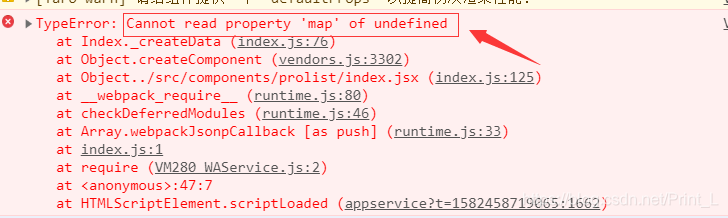
因为初始化时this.props.prolist是undefined
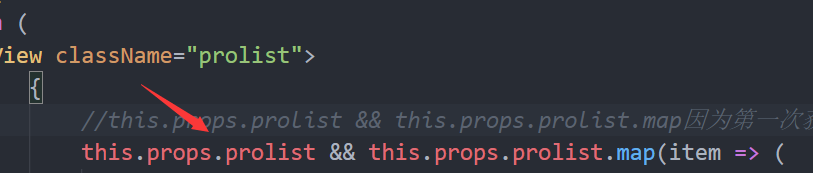
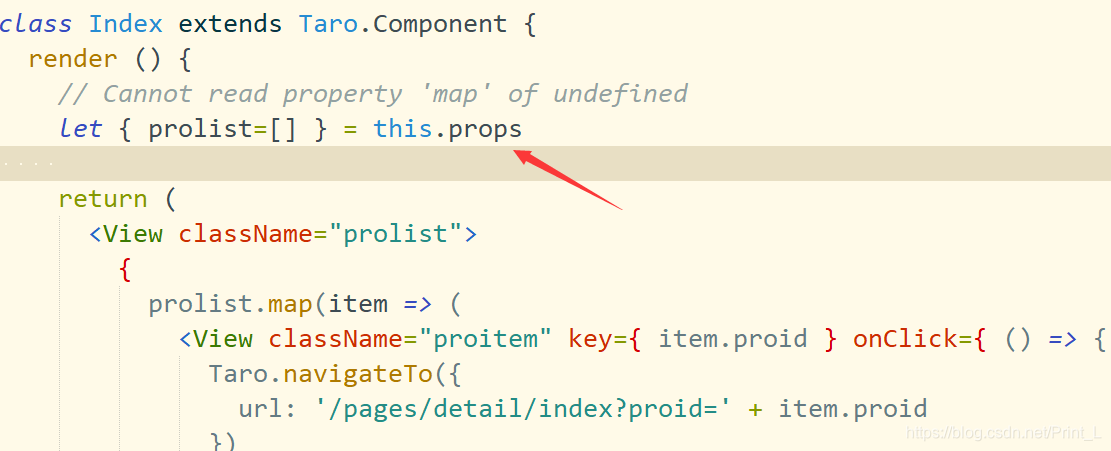
所有要判断this.props.prolis是不是undefined,直到有值才渲染
解决方案
【1】
【2】
如有解释不周,请谅解。。。





 扫一扫
扫一扫


 5766
5766

 被折叠的 条评论
为什么被折叠?
被折叠的 条评论
为什么被折叠?
 到【灌水乐园】发言





