如何将doc文档转换为docx,以及如何实现用Python 3将doc文档转换为docx

诸神缄默不语-个人技术博文与视频目录

1. Win10系统

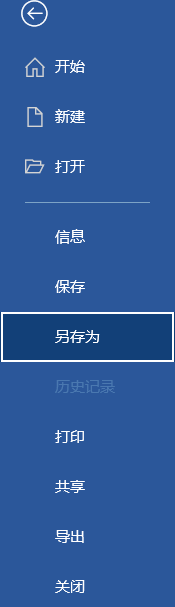
用Word打开文件后选择“文件”:

在这里插入图片描述
选择“另存为”:
在这里插入图片描述

在选择文件储存位置的窗口弹出后,在保存类型中选择docx格式即可:
在这里插入图片描述

2. Python 3实现

通过win32com(操作COM接口)来实现文件格式转换。这个函数会在输入文件同目录下新建同名的docx文档来储存转换后的docx文件,如果已经有同名文件,将在文件名后增加序号。

from win32com import client as wc

def convert_doc2docx(doc_path: str) -> str:
    word = wc.Dispatch("Word.Application")
    word.Visible = False

    doc = word.Documents.Open(doc_path)
    new_path = os.path.splitext(doc_path)[0] + ".docx"
    count = 0
    while os.path.exists(new_path):
        new_path = os.path.splitext(doc_path)[0] + "(" + str(count + 1) + ").docx"
        count += 1
    doc.SaveAs(new_path, 16)
    doc.Close()

    word.Quit()
    return new_path
在Vue项目中,本身并没有直接将doc格式文件转换docx格式的能力,不过可以借助后端服务或者第三方工具来实现。以下为几种可行的实现思路: ### 借助后端服务转换 可以把doc文件上传到后端,利用后端的库进行格式转换,之后再将转换后的docx文件返回给前端。后端可以使用Python的`python-docx`库和`pywin32`库。 #### 前端代码示例 ```vue <template> <div> <input type="file" @change="handleFileChange" /> <button @click="convertDocToDocx">转换文件</button> </div> </template> <script setup> import { ref } from &#39;vue&#39;; const file = ref(null); const handleFileChange = (e) => { file.value = e.target.files[0]; }; const convertDocToDocx = async () => { if (file.value) { const formData = new FormData(); formData.append(&#39;file&#39;, file.value); try { const response = await fetch(&#39;/api/convert&#39;, { method: &#39;POST&#39;, body: formData }); if (response.ok) { const blob = await response.blob(); const url = window.URL.createObjectURL(blob); const a = document.createElement(&#39;a&#39;); a.href = url; a.download = &#39;converted.docx&#39;; a.click(); window.URL.revokeObjectURL(url); } } catch (error) { console.error(&#39;转换失败:&#39;, error); } } }; </script> ``` #### 后端Python代码示例 ```python from flask import Flask, request, send_file import win32com.client as win32 import os app = Flask(__name__) @app.route(&#39;/api/convert&#39;, methods=[&#39;POST&#39;]) def convert_doc_to_docx(): file = request.files[&#39;file&#39;] input_path = &#39;input.doc&#39; output_path = &#39;output.docx&#39; file.save(input_path) word = win32.gencache.EnsureDispatch(&#39;Word.Application&#39;) doc = word.Documents.Open(os.path.abspath(input_path)) doc.SaveAs(os.path.abspath(output_path), FileFormat=16) doc.Close() word.Quit() return send_file(output_path, as_attachment=True) if __name__ == &#39;__main__&#39;: app.run(debug=True) ``` ### 利用第三方API 可以使用一些第三方的文档转换API,像Zamzar、CloudConvert等。这些API通常提供了RESTful接口,能够方便地在前端调用。 #### 前端代码示例 ```vue <template> <div> <input type="file" @change="handleFileChange" /> <button @click="convertDocToDocx">转换文件</button> </div> </template> <script setup> import { ref } from &#39;vue&#39;; const file = ref(null); const handleFileChange = (e) => { file.value = e.target.files[0]; }; const convertDocToDocx = async () => { if (file.value) { const formData = new FormData(); formData.append(&#39;file&#39;, file.value); formData.append(&#39;target_format&#39;, &#39;docx&#39;); try { const response = await fetch(&#39;https://api.zamzar.com/v1/jobs&#39;, { method: &#39;POST&#39;, headers: { &#39;Authorization&#39;: &#39;Bearer YOUR_API_KEY&#39; }, body: formData }); if (response.ok) { const data = await response.json(); // 处理转换结果 console.log(data); } } catch (error) { console.error(&#39;转换失败:&#39;, error); } } }; </script> ```
评论
添加红包

请填写红包祝福语或标题

红包个数最小为10个

红包金额最低5元

当前余额3.43前往充值 >
需支付:10.00
成就一亿技术人!
领取后你会自动成为博主和红包主的粉丝 规则
hope_wisdom
发出的红包

打赏作者

诸神缄默不语

你的鼓励将是我创作的最大动力

¥1 ¥2 ¥4 ¥6 ¥10 ¥20
扫码支付:¥1
获取中
扫码支付

您的余额不足,请更换扫码支付或充值

打赏作者

实付
使用余额支付
点击重新获取
扫码支付
钱包余额 0

抵扣说明:

1.余额是钱包充值的虚拟货币,按照1:1的比例进行支付金额的抵扣。
2.余额无法直接购买下载,可以购买VIP、付费专栏及课程。

余额充值