1.全局直方图均衡化
# -*- coding: utf-8 -*-
import sys
import cv2
import numpy as np
import matplotlib.pyplot as plt
import math

def calcGrayHist(img):
    h,w=img.shape
    grayHist=np.zeros(256,np.uint64)
    for i in range(w):
        for j in range(h):
            grayHist[img[j][i]]+=1
    return grayHist

def print_grayhist(img):
    h,w=img.shape
    numbins=256
    pixelSequence=img.reshape([h*w,])
    histogram,bins,patch=plt.hist(pixelSequence,numbins,facecolor='blue',histtype='bar')
    plt.xlabel('gray level')
    plt.ylabel('number of pixels')
    y_maxValue=np.max(histogram)
    plt.axis([0,255,0,y_maxValue])
    plt.show()

def equalHist(img):
    h,w=img.shape
    grayhist=calcGrayHist(img)
    #计算累加灰度直方图
    zeroCumuMoment=np.zeros(256,np.uint32)
    for p in range(256):
        if p==0:
           zeroCumuMoment[p]=grayhist[0]
        else:
           zeroCumuMoment[p]=zeroCumuMoment[p-1]+grayhist[p]
    #根据累加灰度直方图得到输入灰度级和输出灰度级之间的映射关系
    output_q=np.zeros(256,np.uint8)
    cofficient=256.0/(h*w)
    for p in range(256):
        q=cofficient*float(zeroCumuMoment[p])-1
        if q>=0:
           output_q[p]=math.floor(q) #取整数部分
        else:
           output_q[p]=0
    #得到直方图均衡化后的图像
    equalHistImage=np.zeros(img.shape,np.uint8)
    for r in range(h):
        for c in range(w):
            equalHistImage[r][c]=output_q[img[r][c]]
    return equalHistImage


if __name__=="__main__":
   if len(sys.argv)>1 :
      img = cv2.imread(sys.argv[1],0)
   else:
      print('None')
   cv2.imshow('img',img)
   h,w=img.shape
   pixelSequence=img.reshape([h*w,])
   numbins=256
   histogram,bins,patch=plt.hist(pixelSequence,numbins,facecolor='blue',histtype='bar')
   plt.xlabel('gray level')
   plt.ylabel('number of pixels')
   y_maxValue=np.max(histogram)
   plt.axis([0,255,0,y_maxValue])
   plt.show()

   o=equalHist(img)
   cv2.imshow("o",o)
   print_grayhist(o)

   cv2.waitKey(0)
   cv2.destroyAllWindows()
2.限制对比度的自适应直方图均衡化
# -*- coding: utf-8 -*-
import sys
import cv2
import numpy as np
import matplotlib.pyplot as plt

def clahe(img):
    clahe=cv2.createCLAHE(clipLimit=2.0, tileGridSize=(8,8))
    #clipLimit:限制个数;tileGridSize:分块的行数和列数
    dst=clahe.apply(img)
    return dst

def print_grayhist(img):
    h,w=img.shape
    numbins=256
    pixelSequence=img.reshape([h*w,])
    histogram,bins,patch=plt.hist(pixelSequence,numbins,facecolor='blue',histtype='bar')
    plt.xlabel('gray level')
    plt.ylabel('number of pixels')
    y_maxValue=np.max(histogram)
    plt.axis([0,255,0,y_maxValue])
    plt.show()

if __name__=="__main__":
   if len(sys.argv)>1 :
      img = cv2.imread(sys.argv[1],0)
   else:
      print('None')
   cv2.imshow('img',img)
   dst=clahe(img)
   cv2.imshow('clahe',dst)
   print_grayhist(dst)

   cv2.waitKey(0)
   cv2.destroyAllWindows()
3.结果(原图-全局-限制)



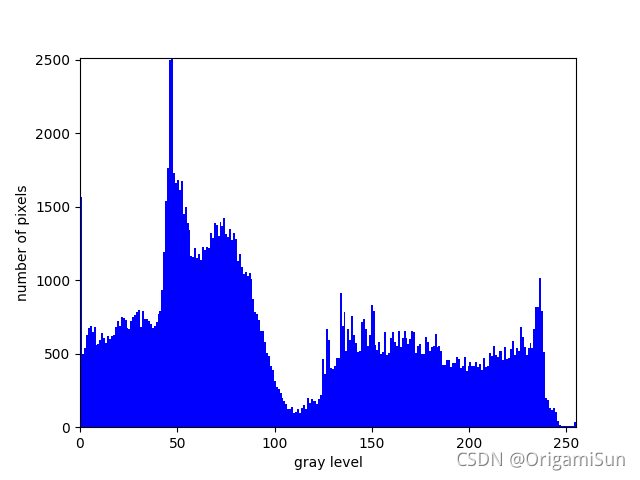
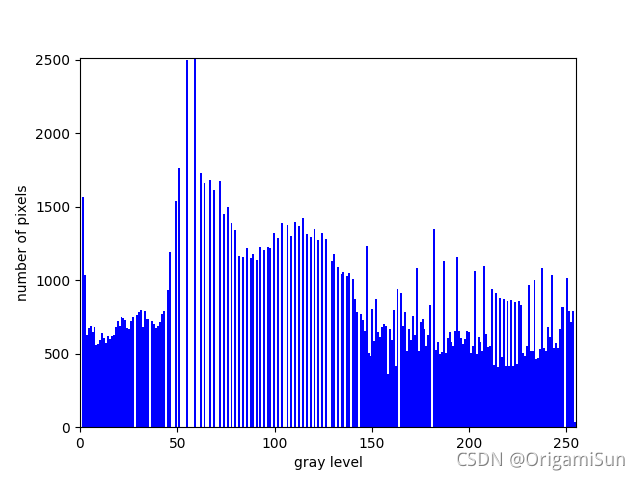
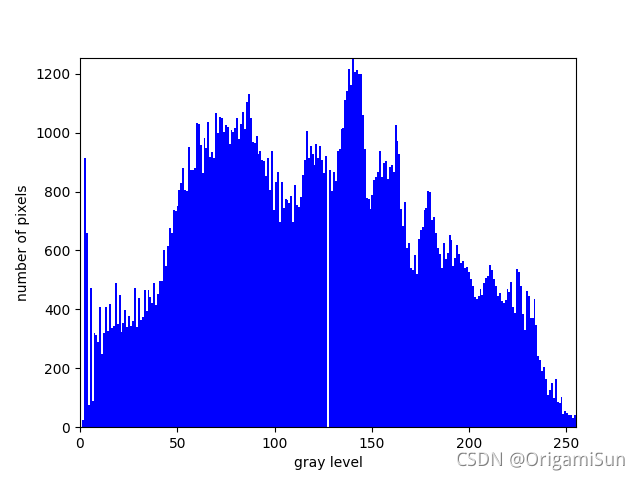



 该博客介绍了两种图像处理技术:全局直方图均衡化和限制对比度的自适应直方图均衡化(CLAHE)。全局直方图均衡化通过重新映射灰度级来提升图像的整体对比度,而CLAHE则通过局部对比度限制避免过强的对比度增强。代码示例展示了如何使用OpenCV库实现这两种方法,并给出了处理前后的图像对比。





 扫一扫
扫一扫


 1060
1060

 被折叠的 条评论
为什么被折叠?
被折叠的 条评论
为什么被折叠?
 到【灌水乐园】发言





