



 本文介绍了如何在Flutter应用中选择合适的动画组件。通过一个决策树,帮助开发者判断应使用隐式还是显式动画,以及何时使用CustomPainter、TweenAnimationBuilder或 AnimatedWidget等。文章还探讨了何时考虑使用第三方动画框架,如Flare和Lottie。
要以视频形式观看这篇文章,请在此处查看我们的 YouTube 视频。
本文最初由 Emily Fortuna 撰写,并已代表她发布。
所以,你决定在你的 Flutter 应用程序中包含一个动画——多么令人兴奋! 问题是,有很多不同的动画组件,因此找出最合适的一个可能会让人不知所措。 幸运的是,这篇文章可以提供帮助!
So, you’ve decided to include an animation in your Flutter app — how
exciting! The thing is, there are a lot of different animation widgets
so figuring out which one is most appropriate can feel overwhelming.
Fortunately, this article is here to help!
您可以问自己关于您想到的动画,我将通过一系列问题以帮助您确定应该如何创建它。另一件要记住的是,核心 Flutter 库中提供的动画组件非常低级。 这意味着如果您有一个复杂的动画,我建议您查看 pub.dev 上提供的一些提供更高级别接口的动画库(animation packages )。
I’ll walk through a series of questions you can ask yourself about the animation you have in mind, to help you determine how you should create it. The other thing to remember is that the animation widgets provided in the core Flutter library are pretty low-level. This means that if you have a complex animation in mind, I recommend you check out some of the animation packages available on pub.dev that provide higher-level interfaces.
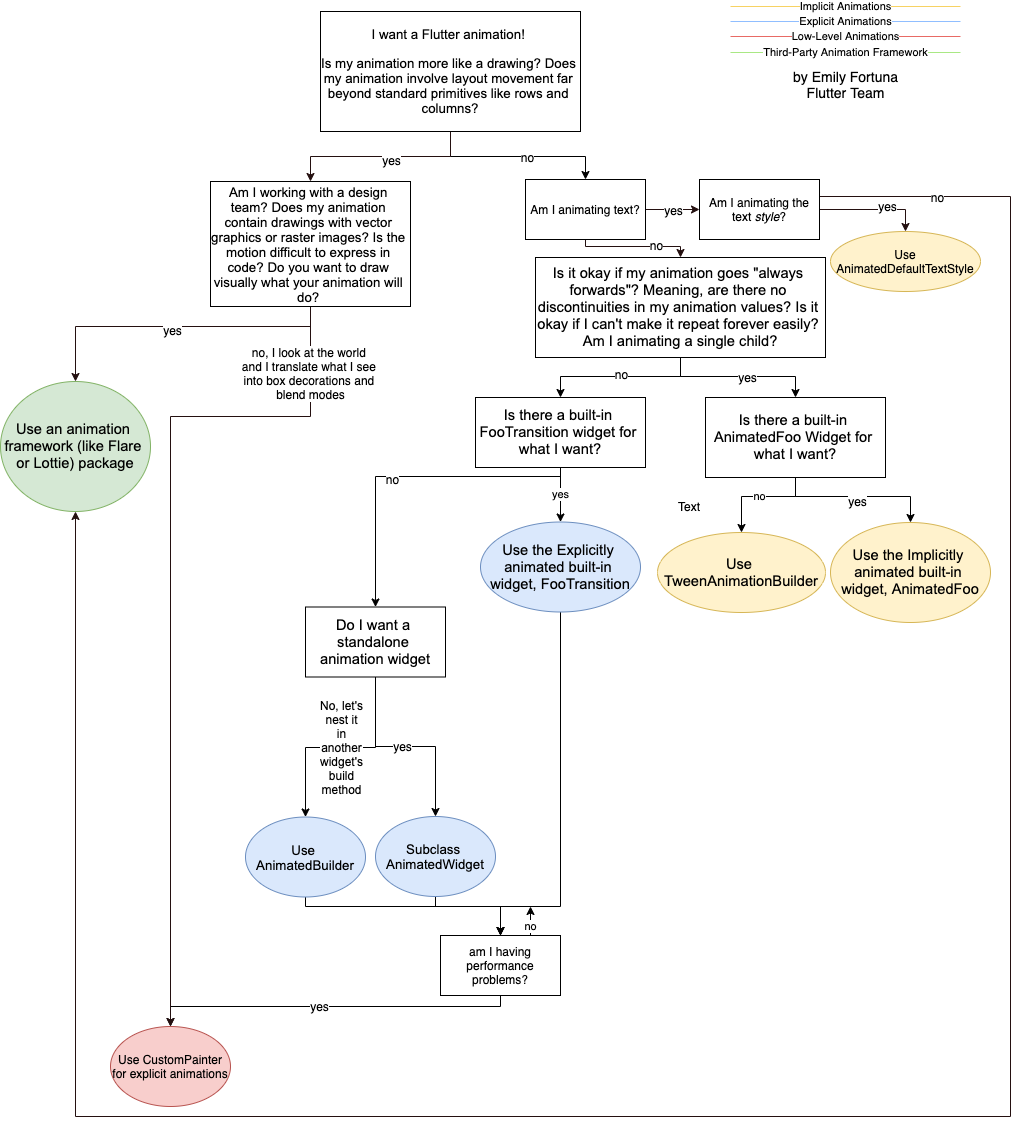
看看下面的决策树,我将在本文中解释:
Take a look at the following decision tree, which I’ll explain in this article:
隐式动画
Implicit Animations
显示动画
Explicit Animations
低级动画
Low-Level Animations
第三方动画框架
Third-Party Animation Framework
作者:Emily Fortuna Flutter Team
by Emily Fortuna Flutter Team
我想要一个 Flutter 动画!
我的动画更像是绘制的吗? 我的动画是否涉及远远超出标准基础类型的布局移动, 如Row和Column?
I want a Flutter animation! Is my animation more like a drawing? Does
my animation involve layout movement far beyond standard primitives
like rows and columns?
我是否在与设计团队合作? 我的动画是否包含带有矢量图形或光栅图像的绘图? 动作很难用代码表达吗? 你想直观地画出你的动画会做什么吗?
Am I working with a design team? Does my animation contain drawings
with vector graphics or raster images? Is the motion difficult to
express in code? Do you want to draw visually what your animation will
do?
是的, 使用动画框架(如 Flare 或 Lottie)包
Use an animation framework(like Flare or Lottie) package
不,我看看这个世界,然后将我所见转化为盒子装饰(box decorations )和混合模式(blend modes)。个人理解:不要设计团队帮忙制作图形,我想自己制作图形动画
no, I look at the world and I translate what I see into box
decorations and blend modes
将 CustomPainter 用于显式动画
Use CustomPainter for explicit animations
我是要让文本做动画吗?
Am I animating text?
我是要让文本样式做动画吗?
Am I animating the text style?
我的动画是否“总是向前”的?意思是动画值是连续的吗?动画不能循环重播吗?我是要让一个单独的child组件做动画吗?
Is it okay if my animation goes “always forwards”? Meaning, are there
no discontinuities in my animation values? Is if okay if I can’t make
it repeat forever easily? Am I animating a single child?
Flutter是否有我想要的内置 FooTransition 控件吗?
Is there a built-in FooTransition widget for what I want?
我想要一个独立的动画控件吗
Do I want a standalone animation widget
不,让我们将它嵌套在另一个控件的的构建方法中
No, let’s nest it in another widget’s build method
使用 AnimatedBuilder
Use AnimatedBuilder
继承 AnimatedWidget,作为其子类
Subclass AnimatedWidget
使用Flutter内置的显示动画控件, FooTransition
Use the Explicitly animated built-in widget, FooTransition
有性能问题吗?
am I having performance problems?
Flutter是否有我想要的内置 AnimatedFoo 控件吗?
Is there a built-in AnimatedFoo Widget for what I want?
使用 TweenAnimationBuilder
Use TweenAnimationBuilder
使用Flutter内置的隐式动画控件, AnimatedFoo
Use the Implicitly animated built-in widget, AnimatedFoo
从广义上讲,您可能希望在 Flutter 应用程序中包含两种主要类型的动画:基于绘图的动画和基于代码的动画。
Broadly speaking, there are two main types of animations that you
might want to include in your Flutter app: drawing-based animations,
and code-based animations.
基于代码的动画以小部件为中心,植根于标准布局和样式原语,如行、列、颜色或文本样式。 这并不是说它们很无聊或简单,但从本质上讲,它们倾向于增强特定现有小部件的外观或过渡,而不是自己充当独立小部件。
Code-based animations are widget-focused and are rooted in standard
layout and style primitives like rows, columns, colors, or text
styles. That’s not to say they’re boring or simple, but at their heart
they tend to enhance a particular existing widget’s appearance or
transition rather than act as a standalone widget in their own right.
相比之下,基于绘图的动画看起来像是有人画的。 它们通常是独立的精灵,如游戏角色,或者涉及纯代码难以表达的转换。
Drawing-based animations, in contrast, look like someone drew them.
They often are stand-alone sprites, like game characters, or involve
transformations that would be challenging to express purely in code.
所以要问自己的第一个问题是:“我的动画是更像是一幅画,还是看起来像是可以用 Flutter 小部件基元构建的东西?” 如果您的动画更像是绘图,或者您正在与将提供矢量或光栅图像资产的设计团队合作,那么我建议您使用第三方工具(例如 Rive 或 Lottie)以图形方式构建您的动画,然后导出它到Flutter。 有几个包可以帮助您在 Flutter 应用程序中包含这些资产。
So the first question to ask yourself is: “Is my animation more like a
drawing, or does it look like something that you can build out of
Flutter widget primitives?” If your animation is more like a drawing,
or you are working with a design team who will provide vector or
raster image assets, then I recommend you use a third-party tool such
as Rive or Lottie to build your animation graphically, and then export
it to Flutter. There are several packages that can help you include
these assets in your Flutter app.
否则,如果您的动画涉及改变小部件(例如更改颜色、形状或位置),您将需要编写一些 Flutter 代码!
Otherwise, if your animations involve mutating widgets — such as changing colors, shapes, or positions — you’ll get to write some Flutter code!
显示还是隐式?
Explicit or implicit
Flutter 基于代码的动画有两种形式:隐式动画和显式动画。 下一步是确定您需要哪种类型。
Flutter code-based animations come in two flavors: implicit and explicit animations. The next step is figuring out which type you need.
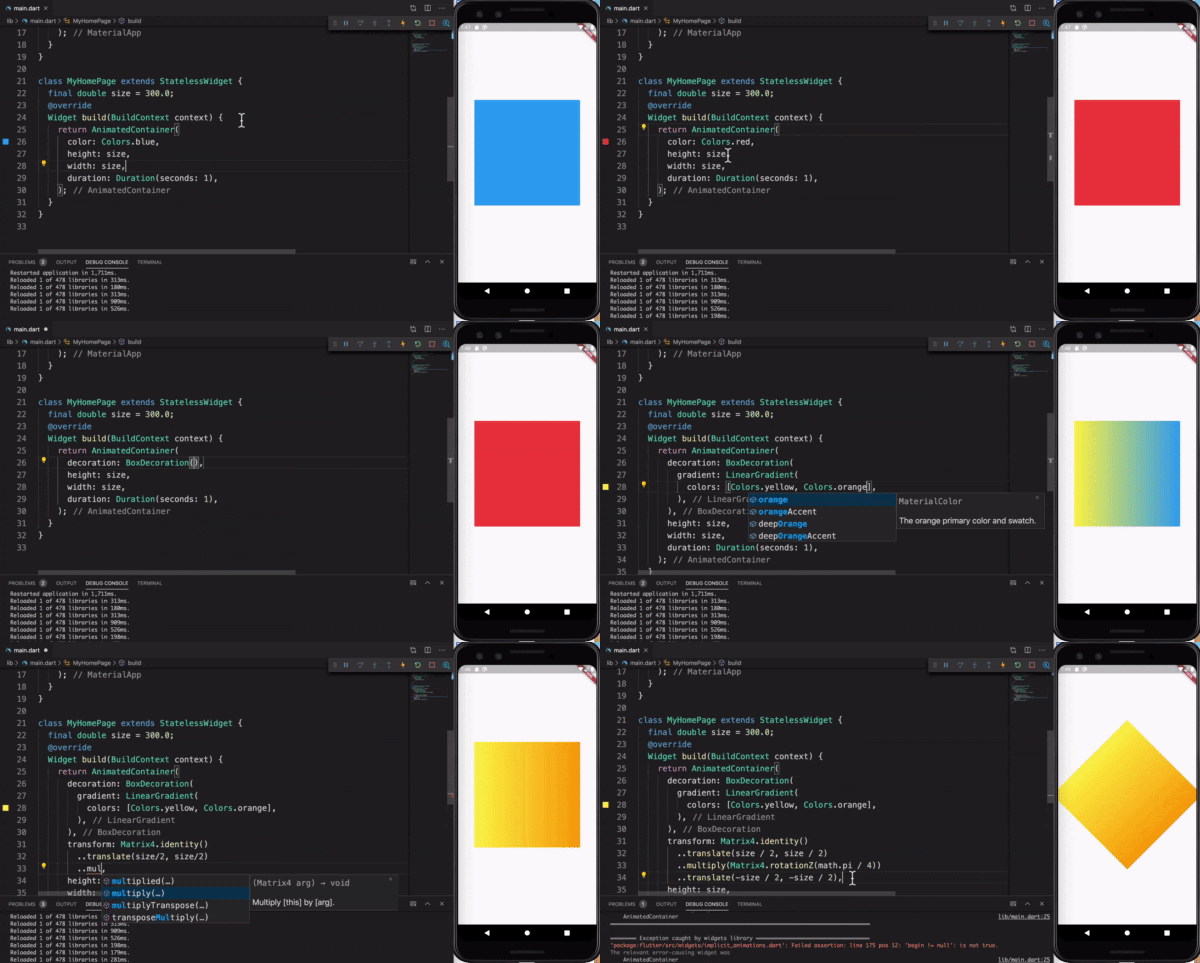
当值发生变化时,隐式动画小部件会产生动画。
Implicit Animation Widgets animate when the values change.
隐式动画依赖于简单地为某些小部件属性设置一个新值,而 Flutter 负责将其从当前值动画到新值。 这些小部件易于使用且功能强大。 您在上面看到的所有动画都是通过隐式动画小部件完成的。 在寻找动画时,隐式动画是一个很好的起点。
Implicit animations rely on simply setting a new value for some widget property and Flutter takes care of animating it from the current value to the new value. These widgets are easy to use and are amazingly powerful. All of the animations you see above are done with implicitly animated widgets. Implicit animations are a good place to start when looking to animate something.
显式动画需要 AnimationController。 它们被称为“显式”,因为它们仅在明确要求时才开始动画。 您可以使用显式动画来完成您可以使用隐式动画执行的所有操作,以及更多内容。 烦人的是你必须手动管理 AnimationController 的生命周期,因为它不是一个小部件,这意味着将它放在一个有状态的小部件中。 因此,如果您可以避免使用隐式动画小部件,您的代码通常会更简单。
Explicit animations require an AnimationController. They are called “explicit” because they only start animating when explicitly asked to. You can use explicit animations to do everything you can with implicit animations, plus a little more. The annoying thing is you have to manually manage the life-cycle of the AnimationController since it’s not a widget, which means putting it inside a stateful widget. For that reason, your code is generally simpler if you can get away with using an implicit animation widget.
有三个问题要问你自己,以确定你需要什么类型的小部件:我的动画会永远重复吗?我所说的“永远”是指当它出现在某个屏幕上,或者只要某个条件是真的,比如音乐播放。
There are three questions to ask yourself to determine what type of widget you need: Does my animation repeat forever? By “forever” I mean while it’s on a certain screen, or as long as a certain condition is true, such as music playing.
要问自己的第二个问题是动画中的值是否不连续。 我所说的不连续动画的一个例子是这个不断增长的圆圈动画。 圆圈反复从小到大,小到大。 它永远不会变小变大,然后再次缩小。 在这种情况下,圆的大小是不连续的。
The second question to ask yourself is whether the values in your animation are discontinuous. An example of what I mean by a discontinuous animation is this growing circle animation. The circle repeatedly grows small-large, small-large. It never grows small-large and then shrinks back down again. In this case, the circle’s size is discontinuous.
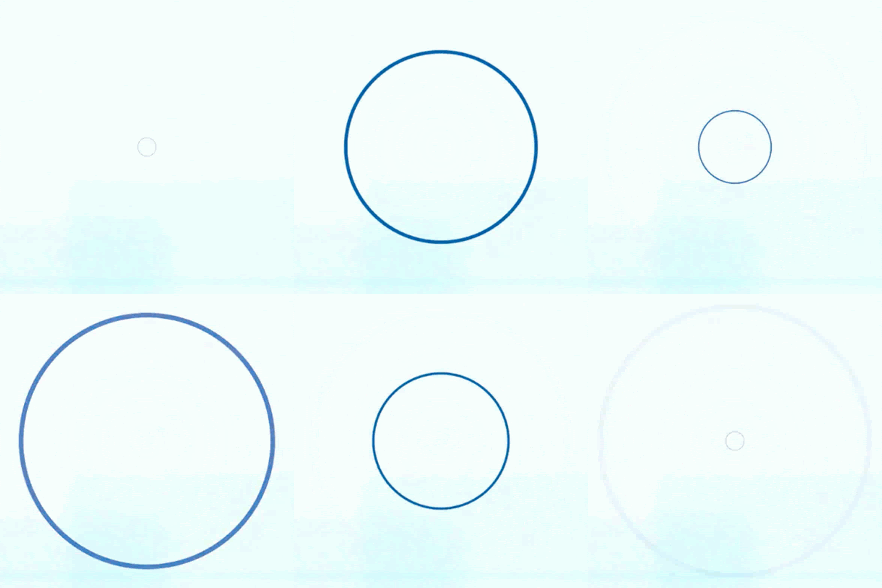
一个只会增长,不会缩小的圆圈。 这是一个不连续的动画!
A circle that only grows, never shrinks. It’s a discontinuous animation!
最后一个要问自己的问题是多个小部件是否以协调的方式一起动画? 例如:
The last question to ask yourself is whether multiple widgets are animating in a coordinated fashion together? For example:

多个盒子一起动画。
Multiple boxes animating together.
如果您对这三个问题中的任何一个回答“是”,则需要使用显式小部件。 否则,您可以使用隐式小部件! 一旦您决定需要隐式还是显式小部件,最后一个问题将引导您找到所需的特定小部件。
If you answered “yes” to any of those three questions, you need to use an explicit widget. Otherwise, you can use an implicit widget! Once you’ve decided whether you need an implicit or explicit widget, the last question will lead you to finding the specific widget you need.
选择哪个小部件?
Which widget?
问问自己,是否有适合我需要的内置小部件? 如果您正在寻找内置的隐式动画小部件,请查找名为 AnimatedFoo 的小部件,其中“Foo”是您要设置动画的属性,例如 AnimatedOpacity。 还要检查 AnimatedContainer,因为它是一个非常强大且通用的小部件,可用于许多不同的隐式动画。
Ask yourself, is there a built-in widget for my needs? If you’re looking for a built-in implicit animation widget, look for widgets named AnimatedFoo where “Foo” is the property you want to animate, such as AnimatedOpacity. Also check AnimatedContainer as it is an extremely powerful and versatile widget for many different implicit animations.
如果找不到需要的内置隐式动画,可以使用 TweenAnimationBuilder 来创建自定义的隐式动画。 相反,如果您正在寻找一个内置的显式小部件,它们通常被称为 FooTransition,其中“Foo”是您正在制作动画的属性,例如 SlideTransition。
If you can’t find the built-in implicit animation you need, you can use TweenAnimationBuilder to create a custom implicit animation. Conversely, if you’re looking for a built-in explicit widget, they are usually called FooTransition, where “Foo” is the property you’re animating, such as SlideTransition.
如果你找不到相关的内置显式动画,你需要问自己最后一个问题:我希望我的动画是一个独立的小部件还是另一个周围小部件的一部分? 这个问题的答案主要是品味问题。 如果你想要一个独立的自定义显式动画,你应该扩展 AnimatedWidget。 否则,您可以使用 AnimatedBuilder。
If you can’t find a relevant built-in explicit animation, there is one last question you need to ask yourself: Do I want my animation to be a standalone widget or part of another surrounding widget? The answer to this is mostly of a matter of taste. If you want a standalone custom explicit animation, you should extend AnimatedWidget. Otherwise, you can use AnimatedBuilder.
如果您遇到性能问题,还有最后一个选项需要考虑,那就是使用 CustomPainter 制作动画。 您可以像使用 AnimatedWidget 一样使用它,但 CustomPainter 直接绘制到 Canvas,而不需要标准的小部件构建范例。 如果使用得当,您可以创建一些简洁、高度自定义的效果或节省性能。 但是,如果滥用,您的动画可能会导致更多的性能问题。 所以,要小心,就像手动内存管理一样,确保在到处散布共享指针之前知道自己在做什么。
There’s one last option to consider if you’re seeing performance problems, and that is animating with CustomPainter. You can use it much like AnimatedWidget, but CustomPainter paints directly to the Canvas, without the standard widget build paradigm. When used well, you can create some neat, extremely custom effects or save on performance. When misused, though, your animation could cause more performance issues. So, take care and, much like manual memory management, make sure you know what you’re doing before sprinkling shared pointers everywhere.
结论
Conclusion
总之,您可以问自己一系列高级问题来指导如何创建动画。 这一系列问题创建了一个决策树,用于确定哪种小部件或包适合您的需求。 如果你折叠这些端点,它们会变成一条线,从左到右大约表示难度。 感谢您的阅读,并继续创建出色的 Flutter 动画——通过第三方框架或包,无论是显式还是隐式!
In summary, there are a series of high-level questions you can ask yourself that guide how to create your animation. That sequence of questions creates a decision tree for determining what widget or package is right for your needs. If you collapse those end-points, they fall into a line, approximately indicating difficulty from left to right. Thanks for reading, and go forth and create great Flutter animations — through a third-party framework, or with packages, either explicitly, or implicitly!
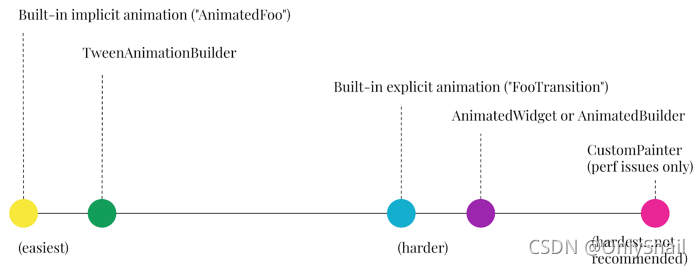
从最简单到最难的动画小部件。
Animation widgets from easiest … to hardest.
本系列文章:
Articles in this series:
- 如何选择适合你的 Flutter Animation Widget? (这遍文章)
- Flutter 动画基础与隐式动画
- Flutter 中的自定义隐式动画……使用 TweenAnimationBuilder
- 带有内置显式动画的定向动画
- 我什么时候应该使用 AnimatedBuilder 或 AnimatedWidget?
- 深入动画
- How to Choose Which Flutter Animation Widget is Right for You? (this article)
- Flutter animation basics with implicit animations
- Custom Implicit Animations in Flutter…with TweenAnimationBuilder
- Directional animations with built-in explicit animations
- When should I use AnimatedBuilder or AnimatedWidget?
- Animation deep dive





 扫一扫
扫一扫


 374
374

 被折叠的 条评论
为什么被折叠?
被折叠的 条评论
为什么被折叠?
 到【灌水乐园】发言





