



 本文详细介绍了在IntelliJ IDEA中解决Spring框架XML配置文件中p命名空间注册问题的具体步骤,通过正确配置Schemas and DTDs,避免了因URI未注册导致的错误。
出现这个问题,找了很多。都是没说到问题点子上,解决不了。分享下具体怎么解决。
<?xml version="1.0" encoding="UTF-8" ?>
<beans xmlns="http://www.springframework.org/schema/beans"
       xmlns:xsi="http://www.w3.org/2001/XMLSchema-instance"
       xmlns:context="http://www.springframework.org/schema/context" xmlns:p="http://springframework.org/schema/p"
       xsi:schemaLocation="http://www.springframework.org/schema/beans
       http://www.springframework.org/schema/beans/spring-beans-4.0.xsd
       http://www.springframework.org/schema/context
       http://www.springframework.org/schema/context/spring-context-4.0.xsd">
    <context:component-scan base-package="com.smart.web"/>
    <bean
            class="org.springframework.web.servlet.view.InternalResourceViewResolver"
            p:viewClass="org.springframework.web.servlet.view.JstlView"
            p:prefix="/WEB-INF/jsp/"
            p:suffix=".jsp"/>

</beans>
上面配置中 xmlns:p="http://springframework.org/schema/p" 标签出错,报“URI is not registered...”
解决办法:
打开File-------->Settings-------->Languages&Frameworks--------->Schemas and DTDs ---------->
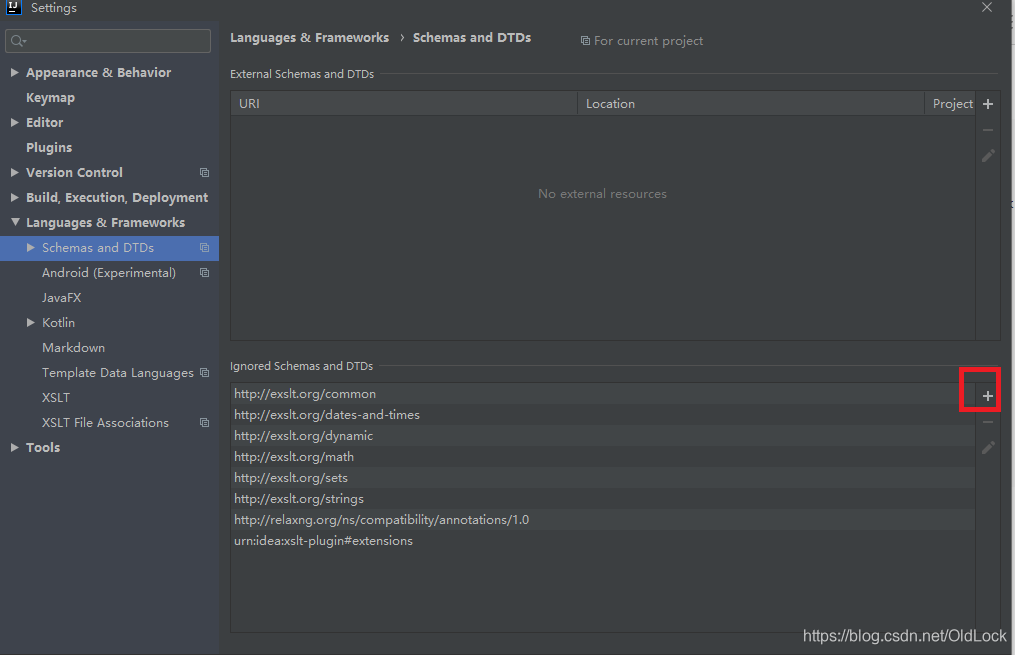
加入“http://springframework.org/schema/p” ---->Apply
OK了,解决问题。





 扫一扫
扫一扫


 1万+
1万+

 被折叠的 条评论
为什么被折叠?
被折叠的 条评论
为什么被折叠?
 到【灌水乐园】发言





