


目录
一、前言
Android开发新手入门,安全性会有所欠佳
欢迎各路大佬提供宝贵建议
1.项目环境
- JDK 1.8(JAVA环境)
- MySQL 5.5(数据库环境)
- Android Studio(安卓端开发)
- Navicat Premium 12(数据库可视化)
- IntelliJ IDEA 2017(服务端开发)
- 阿里云服务器(服务端搭建平台)
- 花生壳(内网穿透工具)
本文仅供学习,如需转载请标明出处,谢谢 😃
二、Android前端制作
1.基本框架结构
Android端普遍分为两大模块:
- 交互界面布局设计(俗称 Layout.xml):通俗的说,它决定了你的APP长什么样
- 功能及事件响应编程(俗称 Activity.class):通俗的说,它决定了你的APP怎么使用
2.UI交互界面设计
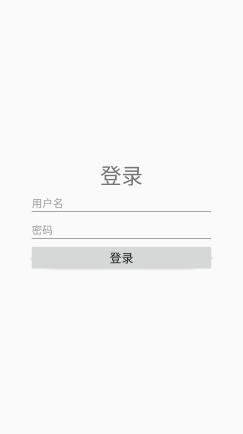
首先设计登录界面粗糙设计(用户名,密码,登录按钮)
奉上Layout文件
<?xml version="1.0" encoding="utf-8"?>
<androidx.constraintlayout.widget.ConstraintLayout xmlns:android="http://schemas.android.com/apk/res/android"
    xmlns:app="http://schemas.android.com/apk/res-auto"
    xmlns:tools="http://schemas.android.com/tools"
    android:layout_width="match_parent"
    android:layout_height="match_parent"
    tools:context=".MainActivity">

    <LinearLayout
        android:layout_width="match_parent"
        android:layout_height="match_parent"
        android:gravity="center"
        android:orientation="vertical"
        android:paddingLeft="50dp"
        android:paddingRight="50dp">

        <TextView
            android:id="@+id/tv_Title"
            android:layout_width="match_parent"
            android:layout_height="wrap_content"
            android:gravity="center"
            android:text="登录"
            android:textSize="36sp" />

        <EditText
            android:id="@+id/et_username"
            android:layout_width="match_parent"
            android:layout_height="wrap_content"
            android:ems="10"
            android:hint="用户名"
            android:inputType="text" />

        <EditText
            android:id="@+id/et_password"
            android:layout_width="match_parent"
            android:layout_height="wrap_content"
            android:ems="10"
            android:hint="密码"
            android:inputType="textPassword" />

        <Button
            android:id="@+id/btn_login"
            android:layout_width="match_parent"
            android:layout_height="wrap_content"
            android:text="登录"
            android:textSize="20sp" />
    </LinearLayout>
</androidx.constraintlayout.widget.ConstraintLayout>
效果是这样的
3.Activity功能实现
import androidx.appcompat.app.AppCompatActivity;

import android.os.Bundle;
import android.view.View;
import android.widget.Button;
import android.widget.TextView;
 最低0.47元/天 解锁文章






 扫一扫
扫一扫


 3180
3180


 到【灌水乐园】发言



