

ELK入门——解决:Failed to start heartbeat.service: Unit not found

本文介绍了一种常见的情况,即直接启动Heartbeat服务时遇到失败,并给出了正确的服务名称及启动命令。通过使用systemctl list-unit-files --type=service命令来查找正确的心跳服务名称,然后使用systemctl start heartbeat-elastic命令成功启动。

以往我们都是直接start logastash/filebeat,但是直接运行heartbeat我们会发现失败了,提示没有找到这个service

systemctl start heartbeat

其实是heartbeat的服务名不对,用下面这行语句查看服务,我们可以找到heartbeat所对应的.service

systemctl list-unit-files --type=service
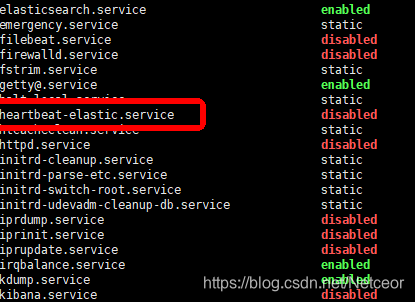
重新运行下面语句就可以了

systemctl start heartbeat-elastic
这是deployment.yaml但是报错Error: YAML parse error on vms-core-server/templates/deployment.yaml: error converting YAML to JSON: yaml: invalid map key: map[interface {}]interface {}{".Values.service.cloudAccessS.port":interface {}(nil)} apiVersion: apps/v1 kind: Deployment metadata: name: {{ include "service.name" . }}-{{ .Values.app.version | lower }} namespace: {{ .Values.app.namespace }} labels: app.kubernetes.io/name: {{ include "service.name" . }} helm.sh/chart: {{ include "service.chart" . }} spec: replicas: {{ .Values.replicaCount }} strategy: {{- toYaml .Values.deployment.strategy | nindent 4 }} minReadySeconds: {{ .Values.deployment.minReadySeconds }} selector: matchLabels: app.kubernetes.io/name: {{ include "service.name" . }} app.kubernetes.io/version: {{ .Values.app.version | lower }} region: {{ .Values.app.region }} template: metadata: annotations: configmap/checksum: {{ include "configmap.checksum" . | quote }} secret/checksum: {{ include "secret.checksum" . | quote }} sidecar.istio.io/proxyMemory: "512Mi" sidecar.istio.io/proxyMemoryLimit: "2Gi" sidecar.istio.io/proxyCPU: "200m" sidecar.istio.io/proxyCPULimit: "2000m" # 解决开启sidecar之后不能使用pod ip访问devops的问题 traffic.sidecar.istio.io/excludeOutboundPorts: "8851" traffic.sidecar.istio.io/excludeInboundPorts: "8083" labels: app.kubernetes.io/name: {{ include "service.name" . }} app.kubernetes.io/version: {{ .Values.app.version | lower }} region: {{ .Values.app.region }} elk: {{ .Values.app.elk }} spec: serviceAccountName: irsa-{{ include "service.name" . }}-{{ .Values.app.version | lower }} terminationGracePeriodSeconds: {{ .Values.deployment.terminationGracePeriodSeconds }} containers: - name: {{ .Chart.Name }} image: "{{ .Values.image.repository }}:{{ .Values.image.tag }}" imagePullPolicy: {{ .Values.image.pullPolicy }} volumeMounts: - name: config-volume mountPath: {{ .Values.configMap.mountPath }} - name: secret-volume mountPath: {{ .Values.secret.mountPath }} env: - name: ENVIRONMENT value: {{ .Values.app.environment }} - name: REGION value: {{ .Values.app.region }} - name: JVMARGS value: {{ .Values.app.jvmArgs }} - name: SERVER_MODE value: {{ .Values.app.mode }} - name: SERVER_NAME value: {{ .Values.app.name }} - name: SERVER_VERSION value: {{ .Values.app.version }} - name: SW_AGENT_NAME value: {{ .Values.app.name }} - name: CPU_REQUEST value: {{ .Values.resources.requests.cpu }} - name: THRESHOLD value: {{ .Values.cpuShell.threshold }} - name: SW_AGENT_COLLECTOR_BACKEND_SERVICES value: oap-server-{{ include "region.short" . }}.skywalking.svc.cluster.local:11800 {{- range $key, $value := .Values.env }} - name: {{ $key }} value: {{ $value | quote }} {{- end }} ports: - name: http-actuator containerPort: {{ .Values.service.httpActuator.port }} protocol: TCP - name: grpc containerPort: {{ .Values.service.grpc.port }} protocol: TCP - name: http containerPort: {{ .Values.service.http.port }} protocol: TCP - name: event containerPort: {{ .Values.service.event.port }} protocol: TCP - name: ops containerPort: {{ .Values.service.ops.port }} protocol: TCP - name: internal containerPort: {{ .Values.service.internal.port }} protocol: TCP - name: websocket containerPort: {{ .Values.service.websocket.port }} protocol: TCP - name: cloud-access containerPort: {{ .Values.service.cloudAccess.port }} protocol: TCP - name: cloud-access-s containerPort: { { .Values.service.cloudAccessS.port } } protocol: TCP - name: ai containerPort: {{ .Values.service.ai.port }} protocol: TCP lifecycle: preStop: exec: command: ["/bin/bash","-c","/home/ubuntu/server/scripts/stop.sh"] livenessProbe: {{- toYaml .Values.healthCheck.livenessProbe | nindent 12 }} readinessProbe: {{- toYaml .Values.healthCheck.readinessProbe | nindent 12 }} resources: {{- toYaml .Values.resources | nindent 12 }} volumes: - name: config-volume configMap: name: {{ include "service.name" . }}-{{ .Values.app.version | lower }}-config - name: secret-volume secret: secretName: {{ include "service.name" . }}-{{ .Values.app.version | lower }}-secret {{- with .Values.nodeSelector }} nodeSelector: {{- toYaml . | nindent 8 }} {{- end }} {{- with .Values.affinity }} affinity: {{- toYaml . | nindent 8 }} {{- end }} {{- with .Values.tolerations }} tolerations: {{- toYaml . | nindent 8 }} {{- end }} {{- if ne .Values.app.cloudPlatform "aws" }} imagePullSecrets: - name: awsecr-cred {{- end }}
最新发布
10-21
评论
成就一亿技术人!
拼手气红包6.0元
还能输入1000个字符
 
红包 添加红包
表情包 插入表情
 条评论被折叠 查看
添加红包

请填写红包祝福语或标题

红包个数最小为10个

红包金额最低5元

当前余额3.43前往充值 >
需支付:10.00
成就一亿技术人!
领取后你会自动成为博主和红包主的粉丝 规则
hope_wisdom
发出的红包
实付
使用余额支付
点击重新获取
扫码支付
钱包余额 0

抵扣说明:

1.余额是钱包充值的虚拟货币,按照1:1的比例进行支付金额的抵扣。
2.余额无法直接购买下载,可以购买VIP、付费专栏及课程。

余额充值


