


首先安装WSL:
1. 打开windows PowerShell
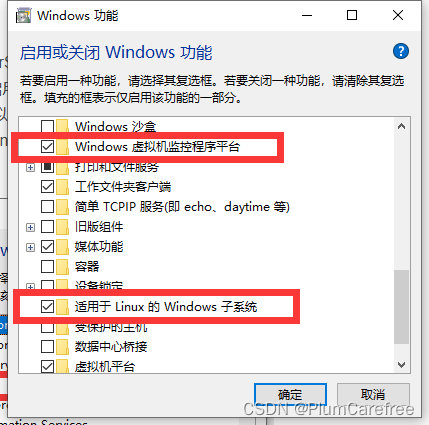
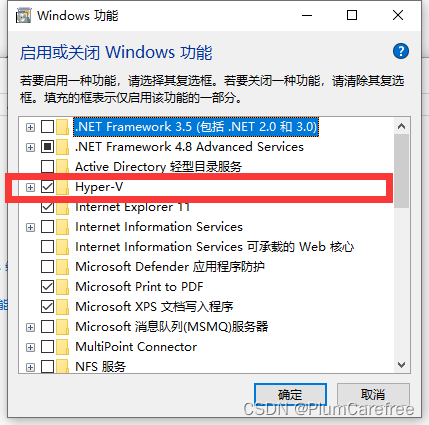
2. 控制面板->程序->启用或关闭 windows 功能
1. 开启Windows虚拟机监控程序平台
2. 适用于Linux的Windows子系统
3. 开启Hyper-V
3. 重启电脑
4. PowerShell中开启 windows 子系统:
dism.exe /online /enable-feature /featurename:Microsoft-Windows-Subsystem-Linux /all /norestart
5. PowerShell中开启虚拟机特性
dism.exe /online /enable-feature /featurename:VirtualMachinePlatform /all /norestart
6. PowerShell中切换和更新WSL2
wsl --set-default-version 2
wsl --update
然后安装Unbuntu22.04 LTS
7. windows应用商店中下载Ubuntu22.04.3LTS
8. 下载成功后,即可在开始菜单中点击Ubuntu,然后进入Ubuntu配置自己的账号密码等,刚开始有些慢





 扫一扫
扫一扫


 6633
6633

 被折叠的 条评论
为什么被折叠?
被折叠的 条评论
为什么被折叠?
 到【灌水乐园】发言





