



目录
2、使用ConfigurationProperties注解(常用)
7、使用Spring Expression Language (SpEL)
在Spring Boot应用中,读取配置是一项基础且重要的任务。Spring Boot提供了多种灵活的方式来读取配置,以满足不同场景下的需求。本文将总结一下Spring Boot中读取配置的几种常用方法。
一、七种配置方式目录
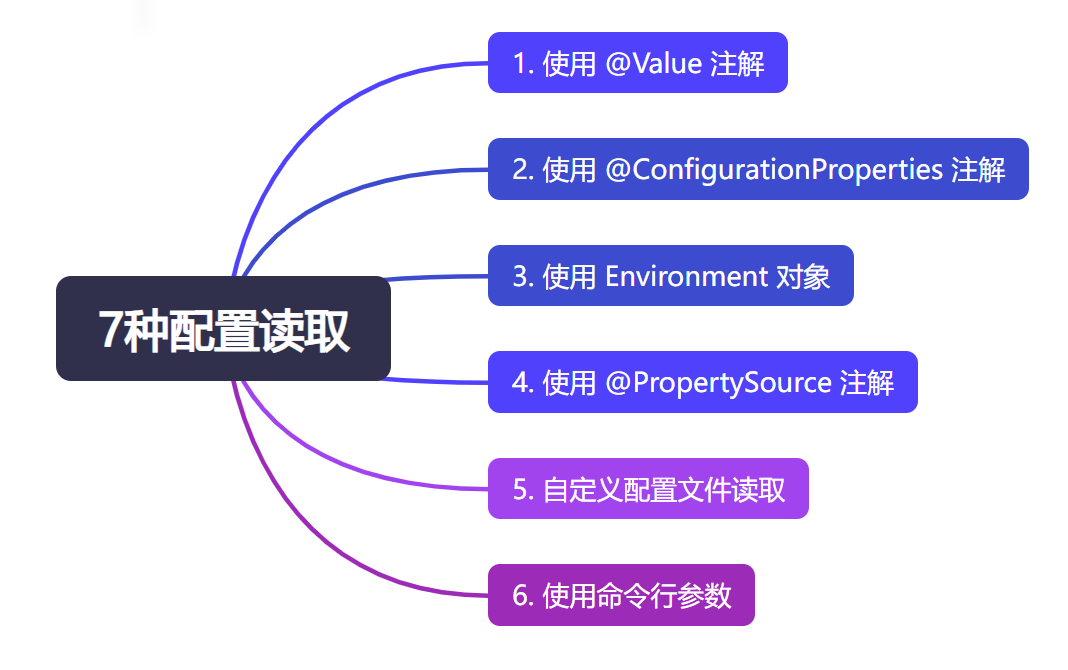
二、具体配置方式介绍
1、使用@Value注解(常用)
@Value注解是最直接且常用的读取配置的方式。它可以将配置文件中的属性值注入到Spring管理的Bean的字段中。
配置文件 application.yml
server:
  port: 8080

fruits:
  name: apple
  price: 10
配置获取类:
@Component
@Getter
@Setter
public class GetConfig {

	@Value("${fruits.name}")
	private String name;

	@Value("${fruits.price}")
	private Integer price;

}
总结:
@Value注解只能读取单个配置进行赋值,无法读取整个配置文件批量赋值
可以在属性名称后面使用冒号(:default-value)的形式添加默认值
只能用于被Spring管理的Bean中使用,或Java配置@Configuration类
可以用于字段、构造函数参数、方法参数和方法上。当将它放在方法上时,Spring容器初始化时会调用该方法,并将配置属性的值作为方法的参数传递进去.
2、使用ConfigurationProperties注解(常用)
ConfigurationProperties注解允许将配置文件的属性绑定到一个Bean上,这样可以更方便地管理和使用配置信息。与@Value注解相比,ConfigurationProperties支持复杂类型的配置,如列表、集合等。
配置文件 application.yml
server:
  port: 8080

fruits:
  name: apple
  price: 10
  color: red
         green
配置获取类:
@Component
@Getter
@Setter
@ConfigurationProperties(prefix = "fruits")
public class GetConfigTwo {
	private String name;

	private Integer price;

	private List<String> color;
}
@ConfigurationProperties使用注意事项:
「配置文件属性名与类字段名的映射规则」:
默认情况下,@ConfigurationProperties会将配置文件中的属性名与类字段名进行映射。例如,配置文件中的
student.name会自动映射到类字段name上。如果配置文件中的属性名与类字段名不一致,可以使用@Value注解或通过setter方法来指定映射关系。
「支持类型转换」:@ConfigurationProperties支持自动类型转换,能够将配置文件中的字符串值转换为目标字段的类型。例如,将字符串转换为整数、布尔值等。如果无法进行类型转换,会抛出异常。
「默认值和可选属性」:
可以为@ConfigurationProperties注解的字段设置默认值,以防止配置文件中缺少对应的属性。可以使用":"符号指定默认值,例如
@Value("${my.property:default-value}")。另外,可以使用
required属性来指定某个属性是否为必需的。「配置项的验证和校验」:可以使用JSR-303/349规范的注解对@ConfigurationProperties注解的字段进行验证和校验。例如,使用@NotBlank、@Min、@Max等注解来限制属性值的有效性。
3、使用Environment对象(常用)
Environment对象提供了访问配置信息的方法。可以通过注入Environment对象来获取配置属性值。
配置文件 application.yml
server:
  port: 8080

fruits:
  name: apple
  price: 10
  color: red
         green
配置获取类:
@Component
@Getter
@Setter
public class GetConfigThree {
	private String name;

	private Integer price;

	@Autowired
	private Environment environment;

	public void someMethod() {
		String someKey = environment.getProperty("fruits.name");
		System.out.println(someKey);
	}
}
4、 使用@PropertySource注解 (常用)
@PropertySource注解允许指定额外的属性文件作为配置源。这对于读取非application.properties或application.yml文件中的配置非常有用。
配置自定义配置文件 my.yml
# 定义一个名为my的配置文件
fruits:
  name: apple
  price: 10
  color: red
         green
配置获取类:
@Configuration
@Getter
@Setter
@PropertySource("classpath:my.yml")
public class GetConfigFour {
	@Value("${fruits.name}")
	private String name;

	@Value("${fruits.price}")
	private Integer price;
}
5、 自定义配置文件读取
在某些情况下,需要读取非标准的配置文件(如JSON、XML等)。这时,可以通过编写自定义的配置文件读取逻辑来实现。例如,使用Jackson库来读取JSON配置文件。
@Service
public class ConfigService {
    private MyConfig config;

    @PostConstruct
    public void init() throws IOException {
        ObjectMapper mapper = new ObjectMapper();
        InputStream inputStream = new ClassPathResource("config.json").getInputStream();
        this.config = mapper.readValue(inputStream, MyConfig.class);
    }

    // ... 使用config的方法
}
6、 使用命令行参数
Spring Boot应用也支持通过命令行参数来传递配置信息。可以通过实现
CommandLineRunner接口来访问命令行参数。
import org.springframework.boot.CommandLineRunner;
import org.springframework.stereotype.Component;

@Component
public class CommandLineAppStartupRunner implements CommandLineRunner {

    @Override
    public void run(String... args) throws Exception {
        if (args.length > 0) {
            System.out.println("接收到命令行参数:");
            for (String arg : args) {
                System.out.println(arg);
            }
        } else {
            System.out.println("没有接收到命令行参数。");
        }
    }
}
打包并运行Spring Boot应用。在运行时通过命令行传递参数。
java -jar your-spring-boot-app.jar arg1 arg2 arg3arg1、arg2和arg3是作为命令行参数传递给应用的。
7、使用Spring Expression Language (SpEL)
SpEL可以在
@Value注解中使用,以更复杂的表达式形式来读取配置值。例如,可以结合系统属性或环境变量来动态获取配置。
@Value("#{systemProperties['some.key'] ?: 'default'}")
private String someKey;





 扫一扫
扫一扫


 5615
5615


 到【灌水乐园】发言




