



 本文深入探讨了Java NIO编程模型,对比BIO模型,介绍了NIO的核心组件如Channel、Buffer和Selector,并通过实战案例详细讲解了如何使用NIO搭建聊天室服务器与客户端。
一文学习网络编程之NIO
前置知识:
- Java基础知识;
- BIO网络编程知识;
- 多线程编程知识;
一、网络编程模型
1.编程模型
模型:对事务共性的抽象;
编程模型:对编程共性的抽象;
实际的问题 具体的解决方案 抽象出一套
依靠这个模型来解决这一类问题;
2.BIO网络模型
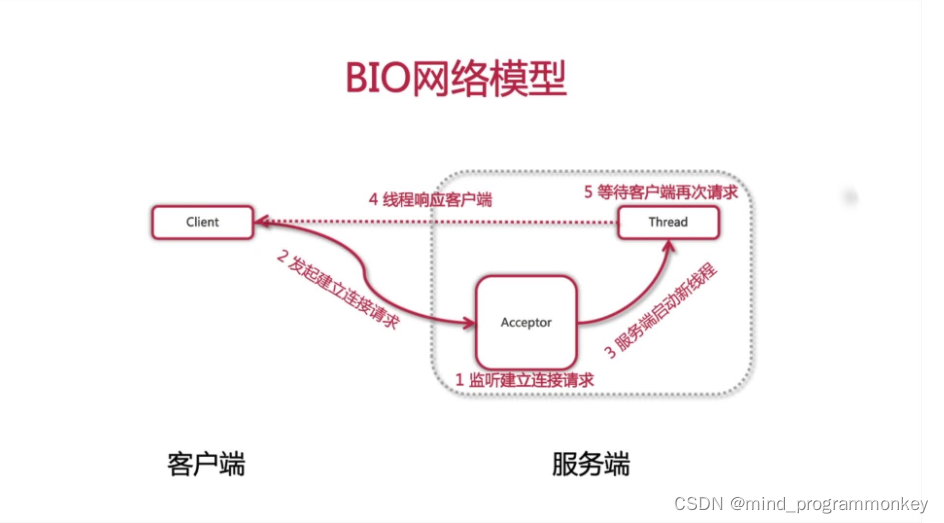
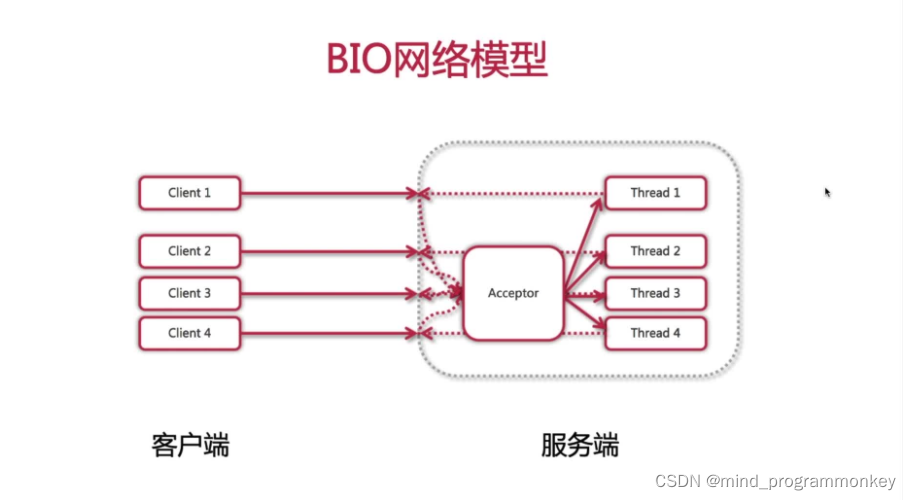
- 阻塞式 I/O 模型
- 如果客户端没有发起请求,服务的会一直存在并等待连接
- 弹性伸缩能力差
- 每一个对服务端的连接就需要开启一个线程
- 连接数很可能超过服务器所能负载的最大线程数
- 多线程耗资源
- 创建,销毁,维护大量线程以及线程切换都非常消耗系统资源
3.NIO网络模型
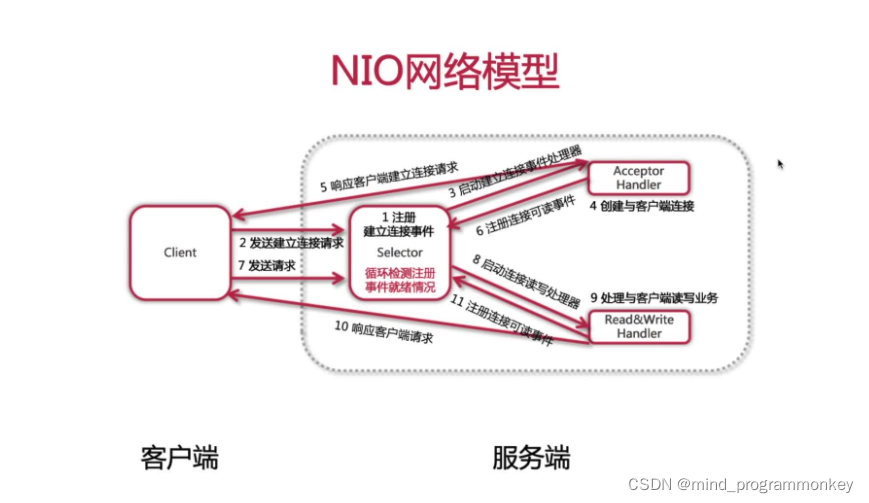
- 非阻塞 IO 模型
- 服务器端提供一个单线程的 selector 来统一管理所有客户端接入的连接
- 并负责监听每个连接所关心的事件
- 弹性伸缩能力加强
- 服务器端一个线程处理所有客户端的连接请求
- 客户端的个数与服务器端的线程数呈 M 比 1 的关系
- 单线程节省资源
- 避免了线程的频繁创建和销毁
- 同时也避免了多个线程之间上下文的切换,提高了执行效率
二、BIO下的TCP编程通信
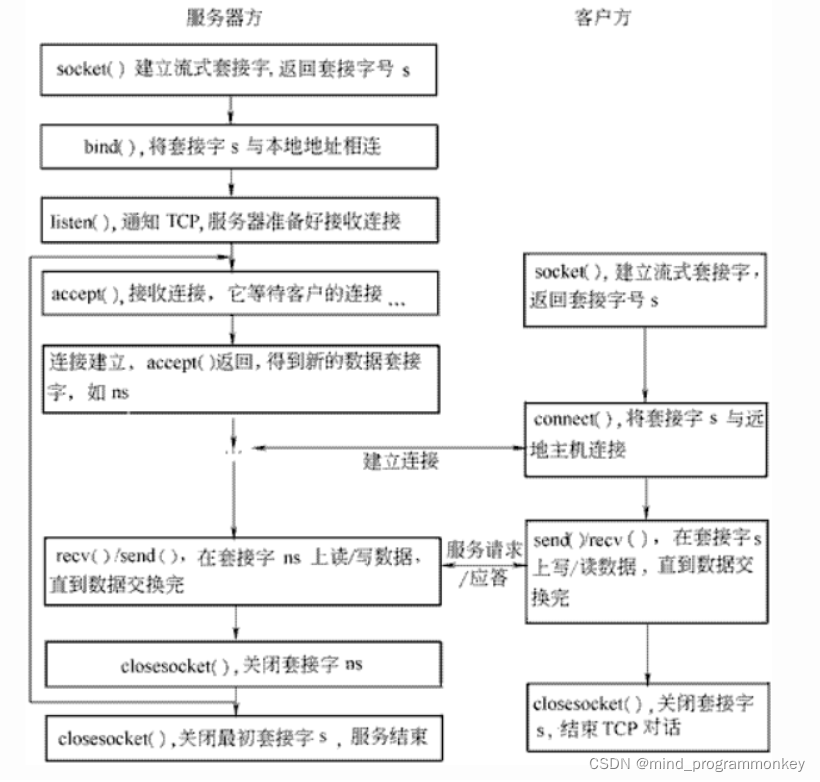
1.服务器端server
server.java
import java.io.IOException;
import java.net.InetAddress;
import java.net.ServerSocket;
import java.net.Socket;

/**
 * @author : codingchao
 * @date : 2022-01-17 21:14
 * @Description: 服务器端
 **/
public class Server {
    /**
     * 启动服务器端
     */
    public void start() throws IOException {
        //1.服务器端监听建立连接请求
        ServerSocket serverSocket = new ServerSocket(8888);
        System.out.println("服务端即将启动,等待客户端的连接...");
        //2.客户端发起建立连接请求
        int count = 0;
        Socket socket  = null;
        while(true){//循环监听客户端的连接
            //调用accept()方法监听,等待客户端连接以获取socket实例
            socket = serverSocket.accept();
            //3.服务器端启动新线程
            //4.线程响应客户端
            //5.等待客户单再次请求
            //创建新线程
            Thread thread = new Thread(new ServerThread(socket));
            thread.start();
            count++;
            System.out.println("服务器端被连接过的次数:"+count);
            InetAddress address = socket.getInetAddress();
            System.out.println("当前客户端IP为:"+address.getHostAddress());
        }


    }

    public static void main(String[] args) throws IOException {
        Server server = new Server();
        server.start();
    }
}
ServerThread.java
/**
 * @author : codingchao
 * @date : 2022-01-17 21:21
 * @Description:
 **/
import java.io.BufferedReader;
import java.io.IOException;
import java.io.InputStream;
import java.io.InputStreamReader;
import java.io.OutputStream;
import java.io.PrintWriter;
import java.net.Socket;

public class ServerThread implements Runnable{

    Socket socket = null;
    public ServerThread(Socket socket){
        this.socket = socket;
    }
    @Override
    public void run() {
        InputStream is = null;
        InputStreamReader isr = null;
        BufferedReader br = null;
        OutputStream os = null;
        PrintWriter pw = null;
        //与客户端建立通信,获取输入流,读取客户端提供的信息
        try {
            is = socket.getInputStream();
            isr = new InputStreamReader(is,"UTF-8");
            br = new BufferedReader(isr);
            String data = null;
            while((data = br.readLine())!=null){
                System.out.println("我是服务器,客户端提交的信息为:"+data);
                socket.shutdownInput();//关闭输入流

                //获取输出流,响应客户端的请求
                os = socket.getOutputStream();
                pw = new PrintWriter(os);
                pw.write("服务器端响应成功");
                pw.flush();
            }
        } catch (IOException e) {
            // TODO Auto-generated catch block
            e.printStackTrace();
        }finally{
            //关闭资源和相关socket
            try{
                if(pw!=null){
                    pw.close();
                }
                if(os!=null){
                    os.close();
                }
                if(is!=null){
                    is.close();
                }
                if(isr!=null){
                    isr.close();
                }
                if(br!=null){
                    br.close();
                }
                if(socket!=null){
                    socket.close();
                }
            }catch(Exception e){
                e.printStackTrace();
            }
        }
    }
}
2.客户端client
/**
 * @author : codingchao
 * @date : 2022-01-17 21:23
 * @Description:
 **/
import java.io.BufferedReader;
import java.io.IOException;
import java.io.InputStream;
import java.io.InputStreamReader;
import java.io.OutputStream;
import java.io.PrintWriter;
import java.net.Socket;
import java.net.UnknownHostException;


public class Client {
    public static void main(String[] args) {
        try{
            Socket socket = new Socket("localhost",8888);
            OutputStream os = socket.getOutputStream();
            PrintWriter pw = new PrintWriter(os);
            pw.write("用户名:jinxueling;密码:123");
            pw.flush();
            socket.shutdownOutput();

            InputStream is = socket.getInputStream();
            InputStreamReader isr = new InputStreamReader(is,"UTF-8");
            BufferedReader br = new BufferedReader(isr);
            String data = null;
            while((data = br.readLine())!=null){
                System.out.println("我是客户端,服务器端响应的数据为:"+data);
            }
            socket.close();
        }catch (UnknownHostException e) {
            e.printStackTrace();
        }catch(IOException e){
            e.printStackTrace();
        }
    }
}
三、NIO下的聊天室编程
1NIO网络编程详解
NIO 核心
Channel:通道Buffer:缓冲区Selector:选择器或多路复用器
1.1. Channel
特点:
- 双向性
- 非阻塞性
- 操作唯一性
实现:
- 文件类:
FileChannel - UDP 类:
DatagramChannel - TCP 类:
ServerSocketChannel/SocketChannel
/*
  代码片段1:服务器端通过服务端socket创建channel
 */
ServerSocketChannel serverSocketChannel = ServerSocketChannel.open();
/*
  代码片段2:服务器端绑定端口
 */
serverSocketChannel.bind(new InetSocketAddress(8000));
 /*
 代码片段3:服务器端监听客户端连接,建立socketChannel连接
 */
SocketChannel socketChannel = serverSocketChannel.accept();
/*
 代码片段4:客户端连接远程主机及端口
 */
SocketChannel socketChannel = SocketChannel.open(
        new InetSocketAddress("127.0.0.1", 8000));
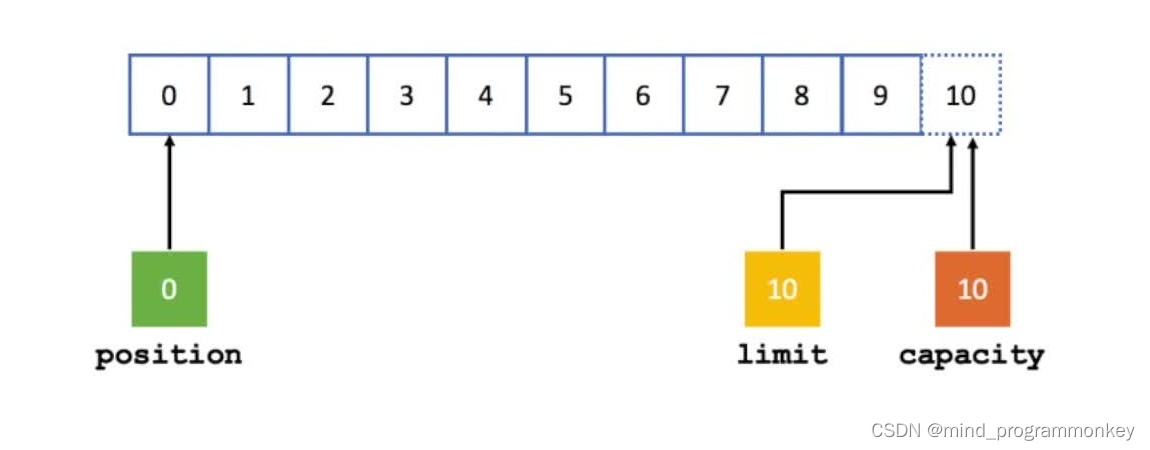
1.2 Buffer
作用:读写 Channel 中数据
本质:一块内存区域
属性:
Capacity:容量Position:位置Limit:上限Mark:标记
用法:
/*
  初始化长度为10的byte类型buffer
 */
ByteBuffer.allocate(10);
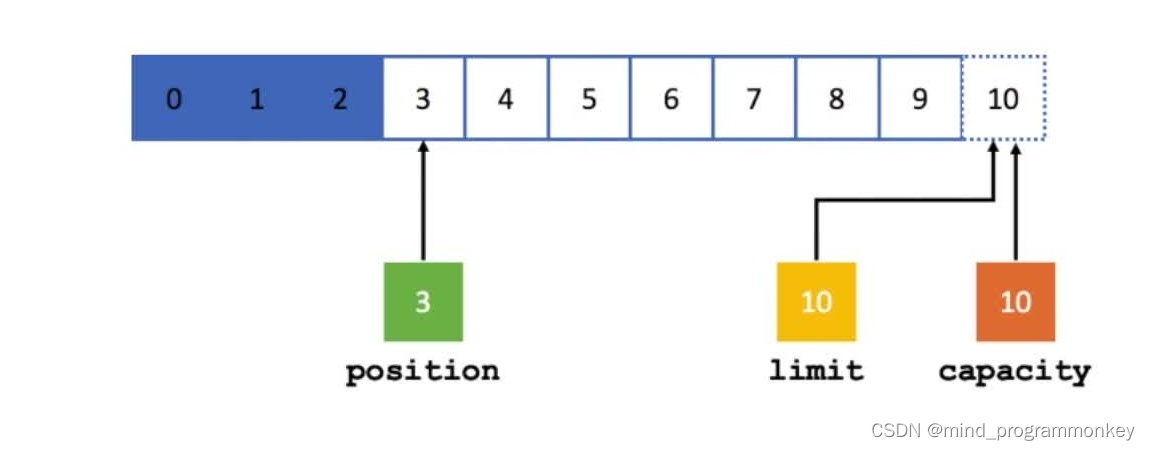
/*
  向byteBuffer中写入三个字节
 */
ByteBuffer.put("abc".getBytes(Charset.forName("UTF-8")));
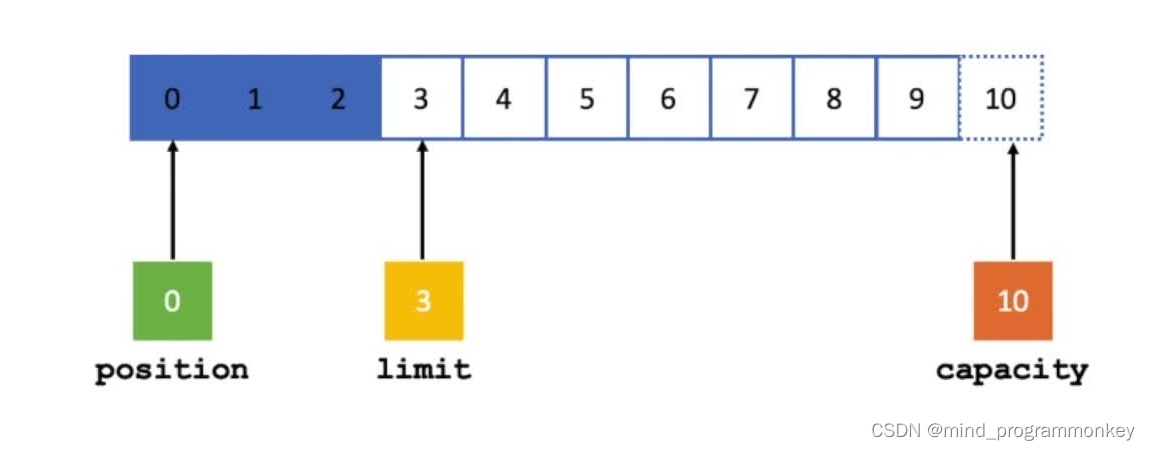
/*
  将byteBuffer从写模式写换到读模式
 */
ByteBuffer.flip();
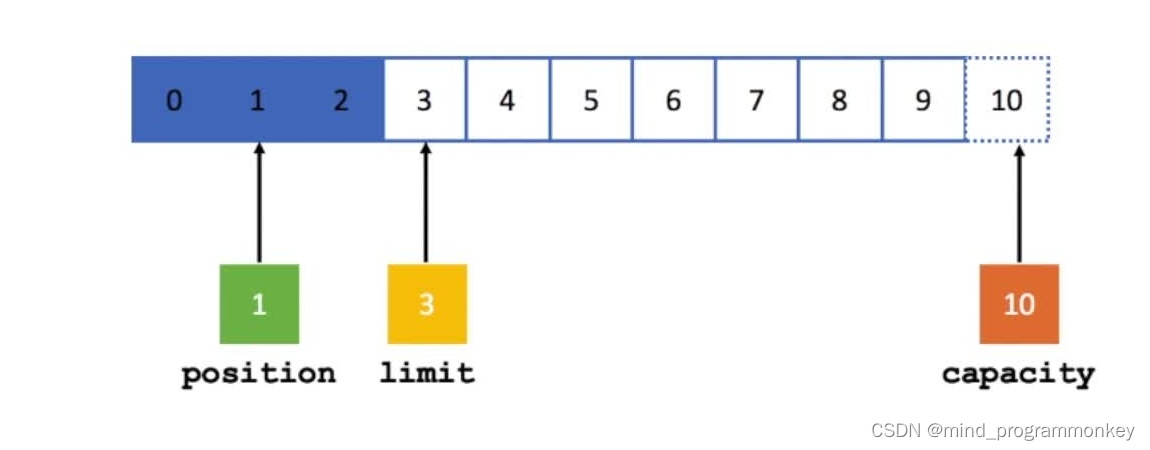
/*
  从byteBuffer中读取一个字节
 */
ByteBuffer.get();
/*
  调用mark方法记录下当前position的位置
 */
ByteBuffer.mark();
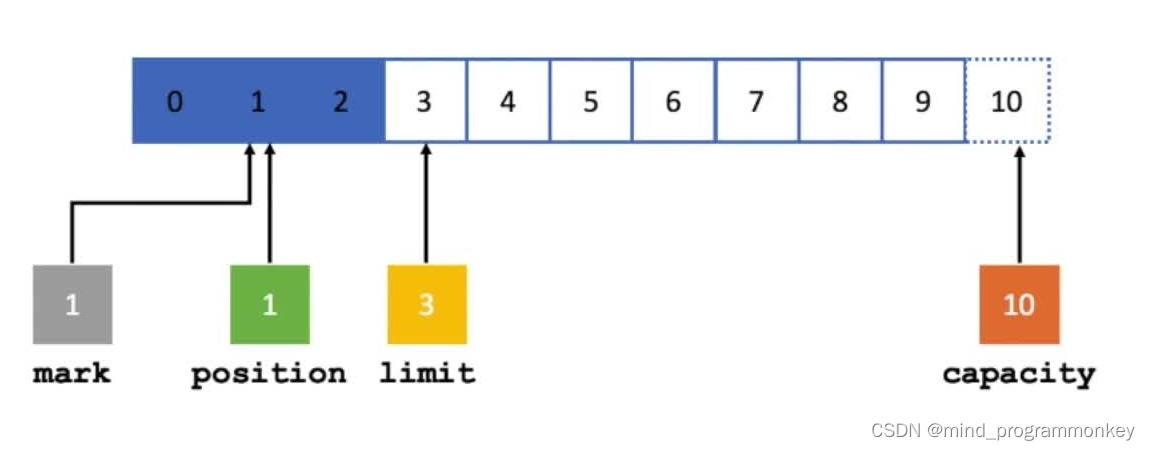
/*
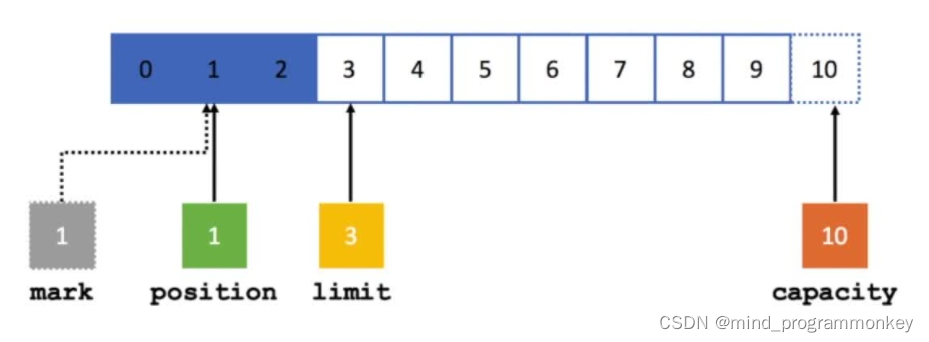
  先调用get方法读取下一个字节
  再调用reset方法将position重置到mark位置
 */
ByteBuffer.get();
ByteBuffer.reset();
/*
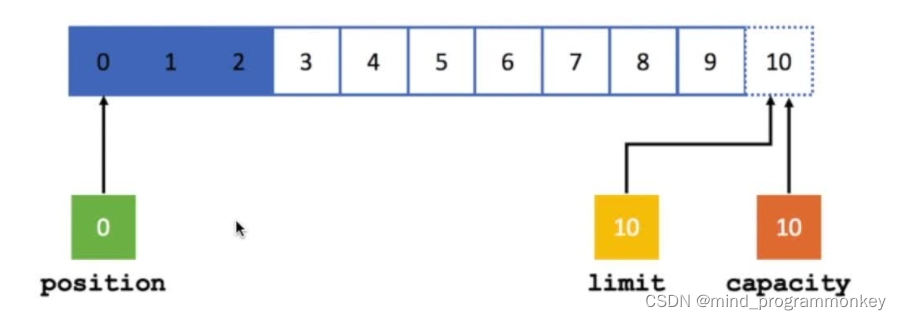
  调用clear方法,将所有属性重置
 */
ByteBuffer.clear();
1.3 Selector
作用:I/O 事件就绪选择
地位:NIO 网络编程的基础之一
/*
  代码片段1,创建Selector
 */
Selector selector = Selector.open();
/*
  代码片段2,将channel注册到selector上,监听读就绪事件
 */
serverSocketChannel.register(selector, SelectionKey.OP_READ);
/*
  代码片段3,阻塞等待channel有就绪事件发生
 */
int selectNum = selector.select();
/*
  代码片段4,获取发生就绪事件的channel集合
 */
Set<SelectionKey> selectionKeys = selector.selectedKeys();
SelectionKey 提供四种就绪状态常量:
- 连接就绪:
connect - 接受就绪:
accept - 读就绪:
read - 写就绪:
write
1.4 NIO编程步骤
- 第一步:创建
Selector - 第二步:创建
ServerSocketChannel,并绑定监听端口 - 第三步:将
Channel设置为非阻塞模式 - 第四步:将
Channel注册到Selector上,监听连接事件 - 第五步:循环调用
Selector的select方法,检测就绪情况 - 第六步:调用
selectedKeys方法获取就绪channel集合 - 第七步:判断就绪事件种类,调用业务处理方法
- 第八步:根据业务需要决定是否再次注册监听事件,重复执行第三步操作
2.NIO网络编程聊天室实战
2.1 服务器端
import java.io.IOException;
import java.net.InetSocketAddress;
import java.nio.ByteBuffer;
import java.nio.channels.*;
import java.nio.charset.Charset;
import java.nio.charset.StandardCharsets;
import java.util.Iterator;
import java.util.Set;

/**
 * @author : codingchao
 * @date : 2022-01-18 09:29
 * @Description: NIO服务器端
 **/
public class NioServer {
    /**
     * 启动函数
     */
    public void start() throws IOException {
        //1.创建selector
        Selector selector = Selector.open();
        //2.通过serversocketchannel创建channel通道
        ServerSocketChannel serverSocketChannel = ServerSocketChannel.open();
        //3.为channel绑定监听端口
        serverSocketChannel.bind(new InetSocketAddress(8000));
        //4.设置channel为非阻塞模式
        serverSocketChannel.configureBlocking(false);
        //5.将channel注册到selector上监听连接事件
        serverSocketChannel.register(selector, SelectionKey.OP_ACCEPT);
        System.out.println("服务器启动成功");
        //6.循环等待新接入的连接
        for (;;){

            //获取可用的channel数量
            int readChannels = selector.select();
            if (readChannels==0){
                continue;
            }
            //获取可用的channel地址集合
            Set<SelectionKey> selectionKeySet = selector.selectedKeys();
            Iterator<SelectionKey> iterator = selectionKeySet.iterator();
            while (iterator.hasNext()){
                //selectionKey实例
                SelectionKey  selectionKey= (SelectionKey) iterator.next();
                //移除set中当前selectionKey实例
                iterator.remove();
                //7.根据对应状态,调用对应方法处理业务逻辑
                if (selectionKey.isAcceptable()){
                    //如果是接入事件
                    acceptHandler(serverSocketChannel,selector);
                }
                if (selectionKey.isReadable()){
                    //如果是可读事件
                    readHandler(selectionKey,selector);
                }
            }
        }

    }

    /**
     * 接入事件处理器
     */
    private void acceptHandler(ServerSocketChannel serverSocketChannel,
                               Selector selector) throws IOException {
        //如果是接入事件,创建socketchannel
        SocketChannel socketChannel = serverSocketChannel.accept();
        //将socketchannel设置为非阻塞工作模式
        socketChannel.configureBlocking(false);
        //将channel注册到selector上,监听可读事件
        socketChannel.register(selector,SelectionKey.OP_READ);
        //回复客户端提示信息
        socketChannel.write(StandardCharsets.UTF_8.encode("你与聊天室李其他人都不是朋友关系,请注意隐私安全"));
    }

    /**
     * 可读事件处理器
     * @param selectionKey
     * @param selector
     */
    private void readHandler(SelectionKey selectionKey,Selector selector) throws IOException {
        //从selectionkey中获取到已经就绪的channel
        SocketChannel socketChannel  = (SocketChannel) selectionKey.channel();
        //创建buffer
        ByteBuffer byteBuffer = ByteBuffer.allocate(1024);
        //循环读取客户端请求信息
        StringBuilder request = new StringBuilder();
        while (socketChannel.read(byteBuffer)>0){
            //切换buffer为读模式
            byteBuffer.flip();
            //读取buffer中的内容
            request.append(StandardCharsets.UTF_8.decode(byteBuffer));
        }

        //将channel再次注册到selector上,监听其它的可读事件
        socketChannel.register(selector,SelectionKey.OP_READ);
        //将客户端发送的请求信息,广播到其它客户端
        if (request.length()>0){
            boardCast(selector,socketChannel,request.toString());
        }
    }

    /**
     * 将消息广播到其它客户端中
     * @param selector
     * @param sourceChannel
     * @param request
     */
    private void boardCast(Selector selector, SocketChannel sourceChannel, String request) {
        //获取到所有已接入的客户端channel
        Set<SelectionKey> selectionKeySet = selector.keys();
        //循环向所有channel广播信息
        selectionKeySet.forEach(selectionKey -> {
            Channel targetChannel= selectionKey.channel();
            //剔除发消息的客户端
            if (targetChannel instanceof SocketChannel && targetChannel != sourceChannel){
                try {
                    //将消息发送到targetChannel客户端
                    ((SocketChannel) targetChannel).write(StandardCharsets.UTF_8.encode(request));
                } catch (IOException e) {
                    e.printStackTrace();
                }
            }
        });
    }

    public static void main(String[] args) throws IOException {
        NioServer nioServer = new NioServer();
        nioServer.start();
    }
}
2.2 客户端
import java.io.IOException;
import java.net.InetSocketAddress;
import java.nio.channels.SelectionKey;
import java.nio.channels.Selector;
import java.nio.channels.SocketChannel;
import java.nio.charset.StandardCharsets;
import java.util.Scanner;

/**
 * @author : codingchao
 * @date : 2022-01-18 09:50
 * @Description: Nio客户端
 **/
public class NioClient {
    /**
     * 启动客户端
     */
    public void start(String nickname) throws IOException {
        SocketChannel socketChannel = SocketChannel.open(new InetSocketAddress("127.0.0.1", 8000));
        System.out.println("客户端启动成功");
        /**
         * 接收服务器响应
         * 新开线程,专门负责来接收服务器端的响应数据
         * selector socketchannel注册
         */
        Selector selector = Selector.open();
        socketChannel.configureBlocking(false);
        socketChannel.register(selector, SelectionKey.OP_READ);
        new Thread(new NioClientHandler(selector)).start();

        /**
         * 向服务器端发送数据
         */
        Scanner scanner = new Scanner(System.in);
        while (scanner.hasNextLine()){
            String request = scanner.nextLine();
            if (request!=null&&request.length()>0){
                socketChannel.write(StandardCharsets.UTF_8.encode(nickname+" : " + request));
            }
        }
    }
}
import java.io.IOException;
import java.nio.ByteBuffer;
import java.nio.channels.SelectionKey;
import java.nio.channels.Selector;
import java.nio.channels.SocketChannel;
import java.nio.charset.StandardCharsets;
import java.util.Iterator;
import java.util.Set;

/**
 * @author : codingchao
 * @date : 2022-01-18 10:03
 * @Description:客户端线程类,专门接收服务器端响应消息
 **/
public class NioClientHandler implements Runnable{
    private final Selector selector;

    public NioClientHandler(Selector selector) {
        this.selector = selector;
    }

    @Override
    public void run() {
        try {
            for (;;){
                int readChannels = selector.select();
                if (readChannels==0){
                    continue;
                }
                Set<SelectionKey> selectionKeySet = selector.selectedKeys();
                Iterator<SelectionKey> iterator = selectionKeySet.iterator();
                while(iterator.hasNext()){
                    SelectionKey selectionKey = iterator.next();
                    iterator.remove();
                    if (selectionKey.isReadable()){
                        readHander(selectionKey,selector);
                    }
                }
            }
        } catch (IOException e) {
            e.printStackTrace();
        }
    }


    private void readHander(SelectionKey selectionKey,Selector selector) throws IOException {
       SocketChannel socketChannel = (SocketChannel) selectionKey.channel();
        ByteBuffer byteBuffer = ByteBuffer.allocate(1024);
        StringBuilder response = new StringBuilder();
        while(socketChannel.read(byteBuffer)>0){
            byteBuffer.flip();
            response.append(StandardCharsets.UTF_8.decode(byteBuffer));
        }
        socketChannel.register(selector,SelectionKey.OP_READ);
        if (response.length()>0){
            System.out.println(response);
        }
    }
}
3.NIO网络编程缺陷
- 麻烦
- NIO 类库和 API 繁杂
- 心累
- 可靠性能力补齐,工作量和难度都非常大
- 有坑
- Selector 空轮询,导致 CPU 占用率 100%





 扫一扫
扫一扫


 1236
1236

 被折叠的 条评论
为什么被折叠?
被折叠的 条评论
为什么被折叠?
 到【灌水乐园】发言





