 Spring AOP深度解析:面向切面编程实战与应用



 本文详细介绍了AOP的基本概念,Spring中的AOP应用,包括声明式事务和自定义切面,并通过代码实例展示了如何使用Spring API、自定义切面和注解实现AOP,适合深入理解并实践AOP在Spring框架中的运用。
一、什么时AOP
AOP (Aspect Oriented Programming)意为:面向切面编程,通过预编译方式和运行期动态代理实现程序功能的统一维护的一种技术。
AOP是OOP的延续,是软件开发中的一个热点,也是Spring框架中的一个重要内容,是函数式编程的一种衍生范型。利用AOP可以对业务逻辑的各个部分进行隔离,从而使得业务逻辑各部分之间的耦合度降低,提高程序的可重用性,同时提高了开发的效率。
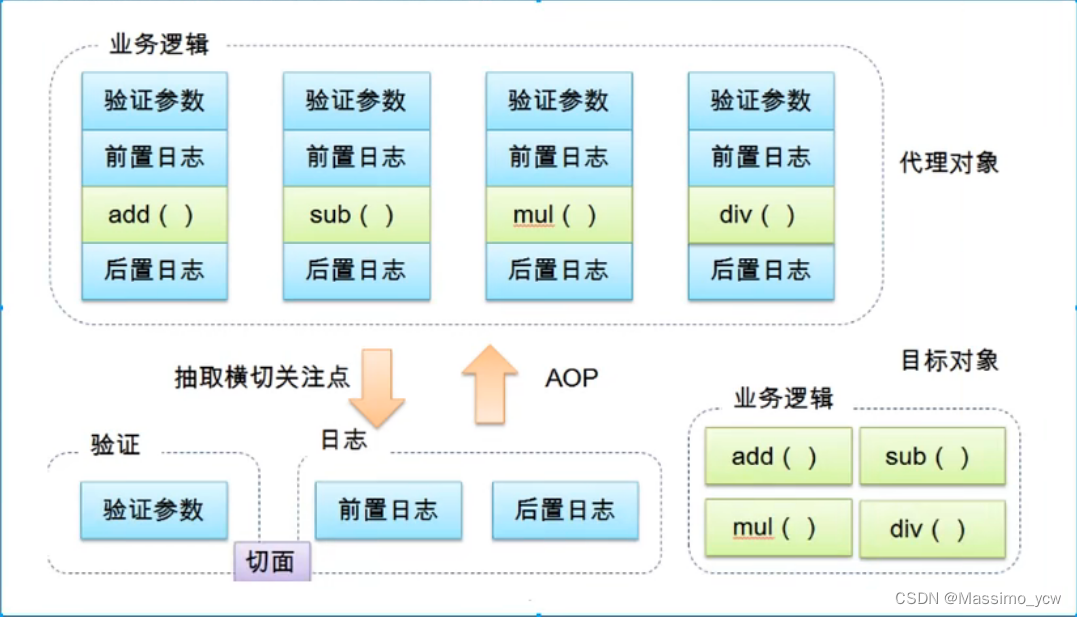
二、AOP在Spring中的作用
提供声明式事务;允许用户自定义切面。
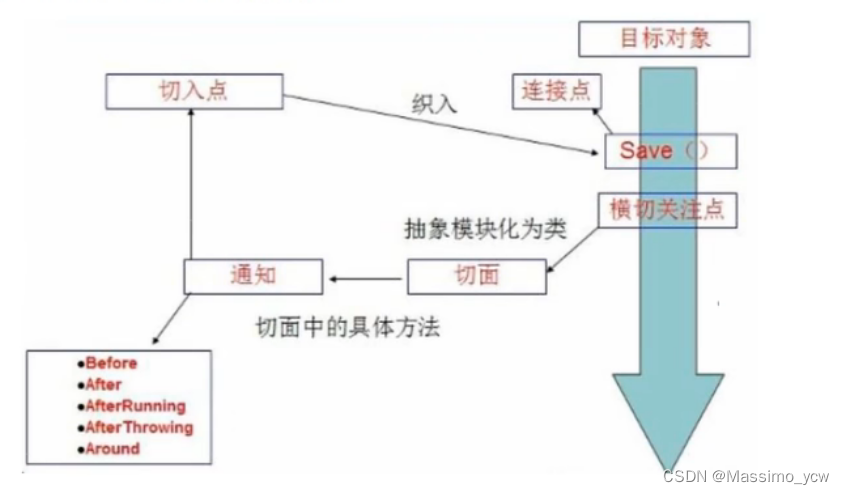
- 横切关注点:跨越应用程序多个模块的方法或功能。即是,与我们业务逻辑无关的,但是我们需要关注的部分,就是横切关注点。如日志,安全,缓存,事务等等…
- 切面(ASPECT) :横切关注点被模块化的特殊对象。即,它是一个类。
- 通知(Advice) :切面必须要完成的工作。即,它是类中的一个方法。
- 目标(Target) :被通知对象。
- 代理(Proxy) :向目标对象应用通知之后创建的对象。
- 切入点(PointCut) :切面通知执行的“地点"的定义。
- 连接点(JointPoint) :与切入点匹配的执行点。
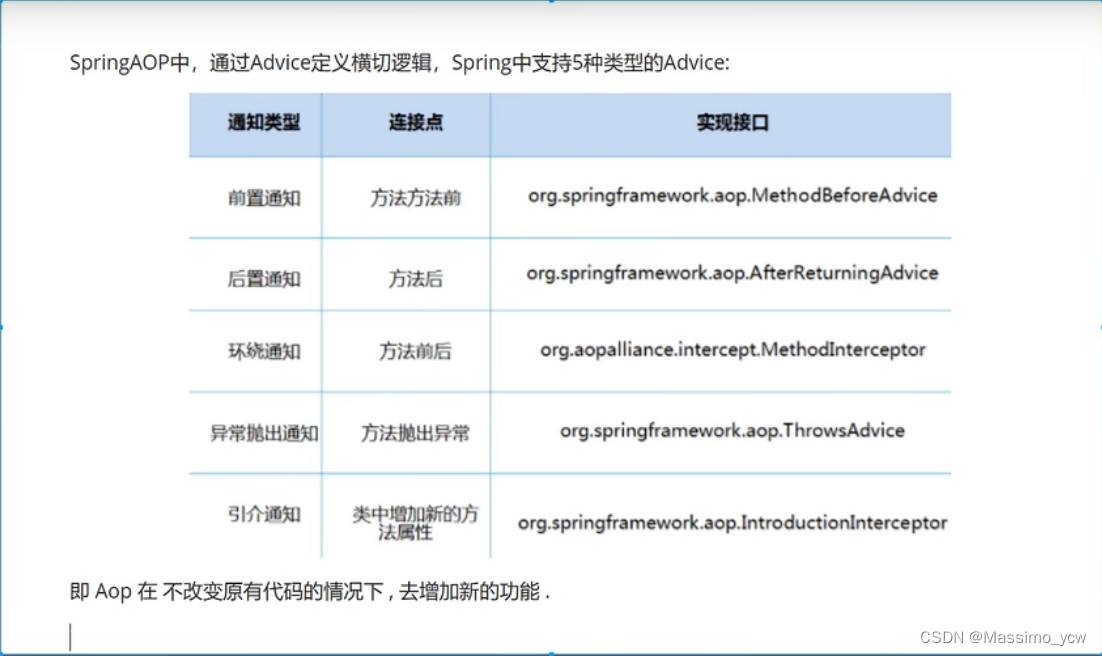
SpringAOP中,通过Advice定义横切逻辑,Spring中支持5种类型的Advice:
三、使用Spring实现Aop
【重点】使用AOP织入,需要导入一个依赖包!
<dependency>
		<groupId>org.aspectj</groupId>
		<artifactId>aspectjweaver</artifactId>
		<version>1.9.4</version>
</dependency>
3.1、方式一:使用Spring的API接口
3.1.1、接口
package com.massimo.service;

public interface UserService {
    public void add();
    public void delete();
    public void update();
    public void query();
}
3.1.2、实际角色
package com.massimo.service;

public class UserServiceImpl implements UserService {
    public void add() {
        System.out.println("增加了一个用户");
    }

    public void delete() {
        System.out.println("删除了一个用户");
    }

    public void update() {
        System.out.println("修改了一个用户");
    }

    public void query() {
        System.out.println("查询了一个用户");
    }
}
3.1.3、AfterLog和Log
AfterLog:
package com.massimo.log;

import org.springframework.aop.AfterReturningAdvice;

import java.lang.reflect.Method;

public class AfterLog implements AfterReturningAdvice {

    //returnValue:返回值
    public void afterReturning(Object returnValue, Method method, Object[] objects, Object o1) throws Throwable {
        System.out.println("执行了" + method.getName() + "方法,返回结果为:" + returnValue);
    }
}
Log:
package com.massimo.log;

import org.springframework.aop.MethodBeforeAdvice;

import java.lang.reflect.Method;

public class Log implements MethodBeforeAdvice {

    //method:要执行的目标对象的方法
    //args:参数
    //target:目标对象
    public void before(Method method, Object[] args, Object target) throws Throwable {
        System.out.println(target.getClass().getName() + "的" + method.getName() + "被执行了");
    }
}
3.1.4、bean配置文件
<?xml version="1.0" encoding="UTF-8"?>
<beans xmlns="http://www.springframework.org/schema/beans"
       xmlns:xsi="http://www.w3.org/2001/XMLSchema-instance"
       xmlns:aop="http://www.springframework.org/schema/aop"
       xsi:schemaLocation="
        http://www.springframework.org/schema/beans
        http://www.springframework.org/schema/beans/spring-beans.xsd
        http://www.springframework.org/schema/aop
        http://www.springframework.org/schema/aop/spring-aop.xsd">

    <!--注册-->
    <bean id="userService" class="com.massimo.service.UserServiceImpl"/>
    <bean id="log" class="com.massimo.log.Log"/>
    <bean id="afterLog" class="com.massimo.log.AfterLog"/>

    <!-- 方式一:使用原生Spring API接口-->
    <!--配置aop:需要导入aop的约束-->
    <aop:config>
        <!--切入点:expression:表达式 ,execution(要执行的位置! * * * * *)-->
        <aop:pointcut id="pointcut" expression="execution(* com.massimo.service.UserServiceImpl.*(..))"/>

        <!--执行环绕通知-->
        <aop:advisor advice-ref="log" pointcut-ref="pointcut"/>
        <aop:advisor advice-ref="afterLog" pointcut-ref="pointcut"/>
    </aop:config>

</beans>
3.1.5、测试
import com.massimo.service.UserService;
import org.springframework.context.ApplicationContext;
import org.springframework.context.support.ClassPathXmlApplicationContext;

public class MyTest {
    public static void main(String[] args) {
        ApplicationContext context = new ClassPathXmlApplicationContext("applicationContext.xml");
        //注意到:动态代理的是接口
        UserService userService = (UserService) context.getBean("userService");
        userService.add();
    }
}
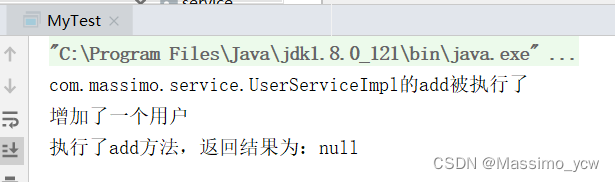
效果:
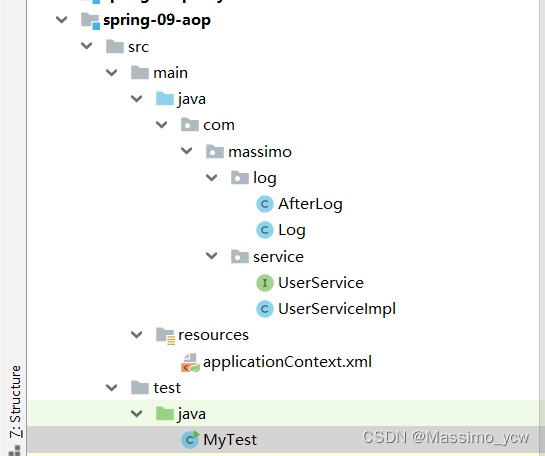
3.1.6、项目结构
3.2、自定义来实现AOP
沿用上面方式一的项目
3.2.1、自定义切面
package com.massimo.diy;

public class DiyPointCut {

    public void before(){
        System.out.println("=========方法执行前=========");
    }

    public void after(){
        System.out.println("=========方法执行后=========");
    }
}
3.2.2、修改bean配置文件
<?xml version="1.0" encoding="UTF-8"?>
<beans xmlns="http://www.springframework.org/schema/beans"
       xmlns:xsi="http://www.w3.org/2001/XMLSchema-instance"
       xmlns:aop="http://www.springframework.org/schema/aop"
       xsi:schemaLocation="
        http://www.springframework.org/schema/beans
        http://www.springframework.org/schema/beans/spring-beans.xsd
        http://www.springframework.org/schema/aop
        http://www.springframework.org/schema/aop/spring-aop.xsd">

        <!--注册-->
        <bean id="userService" class="com.massimo.service.UserServiceImpl"/>
        <bean id="log" class="com.massimo.log.Log"/>
        <bean id="afterLog" class="com.massimo.log.AfterLog"/>

        <!--方式二:自定义类-->
        <bean id="diy" class="com.massimo.diy.DiyPointCut"/>

    <aop:config>
    <!--自定义切面,ref  要引用的类-->
        <aop:aspect ref="diy">
        <!--切入点-->
            <aop:pointcut id="point" expression="execution(* com.massimo.service.UserServiceImpl.*(..))"/>
        <!--通知-->
            <aop:before method="before" pointcut-ref="point"/>
            <aop:after method="after" pointcut-ref="point"/>
        </aop:aspect>
    </aop:config>

</beans>
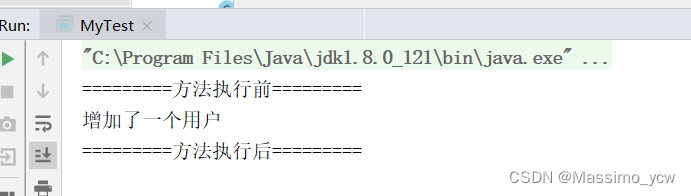
3.2.3、测试效果
3.3、使用注解实现
沿用上面方式一的项目
3.3.1、自定义切面
package com.massimo.diy;

import org.aspectj.lang.ProceedingJoinPoint;
import org.aspectj.lang.Signature;
import org.aspectj.lang.annotation.After;
import org.aspectj.lang.annotation.Around;
import org.aspectj.lang.annotation.Aspect;
import org.aspectj.lang.annotation.Before;

@Aspect//标注这个类是一个切面
public class AnnotationPointcut {

    @Before("execution(* com.massimo.service.UserServiceImpl.*(..))")
    public void before(){
        System.out.println("=======方法执行前=======");
    }

    @After("execution(* com.massimo.service.UserServiceImpl.*(..))")
    public void after(){
        System.out.println("=======方法执行后=======");
    }

    //在环绕增强中,我们可以定义一个参数,代表我们要获取处理切入的点
    @Around("execution(* com.massimo.service.UserServiceImpl.*(..))")
    public void around(ProceedingJoinPoint jp) throws Throwable{
        System.out.println("环绕前");
        Signature signature = jp.getSignature();//获得签名
        System.out.println("signature" + signature);
        //执行方法
        Object proceed = jp.proceed();
        System.out.println("环绕后");
        System.out.println(proceed);
    }

}
3.3.2、修改bean配置文件
<?xml version="1.0" encoding="UTF-8"?>
<beans xmlns="http://www.springframework.org/schema/beans"
       xmlns:xsi="http://www.w3.org/2001/XMLSchema-instance"
       xmlns:aop="http://www.springframework.org/schema/aop"
       xsi:schemaLocation="
        http://www.springframework.org/schema/beans
        http://www.springframework.org/schema/beans/spring-beans.xsd
        http://www.springframework.org/schema/aop
        http://www.springframework.org/schema/aop/spring-aop.xsd">

        <!--注册-->
        <bean id="userService" class="com.massimo.service.UserServiceImpl"/>
        <bean id="log" class="com.massimo.log.Log"/>
        <bean id="afterLog" class="com.massimo.log.AfterLog"/>

        <!--方式三-->
        <bean id="annotationPointcut" class="com.massimo.diy.AnnotationPointcut"/>
        <!--开启注解支持-->
        <aop:aspectj-autoproxy/>
</beans>
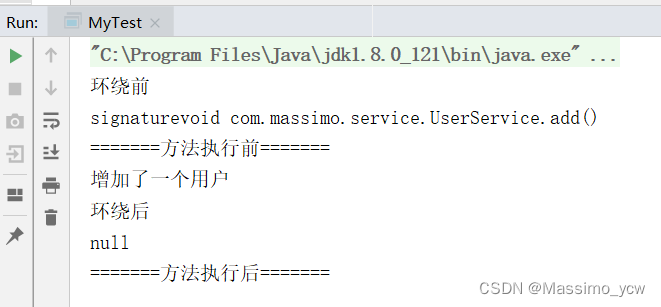
3.3.3、测试





 扫一扫
扫一扫


 7536
7536

 被折叠的 条评论
为什么被折叠?
被折叠的 条评论
为什么被折叠?
 到【灌水乐园】发言





