





 本文介绍了一种常见的Java应用程序中使用JDBC连接数据库时出现的问题及解决方案。具体问题为无法正确加载数据库配置文件导致的连接失败。通过调整项目结构,确保配置文件被正确添加到classpath中,从而解决了该问题。
目录结构:

/**
     * 获取连接
     * @return 返回JDBC得到的Connection
     * @throws ClassNotFoundException
     */
    public static Connection getConnection() throws ClassNotFoundException, IOException, SQLException {

        InputStream in = JDBCUtil.class.getClassLoader().getResourceAsStream("db.properties");
        Properties properties = new Properties();
        properties.load(in);

        String url =properties.getProperty("jdbc.url");
        String user =properties.getProperty("jdbc.user");
        String password =properties.getProperty("jdbc.password");
        String driverClass = properties.getProperty("jdbc.driverClass");
        Class.forName(driverClass);
        return DriverManager.getConnection(url,user,password);
    }
debug发现in为空,代码没有写错,只能是没有读取到db.properties文件的内容
第一感觉是resources这个文件加可能有问题,果然,解决方法是:
Files-->Project Structure-->modules-->source 找到resources文件夹,右键选择resourses,右边会出现resource folders
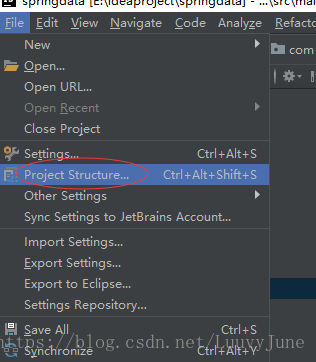
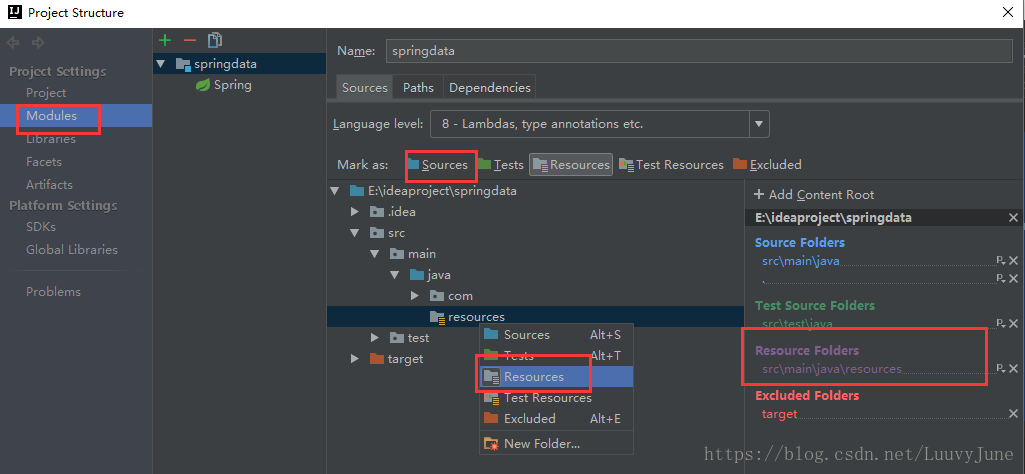
这样就实现了将配置文件添加到classpath,再次debug,不再报空指针,问题解决。





 扫一扫
扫一扫


 1665
1665


 到【灌水乐园】发言



