

swagger分组

本文介绍了如何在Swagger中通过Docket配置实现API的分组管理,以便更高效地组织和查找控制器。作者提供了两个示例,创建了'合作'和'小乌龟'两个分组,分别对应不同的controller包。这样可以显著提高开发者在大型项目中的工作效率。

最近一个项目 swagger没有分组就特喵难受啊

全部都在一个默认里面 找自己写的controller找半天都还找不到

所有swagger分组就非常重要了

代码实现:swagger中配置

 /**
      *把一些多人完成的controller放进去
      * @author zhangjunrong
      * @date 2022/4/2 21:05
      */
    @Bean
    public Docket createRestAoiCooperate(){
        return  new Docket(DocumentationType.SWAGGER_2)
                .apiInfo(apiInfo())
                .select()
                .apis(RequestHandlerSelectors.basePackage("com.xxx.controller.cooperate"))
                .paths(PathSelectors.any())
                .build()
                .groupName("合作");
    }
    /**
     *小乌龟组
     * @author zhangjunrong
     * @date 2022/4/2 21:05
     */
    @Bean
    public Docket createRestAoiZJR(){
        return  new Docket(DocumentationType.SWAGGER_2)
                .apiInfo(apiInfo())
                .select()
                .apis(RequestHandlerSelectors.basePackage("com.xxx.controller.xxx"))
                .paths(PathSelectors.any())
                .build()
                .groupName("小乌龟");
    }

效果展示:
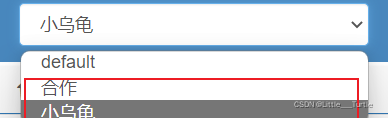
 

### 集成Swagger UI并实现API分组显示 为了在Spring Boot项目中集成Swagger UI并实现API分组显示,可以按照以下方法操作: #### 添加依赖项 首先,在`pom.xml`文件中添加必要的Maven依赖来引入Swagger和UI组件。 ```xml <dependency> <groupId>io.springfox</groupId> <artifactId>springfox-boot-starter</artifactId> <version>3.0.0</version> </dependency> <!-- 如果使用的是Spring Boot 2.x版本 --> <dependency> <groupId>org.springframework.boot</groupId> <artifactId>spring-boot-starter-validation</artifactId> </dependency> ``` 这些依赖会自动配置好大部分所需设置[^1]。 #### 创建Docket Bean实例 接着创建多个`Docket` bean用于定义不同的API分组。这可以通过编写一个配置类完成。 ```java import org.springframework.context.annotation.Bean; import springfox.documentation.builders.PathSelectors; import springfox.documentation.spi.DocumentationType; import springfox.documentation.spring.web.plugins.Docket; @Configuration public class SwaggerConfig { @Bean public Docket groupOne() { return new Docket(DocumentationType.OAS_30) .groupName("Group One") .select() .paths(PathSelectors.ant("/api/v1/**")) .build(); } @Bean public Docket groupTwo() { return new Docket(DocumentationType.OAS_30) .groupName("Group Two") .select() .paths(PathSelectors.ant("/admin/api/**")) .build(); } } ``` 上述代码片段展示了如何通过路径模式区分不同接口所属的分组。 #### 启用Swagger UI访问 确保应用程序属性文件(`application.properties`)中有如下配置以启用Swagger UI界面: ```properties spring.mvc.pathmatch.matching-strategy=ant_path_matcher springdoc.swagger-ui.enabled=true springdoc.api-docs.enabled=true ``` 此时启动应用后即可通过浏览器访问`http://localhost:8080/swagger-ui.html`查看已分好的API文档页面。
评论
成就一亿技术人!
拼手气红包6.0元
还能输入1000个字符
 
红包 添加红包
表情包 插入表情
 条评论被折叠 查看
添加红包

请填写红包祝福语或标题

红包个数最小为10个

红包金额最低5元

当前余额3.43前往充值 >
需支付:10.00
成就一亿技术人!
领取后你会自动成为博主和红包主的粉丝 规则
hope_wisdom
发出的红包

打赏作者

新生代农民工-小王八

你的鼓励将是我创作的最大动力

¥1 ¥2 ¥4 ¥6 ¥10 ¥20
扫码支付:¥1
获取中
扫码支付

您的余额不足,请更换扫码支付或充值

打赏作者

实付
使用余额支付
点击重新获取
扫码支付
钱包余额 0

抵扣说明:

1.余额是钱包充值的虚拟货币,按照1:1的比例进行支付金额的抵扣。
2.余额无法直接购买下载,可以购买VIP、付费专栏及课程。

余额充值


