



特性
- 无侵入:只做增强不做改变,引入它不会对现有工程产生影响,如丝般顺滑
- 损耗小:启动即会自动注入基本 CURD,性能基本无损耗,直接面向对象操作
- 强大的 CRUD 操作:内置通用 Mapper、通用 Service,仅仅通过少量配置即可实现单表大部分 CRUD 操作,更有强大的条件构造器,满足各类使用需求
- 支持 Lambda 形式调用:通过 Lambda 表达式,方便的编写各类查询条件,无需再担心字段写错
- 支持主键自动生成:支持多达 4 种主键策略(内含分布式唯一 ID 生成器 - Sequence),可自由配置,完美解决主键问题
- 支持 ActiveRecord 模式:支持 ActiveRecord 形式调用,实体类只需继承 Model 类即可进行强大的 CRUD 操作
- 支持自定义全局通用操作:支持全局通用方法注入( Write once, use anywhere )
- 内置代码生成器:采用代码或者 Maven 插件可快速生成 Mapper 、 Model 、 Service 、 Controller 层代码,支持模板引擎,更有超多自定义配置等您来使用
- 内置分页插件:基于 MyBatis 物理分页,开发者无需关心具体操作,配置好插件之后,写分页等同于普通 List 查询
- 分页插件支持多种数据库:支持 MySQL、MariaDB、Oracle、DB2、H2、HSQL、SQLite、Postgre、SQLServer 等多种数据库
- 内置性能分析插件:可输出 SQL 语句以及其执行时间,建议开发测试时启用该功能,能快速揪出慢查询
- 内置全局拦截插件:提供全表 delete 、 update 操作智能分析阻断,也可自定义拦截规则,预防误操作
快速上手
创建一个user表,再插入数据
CREATE TABLE user
(
	id BIGINT(20) NOT NULL COMMENT '主键ID',
	name VARCHAR(30) NULL DEFAULT NULL COMMENT '姓名',
	age INT(11) NULL DEFAULT NULL COMMENT '年龄',
	email VARCHAR(50) NULL DEFAULT NULL COMMENT '邮箱',
	PRIMARY KEY (id)
);

INSERT INTO user (id, name, age, email) VALUES
(1, 'Jone', 18, 'test1@baomidou.com'),
(2, 'Jack', 20, 'test2@baomidou.com'),
(3, 'Tom', 28, 'test3@baomidou.com'),
(4, 'Sandy', 21, 'test4@baomidou.com'),
(5, 'Billie', 24, 'test5@baomidou.com');
在springboot项目中快速导入mybatis-plus的依赖
注意 mybatis和mybatis-plus的依赖不要同时导入,会出现版本问题等等
       <!--        mybatis-plus依赖-->
        <dependency>
            <groupId>com.baomidou</groupId>
            <artifactId>mybatis-plus-boot-starter</artifactId>
            <version>3.2.0</version>
        </dependency>
        <dependency>
            <groupId>mysql</groupId>
            <artifactId>mysql-connector-java</artifactId>
        </dependency>
数据库-java连接配置
spring:
  datasource:
    username: root
    password: 123456
    url: jdbc:mysql://localhost:3306/mybatis-plus?useSSL=false&useUnicode=true&characterEncoding=utf-8
    driver-class-name: com.mysql.cj.jdbc.Driver
pojo:
package com.zhang.pojo;

import lombok.AllArgsConstructor;
import lombok.Data;
import lombok.NoArgsConstructor;

/**
 * @author 小乌龟
 */
@Data
@NoArgsConstructor
@AllArgsConstructor
public class User {
    private  Integer id;
    private String name;
    private Integer age;
    private String email;

}
UserMapper
package com.zhang.mapper;

import com.baomidou.mybatisplus.core.mapper.BaseMapper;
import com.zhang.pojo.User;
import org.springframework.stereotype.Repository;


/**
 * @author 小乌龟
 */
//代表持久层 所有的CRUD语句已经写好了 在BaseMapper配置文件中
@Repository
public interface UserMapper extends BaseMapper<User> {
}
test:
package com.zhang;

import com.zhang.mapper.UserMapper;
import com.zhang.pojo.User;
import org.junit.jupiter.api.Test;
import org.mybatis.spring.annotation.MapperScan;
import org.springframework.beans.factory.annotation.Autowired;
import org.springframework.boot.test.context.SpringBootTest;

import java.util.List;

@SpringBootTest
//一定要扫描到自己创建的mapper上
@MapperScan("com.zhang.mapper")
class SpringbootStudyApplicationTests {
    @Autowired//将person自动注入进来
    private UserMapper userMapper;
    @Test
    void contextLoads() {
        List<User> userList = userMapper.selectList(null);//参数是一个wrapper,条件构造器
        userList.forEach(System.out::println);
    }

}
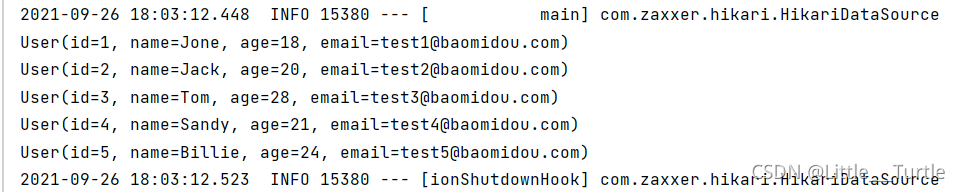
结果:
配置日志
#日志配置 默认的 其他的要导依赖
mybatis-plus:
  configuration:
    log-impl: org.apache.ibatis.logging.stdout.StdOutImpl
insert
package com.zhang.mapper;

import com.zhang.pojo.User;
import org.junit.jupiter.api.Test;
import org.mybatis.spring.annotation.MapperScan;
import org.springframework.beans.factory.annotation.Autowired;
import org.springframework.boot.test.context.SpringBootTest;

@SpringBootTest
@MapperScan("com.zhang.mapper")
class UserMapperTest {
    @Autowired
    private UserMapper userMapper;
    @Test
    public void saveUser(){
        User user = new User();
        user.setAge(18);
        user.setUsername("张三");
        user.setEmail("2523524@qq.com");
        int insert = userMapper.insert(user);
        System.out.println(insert);

    }

}
结果:
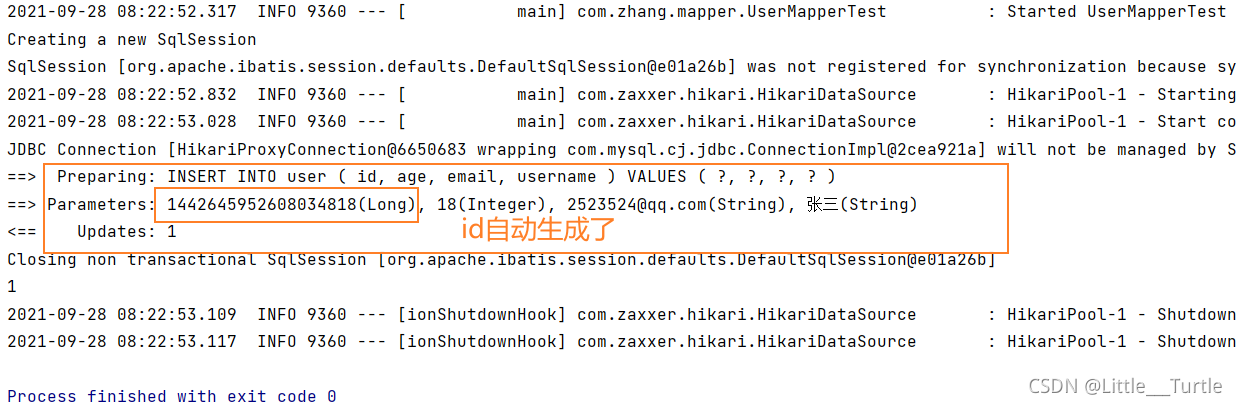
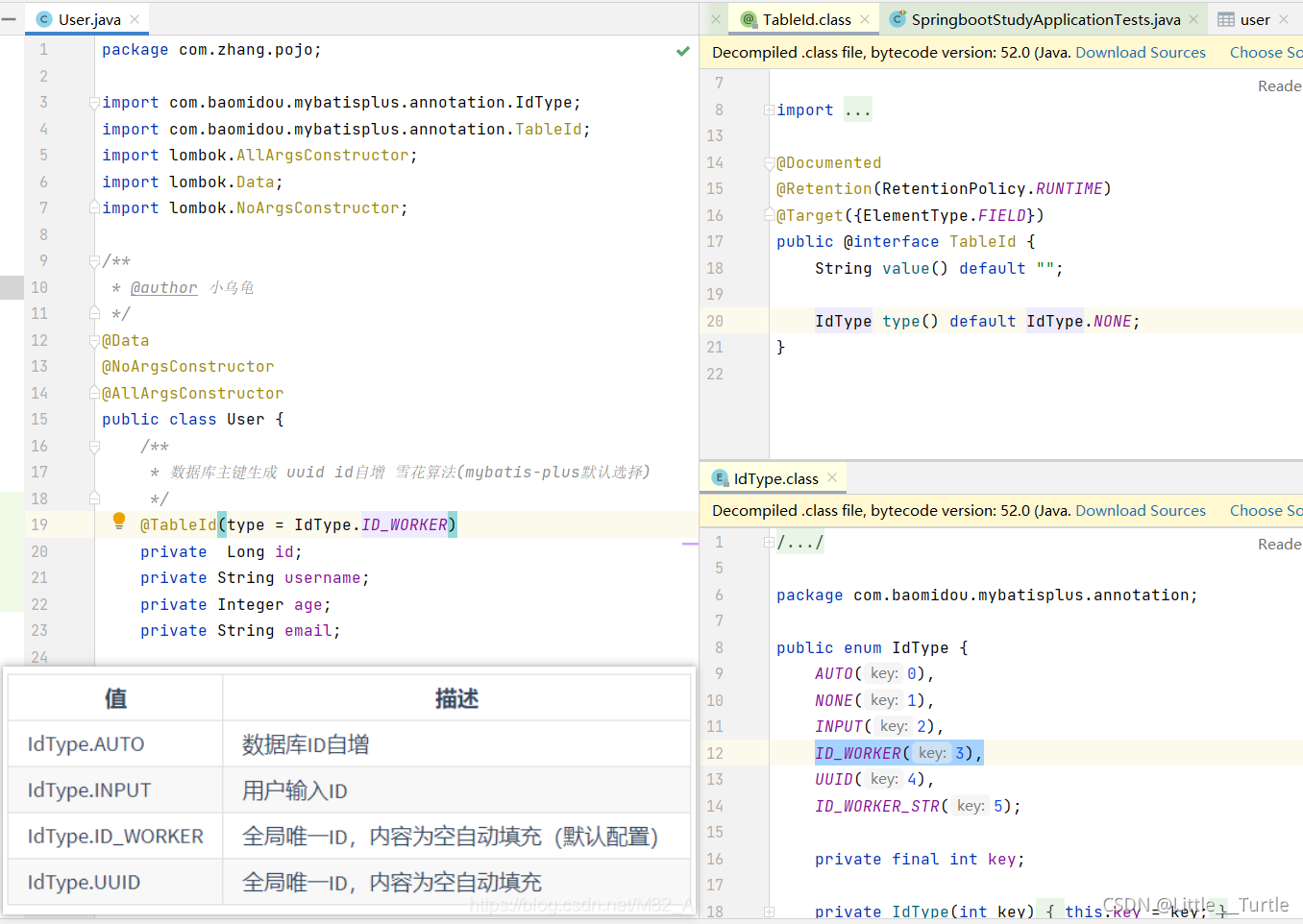
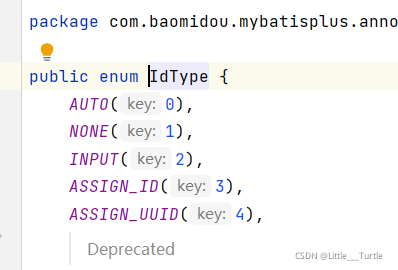
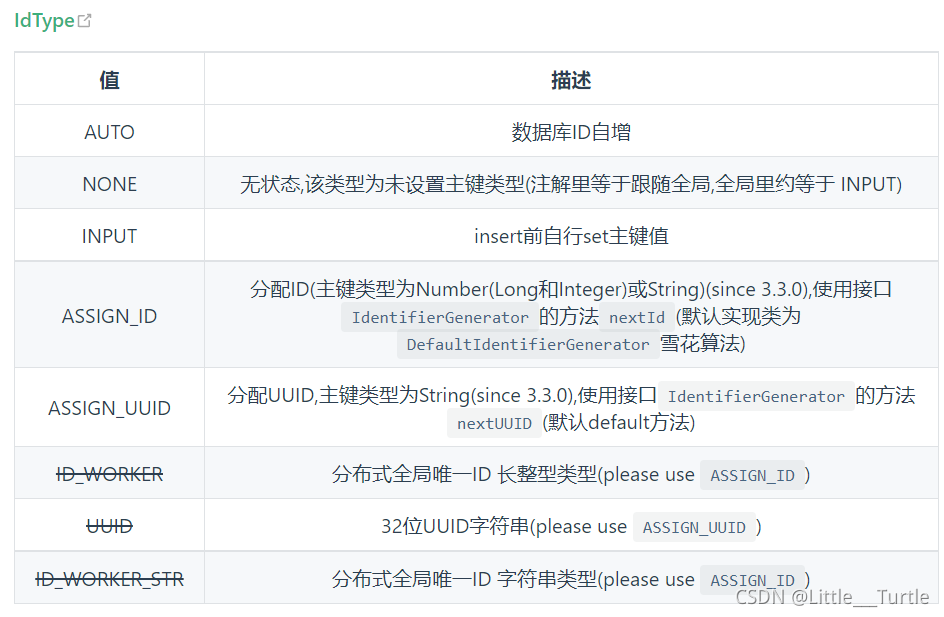
ID_WORKER在3.3.0版本已经过时了 =>IdType.ASSIGN_ID
老版本:
3.3.0版本
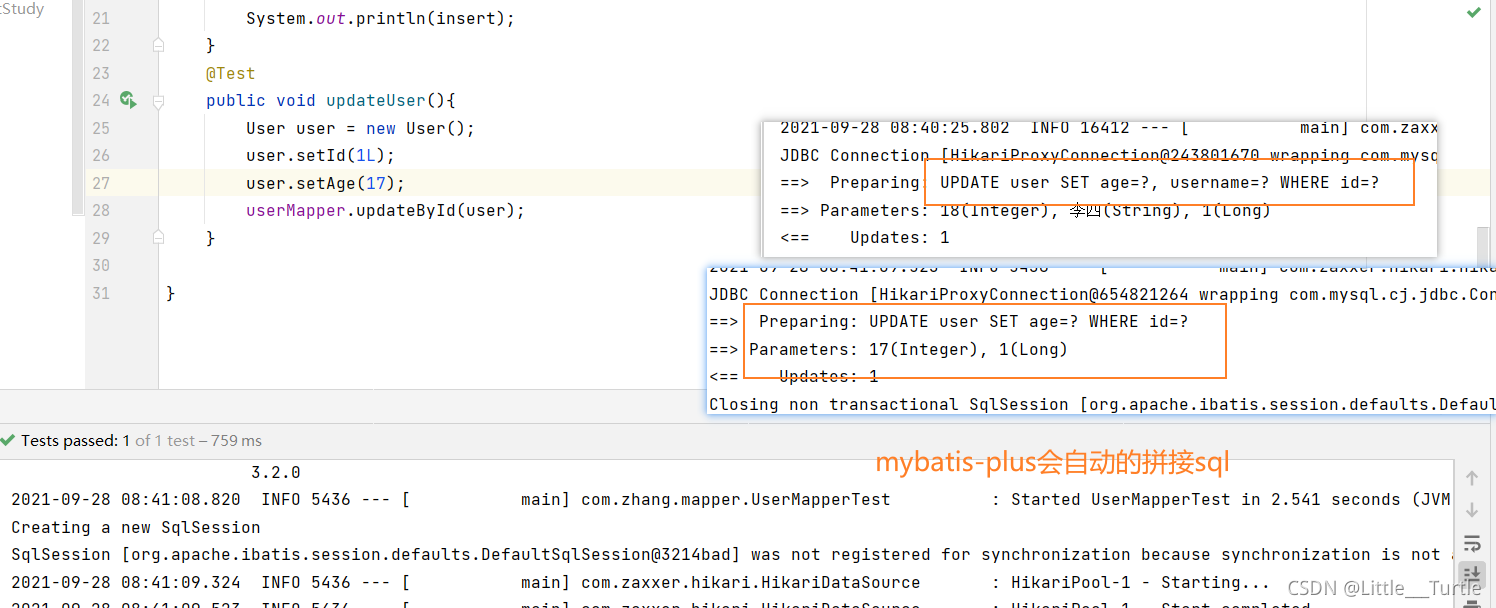
 update
    @Test
    public void updateUser(){
        User user = new User();
        user.setId(1L);
        user.setAge(17);
        userMapper.updateById(user);
    }
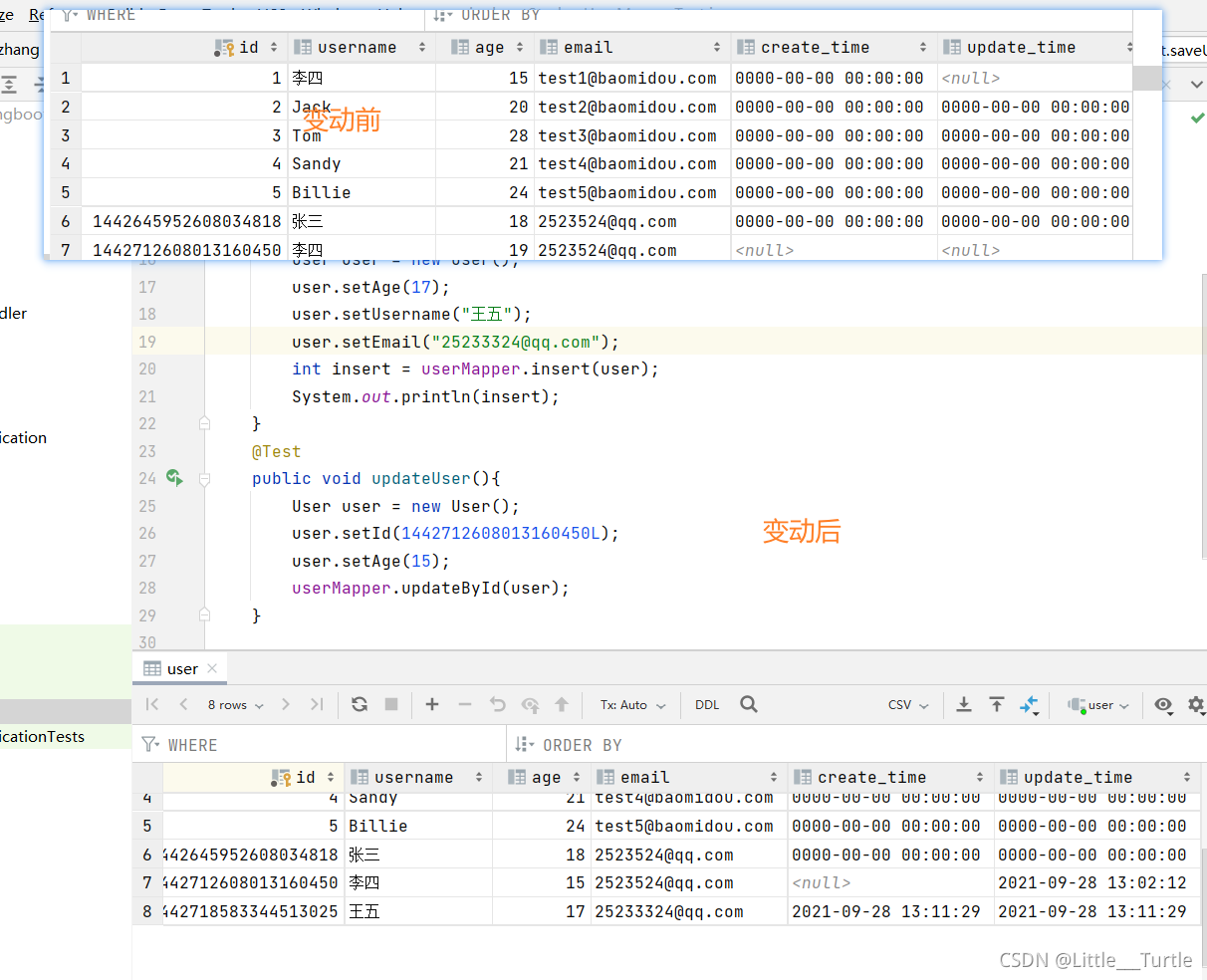
自动填充
阿里:
【强制】表必备三字段:id, create_time, update_time。 说明:其中 id 必为主键,类型为 bigint unsigned、单表时自增、步长为 1。create_time, update_time 的类型均为 datetime 类型,前者现在时表示主动式创建,后者过去分词表示被动式更新
新填字段 create_time updat_time
数据库级别的(工作中公司一般不会让你动的) 简单过一下

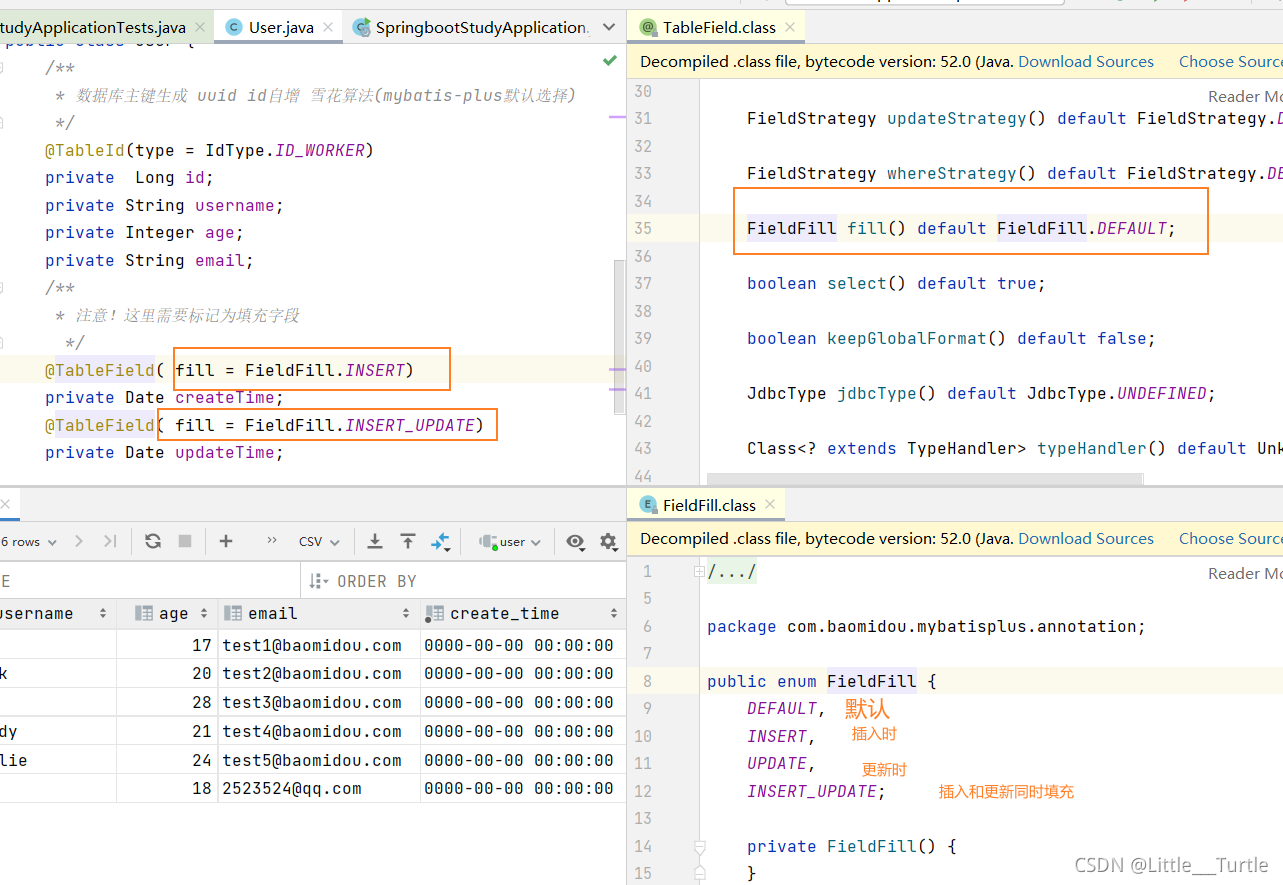
代码级别的
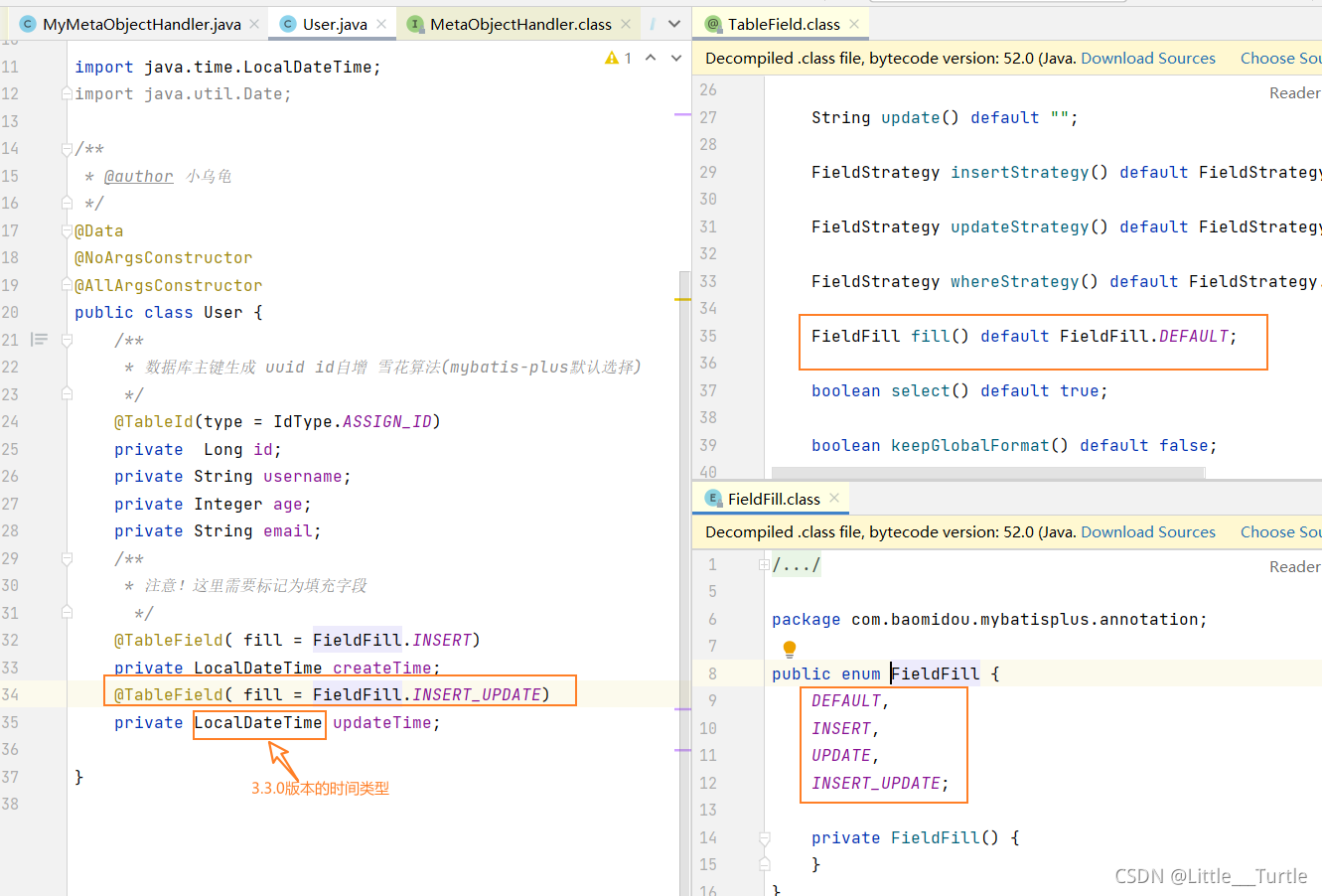
配置类实现
package com.zhang.handler;

import com.baomidou.mybatisplus.core.handlers.MetaObjectHandler;
import lombok.extern.slf4j.Slf4j;
import org.apache.ibatis.reflection.MetaObject;
import org.springframework.stereotype.Component;

import java.time.LocalDateTime;

/**
 * @author 小乌龟
 */
@Slf4j
@Component
public class MyMetaObjectHandler implements MetaObjectHandler {
    @Override
    public void insertFill(MetaObject metaObject) {
        log.info("start insert fill ....");
        // 起始版本 3.3.0(推荐使用)
        // default <T> MetaObjectHandler strictInsertFill(MetaObject metaObject, String fieldName, Class<T> fieldType, Object fieldVal)
        this.strictInsertFill(metaObject, "createTime", LocalDateTime.class, LocalDateTime.now());
        this.strictInsertFill(metaObject, "updateTime", LocalDateTime.class, LocalDateTime.now());
    }

    @Override
    public void updateFill(MetaObject metaObject) {
        log.info("start update fill ....");
        // 起始版本 3.3.0(推荐)
        this.strictUpdateFill(metaObject, "updateTime", LocalDateTime.class, LocalDateTime.now());
    }

}
乐观锁
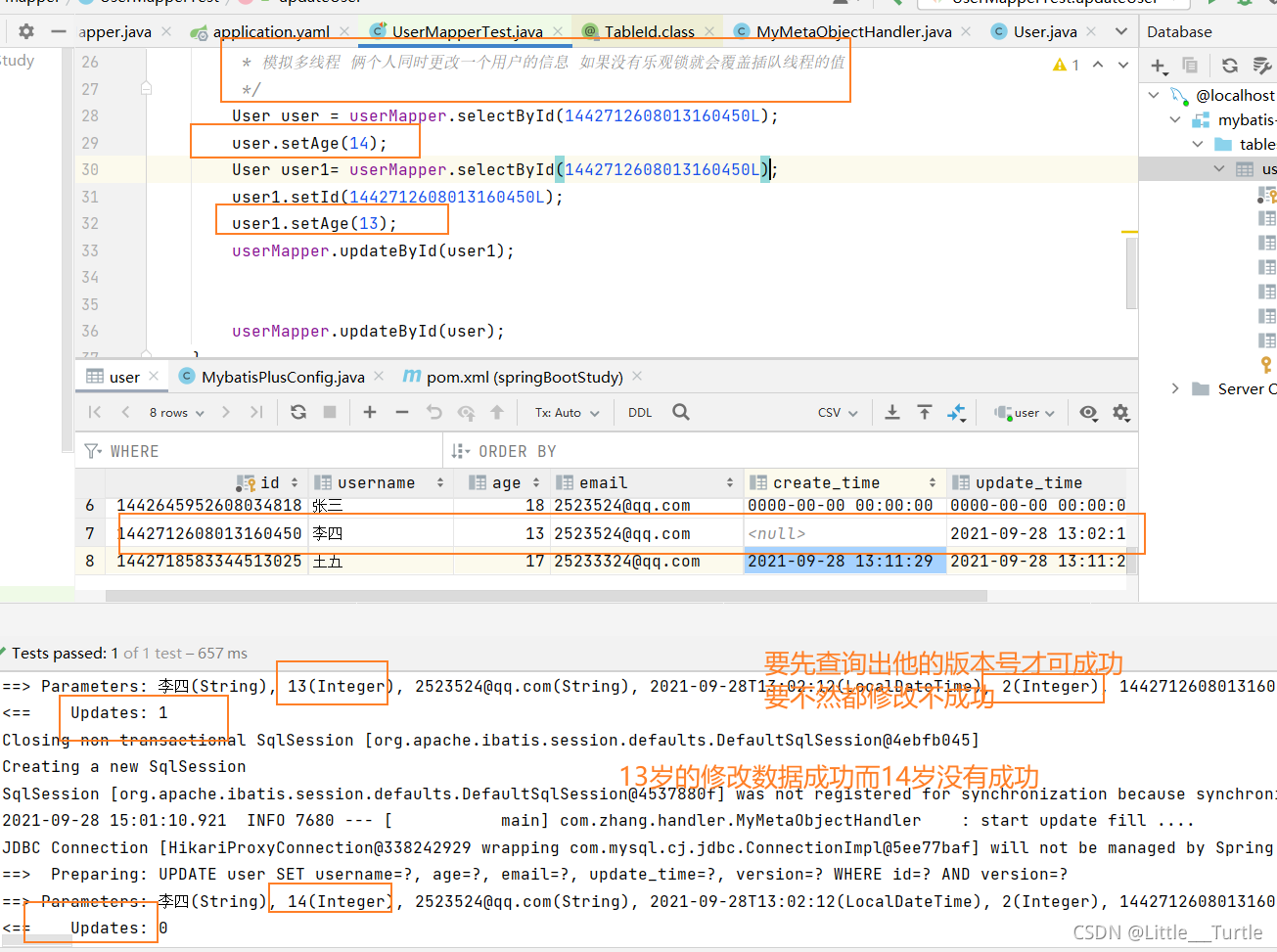
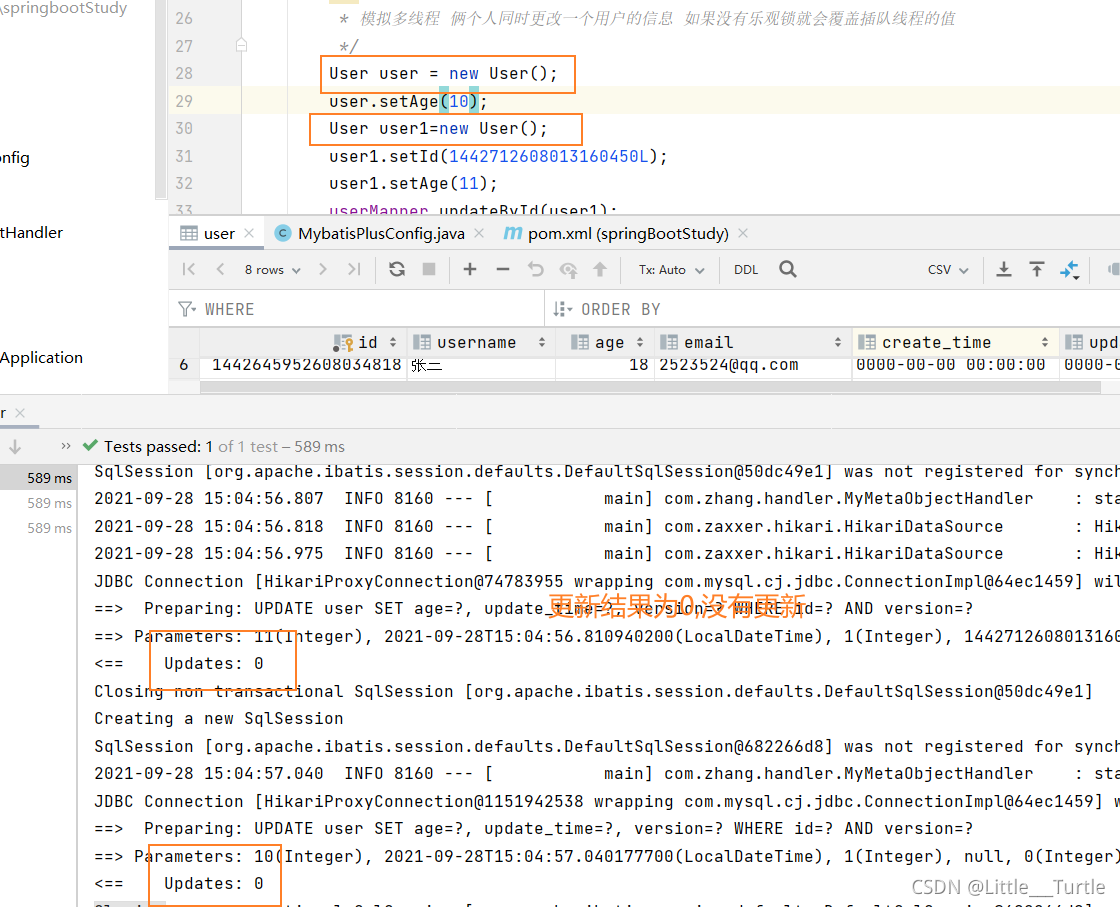
乐观锁:乐观锁在操作数据时非常乐观,认为别人不会同时修改数据.因此乐观锁不会上锁,只是在执行更新的时候判断一下在此期间别人是否修改了数据:如果别人修改了数据则放弃操作,否则执行操作。. 悲观锁:悲观锁在操作数据时比较悲观,认为别人会同时修改数据。. 因此操作数据时直接把数据锁住,直到操作完成后才会释放锁;上锁期间其他人不能修改数据。
当要更新一条记录的时候,希望这条记录没有被别人更新
乐观锁实现方式:
- 取出记录时,获取当前version
- 更新时,带上这个version
- 执行更新时, set version = newVersion where version = oldVersion
- 如果version不对,就更新失败
在数据库里添加一个字段 version int
pojo
  /**
     * 开启乐观锁
     */
    @Version
    private Integer version;
MybatisPlusConfig
package com.zhang.config;

import com.baomidou.mybatisplus.extension.plugins.MybatisPlusInterceptor;
import com.baomidou.mybatisplus.extension.plugins.inner.OptimisticLockerInnerInterceptor;
import org.springframework.context.annotation.Bean;
import org.springframework.context.annotation.Configuration;

/**
 * @author 小乌龟
 */
@Configuration
public class MybatisPlusConfig {
    @Bean
    public MybatisPlusInterceptor mybatisPlusInterceptor() {
        MybatisPlusInterceptor interceptor = new MybatisPlusInterceptor();
        interceptor.addInnerInterceptor(new OptimisticLockerInnerInterceptor());
        return interceptor;
    }

}
结果:
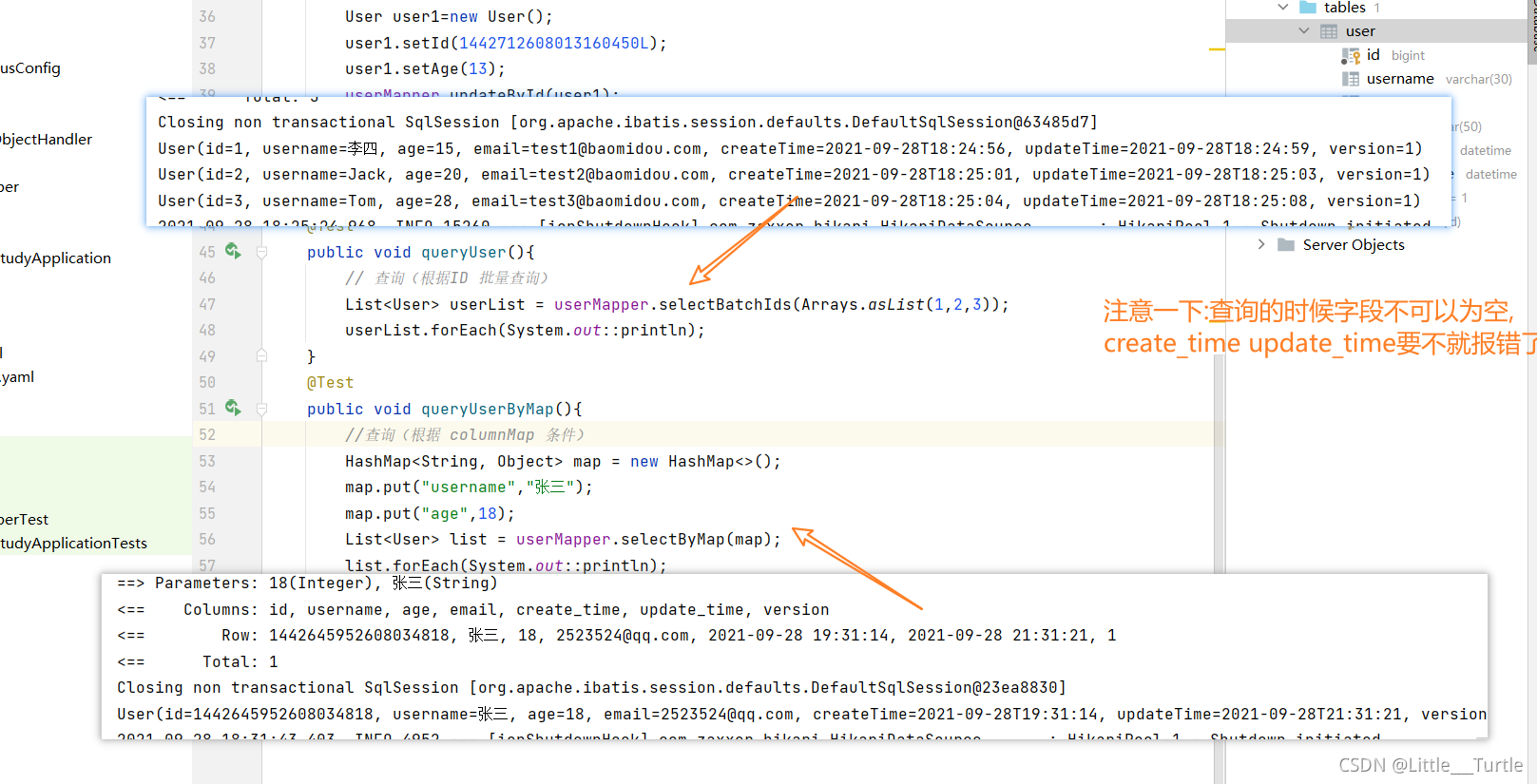
Simple query select
 @Test
    public void queryUser(){
        // 查询(根据ID 批量查询)
        List<User> userList = userMapper.selectBatchIds(Arrays.asList(1,2,3));
        userList.forEach(System.out::println);
    }
    @Test
    public void queryUserByMap(){
        //查询(根据 columnMap 条件)
        HashMap<String, Object> map = new HashMap<>();
        map.put("username","张三");
        map.put("age",18);
        List<User> list = userMapper.selectByMap(map);
        list.forEach(System.out::println);
    }
结果:
分页的简单实现
配置分页插件
package com.zhang.config;

import com.baomidou.mybatisplus.annotation.DbType;
import com.baomidou.mybatisplus.extension.plugins.MybatisPlusInterceptor;
import com.baomidou.mybatisplus.extension.plugins.inner.OptimisticLockerInnerInterceptor;
import com.baomidou.mybatisplus.extension.plugins.inner.PaginationInnerInterceptor;
import org.mybatis.spring.annotation.MapperScan;
import org.springframework.context.annotation.Bean;
import org.springframework.context.annotation.Configuration;
import org.springframework.transaction.annotation.EnableTransactionManagement;

/**
 * @author 小乌龟
 */
@MapperScan("com.zhang.mapper")
@EnableTransactionManagement
@Configuration
public class MybatisPlusConfig {
    @Bean
    public MybatisPlusInterceptor mybatisPlusInterceptor() {
        MybatisPlusInterceptor interceptor = new MybatisPlusInterceptor();
        //乐观锁配置
        interceptor.addInnerInterceptor(new OptimisticLockerInnerInterceptor());
        //最新版分页配置
        interceptor.addInnerInterceptor(new PaginationInnerInterceptor(DbType.H2));
        return interceptor;
    }


}
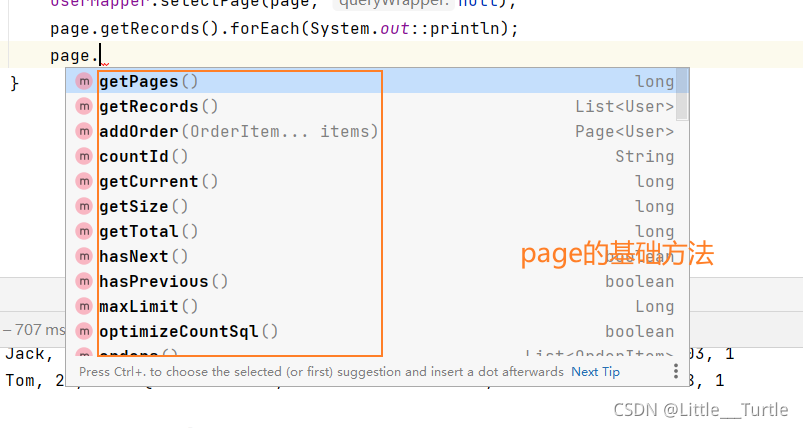
test:
  @Test
    public void textPage(){
        //current 当前页 size 每页大小
        Page<User> page = new Page<>(1,3);
        userMapper.selectPage(page, null);
        page.getRecords().forEach(System.out::println);

    }
结果:

Simple delete
数据原来的样子
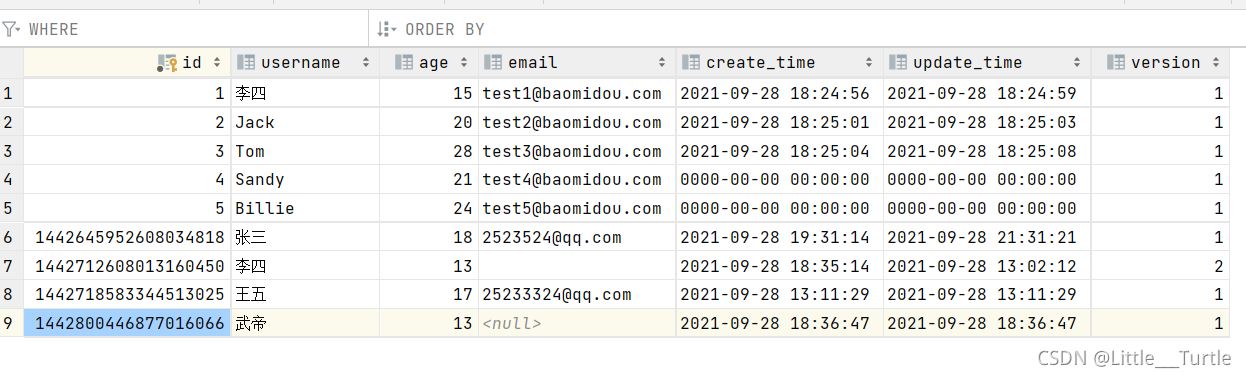
基础删除代码:
  @Test
    public void deleteUserById(){
        //通过id删除
        userMapper.deleteById(1442800446877016066L);
    }
    @Test
    public void deleteUserListById(){
        //通过id批量删除
        userMapper.deleteBatchIds(Arrays.asList(1,2,3));
    }
    @Test
    public void deleteUserByMap(){
        HashMap<String, Object> map = new HashMap<>();
        map.put("username","李四");
        userMapper.deleteByMap(map);
    }
结果:

逻辑删除
删除的但是没有完全删除(用户删除了一些信息,在此查询不到,但是管理员还是可以看到)
说明:
只对自动注入的sql起效:
- 插入: 不作限制
- 查找: 追加where条件过滤掉已删除数据,且使用 wrapper.entity 生成的where条件会忽略该字段
- 更新: 追加where条件防止更新到已删除数据,且使用 wrapper.entity 生成的where条件会忽略该字段
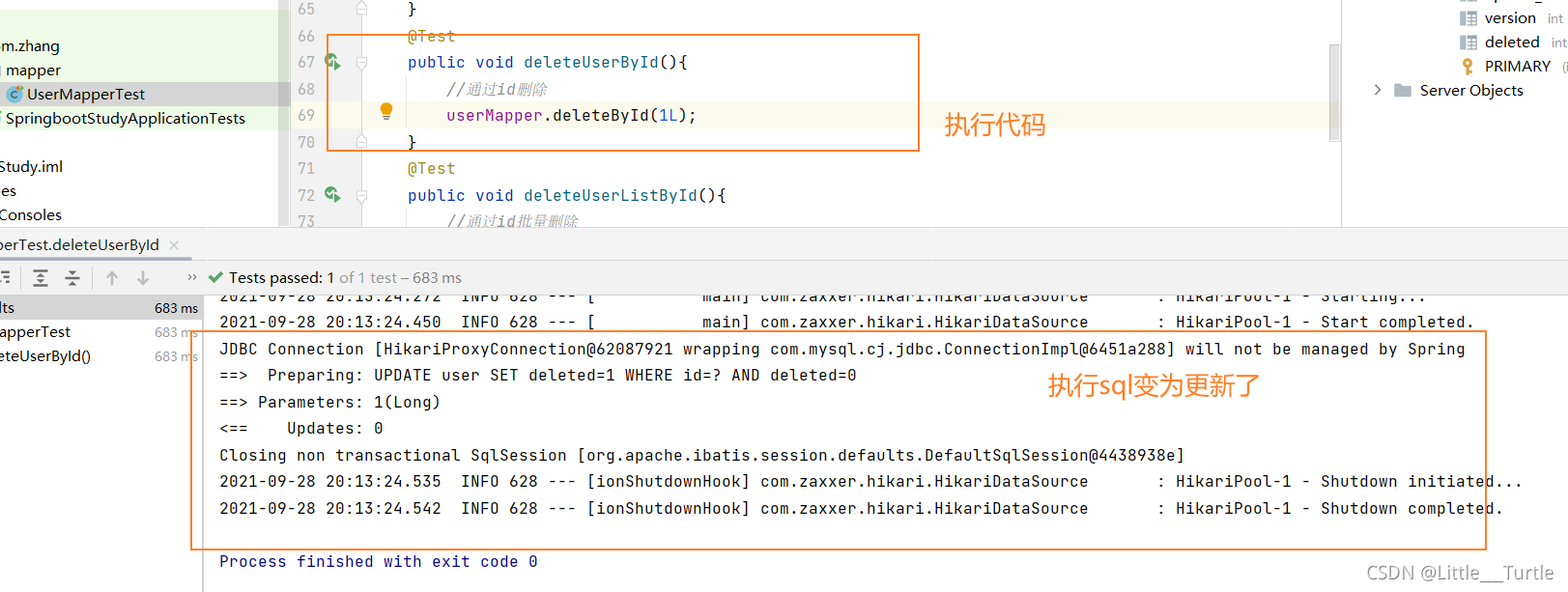
- 删除: 转变为 更新
附录:
- 逻辑删除是为了方便数据恢复和保护数据本身价值等等的一种方案,但实际就是删除。
- 如果你需要频繁查出来看就不应使用逻辑删除,而是以一个状态去表示。
例如:
- 删除:
update user set deleted=1 where id = 1 and deleted=0 - 查找:
select id,name,deleted from user where deleted=0
数据库添加字段 deleted
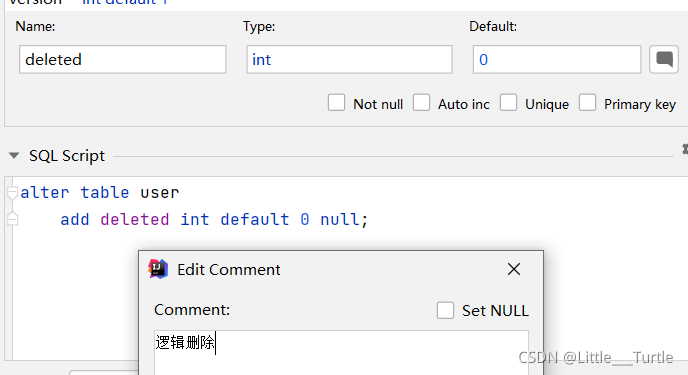
在pojo中添加属性:
private Integer deleted;yaml中配置相关属性:
#日志配置 配置逻辑删除
mybatis-plus:
  configuration:
    log-impl: org.apache.ibatis.logging.stdout.StdOutImpl
  global-config:
    db-config:
      logic-delete-field: deleted  # 全局逻辑删除的实体字段名(since 3.3.0,配置后可以忽略不配置 @TableLogic private Integer deleted;)
      logic-delete-value: 1 # 逻辑已删除值(默认为 1)
      logic-not-delete-value: 0 # 逻辑未删除值(默认为 0)
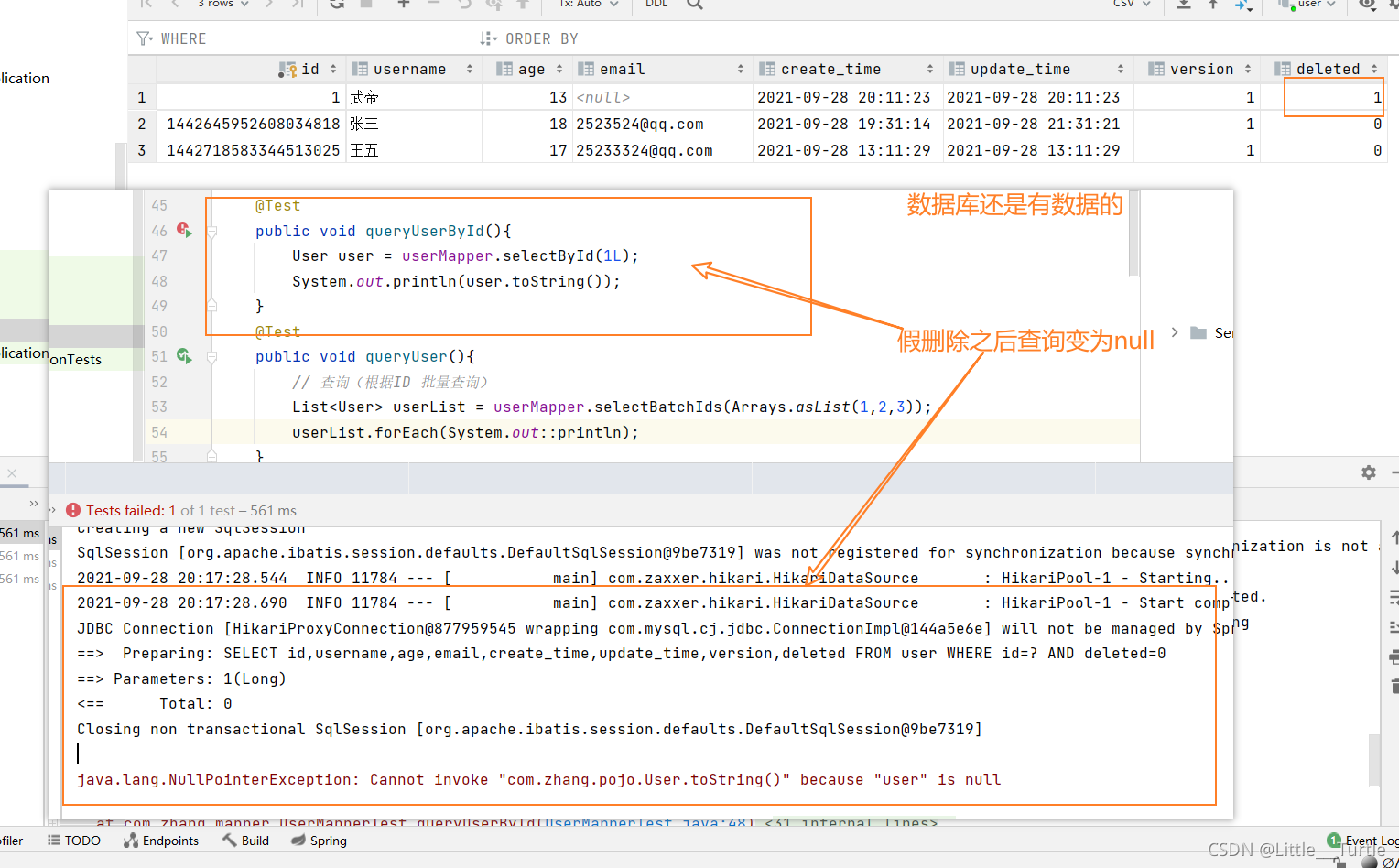
sql性能调优==>执行 SQL 分析打印
具体的去官网了解即可
条件构造器
方法十分多,所有不依次列出,可以去官网里找想要的方法
这里就列出2种.
first:
 @Test
    public void queryUserBySql(){
        QueryWrapper<User> wrapper = new QueryWrapper<>();
        //查询id 通过子查询 id in (select id from table where id < 3)
        wrapper.inSql("id","select id from user where id<3");
        List<Object> list = userMapper.selectObjs(wrapper);
        list.forEach(System.out::println);
    }
结果:
second:
@Test
    public void queryUserByLike(){
        //查询用户 通过模糊查询
        QueryWrapper<User> wrapper = new QueryWrapper<>();
        //likeLife %三  likeRight 三%   username like %三 age > 3 and age<20
        wrapper
                .likeLeft("username","三")
                .between("age",3,20);
        List<Map<String, Object>> maps = userMapper.selectMaps(wrapper);
        maps.forEach(System.out::println);

    }
结果:

代码生成器
导入依赖
   <!--mybatis-puls代码生成器-->
        <dependency>
            <groupId>com.baomidou</groupId>
            <artifactId>mybatis-plus-generator</artifactId>
            <version>3.4.1</version>
        </dependency>
自动生成器代码:
public class CodeGenerator { /**
 * <p>
 * 读取控制台内容
 * </p>
 */
public static String scanner(String tip) {
        Scanner scanner = new Scanner(System.in);
        StringBuilder help = new StringBuilder();
        help.append("请输入" + tip + ":");
        System.out.println(help.toString());
        if (scanner.hasNext()) {
            String ipt = scanner.next();
            if (StringUtils.isNotBlank(ipt)) {
                return ipt;
            }
        }
        throw new MybatisPlusException("请输入正确的" + tip + "!");
}

    public static void main(String[] args) {
        // 代码生成器
        AutoGenerator mpg = new AutoGenerator();

        // 全局配置
        GlobalConfig gc = new GlobalConfig();
        String projectPath = System.getProperty("user.dir");
        gc.setOutputDir(projectPath + "/src/main/java");
        //作者
        gc.setAuthor("xxx");
        //打开输出目录
        gc.setOpen(false);
        //xml开启 BaseResultMap
        gc.setBaseResultMap(true);
        //xml 开启BaseColumnList
        gc.setBaseColumnList(true);
        // 实体属性 Swagger2 注解
        gc.setSwagger2(true);
        mpg.setGlobalConfig(gc);

        // 数据源配置
        DataSourceConfig dsc = new DataSourceConfig();
        dsc.setUrl("url");
        dsc.setDriverName("com.mysql.cj.jdbc.Driver");
        dsc.setUsername("root");
        dsc.setPassword("123456");
        mpg.setDataSource(dsc);

        // 包配置
        PackageConfig pc = new PackageConfig();
        pc.setParent("com.yqs")
                .setEntity("pojo")
                .setMapper("mapper")
                .setService("service")
                .setServiceImpl("service.impl")
                .setController("controller");
        mpg.setPackageInfo(pc);

        // 自定义配置
        InjectionConfig cfg = new InjectionConfig() {
            @Override
            public void initMap() {
                // to do nothing
            }
        };

        // 如果模板引擎是 freemarker
        String templatePath = "/templates/mapper.xml.ftl";
        // 如果模板引擎是 velocity
        // String templatePath = "/templates/mapper.xml.vm";

        // 自定义输出配置
        List<FileOutConfig> focList = new ArrayList<>();
        // 自定义配置会被优先输出
        focList.add(new FileOutConfig(templatePath) {
            @Override
            public String outputFile(TableInfo tableInfo) {
                // 自定义输出文件名 , 如果你 Entity 设置了前后缀、此处注意 xml 的名称会跟着发生变化!!
                return projectPath + "/src/main/resources/mapper/" + tableInfo.getEntityName() + "Mapper"
                        + StringPool.DOT_XML;
            }
        });
        cfg.setFileOutConfigList(focList);
        mpg.setCfg(cfg);

        // 配置模板
        TemplateConfig templateConfig = new TemplateConfig();

        templateConfig.setXml(null);
        mpg.setTemplate(templateConfig);

        // 策略配置
        StrategyConfig strategy = new StrategyConfig();
        //数据库表映射到实体的命名策略
        strategy.setNaming(NamingStrategy.underline_to_camel);
        //数据库表字段映射到实体的命名策略
        strategy.setColumnNaming(NamingStrategy.no_change);
        //lombok模型
        strategy.setEntityLombokModel(true);
        // 自动填充配置
        TableFill gmtCreate = new TableFill("gmt_create", FieldFill.INSERT);
        TableFill gmtModified = new TableFill("gmt_modified", FieldFill.INSERT_UPDATE);
        ArrayList<TableFill> tableFills = new ArrayList<>();
        tableFills.add(gmtCreate);
        tableFills.add(gmtModified);
        strategy.setTableFillList(tableFills);
        // 乐观锁
        strategy.setVersionFieldName("version");
        //生成 @RestController 控制器
        strategy.setRestControllerStyle(true);
        strategy.setInclude(scanner("表名,多个英文逗号分割").split(","));
        strategy.setControllerMappingHyphenStyle(true);
        //表前缀
        strategy.setTablePrefix("t_");
        mpg.setStrategy(strategy);
        mpg.setTemplateEngine(new FreemarkerTemplateEngine());
        mpg.execute();
    }

}





 扫一扫
扫一扫


 3万+
3万+

 被折叠的 条评论
为什么被折叠?
被折叠的 条评论
为什么被折叠?
 到【灌水乐园】发言





