
cento查询磁盘分区格式状态

本文介绍了在CentOS系统中通过lsblk、blkid和parted三个命令来查询磁盘分区和格式状态的方法。lsblk用于列出所有磁盘列表,包括设备名、大小和类型等信息;blkid用于查看设备的UUID,UUID是Linux系统中用于唯一标识磁盘和文件系统的;parted则用于展示磁盘的分区表类型和分区信息,对于MBR和GPT两种分区表,分别应使用fdisk和gdisk进行分区操作。
部署运行你感兴趣的模型镜像

1.lsblk 列出系统上的所有磁盘列表
lsblk 可以看成『 list block device 』的缩写,就是列出所有储存装置的意思!这个工具软件真的很好
用喔!来瞧一瞧!
在这里插入图片描述
 NAME:就是装置的文件名啰!会省略 /dev 等前导目录!
 MAJ:MIN:其实核心认识的装置都是透过这两个代码来熟悉的!分别是主要:次要装置代码!
 RM:是否为可卸除装置 (removable device),如光盘、USB 磁盘等等
 SIZE:当然就是容量啰!
 RO:是否为只读装置的意思
 TYPE:是磁盘 (disk)、分区槽 (partition) 还是只读存储器 (rom) 等输出
 MOUTPOINT:就是前一章谈到的挂载点
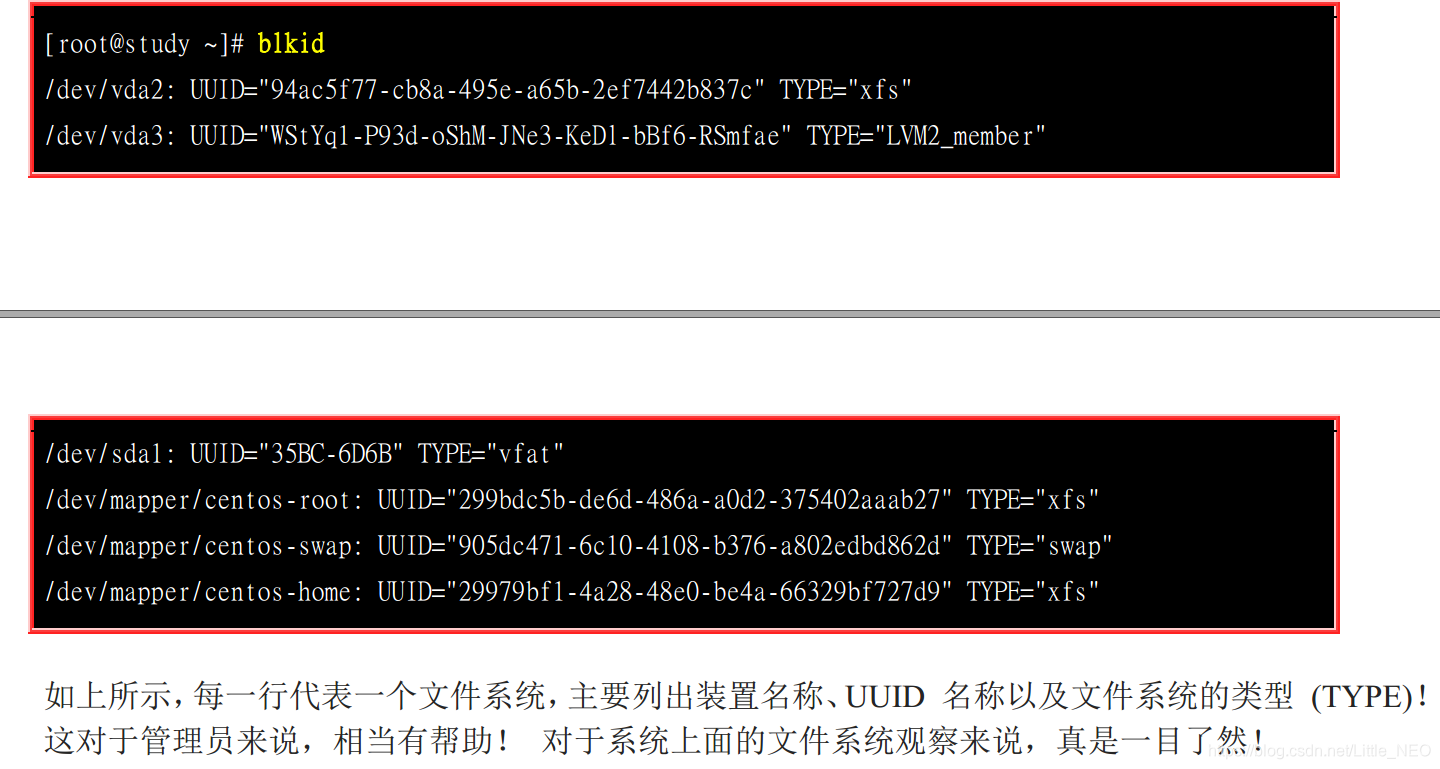
2.blkid 列出装置的 UUID 等参数
虽然 lsblk 已经可以使用 -f 来列出文件系统与装置的 UUID 数据,不过,鸟哥还是比较习惯直接
使用 blkid 来找出装置的 UUID 喔! 什么是 UUID 呢?UUID 是全局单一标识符 (universally
unique identifier),Linux 会将系统内所有的装置都给予一个独一无二的标识符, 这个标识符就可以
拿来作为挂载或者是使用这个装置/文件系统之用了。
在这里插入图片描述
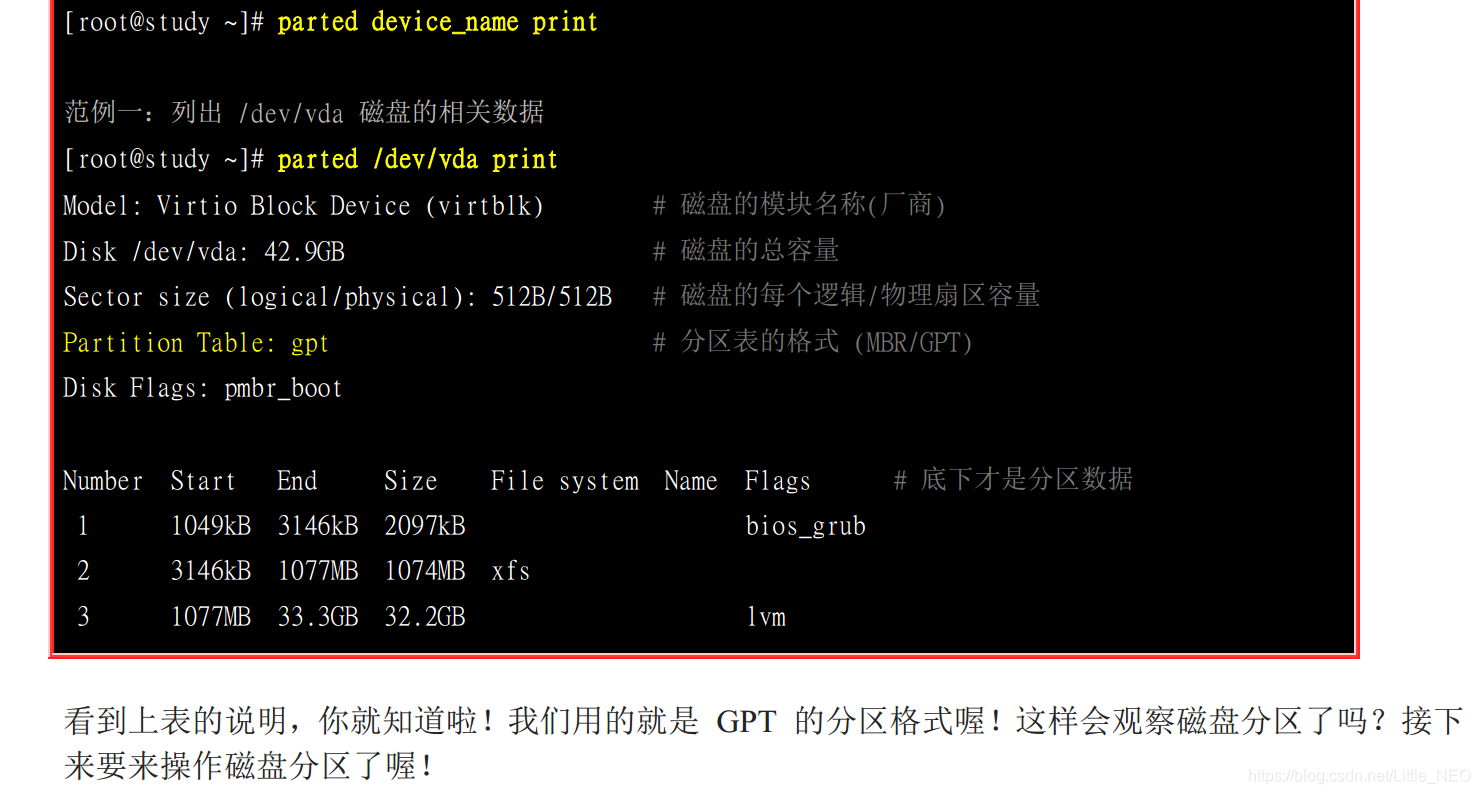
3.parted 列出磁盘的分区表类型与分区信息
虽然我们已经知道了系统上面的所有装置,并且透过 blkid 也知道了所有的文件系统!不过,还是不
清楚磁盘的分区类型。 这时我们可以透过简单的 parted 来输出喔!我们这里仅简单的利用他的输出
而已~本章最后才会详细介绍这个指令的用法的
在这里插入图片描述
『MBR 分区表请使用 fdisk 分区, GPT 分区表请使用 gdisk 分区!』 这个不要搞错~否则会分区失败的!

您可能感兴趣的与本文相关的镜像

GPT-oss:20b

GPT-oss:20b

图文对话
Gpt-oss

GPT OSS 是OpenAI 推出的重量级开放模型,面向强推理、智能体任务以及多样化开发场景

### CentOS Shell Commands and Scripts In the context of using CentOS, several shell commands and scripts are essential for system administration tasks such as installing software packages, configuring services, or managing security settings. For instance, when initializing a secure environment on CentOS 7, one can use a script that automates various configurations including firewall setup, SELinux policy adjustments, and user management[^3]. This demonstrates how powerful scripting is within Linux environments like CentOS to automate complex setups efficiently. When it comes to upgrading from an older version of CentOS (e.g., CentOS 6) to a newer release (such as CentOS 7), specific repository configuration files need adjustment. An example involves setting up `upgradetool.repo` with appropriate URLs pointing towards repositories hosting necessary upgrade tools[^4]. Moreover, starting services through bash scripts exemplifies practical usage scenarios under CentOS systems. For launching MongoDB alongside initiating backend applications built upon frameworks similar to Egg.js, consider employing a bash script containing lines tailored specifically for these operations: ```bash #!/bin/bash sudo /usr/bin/mongod -f /usr/local/mongodb/mongodb.conf &> /dev/null & cd /usr/local/eggServer/mysite-server-main && npm run initLinux && npm run start > /dev/null 2>&1 & ``` This snippet showcases not only invoking service processes but also handling output redirection effectively by silencing standard outputs while ensuring errors do get logged appropriately[^2]. Additionally, installing web servers like Nginx requires executing multiple package installations followed by downloading source code archives before compiling them into binaries suitable for deployment across different architectures supported by CentOS distributions[^5]: ```bash yum -y install gcc yum install -y pcre pcre-devel yum install -y zlib zlib-devel wget http://nginx.org/download/nginx-1.17.10.tar.gz tar -zxvf nginx-1.17.10.tar.gz cd nginx-1.17.10 ./configure make && make install cd /usr/local/nginx/sbin/ ./nginx ``` These examples highlight common practices involving shell commands and scripts used extensively throughout CentOS-based deployments ranging from simple server setups to more intricate application stack orchestrations. --related questions-- 1. How does one configure firewalls automatically during initial CentOS installation? 2. What steps should be taken if encountering issues accessing external repositories during upgrades between major versions of CentOS? 3. Can you provide alternative methods for running background jobs silently without affecting terminal sessions in CentOS shells? 4. Is there any way to streamline the process of building custom Nginx modules directly after obtaining official sources via wget command line tool? 5. Which other popular databases besides MongoDB could benefit similarly from being started through initialization scripts written in Bash language targeting CentOS platforms?
评论
成就一亿技术人!
拼手气红包6.0元
还能输入1000个字符
 
红包 添加红包
表情包 插入表情
 条评论被折叠 查看
添加红包

请填写红包祝福语或标题

红包个数最小为10个

红包金额最低5元

当前余额3.43前往充值 >
需支付:10.00
成就一亿技术人!
领取后你会自动成为博主和红包主的粉丝 规则
hope_wisdom
发出的红包
实付
使用余额支付
点击重新获取
扫码支付
钱包余额 0

抵扣说明:

1.余额是钱包充值的虚拟货币,按照1:1的比例进行支付金额的抵扣。
2.余额无法直接购买下载,可以购买VIP、付费专栏及课程。

余额充值




