


 本文详细介绍了一款基于微信小程序的评论区组件的设计与实现,包括动态内容展示、排序筛选、评论折叠与展开等功能,以及组件化的开发思路。
不说别的先上效果图
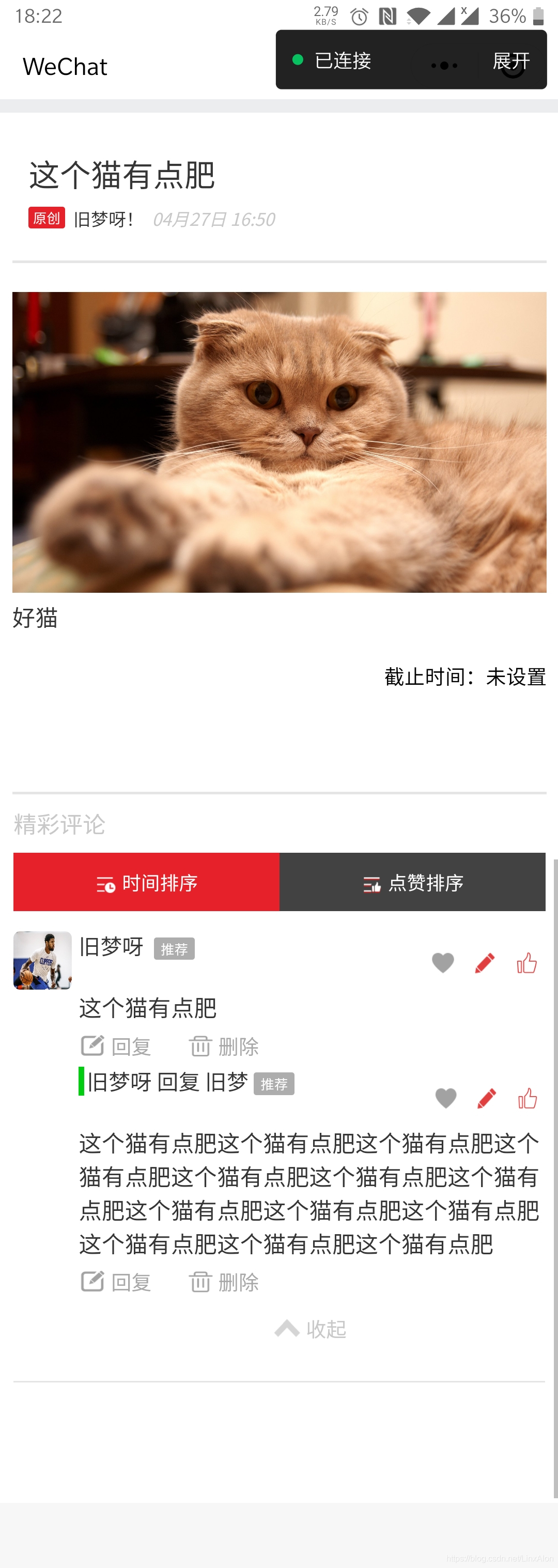
主要实现方向就是呈组件嵌套的方式,下面是结构图:
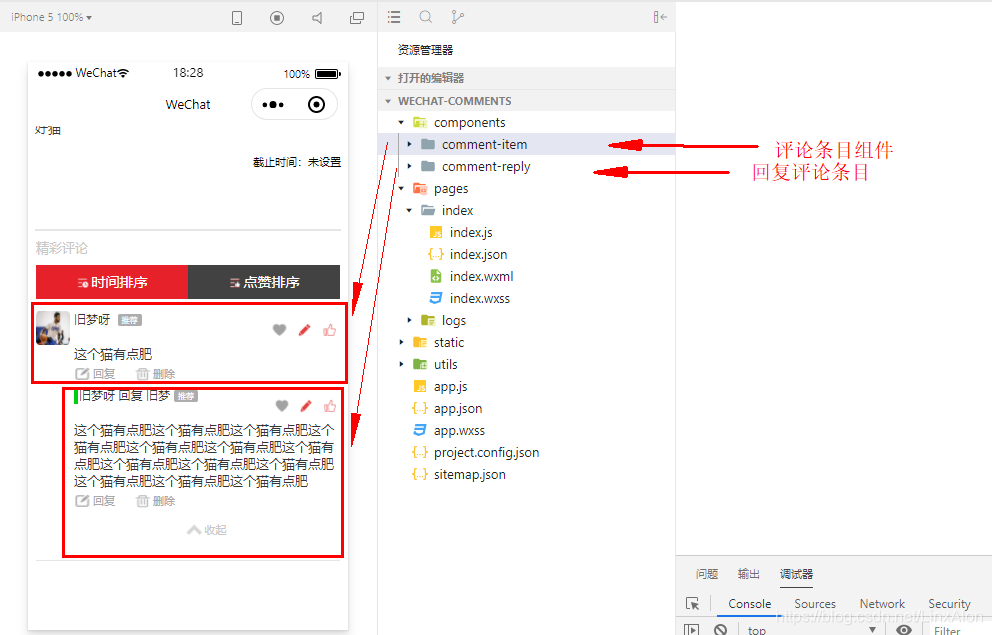
正式代码:
主页部分
WXML:
<!--index.wxml-->
<view class='theme-container'>

  <!-- 专题信息 -->
  <view class='theme-info'>
    <view class='theme-detail'>
      <view class='theme-title'>{{theme.title}}</view>
      <view class='create-info'>
        <view class='original'>原创</view>
        <text class='create-name'>{{theme.createName}}</text>
        <text class='create-time'>{{theme.createTime}}</text>
      </view>
    </view>
  </view>

  <!-- 正文截止时间显示 -->
  <view class="theme-content">
    <rich-text space="emsp" nodes="{{content}}" bindtouchstart="bindtouchstart" bindtouchend="bindtouchend" />
    <view class='deadline'>截止时间:{{theme.expirationDate!=null?theme.expirationDate:'未设置'}}</view>
  </view>

  <!-- 评论 -->
  <view class='comment'>
    <view class='comment-tip'>精彩评论</view>
    <view class='comment-sort'>
      <radio-group bindchange="radioChange">
        <view class='label'>
          <label class="ui-radio {{item.checked==true?'active':''}} {{item.value}}" wx:for="{{items}}" wx:key="value">
            <radio value="{{item.value}}" checked="{{item.checked}}" />
            <image class="iconfont" src="{{item.value=='time-sorting'?'/static/img/time-sorting@2.png':'/static/img/thumbUp-sorting@2.png'}}"></image>
            <text class="text">{{item.name}}</text>
          </label>
        </view>
      </radio-group>
    </view>
    <view class='comment-list'>
      <comment-item wx:for="{{comment}}" wx:key="id" item="{{item}}" bind:deleteEvent="loadComment"></comment-item>
    </view>
  </view>

  <view class="blank"></view>
</view>
WXSS:
page {
  background-color: #ecedee
}

.theme-container {
  height: auto;
  margin-top: 20rpx;
  background-color: #fff
}

.theme-container .theme-info {
  height: 200rpx;
}

.theme-container .theme-info .theme-detail {
  margin: 0 40rpx;
  margin-top: 52rpx;
  height: auto;
  display: inline-block
}

.theme-container .theme-info .theme-detail .theme-title {
  width: 100%;
  height: auto;
  font-size: 42rpx;
  color: #353535
}

.theme-container .theme-info .theme-detail .create-info {
  font-size: 28rpx;
  margin-top: 16rpx;
  height: 30rpx;
  line-height: 30rpx
}

.theme-container>.theme-info>.theme-detail>.create-info>.original {
  display: inline-block;
  float: left;
  width: 50rpx;
  height: 30rpx;
  background-color: #e6212a;
  color: #fff;
  font-size: 20rpx;
  text-align: center;
  border-radius: 4rpx
}

.theme-container>.theme-info>.theme-detail>.create-info>.create-name {
  margin-left: 12rpx;
  font-size: 24rpx;
  color: #353535;
  line-height: 30rpx
}

.theme-container>.theme-info>.theme-detail>.create-info>.create-time {
  font-style: italic;
  margin-left: 12rpx;
  font-size: 24rpx;
  color: #c8c8c8;
  line-height: 30rpx
}

.theme-container>.theme-info>.theme-operation {
  margin: 40rpx 0rpx 20rpx;
  width: auto;
  height: 80rpx;
  text-align: center
}

.theme-container .theme-content {
  padding: 40rpx 0rpx;
  margin: 0px 18rpx;
  height: auto;
  background-color: #fff;
  border-top: 2px solid #e5e5e5;
  border-bottom: 2px solid #e5e5e5
}

.theme-container .theme-content>rich-text {
  word-break: break-all;
  font-size: 32rpx;
  color: #353535
}

.theme-container .theme-content .deadline {
  margin-top: 40rpx;
  width: 100%;
  height: 40rpx;
  line-height: 40rpx;
  font-size: 28rpx;
  text-align: right;
  margin-bottom: 100rpx
}
/* ==================================== */
.comment {
  height: auto;
  margin: 0rpx 20rpx
}

.comment .comment-tip {
  width: 100%;
  height: 80rpx;
  font-size: 32rpx;
  line-height: 80rpx;
  color: #c8c8c8
}

.comment .comment-sort {
  width: 100%;
  height: 80rpx
}

.comment .comment-sort>radio-group {
  height: 100%
}

.ui-radio radio {
  display: none
}

.label {
  width: 100%;
  height: 100%;
  display: flex;
  flex-direction: row;
  flex-wrap: wrap
}

.ui-radio {
  width: 50%;
  height: 100%;
  text-align: center;
  white-space: nowrap;
  font-size: 14px;
  background-color: #424242;
  color: #fff
}

.ui-radio image {
  width: 30rpx;
  height: 30rpx;
  vertical-align: middle
}

.ui-radio .text {
  color: #fff
}

.ui-radio.active {
  width: 50%;
  height: 100%;
  text-align: center;
  white-space: nowrap;
  background-color: #e6212a;
  color: #fff
}


.text {
  line-height: 80rpx;
  font-size: 14px;
  margin-left: 8rpx
}

.ui-radio.active .text {
  line-height: 80rpx;
  font-size: 14px
}

.comment .comment-list {
  margin-top: 20rpx;
  width: 100%;
  height: auto;
}

.theme-container .btn-write {
  width: 100%;
  height: 120rpx;
  text-align: center;
  position: fixed;
  bottom: 0;
  left: 0;
  right: 0;
  z-index: 999;
  background: #fff
}

.theme-container .btn-write>view {
  margin: 0 auto;
  width: 90%;
  height: 80rpx;
  margin-top: 20rpx;
  line-height: 80rpx;
  border-radius: 10rpx;
  display: inline-block;
  text-align: center;
  background-color: #e13e3f;
  color: #fff;
  font-size: 30rpx
}

.theme-container .btn-write>view>image {
  width: 40rpx;
  height: 36rpx;
  vertical-align: middle;
  margin-right: 4rpx
}

.theme-container .btn-write>view>text {
  vertical-align: middle
}

.move-btn {
  width: 80rpx;
  height: 80rpx;
  border-radius: 100%;
  position: fixed;
  top: 80%;
  right: 20rpx;
  z-index: 999;
  background-color: #f759ab;
  text-align: center;
  line-height: 80rpx
}

.move-btn>image {
  width: 32rpx;
  height: 32rpx
}

.blank {
  width: 100%;
  height: 140rpx;
}
JS:
//index.js
//获取应用实例
const app = getApp()

Page({
  data: {
    showMove: false,
    items: [{
      name: '时间排序',
      value: 'time-sorting',
      checked: true,
    }, {
      name: '点赞排序',
      value: 'thumbUp-sorting'
    }],
    theme: {
      title: "这个猫有点肥",
      createName: "旧梦呀!",
      createTime: "04月27日 16:50",
    },
    content: [{
        name: "img",
        attrs: {
          style: "width:100%",
          src: "http://b.zol-img.com.cn/desk/bizhi/start/2/1363937806123.jpg",
        },
      },
      {
        name: "p",
        attrs: {
          style: "margin-bottom:5px",
        },
        children: [{
          name: "p",
          attrs: {
            class: "p2",
          },
          children: [{
            type: "text",
            text: "好猫",
          }]
        }]
      },
    ],

    comment: [{
        id: 1,
        content: "这个猫有点肥",
        createAvatar: "https://timgsa.baidu.com/timg?image&quality=80&size=b9999_10000&sec=1592810633643&di=b39cd992528f67473c64fd503cc9f824&imgtype=0&src=http%3A%2F%2Fbobatiyu.com%2Fwp-content%2Fuploads%2F2019%2F09%2F36cbbf05831851ba614c556baf37e25cfd7e3417.jpg",
        createName: "旧梦呀",
        reply: [{
          id: 2,
          content: "这个猫有点肥这个猫有点肥这个猫有点肥这个猫有点肥这个猫有点肥这个猫有点肥这个猫有点肥这个猫有点肥这个猫有点肥这个猫有点肥这个猫有点肥这个猫有点肥这个猫有点肥",
          createAvatar: "https://timgsa.baidu.com/timg?image&quality=80&size=b9999_10000&sec=1592810633643&di=b39cd992528f67473c64fd503cc9f824&imgtype=0&src=http%3A%2F%2Fbobatiyu.com%2Fwp-content%2Fuploads%2F2019%2F09%2F36cbbf05831851ba614c556baf37e25cfd7e3417.jpg",
          createName: "旧梦呀",
          replyName:"旧梦",
        }],
      }

    ]
  },

  onLoad: function () {

  },

  radioChange: function(e) {
    var items = this.data.items;
    for (var i = 0; i < items.length; ++i) {
      items[i].checked = items[i].value == e.detail.value
    }
    this.setData({
      items: items
    });
  },
});
JSON:
{
  "usingComponents": {
    "comment-item": "/components/comment-item/comment-item"
  }
}
comment-item部分
WXML:
<view class='comment-item'>
  <view class='head-portrait'>
    <image src='{{item.createAvatar}}'></image>
  </view>
  <view class='comment-detail'>
    <view class='comment-info-operation'>
      <view class='comment-info'>
        <view class='comment-create'>
          {{item.createNote!=null&&item.createNote!=''?item.createNote:item.createName}}
          <text wx:if="{{item.reconmend}}" class="comment-recommend">推荐</text>
        </view>
        <view class='comment-time'>{{item.createTime}}</view>
      </view>
      <view class='comment-operation'>
        <image wx:if="{{isGroupManager}}" src="{{collection?'/static/img/comment-collection-pressed@2.png':'/static/img/comment-collection@2.png'}}" bindtap='clickLike'></image>
        <image wx:if="{{isMine}}" src="/static/img/comment-edit-pressed@2.png" bindtap='clickEdit'></image>
        <image wx:if="{{hasUserInfo}}" class='last-image' src="{{praise?'/static/img/comment-praise-pressed@3.png':'/static/img/comment-praise@3.png'}}" bindtap='clickPraise'></image>
        <view class='praise-num'>{{item.collectCount}}</view>
      </view>
    </view>

    <view id="toggle-wrapper" class="comment-content {{toggleParams.toggleFlag == 1 ?'hidden-test':'show-test'}}" bindtouchstart="touchstart" bindtouchend="touchend" bindtouchmove="touchMove">
      <text id="toggle-content" space="nbsp" decode="{{true}}">{{item.content}}</text>
    </view>
    <view class='reply-delete'>
      <view class='reply' bindtap='bindReply'>
        <image src='/static/img/comment-reply@3.png'></image>
        <text>回复</text>
      </view>
      <view class='delete' wx:if="{{isMine||isGroupManager}}" bindtap='clickDelete'>
        <image src='/static/img/comment-delete@3.png'></image>
        <text>删除</text>
      </view>
    </view>
    <view class='show-more' wx:if="{{toggleParams.toggleShow}}">
      <view class='container' bindtap="toggleHandler">
        <image src='/static/img/pack-up@3.png' class="{{toggleParams.toggleFlag === 1?'show':'hide'}}"></image>
        <text>{{toggleParams.toggleFlag===1?'展开':'收起'}}</text>
      </view>
    </view>
    <comment-reply wx:for="{{item.reply}}" wx:key="{{item.id}}" item="{{item}}" bind:deleteParentEvent="reloadEvent" hasUserInfo="{{hasUserInfo}}"></comment-reply>
  </view>
  <i-modal title="删除确认" visible="{{ visible }}" actions="{{actions}}" bind:click="handleClick">
    <view>删除后无法恢复哦</view>
  </i-modal>
</view>
WXSS:
/* components/comment-item/comment-item.wxss */
.comment-item {
  width: 100%;
  height: auto;
  display: table;
  clear: both;
  padding: 10rpx 0rpx;
  border-bottom: 1px solid #e5e5e5;
  margin-bottom: 25rpx;
  overflow: hidden
}

.comment-item .head-portrait {
  width: 80rpx;
  height: 80rpx;
  display: inline-block;
  float: left;
  text-align: center
}

.comment-item .head-portrait>image {
  width: 80rpx;
  height: 80rpx;
  border-radius: 10rpx
}

.comment-item .comment-detail {
  width: 87%;
  height: auto;
  display: inline-block;
  float: left;
  margin-left: 10rpx
}

.comment-item .comment-detail .comment-info-operation {
  width: 100%;
  height: 80rpx
}

.comment-item .comment-detail .comment-info-operation .comment-info {
  display: inline-block;
  float: left;
  width: 60%;
  height: 100%
}

.comment-item .comment-detail .comment-info-operation .comment-operation {
  display: inline-block;
  float: right;
  width: auto;
  max-width: 268rpx;
  height: 100%;
  line-height: 80rpx
}

.comment-item .comment-detail .comment-info-operation .comment-info .comment-create {
  height: 50%;
  line-height: 40rpx;
  font-size: 30rpx;
  color: #353535;
  vertical-align: middle
}

.comment-item .comment-detail .comment-info-operation .comment-info .comment-create .comment-recommend {
  margin-left: 4px;
  font-size: 20rpx;
  color: white;
  background-color: #adadad;
  padding: 3rpx 10rpx;
  border-radius: 2px;
  vertical-align: middle
}

.comment-item .comment-detail .comment-info-operation .comment-info .comment-time {
  width: auto;
  height: 50%;
  font-size: 28rpx;
  color: #c8c8c8;
  font-style: italic
}

.comment-item .comment-detail .comment-info-operation .comment-operation>image {
  display: inline-block;
  width: 40rpx;
  height: 34rpx;
  color: #a2a2a2;
  vertical-align: middle;
  margin: 0rpx 10rpx
}

.comment-item .comment-detail .comment-info-operation .comment-operation>.last-image {
  margin-right: 0rpx !important
}

.comment-item .comment-detail .comment-info-operation .praise-num {
  display: inline-block;
  max-width: 80rpx;
  width: auto;
  height: 34rpx;
  line-height: 34rpx;
  font-size: 30rpx;
  vertical-align: middle;
  color: #c8c8c8
}

.comment-item .comment-detail .comment-content {
  width: 100%;
  font-size: 32rpx;
  color: #353535;
  overflow: hidden
}

.comment-item .comment-detail .comment-content.show-test {
  height: auto;
  overflow: auto;
  white-space: normal;
  text-overflow: clip;
  animation: hideIndex 0.3s;
  word-wrap: break-word;
  word-break: break-all
}

.comment-item .comment-detail .comment-content.hidden-test {
  width: 590rpx;
  overflow: hidden;
  text-overflow: ellipsis;
  word-break: keep-all;
  white-space: nowrap
}

.comment-item .comment-detail .reply-delete {
  width: 100%;
  height: 50rpx;
  line-height: 48rpx;
  font-size: 28rpx;
  color: #a8a8a8
}

.comment-item .comment-detail .reply-delete .reply {
  width: auto;
  height: 100%;
  display: inline-block;
  vertical-align: middle
}

.comment-item .comment-detail .reply-delete .reply>image {
  width: 40rpx;
  height: 34rpx;
  vertical-align: middle
}

.comment-item .comment-detail .reply-delete .reply>text {
  line-height: 34rpx;
  vertical-align: middle;
  margin-left: 6rpx
}

.comment-item .comment-detail .reply-delete .delete {
  width: auto;
  height: 100%;
  display: inline-block;
  vertical-align: middle;
  margin-left: 46rpx
}

.comment-item .comment-detail .reply-delete .delete>image {
  width: 40rpx;
  height: 34rpx;
  vertical-align: middle
}

.comment-item .comment-detail .reply-delete .delete>text {
  line-height: 34rpx;
  vertical-align: middle;
  margin-left: 6rpx
}

.comment-item .comment-detail .show-more {
  width: 100%;
  height: 60rpx;
  text-align: center;
  line-height: 60rpx;
  margin: 12rpx 0 20rpx 0
}

.comment-item .comment-detail .show-more .container {
  display: inline-block;
  height: 60rpx;
  line-height: 60rpx
}

.comment-item .comment-detail .show-more .container>image {
  width: 40rpx;
  height: 30rpx;
  vertical-align: middle;
  transition: all 0.2s linear
}

.comment-item .comment-detail .show-more .container>text {
  font-size: 28rpx;
  color: #c8c8c8;
  vertical-align: middle;
  margin-left: 7rpx
}

.comment-item .comment-detail .show-more .container .show {
  transform: rotate(180deg)
}
JS:
// components/comment-item/comment-item.js
Component({
  /**
   * 组件的属性列表
   */
  properties: {
    item: {
      type: Object,
    },
  },

  /**
   * 组件的初始数据
   */
  data: {
    toggleParams: {
      toggleFlag: 1, //0收起1展开
      toggleShow: false, //默认不显示toggleIcon
    },
  },
  ready: function () {
    this._checkRemarkToggle();
  },
  /**
   * 组件的方法列表
   */
  methods: {
    _getElementWidth(id = "") {
      let _query = this.createSelectorQuery();
      return new Promise(resolve => {
        _query.select(id).fields({
          size: true,
        }, (res) => {
          resolve(res.width)
          _query = null;
        }).exec();
      });
    },
    // 说明文字收起 / 隐藏事件
    toggleHandler() {
      const {
        toggleFlag
      } = this.data.toggleParams;

      this.setData({
        toggleParams: {
          toggleFlag: toggleFlag === 0 ? 1 : 0,
          toggleShow: true
        }
      })
    },
    /*
     * 检测说明文字是否需要隐藏/收起操作
     * 对比文字外层固定宽度容器元素宽度wrapperWidth与当前文字元素宽度contentWidth
     * 若相差小于10则说明超出一行
     * */
    _checkRemarkToggle() {
      Promise.all([
        this._getElementWidth('#toggle-wrapper'),
        this._getElementWidth('#toggle-content')
      ]).then(res => {
        const wrapperWidth = res[0];
        const contentWidth = res[1];
        if (wrapperWidth - contentWidth < 5) {
          this.setData({
            toggleParams: {
              toggleFlag: 0,
              toggleShow: true
            },
          })
        }
      })
    }
  },

  lifetimes: {
    attached: function () {
      // 在组件实例进入页面节点树时执行
    },
    detached: function () {
      // 在组件实例被从页面节点树移除时执行
    },
  },
})
JSON:
{
  "component": true,
  "usingComponents": {
    "comment-reply": "/components/comment-reply/comment-reply"
  }
}
comment-reply相关
WXML:
<!--components/comment-reply/comment-reply.wxml-->
<view class='comment-item'>
  <view class='comment-detail'>
    <view class='comment-info-operation'>
      <view class='comment-info'>
        <view class='comment-create'>{{item.createName}} 回复 {{item.replyName}}<text class="comment-recommend">推荐</text></view>
        <view class='comment-time'>{{item.createTime}}</view>
      </view>
      <view class='comment-operation'>
        <image src="{{collection?'/static/img/comment-collection-pressed@2.png':'/static/img/comment-collection@2.png'}}"></image>
        <image src="/static/img/comment-edit-pressed@2.png" ></image>
        <!-- <image src='/static/img/comment-delete@3.png'></image> -->
        <image class='last-image' src="{{praise?'/static/img/comment-praise-pressed@3.png':'/static/img/comment-praise@3.png'}}"></image>
        <view class='praise-num'>{{item.collectCount}}</view>
      </view>
    </view>

    <view id="toggle-wrapper" class="comment-content {{toggleParams.toggleFlag == 1 ?'hidden-test':'show-test'}}" bindtouchstart="touchstart" bindtouchend="touchend" bindtouchmove="touchMove">
      <text id="toggle-content" space="nbsp" decode="{{true}}">{{item.content}}</text>
    </view>
    <view class='reply-delete'>
      <view class='reply'>
        <image src='/static/img/comment-reply@3.png'></image>
        <text>回复</text>
      </view>
      <view class='delete'>
        <image src='/static/img/comment-delete@3.png'></image>
        <text>删除</text>
      </view>
    </view>
    <view class='show-more' wx:if="{{toggleParams.toggleShow}}">
      <view class='container' bindtap="toggleHandler">
        <image src='/static/img/pack-up@3.png' class="{{toggleParams.toggleFlag === 1?'show':'hide'}}"></image>
        <text>{{toggleParams.toggleFlag===1?'展开':'收起'}}</text>
      </view>
    </view>
    <comment-reply wx:for="{{item.reply}}" wx:key="id" item="{{item}}"></comment-reply>
  </view>
</view>
WXSS:
/* components/comment-reply/comment-reply.wxss */
.comment-item {
  width: 100%;
  height: auto;
  display: table;
  clear: both;
  padding: 10rpx 0rpx;
  margin-bottom: 10rpx;
  overflow: hidden
}

.comment-item .comment-detail {
  width: 100%;
  height: auto;
  display: inline-block;
  float: left
}

.comment-item .comment-detail .comment-info-operation {
  width: 100%;
  height: 80rpx
}

.comment-item .comment-detail .comment-info-operation .comment-info {
  display: inline-block;
  float: left;
  width: 56%;
  height: 100%
}

.comment-item .comment-detail .comment-info-operation .comment-operation {
  display: inline-block;
  float: right;
  width: auto;
  max-width: 200rpx;
  height: 100%;
  line-height: 80rpx
}

.comment-item .comment-detail .comment-info-operation .comment-info .comment-create {
  height: 50%;
  line-height: 40rpx;
  font-size: 30rpx;
  color: #353535;
  padding-left: 4rpx;
  border-left: 4px solid rgb(0, 204, 17);
  overflow: hidden;
  text-overflow: ellipsis;
  white-space: nowrap
}

.comment-item .comment-detail .comment-info-operation .comment-info .comment-create .comment-recommend {
  margin-left: 4px;
  font-size: 20rpx;
  color: white;
  background-color: #adadad;
  padding: 3rpx 10rpx;
  border-radius: 2px;
  vertical-align: middle
}

.comment-item .comment-detail .comment-info-operation .comment-info .comment-time {
  width: auto;
  height: 50%;
  font-size: 28rpx;
  color: #c8c8c8;
  font-style: italic
}

.comment-item .comment-detail .comment-info-operation .comment-operation>image {
  display: inline-block;
  width: 38rpx;
  height: 34rpx;
  color: #a2a2a2;
  vertical-align: middle;
  margin: 0rpx 10rpx
}

.comment-item .comment-detail .comment-info-operation .comment-operation>.last-image {
  margin-right: 0rpx !important
}

.comment-item .comment-detail .comment-info-operation .praise-num {
  display: inline-block;
  max-width: 80rpx;
  width: auto;
  height: 34rpx;
  line-height: 34rpx;
  vertical-align: middle;
  font-size: 30rpx;
  color: #c8c8c8
}

.comment-item .comment-detail .comment-content {
  width: 100%;
  font-size: 32rpx;
  color: #353535;
  overflow: hidden
}

.comment-item .comment-detail .comment-content.show-test {
  height: auto;
  overflow: auto;
  white-space: normal;
  text-overflow: clip;
  animation: hideIndex 0.3s;
  word-wrap: break-word;
  word-break: break-all
}

.comment-item .comment-detail .comment-content.hidden-test {
  width: 590rpx;
  overflow: hidden;
  text-overflow: ellipsis;
  word-break: keep-all;
  white-space: nowrap
}

.comment-item .comment-detail .show-more {
  width: 100%;
  height: 60rpx;
  text-align: center;
  line-height: 60rpx;
  margin: 12rpx 0 20rpx 0
}

.comment-item .comment-detail .show-more .container {
  display: inline-block;
  height: 60rpx;
  line-height: 60rpx
}

.comment-item .comment-detail .show-more .container>image {
  width: 40rpx;
  height: 34rpx;
  vertical-align: middle;
  transition: all 0.2s linear
}

.comment-item .comment-detail .show-more .container>text {
  font-size: 28rpx;
  color: #c8c8c8;
  vertical-align: middle;
  margin-left: 7rpx
}

.comment-item .comment-detail .show-more .container .show {
  transform: rotate(180deg)
}


.comment-item .comment-detail .reply-delete {
  width: 100%;
  height: 50rpx;
  color: #a8a8a8;
  font-size: 28rpx;
  line-height: 48rpx;
}

.comment-item .comment-detail .reply-delete .reply {
  display: inline-block;
  width: auto;
  height: 100%;
  vertical-align: middle;
}

.comment-item .comment-detail .reply-delete .reply>image {
  width: 40rpx;
  height: 34rpx;
  vertical-align: middle;
}

.comment-item .comment-detail .reply-delete .reply>text {
  margin-left: 6rpx;
  vertical-align: middle;
  line-height: 34rpx;
}

.comment-item .comment-detail .reply-delete .delete {
  display: inline-block;
  margin-left: 46rpx;
  width: auto;
  height: 100%;
  vertical-align: middle;
}

.comment-item .comment-detail .reply-delete .delete>image {
  width: 40rpx;
  height: 34rpx;
  vertical-align: middle;
}

.comment-item .comment-detail .reply-delete .delete>text {
  margin-left: 6rpx;
  vertical-align: middle;
  line-height: 34rpx;
}
JS:
// components/comment-reply/comment-reply.js
Component({
  relations: {
    '../collapse/index': {
      type: 'parent',
      linked: function (target) {
        const options = {
          accordion: target.data.accordion
        }
        if (target.data.name === this.data.name) {
          options.showContent = 'i-collapse-item-show-content';
        }
        this.setData(options);
      }
    }
  },

  /**
   * 组件的属性列表
   */
  properties: {
    item: {
      type: Object,
    },
  },

  /**
   * 组件的初始数据
   */
  data: {
    toggleParams: {
      toggleFlag: 1, //0收起1展开
      toggleShow: false, //默认不显示toggleIcon
    },
  },

  ready: function () {
    this._checkRemarkToggle();
  },

  /**
   * 组件的方法列表
   */
  methods: {
    _getElementWidth(id = "") {
      let _query = this.createSelectorQuery();
      return new Promise(resolve => {
        _query.select(id).fields({
          size: true,
        }, (res) => {
          resolve(res.width)
          _query = null;
        }).exec();
      });
    },
    // 说明文字收起 / 隐藏事件
    toggleHandler() {
      const {
        toggleFlag
      } = this.data.toggleParams;

      this.setData({
        toggleParams: {
          toggleFlag: toggleFlag === 0 ? 1 : 0,
          toggleShow: true
        }
      })
    },
    /*
     * 检测说明文字是否需要隐藏/收起操作
     * 对比文字外层固定宽度容器元素宽度wrapperWidth与当前文字元素宽度contentWidth
     * 若相差小于10则说明超出一行
     * */
    _checkRemarkToggle() {
      Promise.all([
        this._getElementWidth('#toggle-wrapper'),
        this._getElementWidth('#toggle-content')
      ]).then(res => {
        const wrapperWidth = res[0];
        const contentWidth = res[1];
        if (wrapperWidth - contentWidth < 5) {
          this.setData({
            toggleParams: {
              toggleFlag: 0,
              toggleShow: true
            },
          })
        }
      })
    }
  },

  lifetimes: {
    attached: function () {
      // 在组件实例进入页面节点树时执行
          console.log(this.properties.item)

    },
    detached: function () {
      // 在组件实例被从页面节点树移除时执行
    },
  },
})
JSON:
{
  "component": true,
  "usingComponents": {}
}





 扫一扫
扫一扫


 2423
2423

 被折叠的 条评论
为什么被折叠?
被折叠的 条评论
为什么被折叠?
 到【灌水乐园】发言





