



Vuex的作用
Vue项目开发采用的是组件化的方式进行开发,这种方式使得项目更加容易管理和维护。但存在的问题就是组件之间如何进行数据传输,每一个组件都是一个孤立的区域,父子组件之间的数据传输只能引用或者是触发事件而不能重新修改,而涉及到不同组件或者是层层嵌套的组件之间数据的联动和管理就变得很复杂了。因此Vue官方推出了 Vuex,称为状态管理模式,它的作用就是将不同组件的共享状态抽取出来,其实也就是项目的全局数据,把它们放在一个仓库里进行集中管理。无论处于树哪个位置的组件都可以轻松地对其引用或修改
城市选择功能采用Vuex
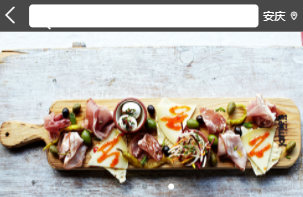
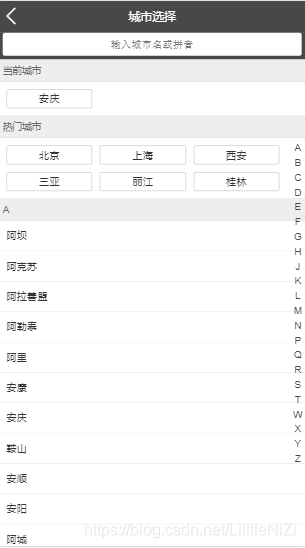
在开发手机应用和小程序的时候我们都需要用到城市定位和切换城市的功能。在首页需要显示选择城市,而当我们需要切换到另一个城市时我们会在下面的城市列表或者是搜索列表选择。如图下面,这些都是不同组件要依赖和变更同一状态,因此需要使用Vuex,将城市这一状态放进共享数据仓库里,当发生改变时就可以实现全局响应

安装Vuex
在项目文件夹的控制台下面输入:npm install vuex --save
创建Vuex的核心store
Vuex的核心store就是存放全局状态(state )的仓库,作为唯一的数据源存在,因此每一个应用仅有一个strore存在
1.在src目录下创建store的文件夹,然后再文件夹下面创建 index.js 文件,其内容如下
import Vue from 'vue'
import Vuex from 'vuex'
Vue.use(Vuex)

export default new Vuex.Store({

})
2.然后在 main.js里面引入store,然后再全局注入一下,这样就可以在任何一个组件里面使用this.$store了
import Vue from 'vue'
import App from './App'
import router from './router'
import store from './store'
import './assets/style/reset.css'
import './assets/style/border.css
/* eslint-disable no-new */
Vue.use(VueAwesomeSwiper)
new Vue({
  el: '#app',
  router,
  store,
  components: { App },
  template: '<App/>'
})
state的使用
3设置state变量,Vuex中的数据源就是在state中定义的,定义完后通过this.store.state来获取变量
store/index.js
import Vue from 'vue'
import Vuex from 'vuex'
Vue.use(Vuex)
//为了避免浏览器兼容性不同报错,使用try
const city{
	let defaultCity = '北京'
	try {
	  if (defaultCity) {
	    defaultCity = localStorage.city //默认先赋值为缓存中的值
	  }
	} catch (e) {}
}
export default new Vuex.Store({
 state,
})
citylist.vue//城市列表页:
在当前城市的取值用{{ this.$store.state.city }}
<template>
  <div class="list" ref="wrapper">
    <div>
      <div class="area">
        <div class="title border-topbottom">当前城市</div>
        <div class="button-list">
          <div class="button-wrapper">
            <div class="button">{{ this.$store.state.city }}</div>
          </div>
        </div>
      </div>
      <div class="area">
        <div class="title border-topbottom" >
          热门城市
        </div>
        <div class="button-list" >
        <div class="button-wrapper"
             v-for="item of hot"
             :key="item.id"
             @click="handleSelectCity(item.name)"
        >
            <div class="button">{{item.name}}</div>
          </div>
        </div>
      </div>
      <div class="area"
         v-for="(item,key) of city"
         :key="key"
         :ref="key"
      >
        <div class="title border-topbottom">{{key}}</div>
        <div class="itemList">
          <div class="item border-bottom"
             v-for="innerItem of item"
             :key="innerItem.id"
             @click="handleSelectCity(innerItem.name)"
          >
            {{innerItem.name}}
          </div>
        </div>
      </div>
    </div>
  </div>
</template>

<script>
import Bscroll from 'better-scroll'
export default{
  name: 'CityList',
  props: {
    city: Object,
    hot: Array,
    letter: String
  },
  mounted () {
    this.scroll = new Bscroll(this.$refs.wrapper, {click: true})
  },
  watch: {
    letter () {
      if (this.letter) {
        const element = this.$refs[this.letter][0]
        this.scroll.scrollToElement(element)
      }
    }
  },
  computed: {

  },
  methods: {
    handleSelectCity (city) {
      this.changeCity(city)
      this.$router.push('/')
    },
    ...mapMutations(['changeCity'])// 把mutations映射到changecity
  }
}
</script>
<style lang="stylus" scoped>
.border-topbottom
  &:before
    border-color:#ccc
  &:after
    border-color:#ccc
.border-bottom
  &:before
    border-color:#ccc
.list
  position:absolute
  top:1.58rem
  left:0
  right:0
  bottom:0
  overflow:hidden
  .title
    height:.4rem
    line-height:.4rem
    background:#eee
    padding:.1rem
    color:#666
    font-size:.26rem
  .button-list
    padding:.1rem .6rem .1rem .1rem
    overflow:hidden
    .button-wrapper
      box-sizing:border-box
      width:33.33%
      float:left
      .button
        margin:.1rem
        padding:.1rem 0
        text-align:center
        border:.02rem solid #ccd
        border-radius:.06rem
  .itemList
    .item
      line-height:.42rem
      padding:.2rem
</style>
Getter的使用
getter对象其实就是起到像computed的作用一样,当它的依赖值发生改变时会重新计算并且缓存起来,具体使用如下:
//store/index.js```
import Vue from 'vue'
import Vuex from 'vuex'
Vue.use(Vuex)
//为了避免浏览器兼容性不同报错,使用try
const city{
	let defaultCity = '北京'
	try {
	  if (defaultCity) {
	    defaultCity = localStorage.city //默认先赋值为缓存中的值
	  }
	} catch (e) {}
}
export default new Vuex.Store({
 state,
 mutations,
  getters:  {
    doubleCity  (state)  {
      return state.city + ' ' + state.city //返回一个两个city值加上一个空格的字符串
    }
  }
})
在首页上的显示当前城市:{{ this.store.getters.doubleCity }}
//header.vue
<template>
<div class="header">
<div class="header-left">
<span class="iconfont"></span>
</div>
<div class="header-input">
<span class="iconfont"></span>
</div>
<router-link to="/city">
<div class="header-right">
{{this.$store.getters.doubleCity}}
<span class="iconfont fontsize"></span>
</div>
</router-link>
</div>
</template>

Mutations的使用
对全局状态的修改需要通过mutations这个对象进行修改,mutatios其实就是存放数据处理方法。mutations不能直接调用,而是要通过commit来显示调用。使用时以this.$store.commit(‘字符串事件’,需要修改的参数)的形式
5.定义mutatuons对象,并且对其字符串事件函数中实现对state里的数据进行修改
//store/index.js```
import Vue from 'vue'
import Vuex from 'vuex'
Vue.use(Vuex)
//为了避免浏览器兼容性不同报错,使用try
const state {
	let defaultCity = '北京'
	try {
	  if (defaultCity) {
	    defaultCity = localStorage.city //默认先赋值为缓存中的值
	  }
	} catch (e) {}
}
const mutations {
//将字符串事件用函数实现其功能
 changeCity (state, city) {
    state.city = city //修改state的值
    try {
      localStorage.city = city //对缓存中的值也进行修改
    } catch (e) {}
  }
export default new Vuex.Store({
 state,
 mutations,
  getters:  {
    doubleCity  (state)  {
      return state.city + ' ' + state.city //返回一个两个city值加上一个空格的字符串
    }
  }
})
在城市列表选择其他城市时,state里面城市的值必定会发生改变,因此在点击想要的城市时会触发一个点击事件,这个事件函数就会以 {{ this.$store.commit() }} 来调用mutations中的函数对数据进行修改
//search.vue
<template>
  <div>
    <div class="search">
      <input v-model="keyword" class="search-input" type="text" placeholder="输入城市名或拼音" />
    </div>
    <div class="search-list"
         v-show="keyword"
         ref="search"
    >
      <ul>
        <li class="search-list-item border-bottom"
            v-for="item of list"
            :key="item.id"
            @click="handleSelectCity(item.name)"//点击列表此项时,会触发一个事件函数
        >
          {{item.name}}
        </li>
        <li class="search-list-item border-bottom"
            v-show="hasNoData"
        >
          无法找到匹配项
        </li>
      </ul>
    </div>
  </div>
</template>

<script>
import Bscroll from 'better-scroll'
import { mapMutations } from 'vuex'
export default {
  name: 'CitySearch',
  props: {
    cities: Object
  },
  data () {
    return {
      keyword: '',
      timer: null,
      list: []
    }
  },
  computed: {
    hasNoData () {
      return !this.list.length
    }
  },
  mounted () {
    this.scroll = new Bscroll(this.$refs.search)
  },
  watch: {
    keyword () {
      if (this.timer) {
        clearTimeout(this.timer)
      }
      if(!this.keyword){
		  this.list=[]
		  return
		  }
      this.timer = setTimeout(() => {
        const result = []
        for (let i in this.cities) {
          this.cities[i].forEach((value) => {
            if (value.spell.indexOf(this.keyword) > -1 || value.name.indexOf(this.keyword) > -1) {
              result.push(value)
            }
          })
        }
        this.list = result
      }, 100)
    }
  },
  mounted() {
	  this.scroll=new Bscroll(this.$refs.search)
  },
  computed:{
	  hasNoData () {
		  return !this.list.length
	  }
  },
  methods: {
    handleSelectCity (city) {
      this.$store.commit('changeCity',city) //显式调用mutations对象中的changeCity函数,把city的值赋给要修改的数据
      this.$router.push('/')
    },

  }
}
</script>

<style lang="stylus" scoped>
  @import '~style/varibles.styl'
  .search
    height: .72rem
    padding: 0 .1rem
    background: $bgColor
    .search-input
      box-sizing: border-box
      width: 100%
      height: .62rem
      padding: 0 .1rem
      line-height: .62rem
      text-align: center
      border-radius: .06rem
      color: #666
  .search-content
    z-index: 1
    overflow: hidden
    position: absolute
    top: 1.58rem
    left: 0
    right: 0
    bottom: 0
    background: #eee
    .search-item
      line-height: .62rem
      padding-left: .2rem
      background: #fff
      color: #666
  .search
    height:.72rem
    background:$bgColor
    padding:0 .1rem
    .search-input
      box-sizing:border-box
      width:100%
      height:.62rem
      padding:0 .1rem
      text-align:center
      line-height:.62rem
      color:#666
  .search-list
    position:absolute
    overflow:hidden
    z-index:1
    top:1.58rem
    left:0
    right:0
    bottom:0
    background:#eee
    .search-list-item
      padding-left:.2rem
      line-height:.62rem
      background:#fff
      color:#666
</style>


Action的使用
actions就是异步修改状态,在actions中提交mutations,然后再由mutations完成状态的修改。异步操作是可以实现多个操作并行,例如我们的电脑可以实现I/O操作的同时cpu也在处理数据,而不需要等待数据输入完成cpu才开始工作。actions的作用就是将mutations里面的同步操作组织成可以异步处理数据的方法
切换城市的功能是不属于异步操作所以不需要采用actions,为了展示actions的用法将其以actions的形式提交mutations来修改状态
在store里创建actions对象
//store/index.js```
import Vue from 'vue'
import Vuex from 'vuex'
Vue.use(Vuex)
//为了避免浏览器兼容性不同报错,使用try
const state {
	let defaultCity = '北京'
	try {
	  if (defaultCity) {
	    defaultCity = localStorage.city //默认先赋值为缓存中的值
	  }
	} catch (e) {}
}
const actions {
//ctx就是一个context对象,一个和store实例有相同方法和属性的context对象,用来调用ctx.commit来提交mutations,city的传过来的参数
 changeCity ( ctx , city ) {
  ctx.commit ( 'changeCity, city)  //changeCity是字符串事件,对应在mutations相对应的状态改变函数
  }
const mutations {
//将字符串事件用函数实现其功能
 changeCity (state, city) {
    state.city = city //修改state的值
    try {
      localStorage.city = city //对缓存中的值也进行修改
    } catch (e) {}
  }
export default new Vuex.Store({
 state,
 actions,
 mutations,
  getters:  {
    doubleCity  (state)  {
      return state.city + ' ' + state.city //返回一个两个city值加上一个空格的字符串
    }
  }
})
因此在需要修改的模板中,以{{ this.store.dispatch( ‘changeCity’, city) }}来调用actions中的字符串事件函数‘changeCity’
 <div class="area">
        <div class="title border-topbottom">当前城市</div>
        <div class="button-list">
          <div class="button-wrapper">
            <div class="button">{{ this.store.dispatch( ‘changeCity’, city )}}</div>
          </div>
        </div>
      </div>
/





 扫一扫
扫一扫


 1089
1089

 被折叠的 条评论
为什么被折叠?
被折叠的 条评论
为什么被折叠?
 到【灌水乐园】发言





