



 本文详细介绍如何使用TensorFlow的目标检测API进行物体识别模型训练。包括环境配置、数据集准备、模型配置及训练步骤等关键环节。
一、配置环境
选择TensorFlow__GPU版本
超级复杂……不愿回忆
二、下载API
GitHub TensorFlow object detection API
三、准备数据集
在下好的object detection文件夹下新建images文件夹以存放数据集(图片)。

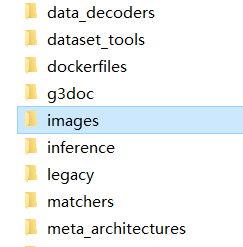
images文件夹下再新建两个文件夹分别命名:train和test
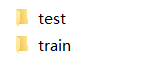
把预先准备的大量训练数据,按照一定的比例(5:1、6:1、7:1都可以)分成两部分,分别放到两个文件夹下(多的放train,少的放test)。
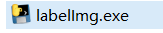
使用labelImg.exe对train和test里的图片进行标注(最累人的打标签,枯燥……无聊……)
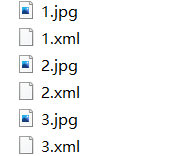
标注完后会在train和test文件夹里得到同名的xml文件
对于Tensorflow,需要输入专门的 TFRecords Format形式。
利用两个小程序,将xml转换成.csv,然后将.csv转换成.record
四、配置config
从sample文件夹下找到ssd_mobilenet_v1_coco.config(这个训练最快)
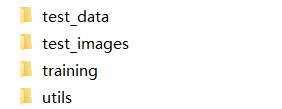
在object detection下新建一个training文件夹,把ssd_mobilenet_v1_coco.config复制进去,然后开始修改
# SSD with Mobilenet v1 configuration for MSCOCO Dataset.
# Users should configure the fine_tune_checkpoint field in the train config as
# well as the label_map_path and input_path fields in the train_input_reader and
# eval_input_reader. Search for "PATH_TO_BE_CONFIGURED" to find the fields that
# should be configured.

model {
  ssd {
    num_classes: 90
    box_coder {
      faster_rcnn_box_coder {
        y_scale: 10.0
        x_scale: 10.0
        height_scale: 5.0
        width_scale: 5.0
      }
    }
    matcher {
      argmax_matcher {
        matched_threshold: 0.5
        unmatched_threshold: 0.5
        ignore_thresholds: false
        negatives_lower_than_unmatched: true
        force_match_for_each_row: true
      }
    }
    similarity_calculator {
      iou_similarity {
      }
    }
    anchor_generator {
      ssd_anchor_generator {
        num_layers: 6
        min_scale: 0.2
        max_scale: 0.95
        aspect_ratios: 1.0
        aspect_ratios: 2.0
        aspect_ratios: 0.5
        aspect_ratios: 3.0
        aspect_ratios: 0.3333
      }
    }
    image_resizer {
      fixed_shape_resizer {
        height: 300
        width: 300
      }
    }
    box_predictor {
      convolutional_box_predictor {
        min_depth: 0
        max_depth: 0
        num_layers_before_predictor: 0
        use_dropout: false
        dropout_keep_probability: 0.8
        kernel_size: 1
        box_code_size: 4
        apply_sigmoid_to_scores: false
        conv_hyperparams {
          activation: RELU_6,
          regularizer {
            l2_regularizer {
              weight: 0.00004
            }
          }
          initializer {
            truncated_normal_initializer {
              stddev: 0.03
              mean: 0.0
            }
          }
          batch_norm {
            train: true,
            scale: true,
            center: true,
            decay: 0.9997,
            epsilon: 0.001,
          }
        }
      }
    }
    feature_extractor {
      type: 'ssd_mobilenet_v1'
      min_depth: 16
      depth_multiplier: 1.0
      conv_hyperparams {
        activation: RELU_6,
        regularizer {
          l2_regularizer {
            weight: 0.00004
          }
        }
        initializer {
          truncated_normal_initializer {
            stddev: 0.03
            mean: 0.0
          }
        }
        batch_norm {
          train: true,
          scale: true,
          center: true,
          decay: 0.9997,
          epsilon: 0.001,
        }
      }
    }
    loss {
      classification_loss {
        weighted_sigmoid {
        }
      }
      localization_loss {
        weighted_smooth_l1 {
        }
      }
      hard_example_miner {
        num_hard_examples: 3000
        iou_threshold: 0.99
        loss_type: CLASSIFICATION
        max_negatives_per_positive: 3
        min_negatives_per_image: 0
      }
      classification_weight: 1.0
      localization_weight: 1.0
    }
    normalize_loss_by_num_matches: true
    post_processing {
      batch_non_max_suppression {
        score_threshold: 1e-8
        iou_threshold: 0.6
        max_detections_per_class: 100
        max_total_detections: 100
      }
      score_converter: SIGMOID
    }
  }
}

train_config: {
  batch_size: 24
  optimizer {
    rms_prop_optimizer: {
      learning_rate: {
        exponential_decay_learning_rate {
          initial_learning_rate: 0.004
          decay_steps: 800720
          decay_factor: 0.95
        }
      }
      momentum_optimizer_value: 0.9
      decay: 0.9
      epsilon: 1.0
    }
  }
  fine_tune_checkpoint: "PATH_TO_BE_CONFIGURED/model.ckpt"
  from_detection_checkpoint: true
  # Note: The below line limits the training process to 200K steps, which we
  # empirically found to be sufficient enough to train the pets dataset. This
  # effectively bypasses the learning rate schedule (the learning rate will
  # never decay). Remove the below line to train indefinitely.
  num_steps: 200000
  data_augmentation_options {
    random_horizontal_flip {
    }
  }
  data_augmentation_options {
    ssd_random_crop {
    }
  }
}

train_input_reader: {
  tf_record_input_reader {
    input_path: "PATH_TO_BE_CONFIGURED/mscoco_train.record-?????-of-00100"
  }
  label_map_path: "PATH_TO_BE_CONFIGURED/mscoco_label_map.pbtxt"
}

eval_config: {
  num_examples: 8000
  # Note: The below line limits the evaluation process to 10 evaluations.
  # Remove the below line to evaluate indefinitely.
  max_evals: 10
}

eval_input_reader: {
  tf_record_input_reader {
    input_path: "PATH_TO_BE_CONFIGURED/mscoco_val.record-?????-of-00010"
  }
  label_map_path: "PATH_TO_BE_CONFIGURED/mscoco_label_map.pbtxt"
  shuffle: false
  num_readers: 1
}
【修改config部分参数】
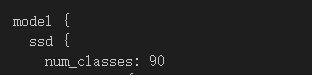
①num_classes代表要训练模型去识别几种物品,识别90种就是90,识别10种就改成10.
②batch_size:改成1(越大对于电脑性能要求越高)

③注释掉这两行

④num_steps:训练步数

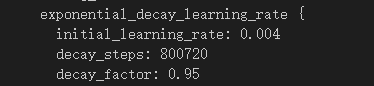
⑤initial_learning_rate:学习率(如果训练结果不理想,可以修改此值调整,往小改)
⑥PATH_TO_BE_CONFIGURED改成自己的路径(注意那个是train的路径哪个是test的路径)
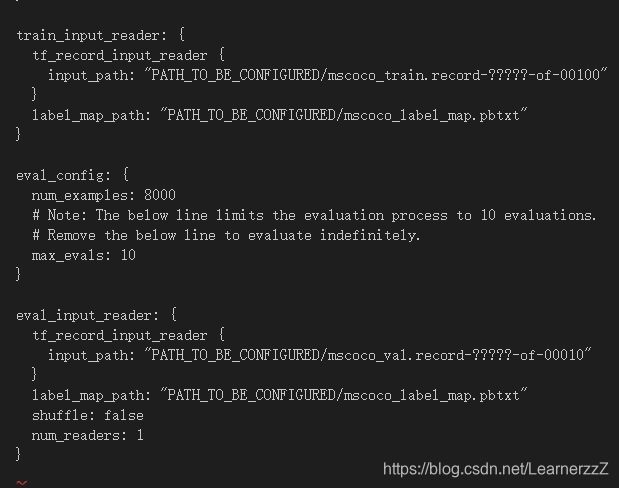
在你修改的“PATH_TO_BE_CONFIGURED”下创建这样一个.pbtxt

item {
  id: 1
  name: 'tiger'
}

item {
  id: 2
  name: 'lion'
}

item {
  id: 3
  name: 'dog'
}

item {
  id: 4
  name: 'whale'
}

item {
  id: 5
  name: 'monkey'
}
五、训练模型
在object detection下打开Terminal
python legacy/train.py --logtostderr --train_dir=training/ --pipeline_config_path=training/ssd_mobilenet_v1_coco.config
或者
python model_main.py \
    --pipeline_config_path=training/ssd_mobilenet_v1_coco.config \
    --model_dir=training \
    --num_train_steps=200000 \
    --num_eval_steps=10000 \
    --alsologtostderr
同时可以用:
tensorboard --logdir='training'打开Tensorboard查看训练进度。






 扫一扫
扫一扫


 1407
1407

 被折叠的 条评论
为什么被折叠?
被折叠的 条评论
为什么被折叠?
 到【灌水乐园】发言





