tensorflow2.17.0无法识别出使用GPU

该文章已生成可运行项目,

本来用torch,但是有代码用到tensorflow,以为和pytorch安装一样顺利!但是!

pytorch安装参考:机器学习入门篇之环境的搭建_搭建机器学习环境-优快云博客,这个写的真的很好很清楚!

所以我安装tensorflow的前提是已经依据上面的🔗安装好cuda和cudnn(均为最新版,cuda版本12.6)。

pip install tensorflow

之后显示正确安装tensorflow2.17.0,但是print(tf.test.is_gpu_available())显示FALSE,无法调用本PC的GPU(已经查过本机正确安装过cuda、cudnn并且配置有GPU,因为torch下可以调用GPU)。查阅很多配置tensorflow的博文,尝试以下命令:

pip install tensorflow-gpu

setup.py报错:

error: subprocess-exited-with-error

× python setup.py egg_info did not run successfully.
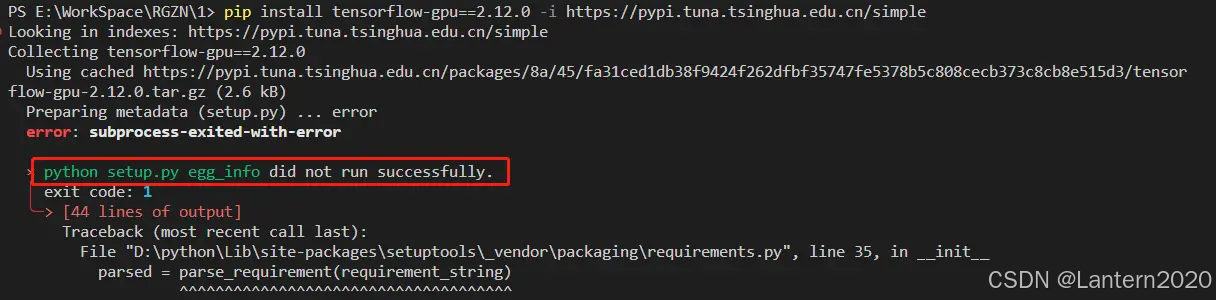

按照报错信息尝试解决:五种方法解决subprocess-exited-with-error × python setup.py egg_info did not run successfully_python subprocess-exited-with-error-优快云博客

按照成功安装的安利将命令改成:

pip install tensorflow-gpu==2.12.0

后来通过【已解决】【Tensorflow2.12.0 版本以后合并 CPU 和 GPU 版】Tensorflow-gpu==2.12.0 安装失败解决办法: - 知乎 (zhihu.com)知道tensorflow的gpu版本下架了,
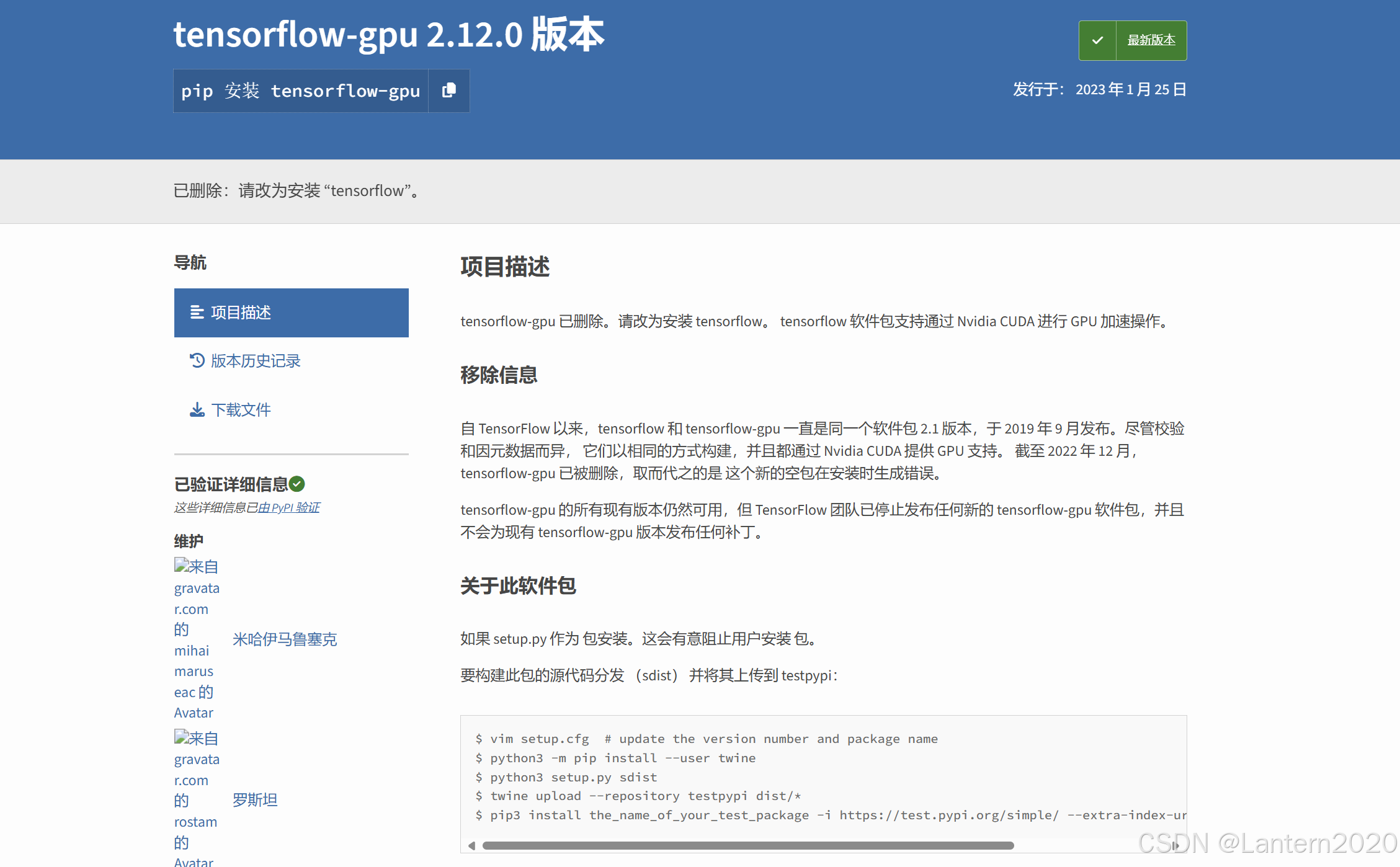
从 2022 年 12 月起 tensorflow-gpu 已经合并到 tensorflow 包中了,可以直接安装 tensorflow,调用 tensorflow 时会自动调用 GPU。

看到这里我又返回去安装tensorflow,但是还是无法调用GPU。

TensorFlow GPU版本安装(Windows)_tensorflow 2.17.0 gpu支持-优快云博客

其他帖子提出,从tensorflow 2.11.0版本开始,在windows上不再支持GPU;但是我换个2.10.0版本下载,貌似也没有效果,应该是cuda和cudnn版本的问题。(之前使用pytorch时下载了高版本)。这个帖子提出了有效的解决方法:

最简单的方法(省流版):将myenv中python版本修改成3.5-3.7,安装1.15.0的tensorflow-gpu版本,一般情况下现在流行的框架也是兼容的。(直接在虚拟环境中pip一键安装)

pip install tensorflow-gpu==1.15.0

另外一种方法是:安装tensorflow-gpu 2.10.0及以前的版本(需要搭配对应的cuda和cudnn)

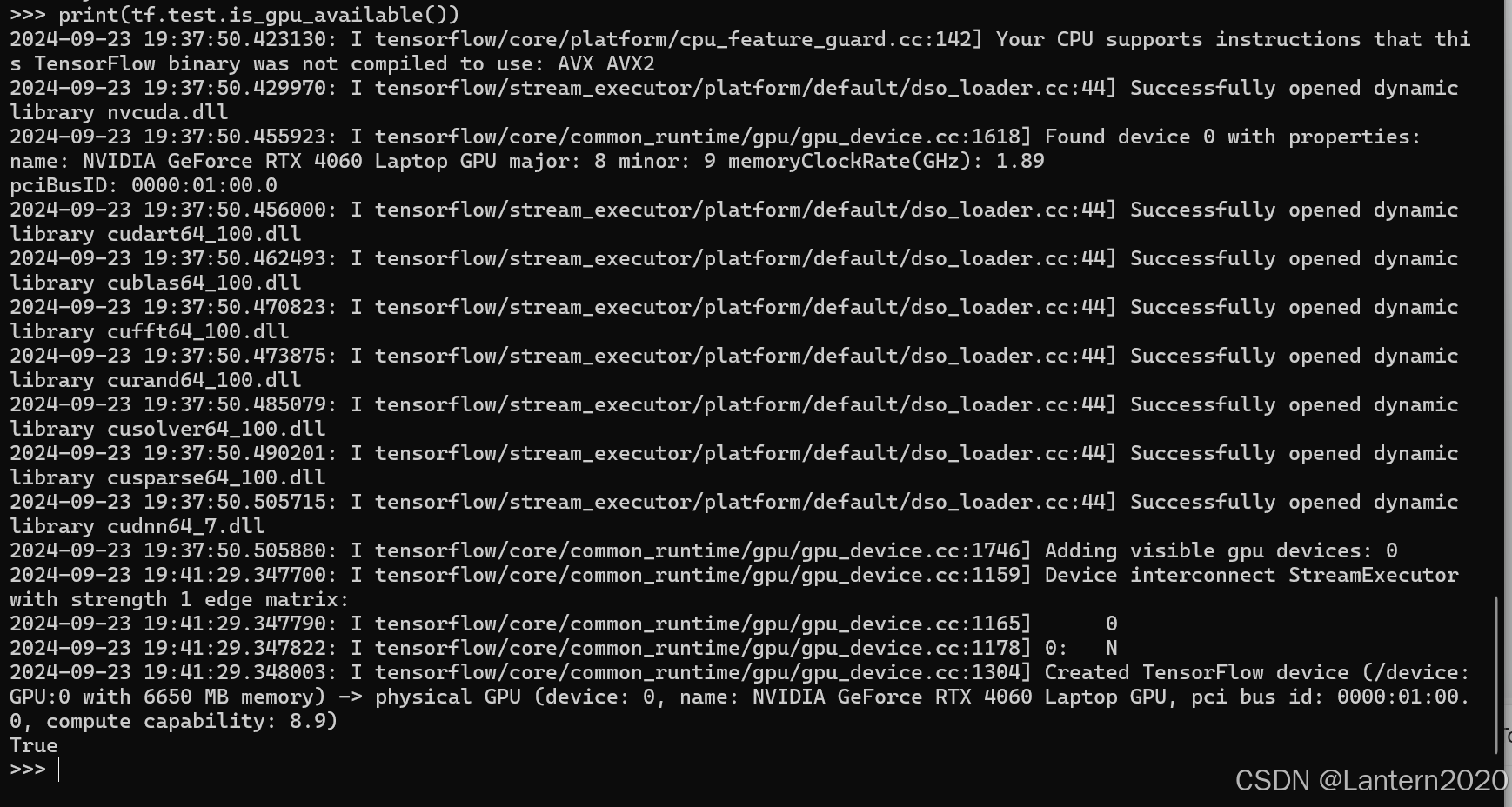
最后检测是否可以调用GPU:
本文章已经生成可运行项目
(base) C:\Users\86153>conda activate zj (zj) C:\Users\86153>conda install tensorflow-gpu=2.10.0 Channels: - https://mirrors.tuna.tsinghua.edu.cn/anaconda/pkgs/main - https://mirrors.tuna.tsinghua.edu.cn/anaconda/pkgs/free - defaults Platform: win-64 Collecting package metadata (repodata.json): done Solving environment: failed PackagesNotFoundError: The following packages are not available from current channels: - tensorflow-gpu=2.10.0* Current channels: - https://mirrors.tuna.tsinghua.edu.cn/anaconda/pkgs/main - https://mirrors.tuna.tsinghua.edu.cn/anaconda/pkgs/free - defaults - https://repo.anaconda.com/pkgs/main - https://repo.anaconda.com/pkgs/r - https://repo.anaconda.com/pkgs/msys2 To search for alternate channels that may provide the conda package you're looking for, navigate to https://anaconda.org and use the search bar at the top of the page. (zj) C:\Users\86153>conda install tensorflow=2.17.0 Channels: - https://mirrors.tuna.tsinghua.edu.cn/anaconda/pkgs/main - https://mirrors.tuna.tsinghua.edu.cn/anaconda/pkgs/free - defaults Platform: win-64 Collecting package metadata (repodata.json): done Solving environment: failed PackagesNotFoundError: The following packages are not available from current channels: - tensorflow=2.17.0* Current channels: - https://mirrors.tuna.tsinghua.edu.cn/anaconda/pkgs/main - https://mirrors.tuna.tsinghua.edu.cn/anaconda/pkgs/free - defaults - https://repo.anaconda.com/pkgs/main - https://repo.anaconda.com/pkgs/r - https://repo.anaconda.com/pkgs/msys2 To search for alternate channels that may provide the conda package you're looking for, navigate to https://anaconda.org and use the search bar at the top of the page.
最新发布
03-18
评论
成就一亿技术人!
拼手气红包6.0元
还能输入1000个字符
 
红包 添加红包
表情包 插入表情
 条评论被折叠 查看
添加红包

请填写红包祝福语或标题

红包个数最小为10个

红包金额最低5元

当前余额3.43前往充值 >
需支付:10.00
成就一亿技术人!
领取后你会自动成为博主和红包主的粉丝 规则
hope_wisdom
发出的红包
实付
使用余额支付
点击重新获取
扫码支付
钱包余额 0

抵扣说明:

1.余额是钱包充值的虚拟货币,按照1:1的比例进行支付金额的抵扣。
2.余额无法直接购买下载,可以购买VIP、付费专栏及课程。

余额充值


