


 该代码示例展示了如何通过WebSocket与服务器建立连接会话,并建立SSH连接,实现网页上的XShell功能。它利用@OnOpen、@OnMessage等注解处理连接打开、消息接收等事件,并通过JsonDecoder进行JSON解码。同时,服务端的initConnection方法初始化SSH连接,receiveHandle方法处理客户端发送的数据,进行命令执行等操作。
功能描述:通过webSocket与服务器建立连接会话,并建立SSH连接,实现网页版XShell配置
文件结构:
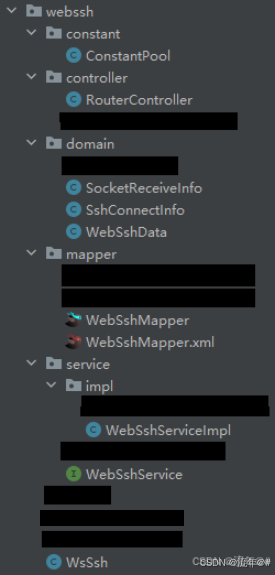
1、创建常量类ConstantPool
public class ConstantPool {

    /**
     * 发送指令:连接
     */
    public static final String WEBSSH_OPERATE_CONNECT = "connect";
    /**
     * 发送指令:命令
     */
    public static final String WEBSSH_OPERATE_COMMAND = "command";
}
2、创建 WebSshData实体类用来保存链接信息:
public class WebSshData extends BaseEntity {

    /**
     * 主键
     */
    @TableId(value = "id", type = IdType.AUTO)
    private Integer id;

    /**
     * 主机名称
     */
    @TableField(value = "name")
    private String name;

    /**
     * 协议
     */
    @TableField(value = "protocol")
    private String protocol;

    /**
     * ip地址
     */
    @TableField(value = "host")
    private String host;

    /**
     * 端口号默认为22
     */
    @TableField("port")
    private Integer port = 22;

    /**
     * 用户名
     */
    @TableField("username")
    private String username;

    /**
     * 密码
     */
    @TableField("password")
    private String password;

    /**
     * 逻辑删除 0 未删除 1 已删除
     */
    @TableField("is_del")
    private Integer isDel;

    /**
     * 操作
     */
    @TableField(exist = false)
    private String operate;

    /**
     * 命令
     */
    @TableField(exist = false)
    private String command = "";
}
创建WebSocket消息接收实体类 SocketReceiveInfo:
@Data
public class SocketReceiveInfo implements Serializable {

    /**
     * 用户token
     */
    private String identifier;

    /**
     * 主机IP
     */
    private String host;

    /**
     * 端口号
     */
    private Integer port;

    /**
     * 用户名
     */
    private String userName;

    /**
     * 密码
     */
    private String password;

    /**
     * 唯一标识
     */
    private String uuid;

    /**
     * 消息
     */
    private String message;

    /**
     * 操作
     */
    private String operation;
}
创建ssh链接 信息实体类SshConnectInfo:
public class SshConnectInfo {
    private Session session;
    private JSch jSch;
    private Channel channel;


    public Session getSession() {
        return session;
    }

    public void setSession(Session session) {
        this.session = session;
    }

    public JSch getjSch() {
        return jSch;
    }

    public void setjSch(JSch jSch) {
        this.jSch = jSch;
    }

    public Channel getChannel() {
        return channel;
    }

    public void setChannel(Channel channel) {
        this.channel = channel;
    }
}
3、创建webSocket连接 及ssh链接
@Slf4j
@Component
@ServerEndpoint(value = "/{identifier}/{uuid}",decoders = JsonDecoder.class)
public class ApiSsh {

    private static final String IDENTIFIER = "identifier";

    private static TokenService tokenService;

    @Resource
    public void setTokenService(TokenService tokenService) {
        ApiSsh.tokenService = tokenService;
    }

    private static WebSshService webSshService;

    @Resource
    public void setWebSshService(WebSshService webSshService) {
        ApiSsh.webSshService = webSshService;
    }

    private MemWebSocketManager webSocketManager = new MemWebSocketManager();

    @OnOpen
    public void onOpen(Session session, @PathParam(IDENTIFIER) String identifier, @PathParam("uuid") String uuid) {
        try {
            if (StringUtils.isEmpty(identifier)) {
                throw new WebSocketException("client identifier is empty !!!");
            }
            LoginUser loginUser = tokenService.getLoginUser(identifier);
            if (loginUser == null) {
                WebSocketUtil.sendMessage(session, "用户token解析失败!!!");
                session.close();
                return;
            }
            log.info("前端 接入========>" + uuid);
            WebSocket webSocket = new WebSocket();
            webSocket.setIdentifier(uuid);
            webSocket.setLastHeart(System.currentTimeMillis());
            webSocket.setSession(session);
            webSocketManager.put(uuid, webSocket);
            webSshService.initConnection(session, uuid);
        } catch (Exception e) {
            log.error("websocket client 接入异常:{}", e.getMessage());
        }
    }

    @OnMessage
    public void onMessage(Session session, SocketReceiveInfo socketReceiveInfo) throws Exception {
        String uuid = socketReceiveInfo.getUuid();
        String message = socketReceiveInfo.getMessage();
        if (log.isInfoEnabled()) {
            log.info("前端发来消息");
        }
        System.out.println(uuid + "--" + message);
        WebSocket webSocket = webSocketManager.get(uuid);
        // 心跳监测
        if ("ping".equalsIgnoreCase(message)) {
            WebSocketUtil.sendMessage(session, "pong");
            if (webSocket != null) {
                webSocket.setLastHeart(System.currentTimeMillis());
            }
            return;
        }

        // 业务逻辑
        WebSshData webSshData = new WebSshData();
        webSshData.setHost(socketReceiveInfo.getHost());
        webSshData.setPort(socketReceiveInfo.getPort());
        webSshData.setUsername(socketReceiveInfo.getUserName());
        webSshData.setPassword(RsaUtils.decryptByPrivateKey(socketReceiveInfo.getPassword()));
        if (ConstantPool.WEBSSH_OPERATE_COMMAND.equals(socketReceiveInfo.getOperation())){
            message = message + "\r";
        }
        webSshData.setOperate(socketReceiveInfo.getOperation());
        webSshData.setCommand(message);
        webSshService.receiveHandle(webSshData, session, uuid);
    }

    @OnClose
    public void onClose(Session session, @PathParam("uuid") String uuid) {
        try {
            log.info("前端连接关闭");
            session.close();
        } catch (IOException e) {
            if (log.isInfoEnabled()) {
                log.info("关闭客户端,连接异常" + e.getMessage());
            } else {
                log.info("关闭客户端,连接异常:{}", e.getMessage());
            }
        }
        disconnect(uuid);
    }

    @OnError
    public void onError(Throwable t, @PathParam("uuid") String uuid) {
        log.error("客户端发生异常:{}", t.getMessage());
        disconnect(uuid);
    }

    private void disconnect(String identifier) {
        webSocketManager.remove(identifier);
    }

}
service层:
/**
     * 初始化连接
     *
     * @param session 会话
     * @param userId  uuid
     */
    @Override
    public void initConnection(javax.websocket.Session session, String userId) {
        JSch jSch = new JSch();
        SshConnectInfo sshConnectInfo = new SshConnectInfo();
        sshConnectInfo.setjSch(jSch);
        sshConnectInfo.setSession(session);
        //将这个ssh连接信息放入map中
        sshMap.put(userId, sshConnectInfo);
        String s = "success";
        byte[] bytes = s.getBytes();
        WebSocketUtil.sendBytes(session,Arrays.copyOfRange(bytes, 0, bytes.length));
    }

    /**
     * 处理客户端发送的数据
     *
     * @param webSSHData XShell实体类
     * @param session    会话
     * @param userId     uuid
     */
    @Override
    public void receiveHandle(WebSshData webSSHData, javax.websocket.Session session, String userId) {
        if (ConstantPool.WEBSSH_OPERATE_CONNECT.equals(webSSHData.getOperate())) {
            //找到刚才存储的ssh连接对象
            SshConnectInfo sshConnectInfo = (SshConnectInfo) sshMap.get(userId);
            //启动线程异步处理
            WebSshData finalWebSSHData = webSSHData;
            executorService.execute(new Runnable() {
                @Override
                public void run() {
                    try {
                        connectToSSH(sshConnectInfo, finalWebSSHData, session);
                    } catch (JSchException | IOException e) {
                        logger.error("webssh连接异常");
                        logger.error("异常信息:{}", e.getMessage());
                        close(userId);
                    }
                }
            });
        } else if (ConstantPool.WEBSSH_OPERATE_COMMAND.equals(webSSHData.getOperate())) {
            String command = webSSHData.getCommand();
            SshConnectInfo sshConnectInfo = (SshConnectInfo) sshMap.get(userId);
            if (sshConnectInfo != null) {
                try {
                    transToSSH(sshConnectInfo.getChannel(), command);
                } catch (IOException e) {
                    logger.error("webssh连接异常");
                    logger.error("异常信息:{}", e.getMessage());
                    close(userId);
                }
            }
        } else {
            logger.error("不支持的操作");
            close(userId);
        }
    }

    /**
     * 关闭链接
     */
    @Override
    public void close(String userId) {
        SshConnectInfo sshConnectInfo = (SshConnectInfo) sshMap.get(userId);
        if (sshConnectInfo != null) {
            //断开连接
            if (sshConnectInfo.getChannel() != null) {
                sshConnectInfo.getChannel().disconnect();
            }
            //map中移除
            sshMap.remove(userId);
        }
    }

    /**
     * 使用jsch连接终端
     *
     * @param sshConnectInfo   sshConnectInfo
     * @param webSSHData       webSSHData
     * @param webSocketSession webSocketSession
     * @throws JSchException JSchException
     * @throws IOException   IOException
     */
    private void connectToSSH(SshConnectInfo sshConnectInfo, WebSshData webSSHData, javax.websocket.Session webSocketSession) throws JSchException, IOException {
        Session session = null;
        Properties config = new Properties();
        config.put("StrictHostKeyChecking", "no");
        //获取jsch的会话
        session = sshConnectInfo.getjSch().getSession(webSSHData.getUsername(), webSSHData.getHost(), webSSHData.getPort());
        session.setConfig(config);
        //设置密码
        session.setPassword(webSSHData.getPassword());
        //连接  超时时间30s
        session.connect(30000);

        //开启shell通道
        Channel channel = session.openChannel("shell");

        //通道连接 超时时间3s
        channel.connect(3000);

        //设置channel
        sshConnectInfo.setChannel(channel);

        //转发消息
        transToSSH(channel, "\r");

        //读取终端返回的信息流
        InputStream inputStream = channel.getInputStream();
        try {
            //循环读取
            byte[] buffer = new byte[1024];
            int i = 0;
            //如果没有数据来,线程会一直阻塞在这个地方等待数据。
            while ((i = inputStream.read(buffer)) != -1) {
                WebSocketUtil.sendBytes(webSocketSession, Arrays.copyOfRange(buffer, 0, i));
            }

        } finally {
            //断开连接后关闭会话
            session.disconnect();
            channel.disconnect();
            if (inputStream != null) {
                inputStream.close();
            }
        }

    }

    /**
     * 将消息转发到终端
     *
     * @param channel channel
     * @param command command
     * @throws IOException IOException
     */
    private void transToSSH(Channel channel, String command) throws IOException {
        if (channel != null) {
            OutputStream outputStream = channel.getOutputStream();
            outputStream.write(command.getBytes());
            outputStream.flush();
        }
    }
总结:
一、@onOpen注解只能接收通过@PathParam传递的参数,其余形式的传参会报参数不识别的错
误,@onMessage注解如果传递对象类型参数,需要前端通过json格式转换并解码操作才能识别,
并在@ServerEndpoint注解中添加解码器类。
解码器:
public class JsonDecoder implements Decoder.Text<SocketReceiveInfo> {

    /**
     * Initialization does nothing
     *
     * @param config The end-point configuration
     */
    @Override
    public void init(EndpointConfig config) {
    }

    /**
     * Judgment of whether decoding is possible
     *
     * @param text text
     * @return boolean
     */
    @Override
    public boolean willDecode(String text) {
        return (text != null);
    }

    /**
     * Decoding process(JSON → object)
     *
     * @param text text
     * @return SocketReceiveInfo
     * @throws DecodeException
     */
    @Override
    public SocketReceiveInfo decode(String text) throws DecodeException {
        ObjectMapper mapper = new ObjectMapper();
        SocketReceiveInfo obj = null;
        try {
            obj = mapper.readValue(text, SocketReceiveInfo.class);
        } catch (JsonProcessingException e) {
            e.printStackTrace();
        }
        return obj;
    }

    /**
     * Do nothing to destroy
     */
    @Override
    public void destroy() {
    }
}
二、第一次请求onOpen会话请求建立服务器会话连接,服务器必须返回信息使得浏览器确认建立
成功,否则webSocket响应码会为1000,浏览器会自动关闭会话。






 扫一扫
扫一扫


 456
456


 到【灌水乐园】发言




