



 本文介绍了如何在Vue中进行日期格式化,展示了一个实现日期年月日、时分秒格式化的实例。通过HTML、JavaScript代码展示了具体实现过程。
Vue 日期格式化年月日,时分秒
实现效果,如图:
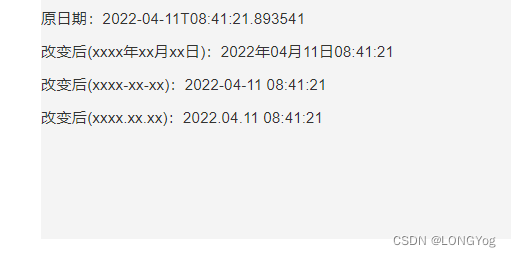
HTML代码:
<template>
    <div>
        <div style="background-color: #f4f4f4;margin:50px 0 0 460px;width:500px;height:500px;">
        	<p>原日期:{{ time }}</p>
            <p>改变后(xxxx年xx月xx日):{{ Object(time).toLocaleString().split(' ')[0].replace('-', '年').replace('-', '月').replace('T', '日').split('.')[0] }}</p>
            <p>改变后(xxxx-xx-xx):{{ Object(time).toLocaleString().split(' ')[0].replace('T', ' ').split('.')[0] }}</p>
            <p>改变后(xxxx.xx.xx):{{ Object(time).toLocaleString().split(' ')[0].replace('-', '.').replace('-', '.').replace('T', ' ').replace(time.substr(time.lastIndexOf('.'),time.lenght),'') }}</p>
        </div>
    </div>
</template>
JavaScript代码:
<script>
export default {
    data () {
        return {
            time: '2022-04-11T08:41:21.893541'
        }
    }
}
</script>





 扫一扫
扫一扫


 7960
7960

 被折叠的 条评论
为什么被折叠?
被折叠的 条评论
为什么被折叠?
 到【灌水乐园】发言





