



在Windows操作系统中,当你使用双屏(或多屏)显示器时,屏幕坐标原点(0, 0)通常是主屏幕的左上角。
假设你有两个显示器,屏幕坐标的定义如下:
-
主屏幕:
- 如果主屏幕是你的主要工作区域(比如显卡设置中设置的主显示器),它的左上角坐标是 (0, 0)。
-
副屏幕:
- 副屏幕的坐标会根据它在主屏幕相对位置的排列方式而变化:
- 如果副屏幕在主屏幕的右侧,其左上角坐标将是 (主屏幕宽度, 0)。
- 如果副屏幕在主屏幕的下方,则其左上角坐标将是 (0, 主屏幕高度)。
- 如果副屏幕在主屏幕的左侧,则其坐标是 (-副屏幕宽度, 0)。
- 如果副屏幕在主屏幕的上方,则其坐标是 (0, -副屏幕高度)。
- 副屏幕的坐标会根据它在主屏幕相对位置的排列方式而变化:
需求是安装在一台双屏笔记本上方便给客户展示,副屏幕在主屏幕的上方,显示端要放到副屏幕上,照相端放在主屏幕。
代码如下:
using System;
using UnityEngine;

public class StartOnSecondaryDisplay : MonoBehaviour
{
    void Start()
    {
        // 获取当前连接的屏幕数
        int screenCount = Display.displays.Length;
        Debug.Log("显示器数量: " + screenCount);
        if (screenCount > 1)
        {
            // 获取副屏幕的宽度和高度
            var windowWidth = Display.displays[1].systemWidth; // 副屏幕宽度
            var windowHeight = Display.displays[1].systemHeight; // 副屏幕高度
            Debug.Log("宽度和高度: " + windowWidth + "+" + windowHeight);
            // 设置屏幕分辨率
            Screen.SetResolution(windowWidth, windowHeight, true);

            // 强制窗口移动到副屏幕 (仅限在Windows)
            Rect windowRect;
            //Rect windowRect = new Rect(0, -windowHeight, windowWidth, windowHeight); // 上

            //Rect windowRect = new Rect(0, -副屏幕高度, windowWidth, windowHeight); // 上
            //Rect windowRect = new Rect(0, 主屏幕高度, windowWidth, windowHeight); // 下
            //Rect windowRect = new Rect(-副屏幕宽度, 0, windowWidth, windowHeight); // 左
            //Rect windowRect = new Rect(主屏幕宽度, 0, windowWidth, windowHeight); // 右
            int displayDebug = ConfigMgr.Instance.baseConfig.显示器调试;

            switch (displayDebug)
            {
                case 1:
                    windowRect = new Rect(0, -windowHeight, windowWidth, windowHeight);
                    MoveWindowToScreen(windowRect);
                    break;
                case 2:
                    windowRect = new Rect(0, Display.displays[0].systemHeight, windowWidth, windowHeight);
                    MoveWindowToScreen(windowRect);
                    break;
                case 3:
                    windowRect = new Rect(-windowWidth, 0, windowWidth, windowHeight);
                    MoveWindowToScreen(windowRect);
                    break;
                case 4:
                    windowRect = new Rect(Display.displays[0].systemWidth, 0, windowWidth, windowHeight);
                    MoveWindowToScreen(windowRect);
                    break;
                default:
                    // 可选: 可以处理未定义的情况
                    break;
            }

        }
    }
    void MoveWindowToScreen(Rect rect)
    {
        // 在Windows平台上使用P/Invoke将窗口移动到指定的位置
#if UNITY_STANDALONE_WIN
        System.IntPtr windowHandle = GetForegroundWindow();
        SetWindowPos(windowHandle, IntPtr.Zero, (int)rect.x, (int)rect.y, (int)rect.width, (int)rect.height, SWP_NOZORDER | SWP_NOACTIVATE);
#endif
    }

    // P/Invoke声明
#if UNITY_STANDALONE_WIN
    [System.Runtime.InteropServices.DllImport("user32.dll")]
    private static extern System.IntPtr GetForegroundWindow();

    [System.Runtime.InteropServices.DllImport("user32.dll")]
    private static extern bool SetWindowPos(System.IntPtr hWnd, IntPtr hWndInsertAfter, int X, int Y, int cx, int cy, uint uFlags);

    private const uint SWP_NOZORDER = 0x0004;
    private const uint SWP_NOACTIVATE = 0x0010;
#endif

}
为了方便适应不同情况,把4种可能列出来用外部TXT文件控制。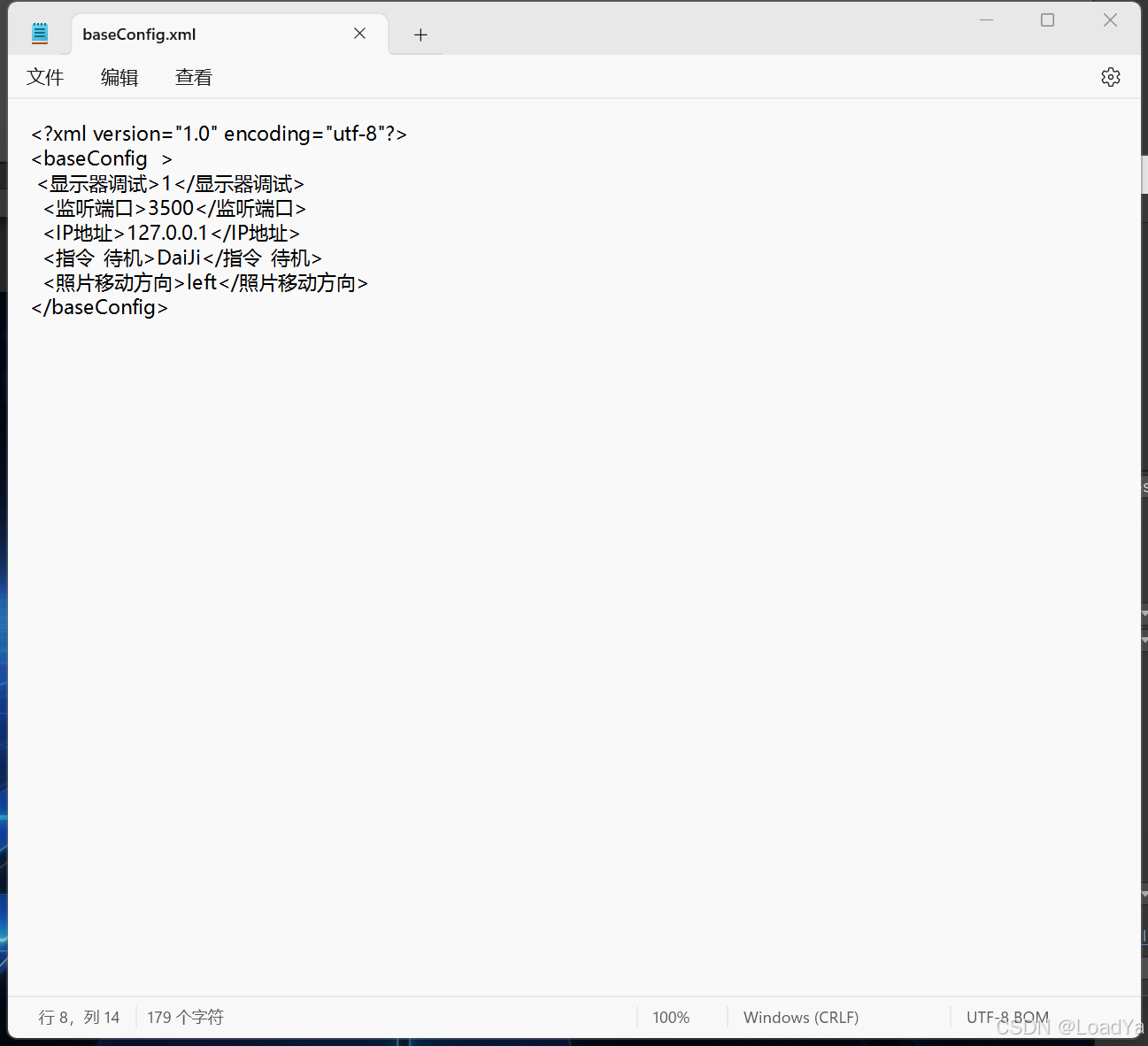






 扫一扫
扫一扫


 被折叠的 条评论
为什么被折叠?
被折叠的 条评论
为什么被折叠?
 到【灌水乐园】发言





