



 Thymeleaf是一个Java模板引擎,专注于优雅的HTML模板,可用于web和独立环境。在Spring中,Thymeleaf通过自动配置管理,需要在pom文件导入依赖。默认管理的模板位于templates文件夹下,前缀为`classpath:/templates/`,后缀通常是.html。创建页面时配合Controller类,Thymeleaf会根据规则处理URL,调用局部变量呈现内容。
thymeleaf
https://www.thymeleaf.org/index.html >thymeleaf官方文档
注:去微信公众号狂神说,boot模板进一步学习
Thymeleaf 是一个用于web和独立环境的现代服务器端Java模板引擎。
Thymeleaf 的主要目标是将优雅自然的模板引入到开发工作流程中——HTML可以在浏览器中正确显示,也可以作为静态原型工作。
使用Thymeleaf需要在pom文件中导包。
Spring如何管理的Thymeleaf
因为是自动加载的,所以去找autoconfig包

查看源码

@Configuration表明是一个配置类
@EnableConfigurationProperties 中含有 @ConfigurationProperties 组合使用

默认前缀:classpath:/templates/ (如果想让文件被thymeleaf管理到就需要用这个前缀,就是说要把被thymeleaf管理的文件放在templates文件夹下面)
默认后缀:.html

创建页面
<!DOCTYPE html>
<html lang="en" xmlns:th="http://www.thymeleaf.org">
<head>
    <meta charset="UTF-8">
    <title>Title</title>
</head>
<body>

<p> test page for thymeleaf</p>

<!--  <p th:text="#{home.welcome}">Welcome to our grocery store!</p> -->

<!-- 下面两种方法等价 -->
<p th:text="${message}"></p>
<p>[[${user}]]</p>

<p>第一种:</p>
<ul>
    <li th:each="user : ${users}"  th:text="${user}"></li>
</ul>

<p>第二种:</p>
<ul>
    <li th:each="user : ${users}"  >[[${user}]]</li>
</ul>

</body>
</html>
创建Controller类
@Controller
public class TestController {
    @RequestMapping("test")
    public String test(Model model){
        // classpath:/templates/
        // ".html";
        model.addAttribute("message", "hello thymeleaf");

        model.addAttribute("users", Arrays.asList("user1","user2","user3"));
        return "test";  // test.html
    }
}
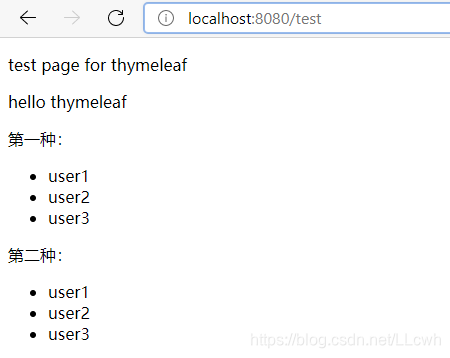
虽然网址上输入的是 test 但是 实际上是 classpath:/templates/ xxx .html 。
之前前url输入test,return"test";会直接显示出return的test这个词。使用thymeleaf后,规则改变了。他会先在前面添加classpath:/templates/,然后在后端添加 xxx .html包装一下。发现templates包中有个这个xxx .html 的资源,最后前端页面显示。
迭代器
Thymeleaf调用局部变量,这些变量是为模板的特定片段定义的,并且只能在该片段内进行计算。
<tr th:each="prod : ${prods}">
    ...
</tr>





 扫一扫
扫一扫


 21万+
21万+

 被折叠的 条评论
为什么被折叠?
被折叠的 条评论
为什么被折叠?
 到【灌水乐园】发言





