


一、VSCode官方在1.86版本表示,将在2025年2月之后不再支持glibc<2.28的服务器。正好CentOS7.9版本处于不支持的服务器系统当中。于是需要选择1.90版本前的vscode版本才方便开发。
二、获取vscode历史版本的方法:输入网址https://code.visualstudio.com/updates/v1_89,其中1_89可以修改成所需的具体版本号。在页面中按自己的需求选择不同系统版本进行下载即可。
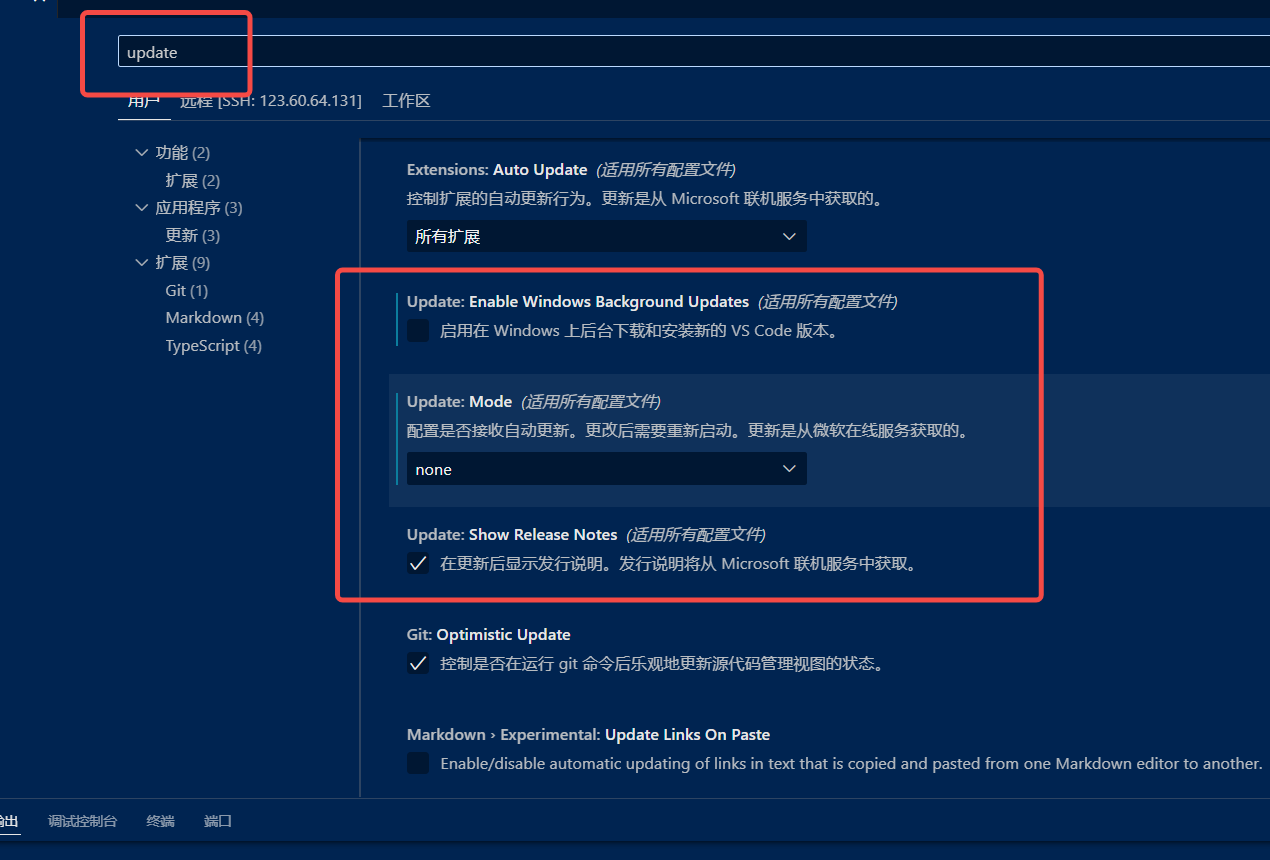
三、关闭vscode自动更新:点击vscode左下角的设置,输入update,按下图设置即可。
四、在centos7上安装vscode的go扩展报错Failed to run '/usr/local/go/bin/go env. The config change may not be applied correctly. 该错误表明:VS Code 的 Go 扩展尝试执行 go env 命令来读取 Go 环境配置,但执行失败了。
处理:在 VS Code 的 settings.json 中添加:
{
    "terminal.integrated.shell.linux": "/bin/bash",
    "terminal.integrated.shellArgs.linux": ["-l"]
}
在 VS Code 的设置中显式指定 GOROOT:即在 settings.json 中添加:
{
    "go.goroot": "/usr/local/go",
    "go.gopath": "/home/yourusername/go",
    "go.toolsGopath": "/home/yourusername/go",
    "go.useLanguageServer": true
}
重启vscode。
五、配置ssh免密登录
在win10上使用命令ssh-keygen -t rsa生成公钥和密钥,把公钥(pub后缀的)内容复制到centos的~/.ssh/authorized_keys文件中,注意~/.ssh文件夹的权限必须是700,~/.ssh/authorized_keys文件权限为600。不然不识别导致失败。






 扫一扫
扫一扫


 4671
4671

 被折叠的 条评论
为什么被折叠?
被折叠的 条评论
为什么被折叠?
 到【灌水乐园】发言





