



Automatically correct the consequences of a incorrect event that's already been processed.
Enterprise applications are about capturing information from the world, doing various computations on that information, and initiating further actions in that world. The computations they carry out and the actions they initiate can only be as accurate as the information they receive. If you get error in the input, you get errors in the output.
We are used to this phenomenon, but once we've found errors in our input it's often difficult to fix. In most cases a human has to figure out what the system did in response to the incorrect input, how the system reacted, how the system should have reacted (if it got the correct input) and how to correct things.
One of the appeals of Event Sourcing is that it provides a basis for making this onerous task a good bit easier. Indeed a careful log of events and their consequences makes it much easier for the human to do their corrections.Retroactive Event goes further allowing a system to automatically correct the results of many incorrect events.
Retroactive Event builds on the foundation of Event Sourcing, so you'll need to be familiar with Event Sourcing before you can understand Retroactive Event. In particular I'll be using a lot of the terminology that I defined in Event Sourcing.
How it Works
Dealing with a retroactive event means that our current application state is incorrect in some way. That had we received the retroactive event we would be in a different application state than we are in now. You may think of this as threeParallel Models:
- Incorrect reality: There is the current live application state which didn't take into account the retroactive event.
- Correct Branch: The application state we should have got had the retroactive event been processed.
- Corrected Reality:The final live application state that we want to end up with.
In many cases the corrected reality will be the same as the correct branch - that is we'll reprocess the event log to take into account the retroactive event. Sometimes we can't quite do that.
Our first step is to figure out where the incorrect reality and the correct branch diverged. This is essentially the point in the event log where retroactive event should have been processed. I'll call this the branch point - again using terminology from the source code control world. The branch point is the point in the event log immediately before where the retroactive event should be inserted.
There are two ways we can construct the branch point: rebuild and rewind.
- In rebuild we revert our application state to the last snapshot before the retroactive event. We then process all the events forwards until we reach the branch point.
- In rewind/replay we reverse the events backwards from the latest event to the branch point.
We can build this branch point in a Parallel Model or we can revert our live application state to the branch point. If we revert our live application state then as we go forward we'll automatically create our correct branch and corrected reality will be the same. If we use a Parallel Model we will have the correct branch in theParallel Model and need to make changes to the live application state to turn it into the corrected reality, essentially merging the differences into the live state.
There are three main kinds of retroactive event: Out of order events, rejected events, and incorrect events. An out-of-order event is one that's received late, sufficiently late that you've already processed events that should have been processed after the out-of-order event was received. A rejected event is an event that you now realize was false and should never have been processed. A incorrect event is an event where you received incorrect information about the event.
Each of the three requires you to do different manipulations to the event stream after the branch point.
- For out-of-order events we insert and process the retroactive event at the branch point.
- For rejected events we reverse the event and mark it as rejected. Effectively a delete to the event log
- For incorrect events we reverse the original event and mark it as rejected. We insert the retroactive event and process it. You can think of this as a rejected event and an out of order event being processed as one.
Events marked as rejected are ignored by all further processing, so they aren't re-processed during replay or reversed in future rewinds. They stay in the event log to maintain history, but are otherwise ignored. We don't need to do this, as an alternative we could just put a reversal immediately after the original event, but clearly it's inefficient to process and reverse event right after each other like that.
Incorrect events can introduce a further complication if the incorrect information of the event changes the order of processing. So we had got a ship arriving on April 1 but our correction has it arriving on March 1. For these cases our branch point is the earlier of the rejected and correct events. Our next processing depends on which one is earlier. If, as in this example, the correct event is earlier we process it and mark the old event as rejected. We can then replay forwards and the old event will be skipped. If the old event is first then we reverse it, replay to the new event, process that and continue processing forwards.
While we're discussing this remember that the retroactive event is always an event in itself. This doesn't make any difference for the out-of-order event, but it does affect the other two cases. Consider the rejected event case - in effect this is a delete to the event in the event log. However the whole point of the event log is that we never delete an event. So what we can do is insert a rejection event to the log, processing that rejection does the changes that I've described. The rejection event is itself always rejected, so it never processes on rebuilds. An incorrect event can be handled the same way, with a replacement event that has both the old and new event. Indeed you can think of a rejection event as a replacement event that doesn't have a corrected event.
I did just say that rejected and replacement events are always rejected so they don't replay. This is true if you always want your Parallel Models to be built with current best knowledge. However if you are constructing a bi-temporal Parallel Model, that is one in terms of what we knew on a past date, then you'll do a more involved processing that will take into account some of the rejected events.
Merging from a Parallel Model
If you follow the style of building a correct branch in a Parallel Model you'll then have to figure out the differences between the correct branch and the current reality and then merge these differences to form the corrected reality.
To discover the changes you'll need to examine all the objects in both models to see which ones have changed as well as check for any objects that only exist in one model. Clearly this could be a huge task, one you can reduce by keeping track of what objects are affected by the events processed since the branch point. You can also do some analysis along the lines of selective replay to determine which subset of objects are going to be changed by the retroactive event.
Once you've found your changes, you now need to apply these changes to the live model. It's worth considering here whether to apply these changes as events themselves. It isn't strictly necessary, as the all the changes should be entirely calculable from the analysis of the initial event, but since this analysis is rather complex, it can be useful to capture the merge changes within their own events.
Clearly this merge processing can get very involved, and the complexity of the merge processing is an important factor to bear in mind when you're deciding how to handle your retroactive events.
Optimizations
Since processing retroactive events is very similar to creating a Parallel Model many of the optimization discussions there apply here too. The techniques of reversal, snapshots, and selective replay can all help you get to the branch point with less event processing.
If you used selective replay to get to the branch point, you can use the same selective replay to process events forwards after the branch point.
Testing Thoughts
A particularly useful testing technique to use with reversal is to always ensure that any behavior you add works well under replay by adding a retroactive event at the event of a test case that will force the entire event sequence under test to be replayed.
Another testing idea (although I haven't directly seen any cases yet) is to randomly generate event sequences and then to process them in random different orders to ensure that they always result in the same application state.
Updating External Systems
Event Sourcing always leads to mismatches with external systems that aren't built in the same way. With regular Event Sourcing we have to ensure that external systems aren't sent update messages during a rebuild. This is relatively easy, just switching off the gateway does the trick. With Retroactive Event, however, we have to go further. We need to figure out if the Retroactive Event causes any change to what updates we should have made, and then deal with these changes in notification.
There are two parts to this problem: detection and correction.
The basic detection scheme is to determine what updates where sent in the incorrect reality, what updates should have been sent in the correct branch, and then find any updates that differ between the two.
A good way to do this is to use Event Sourcing on the gateway itself by turning every external update into an event. If we do this we can capture these events in the different models and compare them. To do this we ensure that we have a mechanism to capture all the external update events and build up our two lists. We are interested in all the update events that are sent out since the branch point. If we are using rewind we can capture the incorrect reality updates if we ensure that event reversals send update events that we can capture.
Once we have the two lists of update events for incorrect reality and correct branch we then compare them to look for mismatches. Any updates that are the same in both lists we can ignore, the important thing to spot is cases where we have events are in one list but not the other. We can then build two new lists of events that differ. These update events are the things we need to correct.
All the stuff I've defined above can be done generically, a generic component can track the events and find the two lists of mismatched events. Dealing with the mismatch however is something that has to be programmed individually for each external system, depending on what compensating action the external system needs to take. It's quite possible that it's not possible to automate the correction, instead a human has to intervene to sort out the mess. But at least the system can give the human a pretty good description what did, and should have, happened.
[TBD: external queries]
[TBD: multipe events in one adjustment]
When to use it
The primary reason to use Retroactive Event is when it's useful to automatically perform corrections to past inputs. As with any automation you have to look at the frequency and difficulty of the corrections. If a lot of human time is spent doing the corrections, then it's worth considering using something like Retroactive Eventto automate them. The great advantage of using Retroactive Event to automate is that it's an entirely generic process, once you have Retroactive Event working for any one event, it's then relatively easy to expand it to other events.
I haven't seen Retroactive Event very often and there's a good reason for that. In order to implement Retroactive Event you need to prepare some vital preliminaries. You need Event Sourcing, and if that's not enough you need to add reversibility orParallel Model. These are not small pre-requisites. As a result building an application to support Retroactive Event is a significant decision with an impact across the whole system. Taking an existing system and adding the necessary refactorings is also non-trivial. The need to do this kind of automated error correction isn't something that's usually an early requirement, so it's easy to end up with a design which needs a lot of work to make Retroactive Event possible.
If a system has lots of links to external systems, then that can add a considerable complication to using Retroactive Event. Full retroactive processing requires full access to information to carry out and will produce every little change for external updates. If you have a lot of integration with external systems, which is a common situation, you'll need to look at how would deal with retro-activity with them pretty carefully to see if Retroactive Event is a viable approach to use.
Remember that Retroactive Event is not an all or nothing choice. You can limitRetroactive Event in a couple of ways to reduce its scope, but still retain some usefulness. One reduction is to only let Retroactive Event apply for a subset of the system - particularly areas with less external impact. Indeed this is where I've seen it - used with accounts. Another scope reduction is time, many business operations fit in fixed cycles, weekly, monthly, annual. In this situation you might use Retroactive Event only for events within your current processing cycle (eg in the last week) before things close. You might also use a more active form of Retroactive Eventwithin the cycle and a more passive form for closed cycles.[TBD: Talk about active or passive forms.]
My last reason that Retroactive Event is rare is that I don't think it's well understood what you need to do to make it happen. I hope this pattern will go some way to removing this obstacle, and thus help us find others.
Example: Retroactive Cargoes with Rewind (C#)
I've been illustrating most of the examples around Event Sourcing with an example based on moving cargoes on ships between ports. I shall continue with that example, looking this time on how to use Retroactive Event.
First off we need to make some of the strategic decisions around how to do ourRetroactive Event. For this example I'll use the approach of reaching the branch point by rewinding the live model. Since the example is simple I won't use any selective replay, instead I'll just rewind the full event list.
Since we are using rewind it's essential that all of the events are reversible. I won't go into the details of the event processing or reversing, see the examples in Event Sourcing to see how that might work.
The Retroactive Event behavior is triggered by a special kind of event.
class ReplacementEvent...
    private DomainEvent original, replacement;
    public DomainEvent Original {get { return original; }}
    public DomainEvent Replacement {get { return replacement; }}

    public ReplacementEvent(DomainEvent oldEvent, DomainEvent replacement)
      : base(oldEvent.Occurred) {
      this.original = oldEvent;
      this.replacement = replacement;
    }
    internal override void Process() {
      throw new Exception("Replacements should not be processed directly");
    }
    internal override void Reverse() {
      throw new Exception("Cannot reverse replacements");
    }
You'll notice that in these cases I've blocked the basic process and reverse methods. Most of the time in these examples I've preferred to have the events handle their own processing logic. Replacements are different: they don't contain any domain logic, and their processing involves knowledge of the event queue and manipulating that event queue. Intimate interaction with the event queue is something I'd prefer to leave to the event processor alone, so in fact I built all the replacement behavior into the event queue.
class EventProcessor...
    public void Process(DomainEvent ev) {
      try {
        if (ev is ReplacementEvent)
          ProcessReplacement((ReplacementEvent) ev);
        else if (OutOfOrder(ev))
          ProcessOutOfOrder(ev);
        else BasicProcessEvent(ev);
      } catch (Exception ex) {
        ev.ProcessingError = ex;
        if (ShouldRethrowExceptions) throw ex;
      }
      InsertToLog(ev);
    }
You'll notice here that I'm committing the cardinal sin of object-oriented programming: explicit conditional behavior based on the type of the argument to a method. I don't do this often, but here I do it because I want the event processor to keep knowledge of the queue to itself. (I could also use double dispatch, but here the situation doesn't seem to be complex enough to warrant it.)
You may also notice that I don't have a case for rejected events here. As we'll see, I deal with those by treating those as replacements where the replacing event is null.
I'll start with the simplest case. The basic Process (and reverse) method is just a simple wrapper that allows me throw in some tracing behavior if I need it.
class EventProcessor...
    private void BasicProcessEvent(DomainEvent e) {
      traceProcess(e);
      e.Process();
    }
    private void BasicReverseEvent(DomainEvent e) {
      traceReverse(e);
      e.Reverse();
    }
Out of order events are the easiest to describe first. These are just regular events that we received out of sequence, we don't use replacement events to model them.Essentially these insert a new event into the stream. The processor tests for an out of order event by simply comparing it to the last one.
class EventProcessor...
    private bool OutOfOrder(DomainEvent e) {
      if (LogIsEmpty()) return false;
      return (LastEvent().after(e));
    }
    private DomainEvent LastEvent() {
      if (LogIsEmpty()) return null;
      return (DomainEvent) log[log.Count - 1];
    }
    private bool LogIsEmpty() {
      return 0 == log.Count;
    }
To keep things laughably simple for this example, I just do event ordering by the occurred date. To do this for real, it may be sufficient just to go to a finer resolution of time point. Sometimes other factors may affect orderings.
The outline of processing out order cases is simple.
class EventProcessor...
    private void ProcessOutOfOrder(DomainEvent e) {
      RewindTo(e);
      BasicProcessEvent(e);
      ReplayAfter(e);
    }
To rewind, I just select all the events from the log that are later than the out of order event. Again for simplicity I'm keeping my log (or at least a cache of it) in memory.
class EventProcessor...
    private void RewindTo(DomainEvent priorEvent) {
      IList consequences = Consequences(priorEvent);
      for (int i = consequences.Count - 1; i >= 0; i--)
        BasicReverseEvent(((DomainEvent) consequences[i]));
    }
    private IList Consequences(DomainEvent baseEvent) {
      IList result = new ArrayList();
      foreach (DomainEvent candidate in log)
        if (candidate.IsConsequenceOf(baseEvent)) result.Add(candidate);
      return result;
    }
class DomainEvent...
    public bool IsConsequenceOf(DomainEvent other) {
      return (!ShouldIgnoreOnReplay && this.after(other));
    }
As you can see, not all events are selected for reprocessing during a rewind, even though I'm not using any selective replay. Essentially I'm not reprocessing either error events or events that have been rejected.
Replaying events forwards again is simple
class EventProcessor...
    private void ReplayAfter(DomainEvent ev) {
      foreach (DomainEvent e in Consequences(ev)) BasicProcessEvent(e);
    }
Now lets move onto replacements.
class EventProcessor...
    private void ProcessReplacement(ReplacementEvent e) {
      if (e.Original.ShouldIgnoreOnReplay)
        throw new ProcessingException("Cannot replace event twice");
      else if (null == e.Replacement)
        ProcessRejection(e);
      else if (e.HasPriorReplacement)
        ProcessPriorReplacement(e);
      else
        ProcessPriorOriginal(e);

    }
class ReplacementEvent...
    public bool HasPriorReplacement {
      get {
        if (null == replacement) return false;
        else return original.after(replacement);
      }
    }
There are several cases to process here. If the original event is already marked to ignore, that means there's an processing error as we should not be rejecting events that are already rejected. Once we've done that we have three main cases: the replacement is a rejection, the replacement event is earlier than the original, and the original is earlier than the replacement.
Let's start with the rejection case, which is indicated by a null replacement event. Here we rewind to the rejected event, reject it, reverse it, and replay forwards.
class EventProcessor...
    private void ProcessRejection(ReplacementEvent e) {
      RewindTo(e.Original);
      BasicReverseEvent(e.Original);
      e.Original.Reject();
      ReplayAfter(e.Original);
    }
class DomainEvent...
    public bool after (DomainEvent other) {
      return this.CompareTo(other) > 0;
    }
    public void Reject() {
      _isRejected = true;
    }
    private bool _isRejected;
    public virtual bool ShouldIgnoreOnReplay {
      get {
        if (WasProcessingError) return true;
        return _isRejected;
      }
    }
Rejecting marks the event so it won't get processed or rewound again.
If we have a prior replacement, we rewind to the replacement, reject the original, process the replacement and replay forwards.
class EventProcessor...
    private void ProcessPriorReplacement(ReplacementEvent e) {
      RewindTo(e.Replacement);
      e.Original.Reject();
      BasicProcessEvent(e.Replacement);
      ReplayAfter(e.Replacement);
    }
For a prior original, we rewind to the original, reverse and reject it, replay to the replacement, process it, and continue replay forwards.
class EventProcessor...
    private void ProcessPriorOriginal(ReplacementEvent e) {
      RewindTo(e.Original);
      BasicReverseEvent(e.Original);
      e.Original.Reject();
      ReplayBetween(e.Original, e.Replacement);
      BasicProcessEvent(e.Replacement);
      ReplayAfter(e.Replacement);
    }
    private void ReplayBetween(DomainEvent first, DomainEvent last) {
      IList eventsToReplay = new ArrayList();
      foreach (DomainEvent e in log) {
        if (e.IsConsequenceOf(first) && last.after(e))
          eventsToReplay.Add(e);
      }
      foreach (DomainEvent e in eventsToReplay)
        BasicProcessEvent(e);
    }
I'm following a convention here of not adding an event to the log until it's been successfully processed. This is useful if the log is not in the same transaction as the application state. If it's all in one transaction I could just add the event into the log after I've reached the branch point and replay forwards (which would pick up the new event.)
Example: Updates to External Systems (C#)
For simple Event Sourcing, it suffices to switch off the external notification during replay. For Retroactive Event, however, we need to go further and do detection and correction. To do this during the rewind/replay we'll save all the events generated and compare to determine what we need to correct. We'll then assume a simple automated correction case of sending cancellation messages and new messages for the changes.
I'll continue with the shipping example here by saying the the customs authorities in the US need to be notified should any cargo enter a US port that has passed through Canada.
The external notification is made by the Cargo object when it's handling an arrival event.
class Cargo...
    public void HandleArrival(ArrivalEvent ev) {
      ev.priorCargoInCanada[this] = _hasBeenInCanada;
      if ("CA" == ev.Port.Country)
        _hasBeenInCanada = true;
      if (HasBeenInCanada && "US" == ev.Port.Country) {
        Registry.CustomsGateway.Notify(ev.Occurred, ev.Ship, ev.Port);
        ev.WasNotificationSent = true;
      }
    }
    private bool _hasBeenInCanada = false;
    public bool HasBeenInCanada {get { return _hasBeenInCanada;}}
To reverse this event we keep a note of whether we sent a notification in the forward play and send it again when we did.
class Cargo...
    public void ReverseArrival(ArrivalEvent ev) {
      _hasBeenInCanada = (bool) ev.priorCargoInCanada[this];
      if (ev.WasNotificationSent)
        Registry.CustomsGateway.Notify(ev.Occurred, ev.Ship, ev.Port);
    }
I'm following the principle here that the domain model should be ignorant of the replay logic in the event processing. It knows how to reverse its own state for each event, but doesn't care about the complexities of talking to external systems.
The logic of talking to external systems is handled by the gateway, which in this case is a cluster of objects.
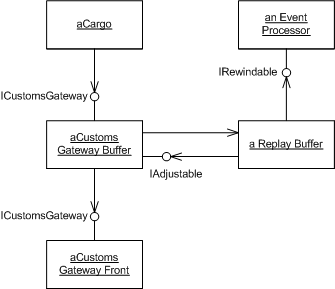
In this example the CustomsGatewayFront is a normal gateway that converts a domain-oriented interface (defined by ICustomsGateway) to the actual messaging infrastructure. We can safely ignore what it does - we just assume that if we invoke a method on it, it ensures that the customs office gets the message.
The interesting stuff happens before, driven by CustomsGatewayBuffer which wraps the actual CustomsGatewayFront, implementing the same interface but adding the ability to cope with the retroactive rewinding.
Because much of the retroactive rewinding is generic, I can put the generic behavior into a different class, ReplayBuffer, so that the Customs Gateway Buffer only handles stuff that's particular to the customs case. The replay buffer does need some communication with the event processor to deal with various stages in the rewind/replay process. It also needs some way to adjust the mismatching events in the end, a task that in this case I assign to the customs gateway buffer. In both of these cases the rewind buffer communicates through collaboration interfaces in order to keep its generic purity.
So thats the dramatis personae, lets now go into the action. I'll begin with the normal case when we are running live. The customs gateway buffer implements the notify operation by creating an update event and sending it to the replay buffer.
class CustomsGatewayBuffer...
    public void Notify (DateTime arrivalDate, Ship ship, Port port) {
      CustomsNotificationEvent ev =
          new CustomsNotificationEvent(gateway, arrivalDate, ship, port);
      buffer.Send(ev);
    }
    ICustomsGateway gateway;
    ReplayBuffer buffer;
class CustomsNotificationEvent...
    public CustomsNotificationEvent(
      ICustomsGateway gateway, DateTime arrivalDate,
      Ship ship, Port port)
    {
      this.gateway = gateway;
      this.arrivalDate = arrivalDate;
      this.ship = ship;
      this.port = port;
    }
The replay buffer then processes the event if it's active, which leads to a call on the real gateway front.
class ReplayBuffer...
    internal void Send(IGatewayEvent ev) {
      current.Add(ev);
      if (isActive)
        ev.Process();
    }
class CustomsNotificationEvent...
    public virtual void Process() {
      gateway.Notify(arrivalDate, ship, port) ;
    }
(I'll talk about how a replay buffer becomes active and what the current list is in a moment.)
So as you can see, for active processing of domain events all that happens is the gateway buffer creates a gateway event, sends it to the replay buffer which processes it, which causes the original invocation to be applied to the actual gateway. All of which is an extremely complicated form of simple delegation.
[TBD: consider sequence diagram for this]The payoff for this weirdness comes in processing the retroactive events. The replay buffer is connected to the event processor through a rewindable interface.
class ReplayBuffer...
    IRewindable eventProcessor;
  internal interface IRewindable   {
    event EventProcessor.EventHandler RewindStarted, RewindFinished, ReplayFinished;
  }
This interface defines three events that matter. The event processor signals these events during its processing of the various cases. Here's the out of order case
class EventProcessor...
    private void ProcessOutOfOrder(DomainEvent e) {
      RewindStarted();
      RewindTo(e);
      RewindFinished();
      BasicProcessEvent(e);
      ReplayAfter(e);
      ReplayFinished();
    }
With replacement the overall start and end are common but each case needs specific placement to indicate when rewind ends.
class EventProcessor...
    private void ProcessReplacement(ReplacementEvent e) {
      RewindStarted();
      if (e.Original.ShouldIgnoreOnReplay)
        throw new ProcessingException("Cannot replace event twice");
      else if (null == e.Replacement)
        ProcessRejection(e);
      else if (e.HasPriorReplacement)
        ProcessPriorReplacement(e);
      else
        ProcessPriorOriginal(e);
      ReplayFinished();
    }
    private void ProcessRejection(ReplacementEvent e) {
      RewindTo(e.Original);
      BasicReverseEvent(e.Original);
      RewindFinished();
      e.Original.Reject();
      ReplayAfter(e.Original);
    }
    private void ProcessPriorOriginal(ReplacementEvent e) {
      RewindTo(e.Original);
      BasicReverseEvent(e.Original);
      RewindFinished();
      e.Original.Reject();
      ReplayBetween(e.Original, e.Replacement);
      BasicProcessEvent(e.Replacement);
      ReplayAfter(e.Replacement);
    }
    private void ProcessPriorReplacement(ReplacementEvent e) {
      RewindTo(e.Replacement);
      RewindFinished();
      e.Original.Reject();
      BasicProcessEvent(e.Replacement);
      ReplayAfter(e.Replacement);
    }
These events give the replay buffer the correct timing information to handle the retroactive processing correctly. I'm using events here because any event processor may have any number of replay buffer doesn't need to know anything about these objects other than that they can understand these three events.
So now lets move to the replay buffer to see how it handles these. The replay buffer is created with a bunch of lists.
class ReplayBuffer...
    internal ReplayBuffer (IRewindable processor, IAdjustable adjuster) {
      this.eventProcessor = processor;
      this.adjuster = adjuster;
      SubscribeToProcessorEvents();
      sent = new ArrayList();
      isActive = true;
      current = sent;
    }
    IList sent,rewound, replayed, current;
    IAdjustable adjuster;
    private bool isActive;
    private void SubscribeToProcessorEvents() {
      eventProcessor.RewindStarted +=
        new EventProcessor.EventHandler(processor_RewindStarted);
      eventProcessor.RewindFinished +=
        new EventProcessor.EventHandler(processor_RewindFinished);
      eventProcessor.ReplayFinished +=
        new EventProcessor.EventHandler(processor_ReplayFinished);
    }
When created the buffer is active, meaning it will process any events sent to it. The current list variable will be set to one of the three core lists, depending on where we are in rewinding - when active it points to the sent list. This gives us a record of all events actually sent on. It also subscribes to all the relevant events on the event processor. (Don't worry about the adjuster for the moment, we'll get there in correction.)
At the beginning of the rewind the buffer makes itself inactive to avoid passing the events on to real gateway, it also swaps the current list variable to point to a fresh list so it can capture all the rewound events.
class ReplayBuffer...
    private void processor_RewindStarted() {
      isActive = false;
      rewound = new ArrayList();
      current = rewound;
    }
With this example you can probably figure out what what happens when the rewind stops, but just in case...
class ReplayBuffer...
    private void processor_RewindFinished() {
      replayed = new ArrayList();
      current = replayed;
    }
So by now it's clear that the last event will be the most interesting as it's here that we need to compute the mismatch lists.
class ReplayBuffer...
    private void processor_ReplayFinished() {
      current = sent;
      DetermineChange();
      isActive = true;
      rewound = null;
      replayed = null;
    }
    private void DetermineChange() {
      IList matchingEvents = new ArrayList();
      foreach (IGatewayEvent ev in replayed) {
        if (rewound.Contains(ev)) matchingEvents.Add(ev);
      }
      foreach (IGatewayEvent ev in matchingEvents) {
        replayed.Remove(ev);
        rewound.Remove(ev);
      }
      adjuster.Adjust(rewound, replayed);
    }
The algorithm is really rather simple, we just find which events match and remove them from both lists. Once we are done we have two lists of mismatched events which we pass on to the adjuster to deal with.
[TBD: Consider sequence diagram for this interaction.]class CustomsGatewayBuffer...
public void Adjust(IList oldEvents, IList newEvents) {
foreach (CustomsNotificationEvent e in oldEvents)
new CustomsCancellationEvent(e).Process();
foreach (CustomsNotificationEvent e in newEvents)
e.Process();
}
class CustomsCancellationEvent {
private CustomsNotificationEvent original;
public CustomsCancellationEvent(CustomsNotificationEvent original) {
this.original = original;
}
public void Process() {
original.Gateway.Cancel(original.ArrivalDate, original.Ship, original.Port);
}
}
In this case I get the customs gateway buffer to handle the adjustment by simply sending a cancellation notice for all the events that ended up rewound and a new notification for the fresh events. In my fantasy world, government agencies are really very accommodating. In practice each adjustment needs to be considered individually, they could easily get quite complicated and require human intervention. The lists of events, however, should help a great deal to sort out what needs to be done for the external system.





 扫一扫
扫一扫


 3138
3138

 被折叠的 条评论
为什么被折叠?
被折叠的 条评论
为什么被折叠?
 到【灌水乐园】发言





