解决ElementPlus使用ElMessageBox.confirm,出现层级低于el-table的问题

现象:

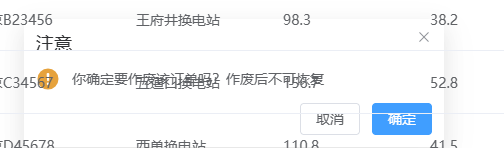
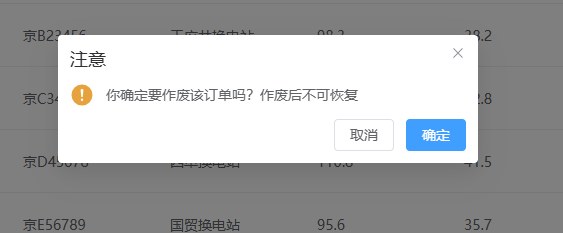
点击【作废】按钮后,弹出来的confirm层级被el-table覆盖
原因:

z-index虽然设置了,但没有生效
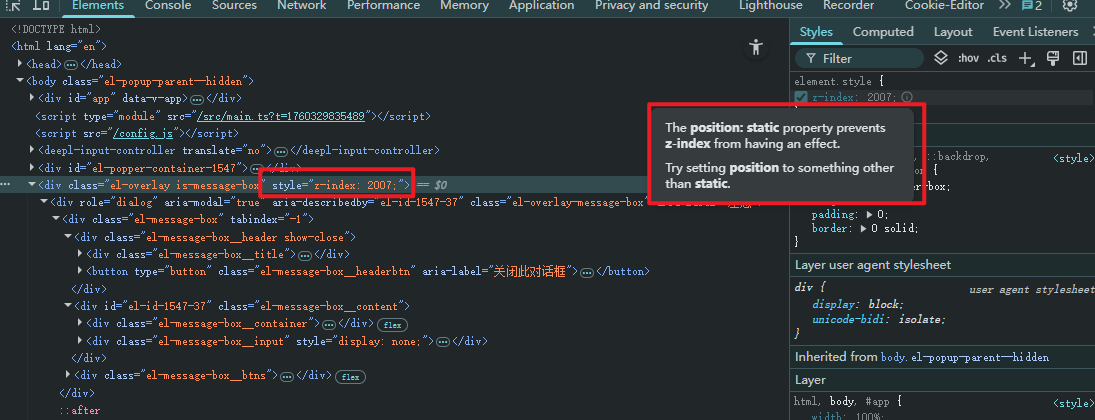
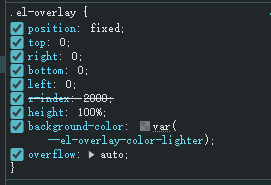
根本问题在于.el-overlay这个样式没有被设置,因为这个类是做了【position: fixed;】的设置的。

没有被设置的原因在于,我引入组件的方式是按需引入,需要单独引入这个样式文件

解决方案:
import { ElMessageBox} from 'element-plus'
import 'element-plus/theme-chalk/src/message-box.scss'
import 'element-plus/theme-chalk/src/overlay.scss'

引入后就能生效了,可以看到元素里面有这个类的设置了
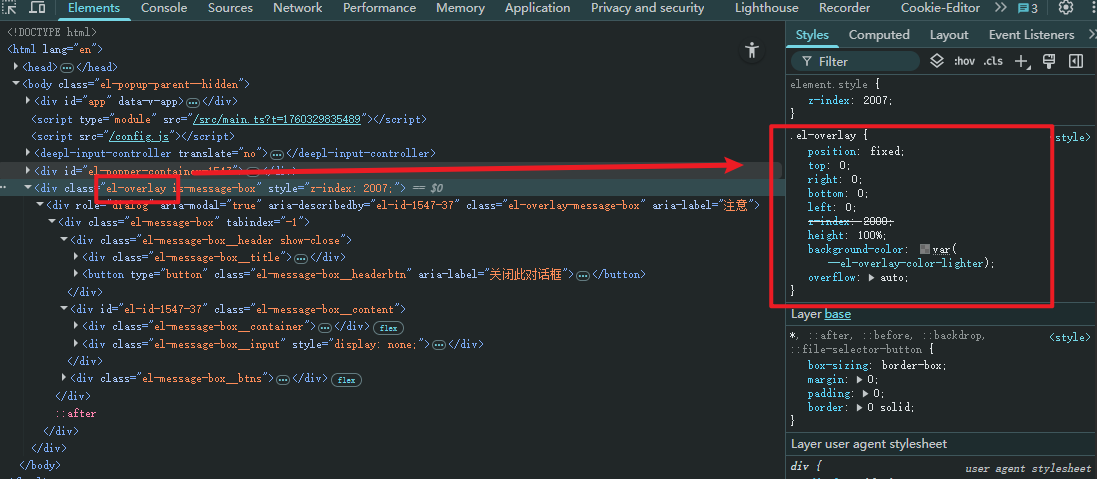
效果:
<template> <div class="app-container"> <!-- 操作工具栏 --> <div class="mb-4"> <el-button type="primary" @click="showFormDialog()">新增分类</el-button> </div> <!-- 树形表格 --> <el-table :data="tableData" row-key="id" :tree-props="{children: 'children'}" border default-expand-all style="width: 100%" > <el-table-column prop="id" label="ID" width="80" /> <el-table-column prop="title" label="分类名称" /> <el-table-column label="操作" width="180" align="center"> <template #default="{ row }"> <el-button type="primary" size="small" @click="showFormDialog(row.id)" >修改</el-button> <el-button type="danger" size="small" @click="handleDelete(row.id)" >删除</el-button> </template> </el-table-column> </el-table> <!-- 表单对话框 --> <el-dialog v-model="formVisible" :title="currentId ? '修改分类' : '新增分类'" width="30%" > <el-form ref="formRef" :model="form" :rules="rules" label-width="80px" > <el-form-item label="分类名称" prop="title"> <el-input v-model="form.title" placeholder="请输入分类名称" /> </el-form-item> </el-form> <template #footer> <el-button @click="formVisible = false">取消</el-button> <el-button type="primary" @click="submitForm">确认</el-button> </template> </el-dialog> </div> </template> <script setup> import { ref, onMounted } from 'vue' import request from '@/utils/request' import { ElMessage, ElMessageBox } from 'element-plus' // 表格数据 const tableData = ref([]) // 表单相关 const formVisible = ref(false) const currentId = ref(null) const form = ref({ title: '' }) const formRef = ref(null) // 验证规则 const rules = ref({ title: [ { required: true, message: '分类名称不能为空', trigger: 'blur' } ] }) // 加载数据 const loadData = async () => { try { const res = await request.get('/category/tree') if (res.code === '200') { tableData.value = res.data } } catch (error) { console.error('加载失败:', error) } } // 显示表单对话框 const showFormDialog = async (id) => { currentId.value = id || null if (id) { // 加载现有数据 const res = await request.get(`/category/${id}`) form.value = res.data } else { form.value = { title: '' } } formVisible.value = true } // 提交表单 const submitForm = async () => { try { await formRef.value.validate() const api = currentId.value ? '/category/update' : '/category/save' const res = await request.post(api, { ...form.value, id: currentId.value }) if (res.code === '200') { ElMessage.success('操作成功') formVisible.value = false await loadData() } } catch (error) { console.error('提交失败:', error) } } // 删除处理 const handleDelete = (id) => { ElMessageBox.confirm('确认删除该分类?', '警告', { type: 'warning', confirmButtonText: '确认', cancelButtonText: '取消' }).then(async () => { const res = await request.delete(`/category/delete/${id}`) if (res.code === '200') { ElMessage.success('删除成功') await loadData() } }) } // 初始化加载 onMounted(() => { loadData() }) </script> <style scoped> .app-container { padding: 20px; } .mb-4 { margin-bottom: 16px; } </style>不要分类全部展示,只有电机的时候再展示
03-22
评论
成就一亿技术人!
拼手气红包6.0元
还能输入1000个字符
 
红包 添加红包
表情包 插入表情
 条评论被折叠 查看
添加红包

请填写红包祝福语或标题

红包个数最小为10个

红包金额最低5元

当前余额3.43前往充值 >
需支付:10.00
成就一亿技术人!
领取后你会自动成为博主和红包主的粉丝 规则
hope_wisdom
发出的红包
实付
使用余额支付
点击重新获取
扫码支付
钱包余额 0

抵扣说明:

1.余额是钱包充值的虚拟货币,按照1:1的比例进行支付金额的抵扣。
2.余额无法直接购买下载,可以购买VIP、付费专栏及课程。

余额充值