


🎯 ABP vNext + Hangfire:生产级定时任务与调度实践指南
通过 Hangfire + PostgreSQL 实现 ABP vNext 中的可靠后台调度体系,支持 Dashboard 授权控制、定时任务注册、队列隔离、Prometheus 监控等生产实践。
⚙️ 1. 项目背景
定时任务用于:
- 🔁 自动同步数据
- 📊 定时报表推送
- 🧹 清理缓存或归档文件
Hangfire 支持持久化任务、可视化管理、失败重试,是 .NET 场景下首选调度框架。
🧱 2. 技术栈
| 组件 | 版本建议 |
|---|---|
| .NET | 8.0 |
| ABP vNext | 8.x |
| Hangfire | 1.8.x |
| PostgreSQL | ≥14 |
| Npgsql 驱动 | ≥6.0 |
📦 3. 安装依赖
dotnet add package Hangfire.AspNetCore
dotnet add package Hangfire.PostgreSql
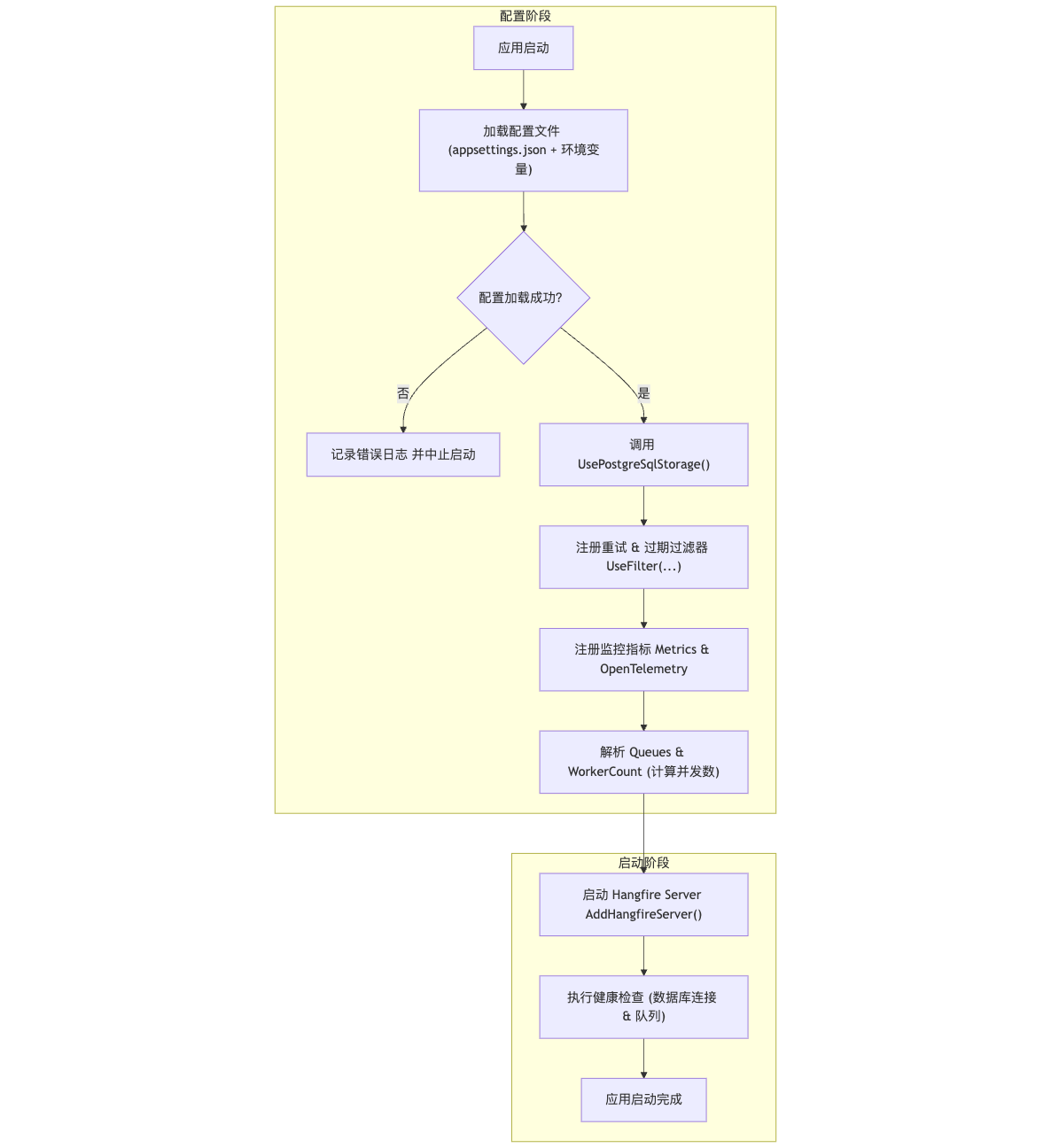
✅ Hangfire 初始化流程图
🔧 4. 服务配置
4.1 配置文件(节选)
{


  "ConnectionStrings": {


    "Default": "Host=prod-db;Database=MyDb;Username=admin;Password=securePwd123" // 演示用,生产请勿明文
  },
  "Hangfire": {


    "Queues": [ "critical", "default", "low" ],
    "WorkerCount": 0
  }
}
⚠️ 生产建议使用 SecretProvider、Key Vault 或 Docker Secret 管理账号信息。
4.2 Web 模块注册
public override void ConfigureServices(ServiceConfigurationContext context)
{
var config = context.Services.GetConfiguration();
var queues = config.GetSection("Hangfire:Queues").Get<string[]>() ?? ["default"];
var workerCount = config.GetValue<int>("Hangfire:WorkerCount", 0);
var resolvedCount = workerCount > 0 ? workerCount : Math.Max(5, Environment.ProcessorCount * 2);
context.Services.AddHangfire(cfg =>
{
cfg.UsePostgreSqlStorage(config.GetConnectionString("Default"), new PostgreSqlStorageOptions
{
SchemaName = "hangfire",
PrepareSchemaIfNecessary = true,
TransactionSynchronisationTimeout = TimeSpan.FromMinutes(1)
});
cfg.UseMetrics();
cfg.UseOpenTelemetry(); // 可选:需安装 OpenTelemetry.Instrumentation.Hangfire
cfg.UseFilter(new AutomaticRetryAttribute
{
Attempts = 3,
DelaysInSeconds = new[] {
60, 300, 600 }
});
cfg.UseFilter(new JobExpirationTimeoutAttribute(TimeSpan.FromDays(7)));
});
context.Services. 最低0.47元/天 解锁文章






 扫一扫
扫一扫


 705
705

 被折叠的 条评论
为什么被折叠?
被折叠的 条评论
为什么被折叠?
 到【灌水乐园】发言





