


 这篇博客介绍了如何使用HTML和CSS实现一种网页交互效果:当鼠标悬停在‘欢迎,程小程’上时,退出选项显示;鼠标离开时,退出选项隐藏。主要涉及CSS的`:hover`伪类和`display`属性的应用。
场景:
当鼠标悬停在 欢迎,程小程 上,退出 显示,鼠标离开 欢迎,程小程 ,退出隐藏
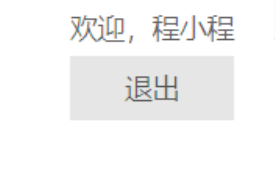
<ul class="login-container">
  <li>欢迎,程小程</li>
  <li>退出</li>
</ul>
.login-container{
    float: right;
    li:not(:first-child){
        display: none;
    }
    &:hover{
        li:not(:first-child){
            display: block;
            background-color: #e6e6e6;
            text-align: center;
            padding: 6px 10px;
            margin-top: 4px;
        }
    }
}





 扫一扫
扫一扫


 5961
5961

 被折叠的 条评论
为什么被折叠?
被折叠的 条评论
为什么被折叠?
 到【灌水乐园】发言





