我在学习VUE框架时遇到了vue.config.js,这部分代码有什么用,每部分实现了什么功能:'use strict'
const path = require('path')
// 引入等比适配插件
const px2rem = require('postcss-px2rem')
const postcss = px2rem({
// 基准大小 baseSize,需要和rem.js中相同
// remUnit: 14 代表 1rem = 14px; 所以当你一个14px值时,它会自动转成 (14px/14)rem
remUnit: 14
})
function resolve(dir) {
return path.join(__dirname, dir)
}
const CompressionPlugin = require('compression-webpack-plugin')
const name = process.env.VUE_APP_TITLE || '皖送智飞' // 网页标题
// const port = process.env.port || process.env.npm_config_port || 80 // 端口
const port = 18181 // 端口
// vue.config.js 配置说明
//官方vue.config.js 参考文档 https://cli.vuejs.org/zh/config/#css-loaderoptions
// 这里只列一部分,具体配置参考文档
module.exports = {
// 部署生产环境和开发环境下的URL。
// 默认情况下,Vue CLI 会假设你的应用是被部署在一个域名的根路径上
// 例如 https://www.ruoyi.vip/。如果应用被部署在一个子路径上,你就需要用这个选项指定这个子路径。例如,如果你的应用被部署在 https://www.ruoyi.vip/admin/,则设置 baseUrl 为 /admin/。
publicPath: process.env.NODE_ENV === "staging" ? "/uavWeb" : "/iws/uavWeb1",
// 在npm run build 或 yarn build 时 ,生成文件的目录名称(要和baseUrl的生产环境路径一致)(默认dist)
outputDir: 'dist',
// 用于放置生成的静态资源 (js、css、img、fonts) 的;(项目打包之后,静态资源会放在这个文件夹下)
assetsDir: 'static',
// 是否开启eslint保存检测,有效值:ture | false | 'error'
lintOnSave: process.env.NODE_ENV === 'development',
// 如果你不需要生产环境的 source map,可以将其设置为 false 以加速生产环境构建。
productionSourceMap: false,
// webpack-dev-server 相关配置
devServer: {
host: '0.0.0.0',
port: port,
open: true,
proxy: {
// detail: https://cli.vuejs.org/config/#devserver-proxy
[process.env.VUE_APP_BASE_API]: {
// target: `http://localhost:19200`,
// target: `http://192.168.3.2:19200`,
// target: `http://localhost:19200`,
// target: `http://192.168.3.56:19200`,
// target: `http://192.168.3.185:19200`,
// target: `http://192.168.3.185:19200`,
target: `10.145.4.68:19200`,
// target: `http://192.168.3.147:19200`,
// target: `http://192.168.3.147:19200`,
// target: `http://192.168.21.45:19200`,
// target: `http://192.168.8.14:19200`,
// target: `http://192.168.3.2:19200`,
// target: `http://192.168.1.2:19200`,
// target: `http://192.168.16.234:19200`,
// target: `http://192.168.3.18:19200`,
// target: `http://192.168.3.45:19200`,
// target: `http://192.168.0.138:19200`,
// target: `http://192.168.3.33:19200`,
// target: `http://192.168.3.135:19200`,
// changeOrigin: true,
pathRewrite: {
['^' + process.env.VUE_APP_BASE_API]: ''
}
},
["/map3d"]: {
// target: "http://192.168.3.185:19198/pointCloud/", //这里填入你要请求的接口的前缀
target: `http://192.168.3.185:19199`,
ws: true, //代理websocked
changeOrigin: true, //虚拟的站点需要更管origin
secure: false, //是否https接口
pathRewrite: {
"^/map3d": "/pic", //重写路径
},
},
["/Mp4"]: {
// target: "http://192.168.3.185:19198/pointCloud/", //这里填入你要请求的接口的前缀
target: `http://192.168.3.185:19199`,
ws: true, //代理websocked
changeOrigin: true, //虚拟的站点需要更管origin
secure: false, //是否https接口
pathRewrite: {
"^/Mp4": "/mappic", //重写路径
},
},
["/apiUrl"]: {
// target: "http://192.168.3.185:19198/pointCloud/", //这里填入你要请求的接口的前缀
target: `http://192.168.3.185:19199`,
ws: true, //代理websocked
changeOrigin: true, //虚拟的站点需要更管origin
secure: false, //是否https接口
pathRewrite: {
"^/apiUrl": "", //重写路径
},
},
},
disableHostCheck: true
},
// css: {
// loaderOptions: {
// sass: {
// sassOptions: { outputStyle: "expanded" }
// }
// }
// },
css: {
loaderOptions: {
less: {
javascriptEnabled: true,
},
postcss: {
plugins: [
postcss,
],
},
},
},
configureWebpack: {
name: name,
resolve: {
alias: {
'@': resolve('src')
}
},
module: {
rules: [
{
test: /\.(glb)$/,
loader: "url-loader"
}
]
},
plugins: [
// http://doc.ruoyi.vip/ruoyi-vue/other/faq.html#使用gzip解压缩静态文件
new CompressionPlugin({
cache: false, // 不启用文件缓存
test: /\.(js|css|html)?$/i, // 压缩文件格式
filename: '[path].gz[query]', // 压缩后的文件名
algorithm: 'gzip', // 使用gzip压缩
// threshold: 10240, //以字节为单位压缩超过此大小的文件,使用默认值10240吧
minRatio: 0.8 // 压缩率小于1才会压缩
})
],
},
chainWebpack(config) {
config.plugins.delete('preload') // TODO: need test
config.plugins.delete('prefetch') // TODO: need test
// set svg-sprite-loader
config.module
.rule('svg')
.exclude.add(resolve('src/assets/icons'))
.end()
config.module
.rule('icons')
.test(/\.svg$/)
.include.add(resolve('src/assets/icons'))
.end()
.use('svg-sprite-loader')
.loader('svg-sprite-loader')
.options({
symbolId: 'icon-[name]'
})
.end()
config.when(process.env.NODE_ENV !== 'development', config => {
config
.plugin('ScriptExtHtmlWebpackPlugin')
.after('html')
.use('script-ext-html-webpack-plugin', [{
// `runtime` must same as runtimeChunk name. default is `runtime`
inline: /runtime\..*\.js$/
}])
.end()
config.optimization.splitChunks({
chunks: 'all',
cacheGroups: {
libs: {
name: 'chunk-libs',
test: /[\\/]node_modules[\\/]/,
priority: 10,
chunks: 'initial' // only package third parties that are initially dependent
},
elementUI: {
name: 'chunk-elementUI', // split elementUI into a single package
test: /[\\/]node_modules[\\/]_?element-ui(.*)/, // in order to adapt to cnpm
priority: 20 // the weight needs to be larger than libs and app or it will be packaged into libs or app
},
commons: {
name: 'chunk-commons',
test: resolve('src/components'), // can customize your rules
minChunks: 3, // minimum common number
priority: 5,
reuseExistingChunk: true
},
}
})
config.optimization.runtimeChunk('single'),
{
from: path.resolve(__dirname, './public/robots.txt'), //防爬虫文件
to: './' //到根目录下
}
})
}
}


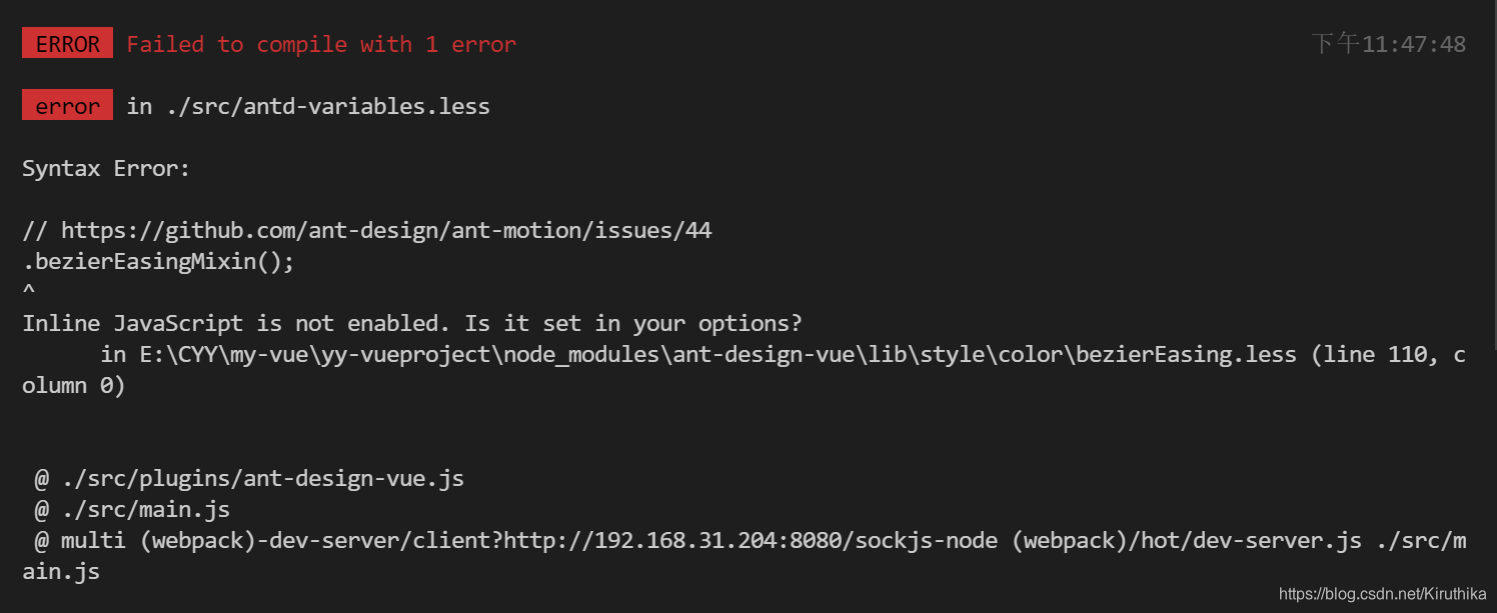
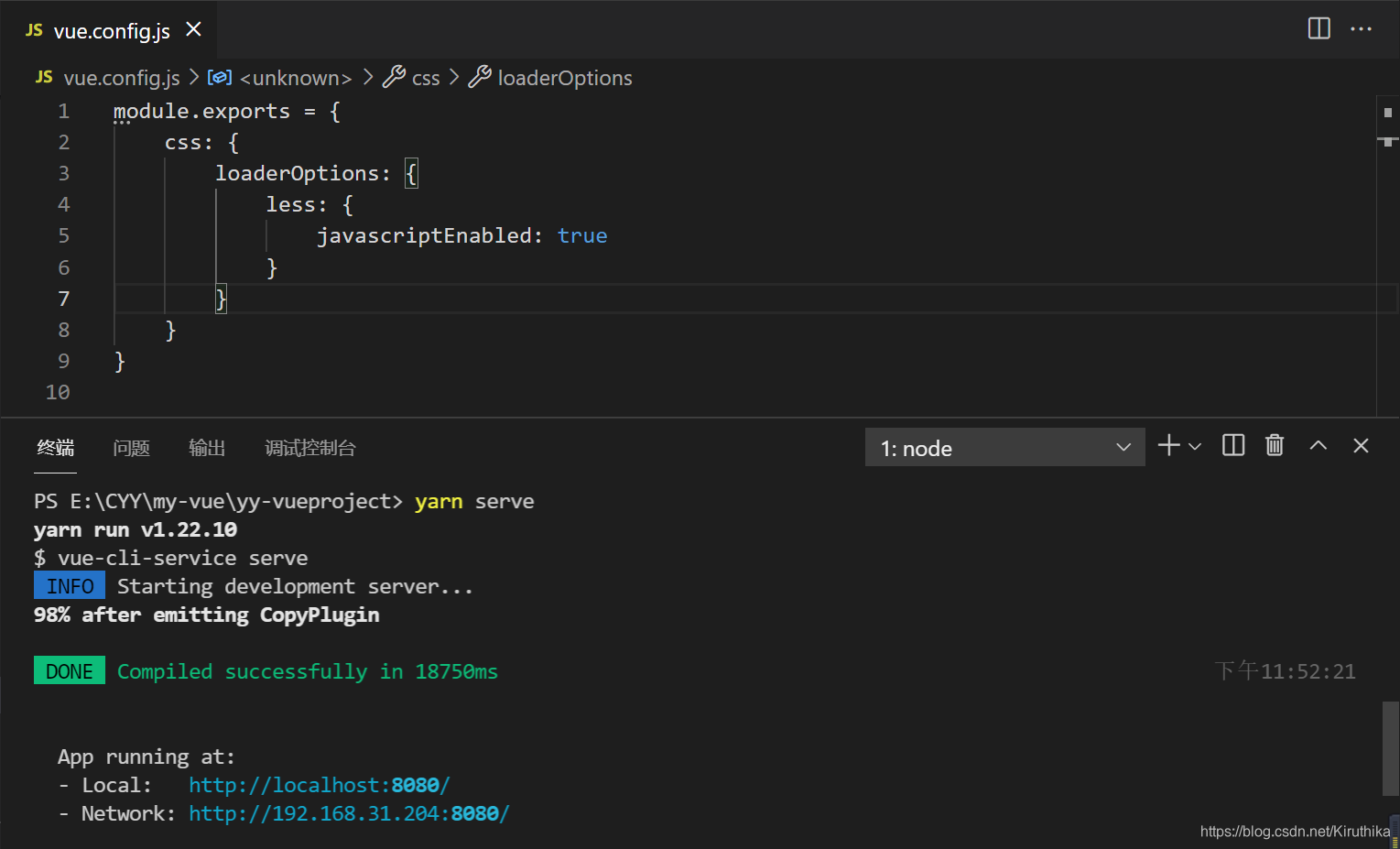
 本文介绍了解决Vue项目中遇到的javascriptDisabled问题,通过在vue.config.js中添加javascriptEnabled:true并重新构建解决了此问题,适用于开发者快速修复常见搭建难题。





 扫一扫
扫一扫


 5502
5502

 被折叠的 条评论
为什么被折叠?
被折叠的 条评论
为什么被折叠?
 到【灌水乐园】发言





