var、let、const常识须知

var:声明变量,且具有变量提升
补充:
变量提升:原理:JS引擎的工作方式是①先解析代码,获取所有被声明的变量;②然后在运行。也就是专业来说是分为预处理和执行两个阶段。
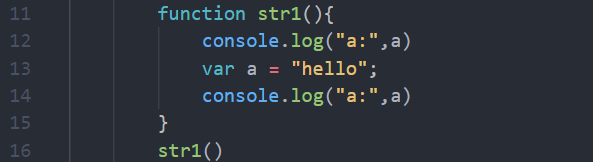
在这里插入图片描述在这里插入图片描述
var:声明的变量可以挂载到全局属性中,但是let和const都不可以

var a = 0;
console.log(window.a) // 0

let b = 1;
console.log(window.b) // undefined

const c =2;
console.log(window.c) // undefined

var:可以多次声明同一个变量,最后声明的变量的值会覆盖前面声明的变量值,但是let和const不可以重复声明同一个变量

var a = 0;
var a = 10
console.log(a) // 10

let b = 1;
let b = 11
console.log(b) // Uncaught SyntaxError: Identifier 'b' has already been declared

const c =2;
const c =22;
console.log(c) // Uncaught SyntaxError: Identifier 'c' has already been declared
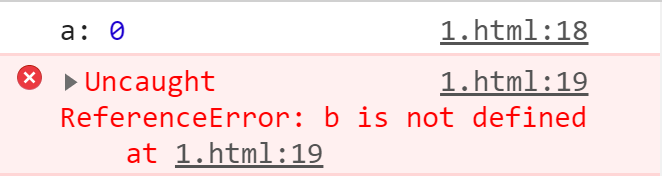
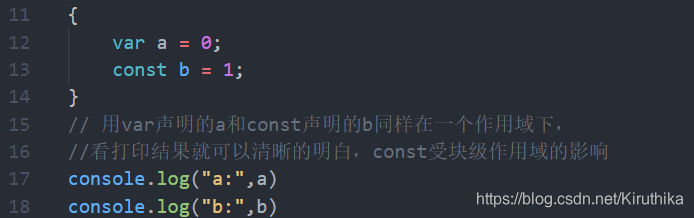
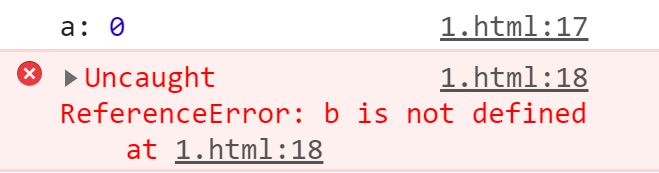
 let:是 ES6 新特性,其作用也是声明变量,但有别于var和const受块级作用域的影响,直白的讲就是在块级作用域中是可获取的,一旦超出块级作用域范围将获取不到
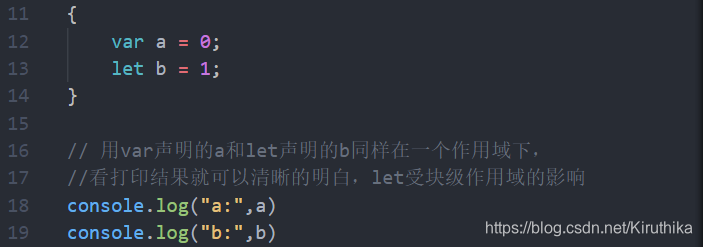
在这里插入图片描述
在这里插入图片描述
const与let一样,同样受块级作用域的影响
在这里插入图片描述
在这里插入图片描述
const:声明的变量,一旦声明变量必须要将其赋值,不然会报错提示一下信息:

const c
console.log(c) // Uncaught SyntaxError: Missing initializer in const declaration

const:区别于var、let,const声明的是常量,而且一旦被赋值,就不能再更改

在这里插入图片描述
在这里插入图片描述

既然const声明的常量一旦被赋值,就不能再修改了,那还有其他情况的发生吗??当然有,废话不多说,直接上代码。。。
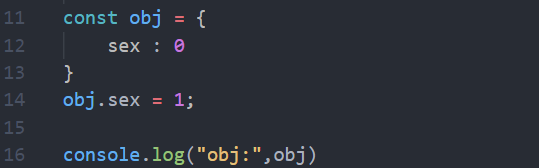
在这里插入图片描述
在这里插入图片描述
看到上面这个代码是不是“咦~~小朋友,你是不是有很多问号??”,哈哈哈皮一下,带着问号继续追究个为什么?
这就跟所谓的堆栈有关系了,const只是修饰栈空间的地址不可更改,但是并没有修饰堆空间的值不可修改。

<template> <div class="attractionsInfo"> <headers></headers> <div class="attractionsInfo1"> <div class="attractionsInfo2"> <div class="attractionsInfo3"> <el-carousel height="500px"> <el-carousel-item v-for="(item,index) in info.images.split(',')" :key="index"> <img style="width:100%;height:100%" :src="item"> </el-carousel-item> </el-carousel> </div> <div class="attractionsInfo4"> <div class="attractionsInfo5">{{info.name}}</div> <div class="attractionsInfo5">价格:{{info.price}}(元)</div> <div style="margin-left:20px;margin-top:10px">门票余量:{{info.num}} -{{info.realName == 0?'非实名':'实名'}}</div> <div class="attractionsInfo6">{{info.introduce}}</div> <div class="attractionsInfo7" style="margin-left:15px"> <el-button size="small" type="primary" plain @click="toOrder">立即预约</el-button> </div> </div> </div> </div> <div class="attractionsInfo1"> <div class="attractionsInfo8" > <div style="margin-left:20px;margin-right:20px;margin-top:20px"> 介绍:{{info.content}} </div> <div style="margin-left:20px;margin-right:20px;margin-top:20px"> 预约须知:{{info.open}} </div> <div style="margin-left:20px;margin-right:20px;margin-top:20px;margin-bottom:20px"> 入园时间:{{info.time}} </div> </div> </div> <div class="attractionsInfo1"> <div class="attractionsInfo8"> <el-input style="margin-top:20px" v-model="content" type="textarea" rows="7" placeholder="请输入评论内容"></el-input> <el-rate v-model="score"></el-rate> <el-button style="margin-top:20px" type="primary" size="small" plain @click="saveSysComments">评论</el-button> <div class="forum1" style="width:100%"> <div class="forum2" style="padding:0" v-for="(item,index) in tableData" :key="index"> <img style="border-radius:50%;width:40px;height:40px;margin-left:20px" :src="$store.state.HOST + item.avatar"> <div style="margin-left:10px"> {{item.createBy}} </div> <div style="margin-left:20px"> {{item.content}} </div> </div> </div> <el-pagination background :page-size="search.pageSize" layout="prev, pager, next" @current-change="handleCurrentChange" :total="total"> </el-pagination> </div> </div> <el-dialog title="预约" :visible.sync="dialogVisible" width="40%"> <span> <el-input-number size="small" v-model="num" :min="1" :max="10"></el-input-number> <el-date-picker size="small" style="margin-left:20px" v-model="date1" type="date" value-format="yyyy-MM-dd" placeholder="选择预约日期"> </el-date-picker> <div class="attractionsInfo9" v-for="(item,index) in people"> <el-input size="small" v-model="item.name" placeholder="请输入姓名"></el-input> <el-input size="small" style="margin-left:10px" v-model="item.tel" placeholder="请输入电话"></el-input> <el-input size="small" v-if="info.realName == 1" style="margin-left:10px" v-model="item.idCard" placeholder="请输入身份证号"></el-input> <div v-if="index == (people.length - 1)" @click="addKeyword" style="margin-left:10px"><i class="el-icon-circle-plus-outline"></i></div> <div @click="minusKeyword(index)" style="margin-left:10px" v-if="index != 0"><i class="el-icon-remove-outline"></i></div> </div> </span> <span slot="footer" class="dialog-footer"> <el-button @click="closeOrder" size="small">取 消</el-button> <el-button type="primary" @click="saveOrder" size="small">确 定</el-button> </span> </el-dialog> <bottoms></bottoms> </div> </template> <script> import {getSysAttractionsById,saveSysAttractionOrder,getSysCommentsPage,saveSysComments} from '../../api/api' import headers from '@/components/header' import bottoms from '@/components/bottom' export default { data() { return{ id: "", dialogVisible: false, search: { attractionsId: "", pageSize: 10, pageNumber: 1, }, info: {}, total:100, tableData: [], content: "", score: null, num: "", userId: null, people: [ { name: "", tel: "", idCard: "" } ], } }, components: { headers, bottoms }, methods: { saveSysComments() { if (!this.content) { this.$message({ message: '请输入评论内容', type: 'warning' }); return } var param = { content: this.content, score:this.score, attractionsId: this.id, userId:this.userId } saveSysComments(param).then(res => { if (res.code == 1000) { this.$message({ message: '评论成功', type: 'success' }); this.content = "" this.getSysCommentsPage() } }) }, getSysCommentsPage() { this.search.attractionsId = this.id getSysCommentsPage(this.search).then(res => { if (res.code == 1000) { this.tableData = res.data.records this.total = res.data.total } }) }, closeOrder() { this.date1 = "" this.num = "" this.people = [ { name: "", tel: "", idCard: "" } ], this.dialogVisible = false }, saveOrder() { if (!this.date1) { this.$message({ message: '请选择预约时间', type: 'warning' }); return } if (this.people.length < this.num) { this.$message({ message: '请完善预约人信息', type: 'warning' }); return } if (this.people.length > this.num) { this.$message({ message: '预约人信息超出预约人数', type: 'warning' }); return } for(let i = 0;i < this.people.length; i++) { var item = this.people[i] if (!item.name) { this.$message({ message: '请完善预约人姓名', type: 'warning' }); return } if (!item.tel) { this.$message({ message: '请完善预约人联系方式', type: 'warning' }); return } if (this.info.realName == 1&& !item.idCard ) { this.$message({ message: '请完善预约人证件号', type: 'warning' }); return } } var param = { attractionsId: this.id, num: this.num, time: this.date1, people: JSON.stringify(this.people) } saveSysAttractionOrder(param).then(res => { if (res.code == 1000) { this.$message({ message: '预约成功,请等待确认', type: 'success' }); this.closeOrder() } else { this.$message({ message: res.message, type: 'warning' }); } }) }, getSysAttractionsById() { getSysAttractionsById({id: this.id}).then(res => { if (res.code == 1000) { this.info = res.data } }) }, toOrder() { this.dialogVisible = true }, addKeyword() { var param = { name: "", tel: "", idCard: "" } this.people.push(param) }, minusKeyword(index) { this.people.splice(index,1) }, handleCurrentChange() { } }, created() { }, mounted() { this.id = this.$route.query.id this.userId = JSON.parse(window.localStorage.getItem("user_info")).id this.getSysAttractionsById() this.getSysCommentsPage() } } </script> <style scoped> @import url('../../assets/css/attractionsInfo.css'); </style> 评论功能
05-13
评论
成就一亿技术人!
拼手气红包6.0元
还能输入1000个字符
 
红包 添加红包
表情包 插入表情
 条评论被折叠 查看
添加红包

请填写红包祝福语或标题

红包个数最小为10个

红包金额最低5元

当前余额3.43前往充值 >
需支付:10.00
成就一亿技术人!
领取后你会自动成为博主和红包主的粉丝 规则
hope_wisdom
发出的红包
实付
使用余额支付
点击重新获取
扫码支付
钱包余额 0

抵扣说明:

1.余额是钱包充值的虚拟货币,按照1:1的比例进行支付金额的抵扣。
2.余额无法直接购买下载,可以购买VIP、付费专栏及课程。

余额充值