


 本文介绍如何利用野火F429-挑战者_V2开发板和RT-Thread操作系统,通过HTTP客户端访问心知天气API获取JSON格式的天气数据。首先在心知天气官网获取API密钥,然后构建API接口地址并请求数据,最后使用cJSON库解析天气数据并在串口控制台打印。示例代码展示了完整的数据获取和解析流程。
代码实现功能
使用野火F429-挑战者_V2开发板+RT-Thread通过http client访问心知天气API获取json格式的天气数据,使用cJSON解析出天气数据然后通过串口控制台打印出天气数据。
心知天气官网:
 https://www.seniverse.com/
获取心知天气API方法:
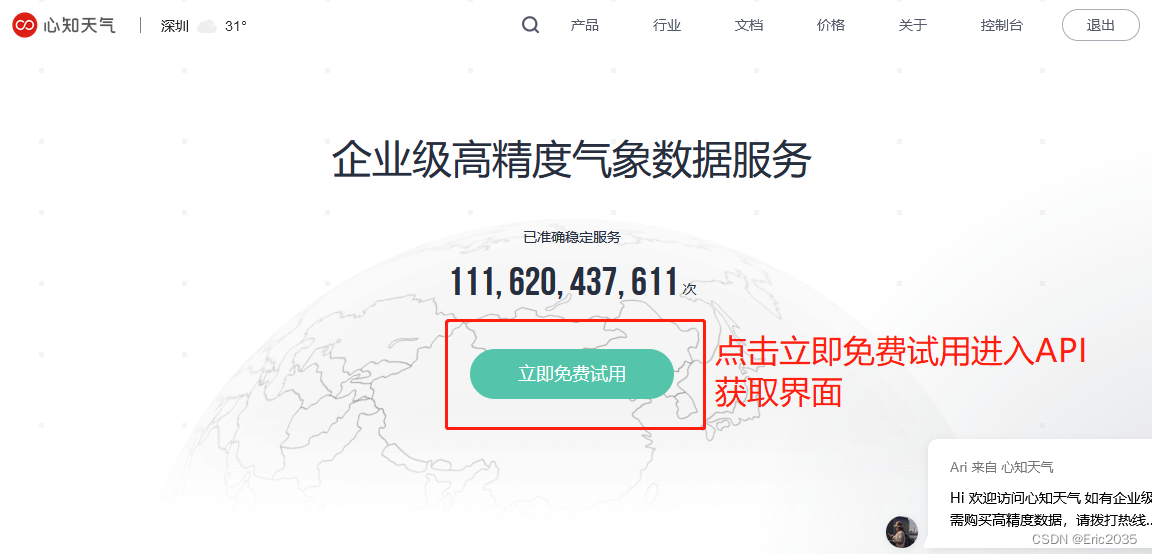
1、打开网站,点击立即免费试用按钮进入API获取界面,如下图:
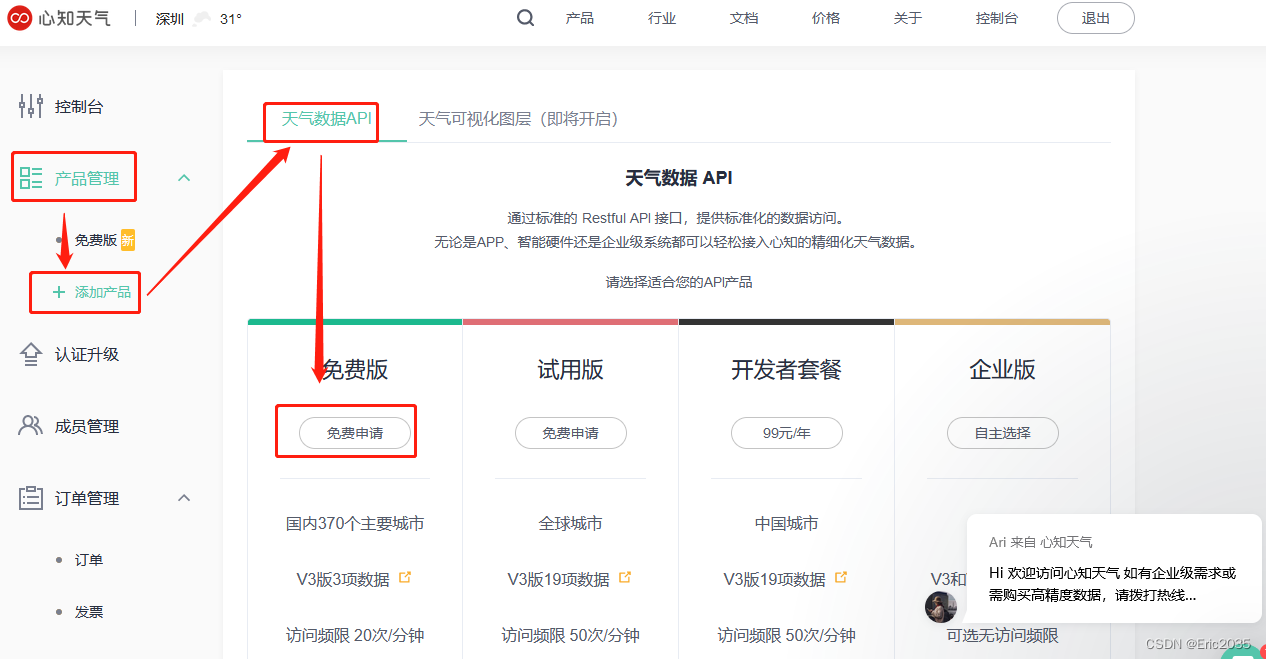
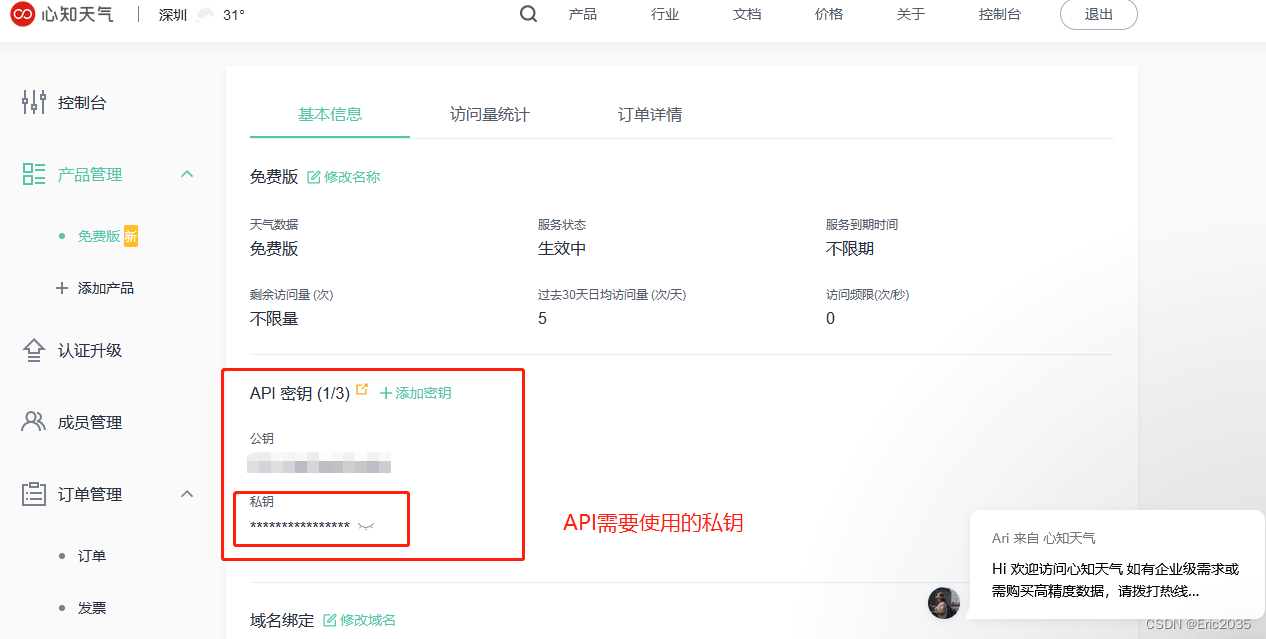
2、获取免费API密钥,详情如下图
3、生成API接口地址
your_api_key:上一步在心知天气官网申请的私钥,需要用我们自己的私钥替换your_api_key
shenzhen:要查询的城市名称
通常我们只需要修改这两个参数就可以,然后把这个API地址复制到软件代码,通过web 客户端请求命令get便可以获取天气信息,返回的天气数据是JSON格式,软件代码使用cjson便可以解析出天气数据,详情请查看代码。
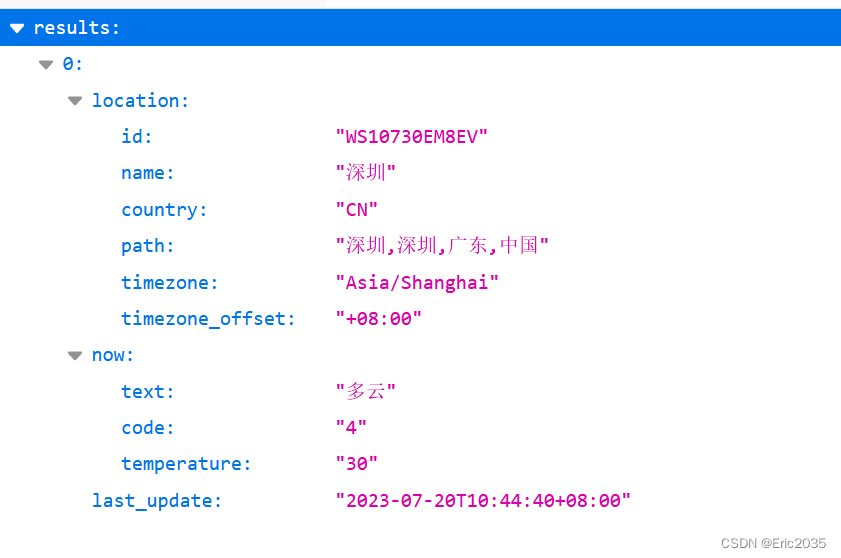
API返回的数据如下图
{"results":[{"location":{"id":"WS10730EM8EV","name":"深圳","country":"CN","path":"深圳,深圳,广东,中国","timezone":"Asia/Shanghai","timezone_offset":"+08:00"},"now":{"text":"多云","code":"4","temperature":"30"},"last_update":"2023-07-20T10:44:40+08:00"}]}
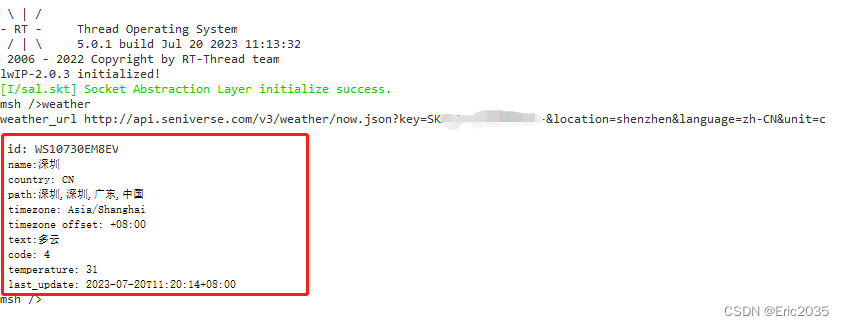
4、软件代码运行结果
软件代码功能实现了通过心知天气API获取心知天气实时天气数据(json格式),然后通过cjson解析出天气数据通过控制台打印出来,代码运行输出结果如下图
5、详情软件代码实现如下
#include <webclient.h>  /* 使用 HTTP 协议与服务器通信需要包含此头文件 */
#include <sys/socket.h> /* 使用BSD socket,需要包含socket.h头文件 */
#include <netdb.h>
#include <cJSON.h>
#include <finsh.h>

#define GET_HEADER_BUFSZ        1024        //头部大小
#define GET_RESP_BUFSZ          1024        //响应缓冲区大小
#define GET_URL_LEN_MAX         256         //网址最大长度
#define GET_URI                 "http://api.seniverse.com/v3/weather/now.json?key=%s&location=guangzhou&language=zh-CN&unit=c" //获取天气的 API
#define PRIVATE_KEY             "your_api_key" //私钥,替换自己的密钥
//心知天气返回的JSON格式数据
#define JSON_DATA    "{\"results\":{\"location\":{\"id\":\"WS10730EM8EV\",\"name\":\"深圳\",\"country\":\"CN\",\"path\":\"深圳,深圳,广东,中国\",\"timezone\":\"Asia/Shanghai\",\"timezone_offset\":\"+08:00\"},\"now\":{\"text\":\"阴\",\"code\":\"9\",\"temperature\":\"31\"},\"last_update\":\"2023-07-19T11:34:47+08:00\"}}"


//当没有心知天气密钥无法通过API获取数据时,可以把此宏定义为0,通过自定义的JSON_DATA解析json数据学习CJSON解析功能
#define JSON_DATA_GET_FROM_API      1


/* 天气数据解析 */
void weather_data_parse(rt_uint8_t *data)
{
    cJSON *root = RT_NULL, *results = RT_NULL, *item = RT_NULL;
    cJSON *location = RT_NULL,*now = RT_NULL;
    root = cJSON_Parse((const char *)data);
    if (!root)
    {
        rt_kprintf("No memory for cJSON root!\n");
        return;
    }


//    rt_kprintf("\r\n 1 %s\n\n",cJSON_Print(root));

    results = cJSON_GetObjectItem(root, "results");

    location = cJSON_GetObjectItem(results, "location");
    item = cJSON_GetObjectItem(location, "id");
    rt_kprintf("\n id: %s ", item->valuestring);
    item = cJSON_GetObjectItem(location, "name");
    rt_kprintf("\n name: %s ", item->valuestring);
    item = cJSON_GetObjectItem(location, "country");
    rt_kprintf("\n country: %s ", item->valuestring);
    item = cJSON_GetObjectItem(location, "path");
    rt_kprintf("\n path: %s ", item->valuestring);
    item = cJSON_GetObjectItem(location, "timezone");
    rt_kprintf("\n timezone: %s ", item->valuestring);
    item = cJSON_GetObjectItem(location, "timezone_offset");
    rt_kprintf("\n timezone_offset: %s ", item->valuestring);

    now = cJSON_GetObjectItem(results, "now");
    item = cJSON_GetObjectItem(now, "text");
    rt_kprintf("\n text: %s ", item->valuestring);
    item = cJSON_GetObjectItem(now, "code");
    rt_kprintf("\n code: %s ", item->valuestring);
    item = cJSON_GetObjectItem(now, "temperature");
    rt_kprintf("\n temperature: %s ", item->valuestring);

    item = cJSON_GetObjectItem(results, "last_update");
    rt_kprintf("\n last_update: %s \r\n", item->valuestring);

    if (root != RT_NULL)
        cJSON_Delete(root);
}

void delchar(char *str, char c)
{   //用指针变量作为函数形参接收数组地址
    int i=0,len=strlen(str);            //strlen函数容易出警告,即没有为字符串添加0终止符,初始化一下即可,即str[100]={0}
    char * p, * q;
    p = q = str;                 //此时p、q、str都相当于函数下标,*p相当于下标p对应的值
    for (i = 0;i<=len;i++) {
        if (str[i] == c)
            p++;                //当str[i]满足条件时,对于指向这个字母的p和q来说,p往后挪了一位,而q没变
        else
        {
            *q = *p;             //当str[i]不满足条件时,此时q在前一位,p在后一位,令*q = *p就等于说后面的值往前挪了一位,之后 q++、p++后面的值一直往前挪,直到\0也挪到末尾
            q++;
            p++;
        }
    }
}

void weather(int argc, char **argv)
{
    rt_uint8_t *buffer = RT_NULL;
    int resp_status;
    struct webclient_session *session = RT_NULL;
    char *weather_url = RT_NULL;
    int content_length = -1, bytes_read = 0;
    int content_pos = 0;

#if  (JSON_DATA_GET_FROM_API==1)

    /* 为 weather_url 分配空间 */
    weather_url = rt_calloc(1, GET_URL_LEN_MAX);
    if (weather_url == RT_NULL)
    {
        rt_kprintf("No memory for weather_url!\n");
        goto __exit;
    }
    /* 拼接 GET 网址 */
    rt_snprintf(weather_url, GET_URL_LEN_MAX, GET_URI, PRIVATE_KEY);
    //rt_snprintf(weather_url, GET_URL_LEN_MAX, GET_URI);//, AREA_ID);
    rt_kprintf("weather_url %s\n",weather_url);
    /* 创建会话并且设置响应的大小 */
    session = webclient_session_create(GET_HEADER_BUFSZ);
    if (session == RT_NULL)
    {
        rt_kprintf("No memory for get header!\n");
        goto __exit;
    }

    /* 发送 GET 请求使用默认的头部 */
    if ((resp_status = webclient_get(session, weather_url)) != 200)
    {
        rt_kprintf("webclient GET request failed, response(%d) error.\n", resp_status);
        goto __exit;
    }

    /* 分配用于存放接收数据的缓冲 */
    buffer = rt_calloc(1, GET_RESP_BUFSZ);
    if (buffer == RT_NULL)
    {
        rt_kprintf("No memory for data receive buffer!\n");
        goto __exit;
    }

    content_length = webclient_content_length_get(session);
    if (content_length < 0)
    {
        /* 返回的数据是分块传输的. */
        do
        {
            bytes_read = webclient_read(session, buffer, GET_RESP_BUFSZ);
            if (bytes_read <= 0)
            {
                break;
            }
        }while (1);
    }
    else
    {
        do
        {
            bytes_read = webclient_read(session, buffer,
                                        content_length - content_pos > GET_RESP_BUFSZ ?
                                        GET_RESP_BUFSZ : content_length - content_pos);
            if (bytes_read <= 0)
            {
                break;
            }
            content_pos += bytes_read;
        }while (content_pos < content_length);
    }
#else
//当无法通过API获取数据时可以通过自定义的json数据解析数据
    /* 分配用于存放接收数据的缓冲 */
    buffer = rt_calloc(1, GET_RESP_BUFSZ);
    if (buffer == RT_NULL)
    {
        rt_kprintf("No memory for data receive buffer!\n");
        goto __exit;
    }


    rt_memcpy(buffer,JSON_DATA,sizeof(JSON_DATA));

#endif
    //删除心知天气返回的JSON数据里面的‘[’、‘]’,不然cjson解析会失败
    delchar((char *)buffer,'[');
    delchar((char *)buffer,']');

    /* 天气数据解析 */
    weather_data_parse(buffer);

//    buffer[content_length]='\0';
//    rt_kprintf("\r\n buffer %s!\n",buffer);

__exit:
    /* 释放网址空间 */
    if (weather_url != RT_NULL)
        rt_free(weather_url);
    /* 关闭会话 */
    if (session != RT_NULL)
        webclient_close(session);
    /* 释放缓冲区空间 */
    if (buffer != RT_NULL)
        rt_free(buffer);
}

MSH_CMD_EXPORT(weather, Get weather by webclient);





 扫一扫
扫一扫


 4489
4489

 被折叠的 条评论
为什么被折叠?
被折叠的 条评论
为什么被折叠?
 到【灌水乐园】发言





