支持 Assets 下的文件或者文件夹拷贝到手机存储
    public static void copyAssetsDirToSDCard(Context context, String assetsDirName, String sdCardPath) {
        Log.d(TAG, "copyAssetsDirToSDCard() called with: context = [" + context + "], assetsDirName = [" + assetsDirName + "], sdCardPath = [" + sdCardPath + "]");
        try {
            String list[] = context.getAssets().list(assetsDirName);
            if (list.length == 0) {
                InputStream inputStream = context.getAssets().open(assetsDirName);
                byte[] mByte = new byte[1024];
                int bt = 0;
                File file = new File(sdCardPath + File.separator
                        + assetsDirName.substring(assetsDirName.lastIndexOf('/')));
                if (!file.exists()) {
                    file.createNewFile();
                } else {
                    return;
                }
                FileOutputStream fos = new FileOutputStream(file);
                while ((bt = inputStream.read(mByte)) != -1) {
                    fos.write(mByte, 0, bt);
                }
                fos.flush();
                inputStream.close();
                fos.close();
            } else {
                String subDirName = assetsDirName;
                if (assetsDirName.contains("/")) {
                    subDirName = assetsDirName.substring(assetsDirName.lastIndexOf('/') + 1);
                }
                sdCardPath = sdCardPath + File.separator + subDirName;
                File file = new File(sdCardPath);
                if (!file.exists())
                    file.mkdirs();
                for (String s : list) {
                    copyAssetsDirToSDCard(context, assetsDirName + File.separator + s, sdCardPath);
                }
            }
        } catch (
                Exception e) {
            e.printStackTrace();
        }
    }
支持 Assets 以下混合文件和文件夹结构拷贝到手机存储
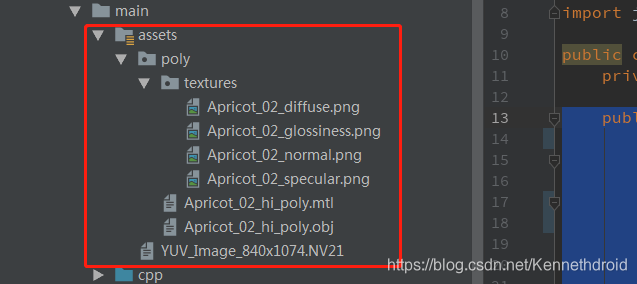



 本文介绍了一种将Android应用Assets目录下的文件或文件夹复制到手机存储的方法,通过递归遍历实现混合文件和文件夹结构的完整拷贝。





 扫一扫
扫一扫


 9838
9838

 被折叠的 条评论
为什么被折叠?
被折叠的 条评论
为什么被折叠?
 到【灌水乐园】发言





